
- Posts: 28
- Thank you received: 1
HikaShop - generate PDF invoice
- highstat@highstat.com
-
 Topic Author
- Offline
Less
More
3 years 11 months ago #347324
by highstat@highstat.com
HikaShop - generate PDF invoice was created by highstat@highstat.com
-- HikaShop version -- : 4.7.0
-- Joomla version -- : 4.latest
-- PHP version -- : 8.0
Hello,
I have enabled the HikaShop - generate PDF invoice plugin. Inside this plugging, I have specified my email address and "Created" for Statuses for email attachment. Will change that to 'Confirmed" once a credit card payment option has been added to the cart.
In the cart itself, I have only implemented "Collect on Delivery" for the moment....hence the reason to use "Created" in the plugin.
Problem: No pdf invoice attachment is sent.
Any clue what I am doing wrong? Under Global Configuration, I have no problems sending a test email.
Kind regards,
Alain
-- Joomla version -- : 4.latest
-- PHP version -- : 8.0
Hello,
I have enabled the HikaShop - generate PDF invoice plugin. Inside this plugging, I have specified my email address and "Created" for Statuses for email attachment. Will change that to 'Confirmed" once a credit card payment option has been added to the cart.
In the cart itself, I have only implemented "Collect on Delivery" for the moment....hence the reason to use "Created" in the plugin.
Problem: No pdf invoice attachment is sent.
Any clue what I am doing wrong? Under Global Configuration, I have no problems sending a test email.
Kind regards,
Alain
Please Log in or Create an account to join the conversation.

3 years 11 months ago - 3 years 11 months ago #347328
by nicolas
Replied by nicolas on topic HikaShop - generate PDF invoice
Hi,
Can you provide a screenshot of the email you receive ?
Also, you need to enter the "namekey" of the order status from System>Order statuses. The namekey of the Created default order status should be "created", so without an uppercase. That might be why it's not adding the PDF to the email.
Can you provide a screenshot of the email you receive ?
Also, you need to enter the "namekey" of the order status from System>Order statuses. The namekey of the Created default order status should be "created", so without an uppercase. That might be why it's not adding the PDF to the email.
Last edit: 3 years 11 months ago by nicolas.
Please Log in or Create an account to join the conversation.
- highstat@highstat.com
-
Topic Author
- Offline
Less
More
- Posts: 28
- Thank you received: 1
3 years 11 months ago - 3 years 11 months ago #347336
by highstat@highstat.com
Replied by highstat@highstat.com on topic HikaShop - generate PDF invoice
Hello,
In the plugin, I have set the status to "confirmed". In the Payment on Collect, I also selected 'Confirmed". Once I place the order, in Orders-Orders it shows as 'Confirmed", I do get an email but I do not get a pdf email attachment. I also get an email in my 'pretend-to-be-customer' email address. See snapshots.
So..everything works...except for the pdf attachment.
The only other thing I noticed is that Joomla gives this "Warning The PHP temporary folder is not set". But a bit off Googling tells me that it will therefore use the tmp folder.
Are there any other things that I need to click in order for a pdf to be attached?
Alain
In the plugin, I have set the status to "confirmed". In the Payment on Collect, I also selected 'Confirmed". Once I place the order, in Orders-Orders it shows as 'Confirmed", I do get an email but I do not get a pdf email attachment. I also get an email in my 'pretend-to-be-customer' email address. See snapshots.
So..everything works...except for the pdf attachment.
The only other thing I noticed is that Joomla gives this "Warning The PHP temporary folder is not set". But a bit off Googling tells me that it will therefore use the tmp folder.
Are there any other things that I need to click in order for a pdf to be attached?
Alain
Last edit: 3 years 11 months ago by highstat@highstat.com.
Please Log in or Create an account to join the conversation.
3 years 11 months ago #347337
by nicolas
Replied by nicolas on topic HikaShop - generate PDF invoice
Hi,
The screenshot of your email is the email sent to the administrator after an order is created.
This is not the email sent to the user after an order is confirmed.
Please check the emails received by the customer instead as the administrator email will not get the PDF attached.
The screenshot of your email is the email sent to the administrator after an order is created.
This is not the email sent to the user after an order is confirmed.
Please check the emails received by the customer instead as the administrator email will not get the PDF attached.
Please Log in or Create an account to join the conversation.
- highstat@highstat.com
-
Topic Author
- Offline
Less
More
- Posts: 28
- Thank you received: 1
3 years 11 months ago - 3 years 11 months ago #347344
by highstat@highstat.com
Replied by highstat@highstat.com on topic HikaShop - generate PDF invoice
Hello...here is a screenshot of the "customer".
Alain
Alain
Last edit: 3 years 11 months ago by highstat@highstat.com.
Please Log in or Create an account to join the conversation.
3 years 11 months ago #347345
by nicolas
Replied by nicolas on topic HikaShop - generate PDF invoice
Hi,
That's the correct email, yes. So you're saying you didn't get the PDF attached with this one ?
And was the email also sent to the email address you entered in the plugin ?
If you click on the "invoice" button when you edit an order in the backend, do you get the PDF ?
That's the correct email, yes. So you're saying you didn't get the PDF attached with this one ?
And was the email also sent to the email address you entered in the plugin ?
If you click on the "invoice" button when you edit an order in the backend, do you get the PDF ?
Please Log in or Create an account to join the conversation.
- highstat@highstat.com
-
Topic Author
- Offline
Less
More
- Posts: 28
- Thank you received: 1
3 years 11 months ago #347351
by highstat@highstat.com
Replied by highstat@highstat.com on topic HikaShop - generate PDF invoice
Hello,
Indeed...no pdf. Neither for the "customer's" email nor the email in the plugin.
Clicking on the Orders-Invoice button...ahh...that gives me something. See snapshot.
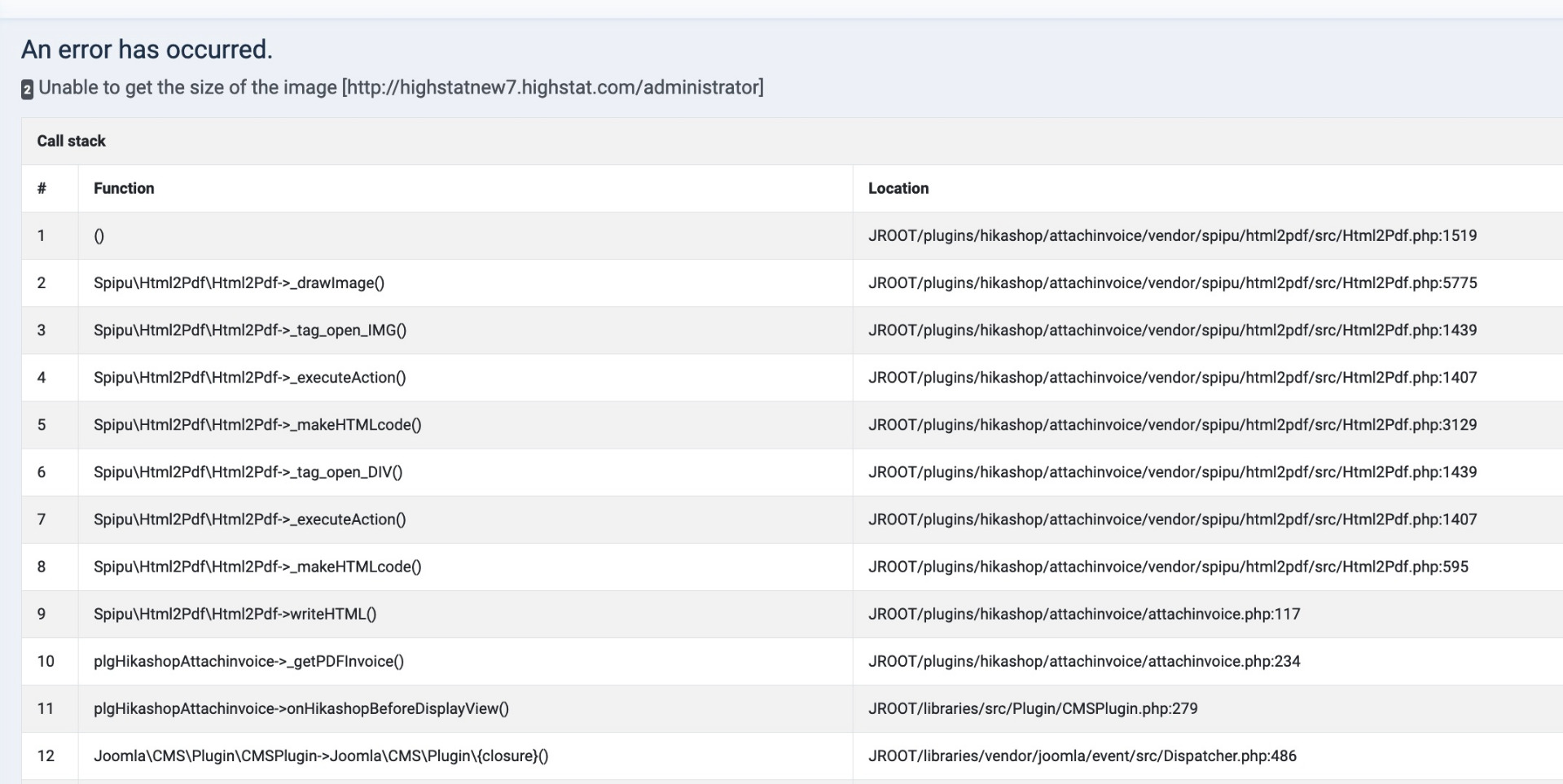
Unable to get the size of the image
What does that mean?
Alain
Indeed...no pdf. Neither for the "customer's" email nor the email in the plugin.
Clicking on the Orders-Invoice button...ahh...that gives me something. See snapshot.
Unable to get the size of the image
What does that mean?
Alain
Please Log in or Create an account to join the conversation.
3 years 11 months ago #347352
by nicolas
Replied by nicolas on topic HikaShop - generate PDF invoice
Hi,
That's a bug we've fixed 2 days ago:
www.hikashop.com/forum/install-update/90...-payment/347256.html
Download again the install package of the PDF invoice plugin on our website and install it again on your website and you should not have the problem anymore.
That's a bug we've fixed 2 days ago:
www.hikashop.com/forum/install-update/90...-payment/347256.html
Download again the install package of the PDF invoice plugin on our website and install it again on your website and you should not have the problem anymore.
Please Log in or Create an account to join the conversation.
- highstat@highstat.com
-
Topic Author
- Offline
Less
More
- Posts: 28
- Thank you received: 1
3 years 11 months ago #347370
by highstat@highstat.com
Replied by highstat@highstat.com on topic HikaShop - generate PDF invoice
I looked in the file that gives the error message.
protected function _drawImage($src, $subLi = false)
{
// get the size of the image
// WARNING : if URL, "allow_url_fopen" must turned to "on" in php.ini
if( strpos($src,'data:') === 0 ) {
$src = base64_decode( preg_replace('#^data:image/[^;]+;base64,#', '', $src) );
$infos = @getimagesizefromstring($src);
$src = "@{$src}";
} else {
$infos = @getimagesize($src);
}
// if the image does not exist, or can not be loaded
if (!is_array($infos) || count($infos)<2) {
if ($this->_testIsImage) {
$e = new ImageException('Unable to get the size of the image ');
$e->setImage($src);
throw $e;
}
I have set allow_url_fopen to 'enabled' ....still same problem.
Alain
protected function _drawImage($src, $subLi = false)
{
// get the size of the image
// WARNING : if URL, "allow_url_fopen" must turned to "on" in php.ini
if( strpos($src,'data:') === 0 ) {
$src = base64_decode( preg_replace('#^data:image/[^;]+;base64,#', '', $src) );
$infos = @getimagesizefromstring($src);
$src = "@{$src}";
} else {
$infos = @getimagesize($src);
}
// if the image does not exist, or can not be loaded
if (!is_array($infos) || count($infos)<2) {
if ($this->_testIsImage) {
$e = new ImageException('Unable to get the size of the image ');
$e->setImage($src);
throw $e;
}
I have set allow_url_fopen to 'enabled' ....still same problem.
Alain
Please Log in or Create an account to join the conversation.
- highstat@highstat.com
-
Topic Author
- Offline
Less
More
- Posts: 28
- Thank you received: 1
3 years 11 months ago #347371
by highstat@highstat.com
Replied by highstat@highstat.com on topic HikaShop - generate PDF invoice
Ah...I didn't see your reply. I will install again.
Alain
Alain
Please Log in or Create an account to join the conversation.
- highstat@highstat.com
-
Topic Author
- Offline
Less
More
- Posts: 28
- Thank you received: 1
3 years 11 months ago - 3 years 11 months ago #347372
by highstat@highstat.com
Replied by highstat@highstat.com on topic HikaShop - generate PDF invoice
Yes....that solves the problems. However....with php 8.0 the invoice pdf is completely blank. But with php 8.1 I (me/admin and the customer) do get a pdf with all the information. So that works. But on php 8.1 I also get this on the order confirmation page:
Deprecated: preg_replace(): Passing null to parameter #3 ($subject) of type array|string is deprecated in /home/*******/**********/libraries/vendor/phpmailer/phpmailer/src/PHPMailer.php on line 1079
Everything else works fine....so..better stick to php 8.1. But how do I get rid of this deprecated message?
Alain
Deprecated: preg_replace(): Passing null to parameter #3 ($subject) of type array|string is deprecated in /home/*******/**********/libraries/vendor/phpmailer/phpmailer/src/PHPMailer.php on line 1079
Everything else works fine....so..better stick to php 8.1. But how do I get rid of this deprecated message?
Alain
Last edit: 3 years 11 months ago by highstat@highstat.com.
Please Log in or Create an account to join the conversation.
3 years 11 months ago #347374
by nicolas
Replied by nicolas on topic HikaShop - generate PDF invoice
Hi,
First, you can easily hide it by turning off the "error reporting" and "debug" settings of the Joomla configuration.
Now, regarding that message, the line:
could be changed to :
in the file libraries/vendor/phpmailer/phpmailer/src/PHPMailer.php and that would remove the message.
However, this is in the code of the PHPMailer library. So it should be reported to them. Maybe they have a better suggestion.
But seeing how github.com/PHPMailer/PHPMailer/issues/2643 was closed saying it was a "user error", I'm afraid they won't do anything. And I'm not sue what is problem. To reach that code from the order confirmation page, there are thousands of lines of code involved between HikaShop and Joomla and it likely doesn't come from code directly calling the function addOrEnqueueAnAddress. There may be several intermediate functions leading to there.
The best would be to temporarily add the line:
on the line of the error. That way, when you reproduce the error, you would get the full callstack leading to this deprecated message, which will allow us to better understand what code is involved in what situation and provide a long term solution.
First, you can easily hide it by turning off the "error reporting" and "debug" settings of the Joomla configuration.
Now, regarding that message, the line:
Code:
$name = trim(preg_replace('/[\r\n]+/', '', $name));
Code:
$name = trim(preg_replace('/[\r\n]+/', '', (string)$name));
However, this is in the code of the PHPMailer library. So it should be reported to them. Maybe they have a better suggestion.
But seeing how github.com/PHPMailer/PHPMailer/issues/2643 was closed saying it was a "user error", I'm afraid they won't do anything. And I'm not sue what is problem. To reach that code from the order confirmation page, there are thousands of lines of code involved between HikaShop and Joomla and it likely doesn't come from code directly calling the function addOrEnqueueAnAddress. There may be several intermediate functions leading to there.
The best would be to temporarily add the line:
Code:
var_dump(debug_backtrace(DEBUG_BACKTRACE_IGNORE_ARGS));
Please Log in or Create an account to join the conversation.
- highstat@highstat.com
-
Topic Author
- Offline
Less
More
- Posts: 28
- Thank you received: 1
3 years 11 months ago #347395
by highstat@highstat.com
Replied by highstat@highstat.com on topic HikaShop - generate PDF invoice
Hello,
I have emailed the results form var_dump(debug_backtrace(DEBUG_BACKTRACE_IGNORE_ARGS)); to you.
In the mean time, I will disable the error message as it doesn't seem to stop the functionality.
Kind regards,
Alain
I have emailed the results form var_dump(debug_backtrace(DEBUG_BACKTRACE_IGNORE_ARGS)); to you.
In the mean time, I will disable the error message as it doesn't seem to stop the functionality.
Kind regards,
Alain
Please Log in or Create an account to join the conversation.
3 years 11 months ago #347400
by nicolas
Replied by nicolas on topic HikaShop - generate PDF invoice
Hi,
Thanks. Changing the line:
to:
in the file administrator/components/com_hikashop/classes/mail.php should also remove the deprecated message.
Please try it and confirm whether it removes it or not. That way, we can add the change on our end for the next release of HikaShop.
Thanks. Changing the line:
Code:
$this->mailer->AddAddress($this->cleanText($mail->dst_email),$addedName);
Code:
$this->mailer->AddAddress($this->cleanText($mail->dst_email),(string)$addedName);
Please try it and confirm whether it removes it or not. That way, we can add the change on our end for the next release of HikaShop.
Please Log in or Create an account to join the conversation.
- highstat@highstat.com
-
Topic Author
- Offline
Less
More
- Posts: 28
- Thank you received: 1
3 years 11 months ago #347410
by highstat@highstat.com
Replied by highstat@highstat.com on topic HikaShop - generate PDF invoice
Hello,
I made the suggested changes in administrator/components/com_hikashop/classes/mail.php
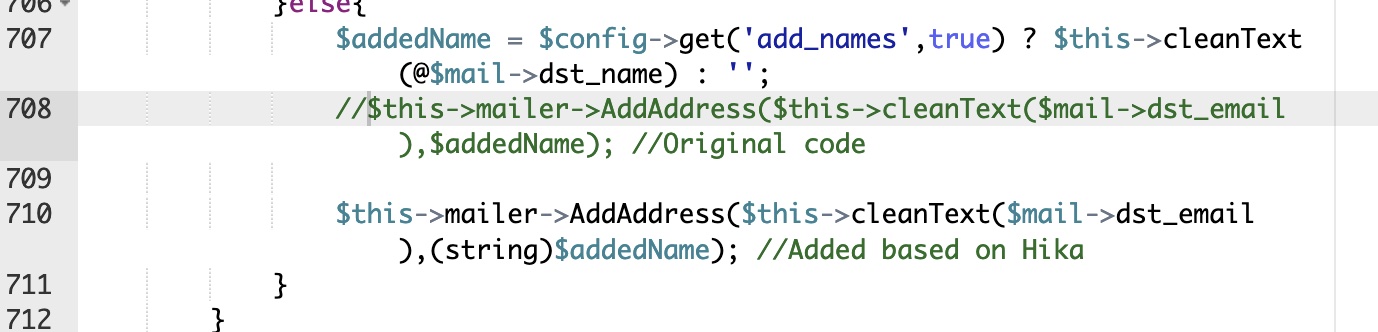
but that gives the same warning message:
Deprecated: preg_replace(): Passing null to parameter #3 ($subject) of type array|string is deprecated .... etc. Same line of code.
I assume that your earlier suggestion, namely changing $name = trim(preg_replace('/[\r\n]+/', '', $name));
to: $name = trim(preg_replace('/[\r\n]+/', '', (string)$name));
in the file libraries/vendor/phpmailer/phpmailer/src/PHPMailer.php
means that when I upgrade Joomla, I have to make this change again?
Alain
I made the suggested changes in administrator/components/com_hikashop/classes/mail.php
but that gives the same warning message:
Deprecated: preg_replace(): Passing null to parameter #3 ($subject) of type array|string is deprecated .... etc. Same line of code.
I assume that your earlier suggestion, namely changing $name = trim(preg_replace('/[\r\n]+/', '', $name));
to: $name = trim(preg_replace('/[\r\n]+/', '', (string)$name));
in the file libraries/vendor/phpmailer/phpmailer/src/PHPMailer.php
means that when I upgrade Joomla, I have to make this change again?
Alain
Please Log in or Create an account to join the conversation.
3 years 11 months ago #347412
by nicolas
Replied by nicolas on topic HikaShop - generate PDF invoice
Hi,
1. That's strange. The callstack debug you provided does point to that line of code and that $addedName variable being null instead of being a string. And the (string) addition there will force this variable to be sent as a string to the AddAddress method.
You're saying "Same line of code". If you add the debug_backtrace code again and look at the result, can you confirm that it now points to the new line number of the AddAddress call and not the old one ? On some hostings, it's possible that even if you modify a line of code, it is taken into account only a while after the change due to caching.
2. The code change in PHPMailer might be needed in a future update of Joomla, but not after each update. It depends whether the update provides a new version of the file or not. But note that if you have the "debug" and "error reporting" turned off in the Joomla configuration (and you should on a live website, for security reasons), you won't see the deprecated message anyways. It will only be a problem when you migrate to PHP 9 or PHP 10 when that deprecated message turns into a fatal error message. At that point, the change will be mandatory. But by that point, PHPMailer will probably have changed their code and Joomla updated it to better take into accounr these issues.
1. That's strange. The callstack debug you provided does point to that line of code and that $addedName variable being null instead of being a string. And the (string) addition there will force this variable to be sent as a string to the AddAddress method.
You're saying "Same line of code". If you add the debug_backtrace code again and look at the result, can you confirm that it now points to the new line number of the AddAddress call and not the old one ? On some hostings, it's possible that even if you modify a line of code, it is taken into account only a while after the change due to caching.
2. The code change in PHPMailer might be needed in a future update of Joomla, but not after each update. It depends whether the update provides a new version of the file or not. But note that if you have the "debug" and "error reporting" turned off in the Joomla configuration (and you should on a live website, for security reasons), you won't see the deprecated message anyways. It will only be a problem when you migrate to PHP 9 or PHP 10 when that deprecated message turns into a fatal error message. At that point, the change will be mandatory. But by that point, PHPMailer will probably have changed their code and Joomla updated it to better take into accounr these issues.
Please Log in or Create an account to join the conversation.
Time to create page: 0.128 seconds