
- Posts: 112
- Thank you received: 7
Cursor filter on Price set to Dynamic not getting dynamic max and min values
- karendunne
-
 Topic Author
- Offline
Less
More
8 years 8 months ago #286109
by karendunne
Cursor filter on Price set to Dynamic not getting dynamic max and min values was created by karendunne
-- HikaShop version -- : 3.2.2
-- Joomla version -- : 3.8.3
-- PHP version -- : 7.0.27
-- Browser(s) name and version -- : Firefox
Hi
We have a cursor filter for price on our site but it does not get maximum and minimum values dynamically from the products. attached you may find the filter configuration.
The product entry has been quite customized but for edit the product the field used in php is : $row->price
Best!!
-- Joomla version -- : 3.8.3
-- PHP version -- : 7.0.27
-- Browser(s) name and version -- : Firefox
Hi
We have a cursor filter for price on our site but it does not get maximum and minimum values dynamically from the products. attached you may find the filter configuration.
The product entry has been quite customized but for edit the product the field used in php is : $row->price
Best!!
Please Log in or Create an account to join the conversation.

8 years 8 months ago #286114
by nicolas
Replied by nicolas on topic Cursor filter on Price set to Dynamic not getting dynamic max and min values
Hi,
On my end when trying to reproduce the issue, I had a problem with the step being too high, but in any case, I didn't had the issue with the range of the filter not being dynamic.
Could you activate the "debug mode" setting of the Joomla configuration and provide the queries on the table hikashop_product that you can find at the bottom of that page with that setting activated ?
On my end when trying to reproduce the issue, I had a problem with the step being too high, but in any case, I didn't had the issue with the range of the filter not being dynamic.
Could you activate the "debug mode" setting of the Joomla configuration and provide the queries on the table hikashop_product that you can find at the bottom of that page with that setting activated ?
Please Log in or Create an account to join the conversation.
- karendunne
-
Topic Author
- Offline
Less
More
- Posts: 112
- Thank you received: 7
8 years 8 months ago #286147
by karendunne
Replied by karendunne on topic Cursor filter on Price set to Dynamic not getting dynamic max and min values
Hi Nicholas,
thank you very much for your reply. There are quite a few and the forum does not allow me to insert them directly so please check attached.
Also if it's easier for you, you may check the live site for them:
Best!!
thank you very much for your reply. There are quite a few and the forum does not allow me to insert them directly so please check attached.
Also if it's easier for you, you may check the live site for them:
This message contains confidential information
Best!!
Please Log in or Create an account to join the conversation.
8 years 8 months ago #286168
by nicolas
Replied by nicolas on topic Cursor filter on Price set to Dynamic not getting dynamic max and min values
Hi,
It's really strange. I see the MySQL query which loads the min/max dynamically for the price cursor filter, but in the javascript of you page, I see that it is the min/max from the configuration which is used.
It's as if the file "filter" of the view "product" had been changed to discard the dynamic min/max.
Can you edit it via the menu Display>Views and check that you have the line below in that file:
I suspect that the last parameter $datas might have been removed, either by the person who made the website or the template provider for some reason.
If that's not the case and that this line is in the file, please provide a backend and a FTP access along with a link to this thread via our contact form so that we can analyse the code:
www.hikashop.com/support/contact-us.html
It's really strange. I see the MySQL query which loads the min/max dynamically for the price cursor filter, but in the javascript of you page, I see that it is the min/max from the configuration which is used.
It's as if the file "filter" of the view "product" had been changed to discard the dynamic min/max.
Can you edit it via the menu Display>Views and check that you have the line below in that file:
Code:
$html[$key]=$this->filterClass->displayFilter($filter, $this->params->get('main_div_name'), $this, $datas);
If that's not the case and that this line is in the file, please provide a backend and a FTP access along with a link to this thread via our contact form so that we can analyse the code:
www.hikashop.com/support/contact-us.html
Please Log in or Create an account to join the conversation.
- karendunne
-
Topic Author
- Offline
Less
More
- Posts: 112
- Thank you received: 7
8 years 8 months ago - 8 years 8 months ago #286394
by karendunne
Replied by karendunne on topic Cursor filter on Price set to Dynamic not getting dynamic max and min values
Hi Nicholas,
That file has not been modified and I have double checked and that line is in.
I have been checking my configuration and there are one detail which I think is the key to this and I did not mention on my first topic.
As instructed on this message: www.hikashop.com/forum/filters-search/89...il-price.html#283321 I have my "price" field in a Custom Field called "Price2" which goes in the PRoduct table in the column "price":
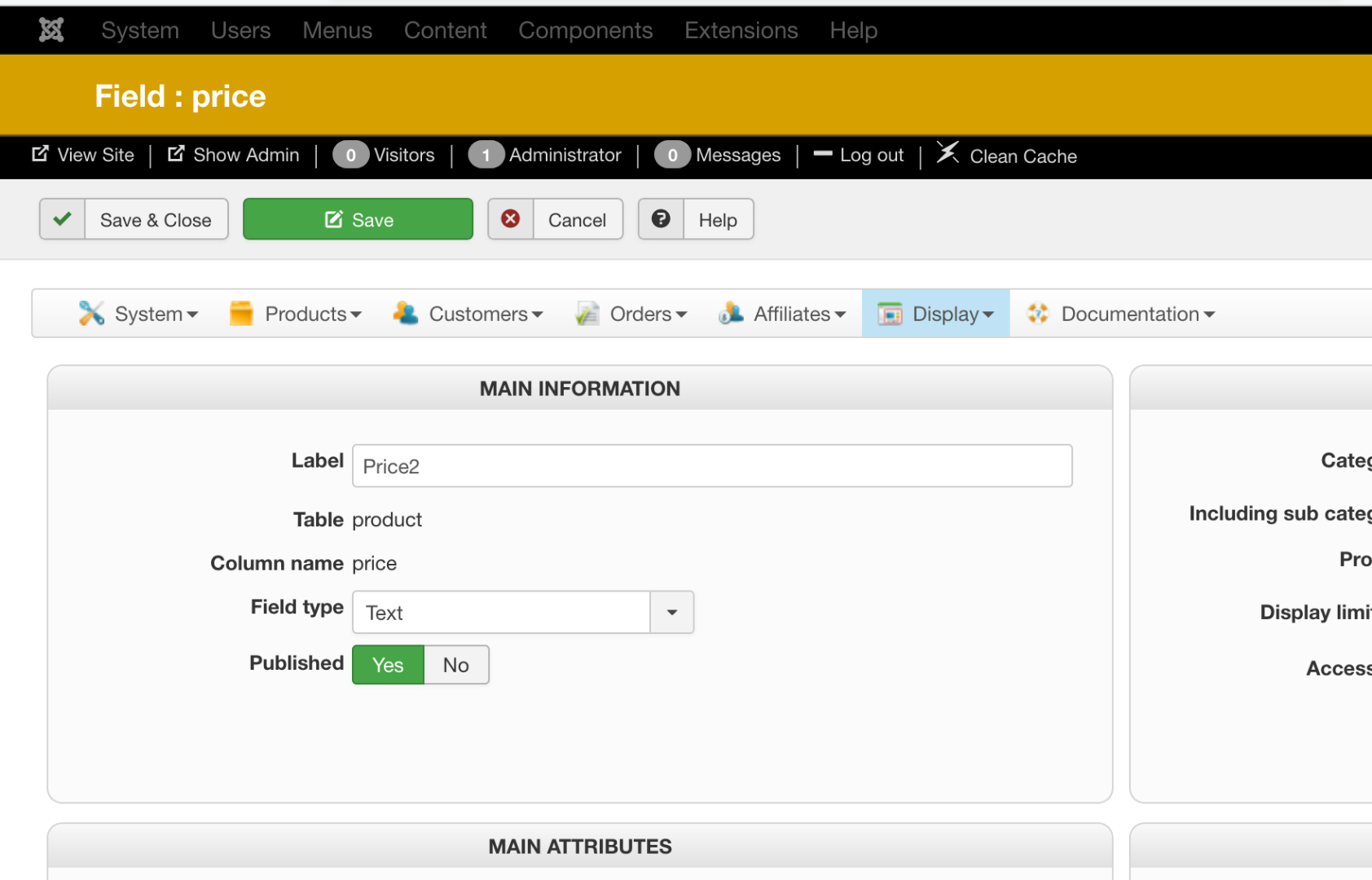
Filter seems correctly configured to get data from Price2:
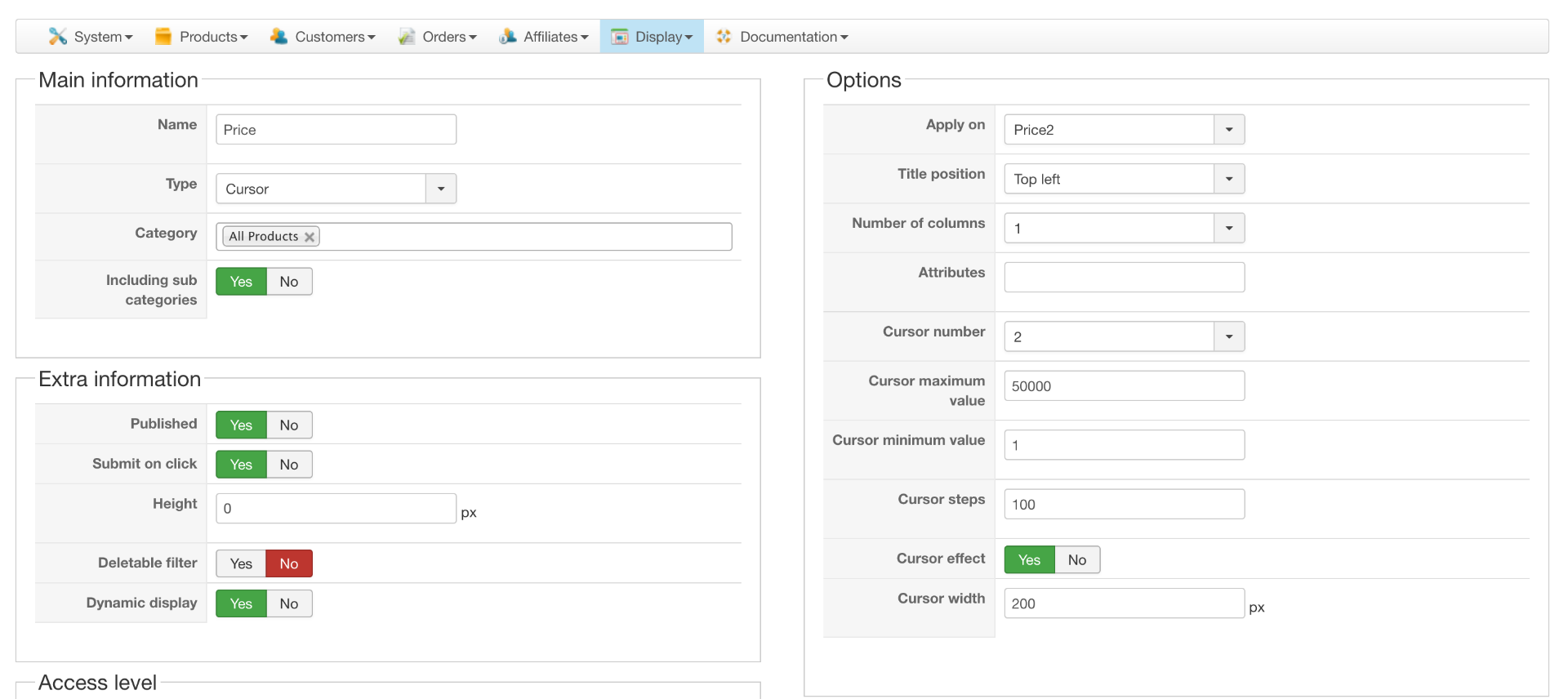
Does this help to find the issue? I guess my filter should look into the column "price" of the product table to get the values, right?
Anyway, as requested I have sent you login data.
Best!!
That file has not been modified and I have double checked and that line is in.
I have been checking my configuration and there are one detail which I think is the key to this and I did not mention on my first topic.
As instructed on this message: www.hikashop.com/forum/filters-search/89...il-price.html#283321 I have my "price" field in a Custom Field called "Price2" which goes in the PRoduct table in the column "price":
Filter seems correctly configured to get data from Price2:
Does this help to find the issue? I guess my filter should look into the column "price" of the product table to get the values, right?
Anyway, as requested I have sent you login data.
Best!!
Last edit: 8 years 8 months ago by karendunne.
Please Log in or Create an account to join the conversation.
8 years 8 months ago #286397
by nicolas
Replied by nicolas on topic Cursor filter on Price set to Dynamic not getting dynamic max and min values
Hi,
That's indeed a key detail in order to understand the situation.
The "apply on" option uses the value "price" of the choice "Price".
For custom fields, the value used in the column name of the custom field.
So since you entered "price" in the column name of your custom field, the filter actually sees as if you had selected the "Price" choice and thus uses the normal prices of the products and not the data you have in your custom field Price2. That's probably why the filter min/max doesn't match with the available prices of the products on the listing.
I would recommend to change and use another column name for your custom field.
That's indeed a key detail in order to understand the situation.
The "apply on" option uses the value "price" of the choice "Price".
For custom fields, the value used in the column name of the custom field.
So since you entered "price" in the column name of your custom field, the filter actually sees as if you had selected the "Price" choice and thus uses the normal prices of the products and not the data you have in your custom field Price2. That's probably why the filter min/max doesn't match with the available prices of the products on the listing.
I would recommend to change and use another column name for your custom field.
Please Log in or Create an account to join the conversation.
- karendunne
-
Topic Author
- Offline
Less
More
- Posts: 112
- Thank you received: 7
8 years 8 months ago - 8 years 8 months ago #286468
by karendunne
Replied by karendunne on topic Cursor filter on Price set to Dynamic not getting dynamic max and min values
Hi Nicholas
thank you very much for your reply!! It actually helped to some extent. I created a field called Unique Price with the column unique_price and Now the filter works correctly for some categories:
mavendesignstudio-demo.com/antique-swan/...en-items/stone-items
But for other categories, it does not get the correct maximum value:
mavendesignstudio-demo.com/antique-swan/lighting
Can you please assist on this?
Thank you very much!!
thank you very much for your reply!! It actually helped to some extent. I created a field called Unique Price with the column unique_price and Now the filter works correctly for some categories:
mavendesignstudio-demo.com/antique-swan/...en-items/stone-items
But for other categories, it does not get the correct maximum value:
mavendesignstudio-demo.com/antique-swan/lighting
Can you please assist on this?
Thank you very much!!
Last edit: 8 years 8 months ago by karendunne.
Please Log in or Create an account to join the conversation.
8 years 8 months ago #286474
by nicolas
Replied by nicolas on topic Cursor filter on Price set to Dynamic not getting dynamic max and min values
Hi,
I was able to find that this happens because of the way the values are entered in the custom field of some of the products.
I've added a patch to the MySQL query so that whatever way you enter the prices int he custom fields, the min/max will be calculated properly.
I've run some tests on your website and it's working fine now.
I was able to find that this happens because of the way the values are entered in the custom field of some of the products.
I've added a patch to the MySQL query so that whatever way you enter the prices int he custom fields, the min/max will be calculated properly.
I've run some tests on your website and it's working fine now.
Please Log in or Create an account to join the conversation.
- karendunne
-
Topic Author
- Offline
Less
More
- Posts: 112
- Thank you received: 7
8 years 8 months ago #286600
by karendunne
Replied by karendunne on topic Cursor filter on Price set to Dynamic not getting dynamic max and min values
Hi Nicolas,
thank you very much for this!! It's indeed working for the "lamps" page, but it's not working in other pages like for instance:
mavendesignstudio-demo.com/antique-swan/...ing/hanging-fixtures
Can you please check?
Also, is this fix something that will be integrated in next release of Hikashop or is there any action I need to apply after an update?
Thanks!!
thank you very much for this!! It's indeed working for the "lamps" page, but it's not working in other pages like for instance:
mavendesignstudio-demo.com/antique-swan/...ing/hanging-fixtures
Can you please check?
Also, is this fix something that will be integrated in next release of Hikashop or is there any action I need to apply after an update?
Thanks!!
Please Log in or Create an account to join the conversation.
8 years 8 months ago #286609
by nicolas
Replied by nicolas on topic Cursor filter on Price set to Dynamic not getting dynamic max and min values
Hi,
Well, the problem this time comes from two things:
- you've set a step of 100
- the cursor system of jQuery-ui we're using for the cursor filter doesn't handle properly the max if the number is not equal to a step starting from the min.
Because of that, the cursor system, with a min of 1895 and a max of 3850 would pick 3795 as the max displayed instead of 3850.
An easy way to avoid that is to change the step to 1 in the filter.
We've added a patch to HikaShop so that it checks the modulo of the difference between the min/max and the step so that if it's not 0, it adds the remainder to the max.
That way, in your example, you now have a max of 3895.
We'll add that patch on our end as well as the previous one so you won't have any action to take when you update.
Well, the problem this time comes from two things:
- you've set a step of 100
- the cursor system of jQuery-ui we're using for the cursor filter doesn't handle properly the max if the number is not equal to a step starting from the min.
Because of that, the cursor system, with a min of 1895 and a max of 3850 would pick 3795 as the max displayed instead of 3850.
An easy way to avoid that is to change the step to 1 in the filter.
We've added a patch to HikaShop so that it checks the modulo of the difference between the min/max and the step so that if it's not 0, it adds the remainder to the max.
That way, in your example, you now have a max of 3895.
We'll add that patch on our end as well as the previous one so you won't have any action to take when you update.
The following user(s) said Thank You: karendunne
Please Log in or Create an account to join the conversation.
- karendunne
-
Topic Author
- Offline
Less
More
- Posts: 112
- Thank you received: 7
8 years 8 months ago #287088
by karendunne
Replied by karendunne on topic Cursor filter on Price set to Dynamic not getting dynamic max and min values
Thank you very much for this!!
Best!!
Best!!
Please Log in or Create an account to join the conversation.
- karendunne
-
Topic Author
- Offline
Less
More
- Posts: 112
- Thank you received: 7
8 years 7 months ago #288330
by karendunne
Replied by karendunne on topic Cursor filter on Price set to Dynamic not getting dynamic max and min values
Hi Nicolas,
Sorry to re-open this, but we have found an issue with the filter. Basically after clearing (clicking the cross) the fitler does not reset the min or max values to the original one. Please check this video for further reference:
screencast-o-matic.com/watch/cFnDrhoMov
Can you please help on this?
Sorry to re-open this, but we have found an issue with the filter. Basically after clearing (clicking the cross) the fitler does not reset the min or max values to the original one. Please check this video for further reference:
screencast-o-matic.com/watch/cFnDrhoMov
Can you please help on this?
Please Log in or Create an account to join the conversation.
8 years 7 months ago #288396
by nicolas
Replied by nicolas on topic Cursor filter on Price set to Dynamic not getting dynamic max and min values
Hi,
Thanks for your feedback. Change the line:
to:
in the file administrator/components/com_hikashop/classes/filter.php and that will fix the issue.
We'll add the patch on our end too.
Thanks for your feedback. Change the line:
Code:
if(!empty($selected) && !empty($selected[0])){
Code:
if(!empty($selected) && !empty($selected[0]) && $selected != ' '){
We'll add the patch on our end too.
The following user(s) said Thank You: karendunne
Please Log in or Create an account to join the conversation.
- karendunne
-
Topic Author
- Offline
Less
More
- Posts: 112
- Thank you received: 7
8 years 7 months ago #288408
by karendunne
Replied by karendunne on topic Cursor filter on Price set to Dynamic not getting dynamic max and min values
That worked like a charm!!
Thank you!!
Thank you!!
Please Log in or Create an account to join the conversation.
Time to create page: 0.262 seconds