
- Posts: 7
- Thank you received: 0
Variants problem and checkout
- andrerosing
-
 Topic Author
- Offline
Less
More
9 years 5 months ago #268983
by andrerosing
Variants problem and checkout was created by andrerosing
Hello,
I got variants by products (a whole cake 15,-, half a cake 8,- and a piece 2,-). When I choose a whole cake it gives me the price for a piece.
When I go to the checkout I don't see the adress fields anymore.
Kind regards,
Andre Rosing
I got variants by products (a whole cake 15,-, half a cake 8,- and a piece 2,-). When I choose a whole cake it gives me the price for a piece.
When I go to the checkout I don't see the adress fields anymore.
Kind regards,
Andre Rosing
Please Log in or Create an account to join the conversation.

9 years 5 months ago #268985
by nicolas
Replied by nicolas on topic Variants problem and checkout
Hi,
Can you provide a screenshot of your settings under the "checkout" tab of the HikaShop configuration and a screenshot of the settings of a product along with a link to the product page of that product so that we can analyze your situation ?
Can you provide a screenshot of your settings under the "checkout" tab of the HikaShop configuration and a screenshot of the settings of a product along with a link to the product page of that product so that we can analyze your situation ?
Please Log in or Create an account to join the conversation.
- andrerosing
-
Topic Author
- Offline
Less
More
- Posts: 7
- Thank you received: 0
9 years 5 months ago - 9 years 5 months ago #269153
by andrerosing
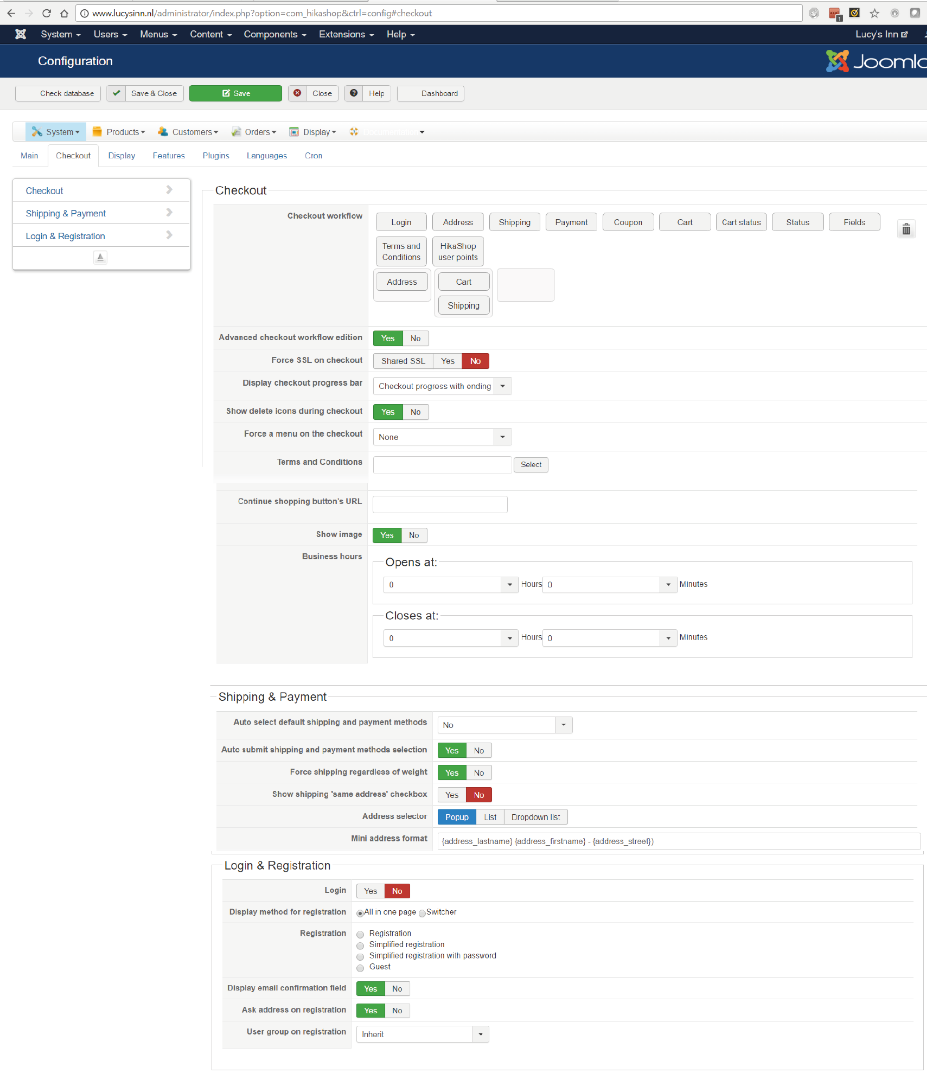
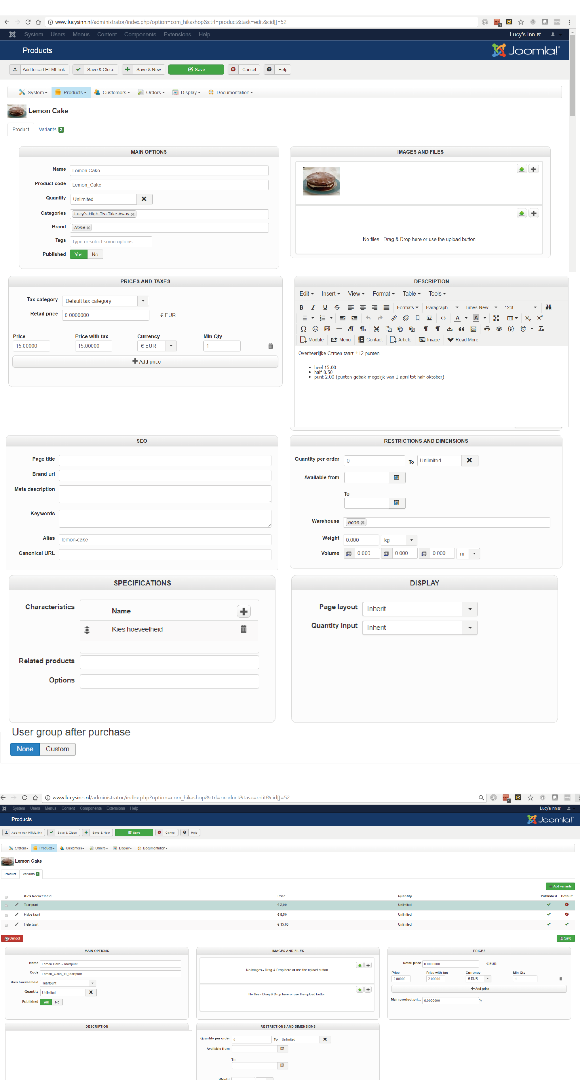 Hello,
Hereby the screenshots and this is the link to the product www.lucysinn.nl/index.php/lucysshop/lucy...roduct/52-lemon-cake
Replied by andrerosing on topic Variants problem and checkout
Hereby the screenshots and this is the link to the product www.lucysinn.nl/index.php/lucysshop/lucy...roduct/52-lemon-cake
Last edit: 9 years 5 months ago by andrerosing.
Please Log in or Create an account to join the conversation.
9 years 5 months ago #269173
by nicolas
Replied by nicolas on topic Variants problem and checkout
Hi,
Regarding the variants problem, the issue is that you have the variants data inside of the product page form while it should normally be outside of it:
monosnap.com/file/b9JvzhNHjBetQ47auT77P9CnwYft7r
Because of that, it's always the last variant data which is taken into account when you click on the add to cart button.
This issue arises because of the way the product page layout was customized. There must be some </div> missing.
I would recommend contacting the developer who made that customization so that he can fix that for you.
For the checkout, that's normal. Since you removed the "login" view from the checkout workflow, you'll only see the address fields once you're logged in with a user account. I would recommend adding back the "login" view.
Regarding the variants problem, the issue is that you have the variants data inside of the product page form while it should normally be outside of it:
monosnap.com/file/b9JvzhNHjBetQ47auT77P9CnwYft7r
Because of that, it's always the last variant data which is taken into account when you click on the add to cart button.
This issue arises because of the way the product page layout was customized. There must be some </div> missing.
I would recommend contacting the developer who made that customization so that he can fix that for you.
For the checkout, that's normal. Since you removed the "login" view from the checkout workflow, you'll only see the address fields once you're logged in with a user account. I would recommend adding back the "login" view.
Please Log in or Create an account to join the conversation.
- andrerosing
-
Topic Author
- Offline
Less
More
- Posts: 7
- Thank you received: 0
9 years 5 months ago #269404
by andrerosing
Replied by andrerosing on topic Variants problem and checkout
Hi,
Its not a extra developed extension and we didn't change the hika software and only use the original Hikashop software. So I do not know how it's changed.
Its not a extra developed extension and we didn't change the hika software and only use the original Hikashop software. So I do not know how it's changed.
Please Log in or Create an account to join the conversation.
9 years 5 months ago #269460
by nicolas
Replied by nicolas on topic Variants problem and checkout
Hi,
Then it must be customized by your Joomla template.
Switch temporarily to the default template of Joomla and see if it works.
Then it must be customized by your Joomla template.
Switch temporarily to the default template of Joomla and see if it works.
Please Log in or Create an account to join the conversation.
- andrerosing
-
Topic Author
- Offline
Less
More
- Posts: 7
- Thank you received: 0
9 years 4 months ago #272454
by andrerosing
Replied by andrerosing on topic Variants problem and checkout
Hey
I spoke to the template provider and after a long discussion they said it takes a lot of time to adjust the template. My question is whether you can customize the code.
If that's not possible, I'll stop with Hikashop and I'll look for something else.
Andre
I spoke to the template provider and after a long discussion they said it takes a lot of time to adjust the template. My question is whether you can customize the code.
If that's not possible, I'll stop with Hikashop and I'll look for something else.
Andre
Please Log in or Create an account to join the conversation.
9 years 4 months ago #272461
by nicolas
Replied by nicolas on topic Variants problem and checkout
Hi,
Well, I gave a solution which should do the job in a previous message:
www.hikashop.com/forum/install-update/89...checkout.html#269173
I'm surprised they say that it takes a lot of time.
And even so, it's always possible to remove the customization of the view file by renaming one or two files in the folder templates/YOUR_TEMPLATE/html/com_hikashop/product/ (probably the "show_default" one) and that should automatically fix the problem since you'll then use the default display on the product page.
So these tips above should allow you to easily have it working.
Well, I gave a solution which should do the job in a previous message:
www.hikashop.com/forum/install-update/89...checkout.html#269173
So in the show_default view file, adding one or two extra </div> at the bottom of the view file should do the trick.This issue arises because of the way the product page layout was customized. There must be some </div> missing.
I'm surprised they say that it takes a lot of time.
And even so, it's always possible to remove the customization of the view file by renaming one or two files in the folder templates/YOUR_TEMPLATE/html/com_hikashop/product/ (probably the "show_default" one) and that should automatically fix the problem since you'll then use the default display on the product page.
So these tips above should allow you to easily have it working.
Please Log in or Create an account to join the conversation.
- andrerosing
-
Topic Author
- Offline
Less
More
- Posts: 7
- Thank you received: 0
9 years 4 months ago #272534
by andrerosing
Replied by andrerosing on topic Variants problem and checkout
Hello,
I know, but the theme provider does nothing with the issue. They say it cost a lot a time and now my webshop is in meanwhile 2 months offline. Can you fix this code?
Regards
Andre
I know, but the theme provider does nothing with the issue. They say it cost a lot a time and now my webshop is in meanwhile 2 months offline. Can you fix this code?
Regards
Andre
Please Log in or Create an account to join the conversation.

9 years 4 months ago #272535
by Jerome
Jerome - Obsidev.com
HikaMarket & HikaSerial developer / HikaShop core dev team.
Replied by Jerome on topic Variants problem and checkout
Hello,
I'm sorry but I'm not following you.
Nicolas wrote :
The current issue is in a customized product page (which is not our responsibility) and Nicolas gave you two solutions in order to :
1 - fix the issue manually
2 - remove the customization and restore the default HikaShop page
Please try these methods first.
I'm sorry but I'm not following you.
Nicolas wrote :
So in the show_default view file, adding one or two extra </div> at the bottom of the view file should do the trick.
And even so, it's always possible to remove the customization of the view file by renaming one or two files in the folder templates/YOUR_TEMPLATE/html/com_hikashop/product/ (probably the "show_default" one) and that should automatically fix the problem since you'll then use the default display on the product page.
The current issue is in a customized product page (which is not our responsibility) and Nicolas gave you two solutions in order to :
1 - fix the issue manually
2 - remove the customization and restore the default HikaShop page
Please try these methods first.
Jerome - Obsidev.com
HikaMarket & HikaSerial developer / HikaShop core dev team.
Please Log in or Create an account to join the conversation.
- andrerosing
-
Topic Author
- Offline
Less
More
- Posts: 7
- Thank you received: 0
9 years 4 months ago #272728
by andrerosing
Replied by andrerosing on topic Variants problem and checkout
Hello,
I can't fix this problem.
We decide to go to another webshop program.
Thanks
Andre
I can't fix this problem.
We decide to go to another webshop program.
Thanks
Andre
Please Log in or Create an account to join the conversation.
Time to create page: 0.253 seconds