

- Posts: 966
- Thank you received: 11
Characteristic Dynamic Display
5 years 6 months ago #331241
by MyWorld
Characteristic Dynamic Display was created by MyWorld
-- HikaShop version -- : 4.4.1
HikaShop 4.4.1 - Release date : February, 12 2020
Under "New Features" is the following. Can you please explain the below a bit more? It may help with an issue that I had brought up previously.
Thanks!
HikaShop 4.4.1 - Release date : February, 12 2020
Under "New Features" is the following. Can you please explain the below a bit more? It may help with an issue that I had brought up previously.
The characteristic dynamic display system can now work for one characteristic only based on how you configured the "Characteristics dynamic display" setting in the HikaShop configuration.
Thanks!
Please Log in or Create an account to join the conversation.

5 years 6 months ago #331246
by nicolas
Replied by nicolas on topic Characteristic Dynamic Display
Hi,
On the product page for a product with only one characteristic, you had previously a dropdown with one value per characteristic value with the one linked to the default variant selected by default.
And that regardless of this "Characteristics dynamic display" setting.
Now, if that option is set to "always", you'll have an extra "please select" choice in the characteristic dropdown so that the customer will have to select something in that dropdown before seeing the add to cart button to purchase the product.
On the product page for a product with only one characteristic, you had previously a dropdown with one value per characteristic value with the one linked to the default variant selected by default.
And that regardless of this "Characteristics dynamic display" setting.
Now, if that option is set to "always", you'll have an extra "please select" choice in the characteristic dropdown so that the customer will have to select something in that dropdown before seeing the add to cart button to purchase the product.
Please Log in or Create an account to join the conversation.
5 years 6 months ago #331286
by MyWorld
Replied by MyWorld on topic Characteristic Dynamic Display
I was testing it out and I love the idea... but I'm thinking that when the button is NOT showing customers may think that that item is not available.
Is it possible to still have the button display but maybe have a message like the attached display when the customer click on the button without selecting a size. Most sites have the "add to cart" button visible.
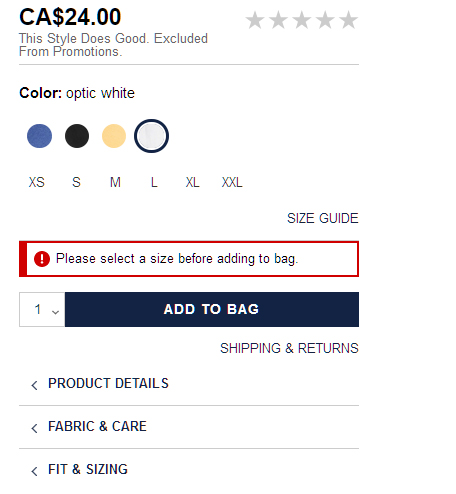
Thanks!!
Is it possible to still have the button display but maybe have a message like the attached display when the customer click on the button without selecting a size. Most sites have the "add to cart" button visible.
Thanks!!
Please Log in or Create an account to join the conversation.
5 years 6 months ago #331312
by nicolas
Replied by nicolas on topic Characteristic Dynamic Display
Hi,
You can do that with a translation override.
For example:
You can do that with a translation override.
For example:
Code:
ADD_TO_CART_AVAILABLE_AFTER_CHARACTERISTIC_SELECTION="<p class='selection_warning'>Please select a size before adding to bag</p><input type='text' value='1'/><a class='hikabtn' onclick='alert(\'Please make a selection first\'); return false;'>Add to cart</a>"
Please Log in or Create an account to join the conversation.
5 years 6 months ago #331500
by MyWorld
Replied by MyWorld on topic Characteristic Dynamic Display
Thanks for the above but I'm missing something as it's not working.
1) I have "Characteristics dynamic display = For two characteristics and more"
2) In the /language/overrides/en-GB.override.ini I add the code you provided:
The button is showing but when I click on it I don't get the alert and am still able to add items to the cart.
What am I missing please?
Thanks!
1) I have "Characteristics dynamic display = For two characteristics and more"
2) In the /language/overrides/en-GB.override.ini I add the code you provided:
Code:
ADD_TO_CART_AVAILABLE_AFTER_CHARACTERISTIC_SELECTION="<p class='selection_warning'>Please select a size before adding to bag</p><input type='text' value='1'/><a class='hikabtn' onclick='alert(\'Please make a selection first\'); return false;'>Add to cart</a>"
The button is showing but when I click on it I don't get the alert and am still able to add items to the cart.
What am I missing please?
Thanks!
Please Log in or Create an account to join the conversation.
5 years 6 months ago #331506
by nicolas
Replied by nicolas on topic Characteristic Dynamic Display
HI,
Can you provide a link to a page with the button so that we can check what's going on ?
Can you provide a link to a page with the button so that we can check what's going on ?
Please Log in or Create an account to join the conversation.
5 years 6 months ago #331534
by MyWorld
Replied by MyWorld on topic Characteristic Dynamic Display
Hi Nicolas,
I sent the link privately. Thanks!!
I sent the link privately. Thanks!!
Please Log in or Create an account to join the conversation.
5 years 6 months ago #331535
by nicolas
Replied by nicolas on topic Characteristic Dynamic Display
Hi,
You've configured the setting "Characteristics dynamic display" to "For two characteristics and more". So the dynamic display will only happen if the product has two characteristics or more.
But the link you provided for the product "SISTER FASHION Cotton Blend Brown Leopard Print Off Shoulder Top" has only one characteristic, so the translation override is not used there.
I tried to search for a product with more than 1 characteristic but I couldn't find one.
As I said here ( www.hikashop.com/forum/install-update/90...-display.html#331246 ) if you want the dynamic display to happen for products with one characteristic you need to select "always" in that "Characteristics dynamic display" setting.
You've configured the setting "Characteristics dynamic display" to "For two characteristics and more". So the dynamic display will only happen if the product has two characteristics or more.
But the link you provided for the product "SISTER FASHION Cotton Blend Brown Leopard Print Off Shoulder Top" has only one characteristic, so the translation override is not used there.
I tried to search for a product with more than 1 characteristic but I couldn't find one.
As I said here ( www.hikashop.com/forum/install-update/90...-display.html#331246 ) if you want the dynamic display to happen for products with one characteristic you need to select "always" in that "Characteristics dynamic display" setting.
Please Log in or Create an account to join the conversation.
5 years 6 months ago #331538
by MyWorld
Replied by MyWorld on topic Characteristic Dynamic Display
When I change "Characteristics dynamic display" to "Always", the button is no longer showing (if you look a the URL I sent you will see that).
As per my post via the link below, I would like the button to display but the user will be prompted to select a size if they click on the "Add to Cart" button before selecting a size. What do I do next?
www.hikashop.com/forum/install-update/90...-display.html#331286
Thanks!
As per my post via the link below, I would like the button to display but the user will be prompted to select a size if they click on the "Add to Cart" button before selecting a size. What do I do next?
www.hikashop.com/forum/install-update/90...-display.html#331286
Thanks!
Please Log in or Create an account to join the conversation.
5 years 6 months ago #331541
by nicolas
Replied by nicolas on topic Characteristic Dynamic Display
Hi,
If you don't see the text "add to cart button available after characteristic selection" on the product page with the "Characteristics dynamic display" setting set to "Always", it means that you probably have a view override on product / show_default.php which is missing the code:
which was added specifically for that.
That would also explain why the translation override doesn't do anything.
So please check your view overrides.
If you don't see the text "add to cart button available after characteristic selection" on the product page with the "Characteristics dynamic display" setting set to "Always", it means that you probably have a view override on product / show_default.php which is missing the code:
Code:
<div id="hikashop_product_quantity_alt" class="hikashop_product_quantity_main_alt" style="display:none;">
<?php echo JText::_('ADD_TO_CART_AVAILABLE_AFTER_CHARACTERISTIC_SELECTION'); ?>
</div>
That would also explain why the translation override doesn't do anything.
So please check your view overrides.
Please Log in or Create an account to join the conversation.
5 years 6 months ago #331568
by MyWorld
Replied by MyWorld on topic Characteristic Dynamic Display
Hi Nicolas,
I think we are getting there. I removed the override and I see the message that was added to the language file but it's not working properly.
1) When you first go to the page, there is a box with a number in it and the "add to cart" button next to it but when I click on a size a different "add to cart" button is displaying.
2) Also, how can I get back the dropdown and the wishlist button that I have in the "Before" picture?
Thanks!
I think we are getting there. I removed the override and I see the message that was added to the language file but it's not working properly.
1) When you first go to the page, there is a box with a number in it and the "add to cart" button next to it but when I click on a size a different "add to cart" button is displaying.
2) Also, how can I get back the dropdown and the wishlist button that I have in the "Before" picture?
Thanks!
Please Log in or Create an account to join the conversation.
5 years 6 months ago #331573
by nicolas
Replied by nicolas on topic Characteristic Dynamic Display
Hi,
You need to adapt the translation override to the situation. I just gave a generic example.
For example, I can see that you're using a select quantity input field. So instead of
which displays an input field with a 1, you could use:
And for the wishlist button, you could add:
It's really just a matter of adapting the translation override to what you have on your product page.
You need to adapt the translation override to the situation. I just gave a generic example.
For example, I can see that you're using a select quantity input field. So instead of
Code:
<input type='text' value='1'/>
Code:
<select><option value='1'>1</option></select>
Code:
<a href='#' class='hikabtn hikawishlist' onclick='alert(\'Please make a selection first\'); return false;'> </a>
Please Log in or Create an account to join the conversation.
5 years 6 months ago #331716
by MyWorld
Replied by MyWorld on topic Characteristic Dynamic Display
Just wanted to say that I really appreciate your help with this. It appears to be working beautifully now.
Thanks again!!
Thanks again!!
Please Log in or Create an account to join the conversation.
Time to create page: 0.360 seconds