

- Posts: 7
- Thank you received: 0
Custom field in email notification
11 years 6 months ago #199665
by ACCAN
Custom field in email notification was created by ACCAN
-- HikaShop version -- : 2.3.5
-- Joomla version -- : 2.5.11
Hi,
I'm only new to PHP and could use some help with adding custom fields to notification emails.
I'm trying to add a field from the item table to a notification email and am using the code
. org_member being the field I want to display. When I send a test email the field isn't displayed.
I'm guessing I need to add some additional code to the preload version to allow the table 'item' to be displayed. Can you tell me what the code should be and where it should be placed.
Regards - Rich
-- Joomla version -- : 2.5.11
Hi,
I'm only new to PHP and could use some help with adding custom fields to notification emails.
I'm trying to add a field from the item table to a notification email and am using the code
Code:
{VAR:item.org_member}
I'm guessing I need to add some additional code to the preload version to allow the table 'item' to be displayed. Can you tell me what the code should be and where it should be placed.
Regards - Rich
Please Log in or Create an account to join the conversation.

11 years 6 months ago #199704
by nicolas
Replied by nicolas on topic Custom field in email notification
Hi,
there is no additional code to display it.
Also, custom item fields should already be displayed automatically on the notification emails thanks to the code:
in the preload of the emails. So actually, you shouldn't have to change anything.
But if you add that tag in the HTML area, you need to add such tag {LINEVAR:item.org_member} and add it between the <!--{START:PRODUCT_LINE}--> and the <!--{END:PRODUCT_LINE}--> tags.
there is no additional code to display it.
Also, custom item fields should already be displayed automatically on the notification emails thanks to the code:
Code:
if(!empty($itemFields)){
foreach($itemFields as $field){
$namekey = $field->field_namekey;
if(!isset($item->$namekey) || (empty($item->$namekey) && !strlen($item->$namekey))) continue;
$t .= '<p>'.$fieldsClass->getFieldName($field).': '.$fieldsClass->show($field,$item->$namekey,'user_email').'</p>';
}
}
But if you add that tag in the HTML area, you need to add such tag {LINEVAR:item.org_member} and add it between the <!--{START:PRODUCT_LINE}--> and the <!--{END:PRODUCT_LINE}--> tags.
The following user(s) said Thank You: ACCAN
Please Log in or Create an account to join the conversation.
11 years 6 months ago #199794
by ACCAN
Replied by ACCAN on topic Custom field in email notification
Hi Nicolas
Fantastic, of course! I can only call those tags between the START:Product_line and END:Product_line. I was trying to display a couple of the item fields in other sections. I now understand that I need to include additional START & END Product line tags to make this work.
This has been a great help.
Thank you
Rich
Fantastic, of course! I can only call those tags between the START:Product_line and END:Product_line. I was trying to display a couple of the item fields in other sections. I now understand that I need to include additional START & END Product line tags to make this work.
This has been a great help.
Thank you
Rich
Please Log in or Create an account to join the conversation.
11 years 6 months ago #199798
by ACCAN
Replied by ACCAN on topic Custom field in email notification
Another quick question.
If I want to add the Product Category to the email. What's the tag I need to use, and is there anything additional to the preload version I need to add.
Is there a list of tags etc that I can for future reference?
Thanks for you time
Rich
If I want to add the Product Category to the email. What's the tag I need to use, and is there anything additional to the preload version I need to add.
Is there a list of tags etc that I can for future reference?
Thanks for you time
Rich
Please Log in or Create an account to join the conversation.
11 years 6 months ago #199807
by ACCAN
Replied by ACCAN on topic Custom field in email notification
Any thoughts you can share on this would be welcome. Thanks
Another quick question.
If I want to add the Product Category to the email. What's the tag I need to use, and is there anything additional to the preload version I need to add.
Is there a list of tags etc that I can for future reference?
Thanks for you time
Rich
Another quick question.
If I want to add the Product Category to the email. What's the tag I need to use, and is there anything additional to the preload version I need to add.
Is there a list of tags etc that I can for future reference?
Thanks for you time
Rich
Please Log in or Create an account to join the conversation.

11 years 6 months ago #199841
by Jerome
Jerome - Obsidev.com
HikaMarket & HikaSerial developer / HikaShop core dev team.
Replied by Jerome on topic Custom field in email notification
Hi,
There is no need to re-reply to your own message ; the "bump" are not useful with our ticket system.. In fact it will have the invert effect because we are treating older messages in priority.
About the product categories ; there is no tag for that so the best will be to edit the "preload" part of the email in order to add the value in the array, so you can use it afterwards as a tag.
Because a product can have several categories, the loading of that information require some special processing, specially to provide just one single value for the tag (which can't handle arrays).
Regards,
There is no need to re-reply to your own message ; the "bump" are not useful with our ticket system.. In fact it will have the invert effect because we are treating older messages in priority.
About the product categories ; there is no tag for that so the best will be to edit the "preload" part of the email in order to add the value in the array, so you can use it afterwards as a tag.
Because a product can have several categories, the loading of that information require some special processing, specially to provide just one single value for the tag (which can't handle arrays).
Regards,
Jerome - Obsidev.com
HikaMarket & HikaSerial developer / HikaShop core dev team.
Please Log in or Create an account to join the conversation.
11 years 5 months ago #200244
by ACCAN
Replied by ACCAN on topic Custom field in email notification
Hi, I've managed to work out the issues above. Thank you for your help.
I have another issue with custom fields in the emails that I can't seem to work out.
I've created text custom fields in the table 'product' and given them a default value, they're published, display is set to all, they're assigned to the correct categories, and I can see the preview. When I look at the categories they're assigned to, I can see them listed at the bottom.
I am trying to use them in an email to create personalised text for each product as per the code below:
I initially set them up using the table 'item' and hid those using CSS in the front-end. This all worked perfectly except they were included in the LINEVAR:PRODUCT_NAME field in the email which I didn't want. The fields from the table 'item' display with no problems in the code above.
So now I'm trying to do the same thing with the table 'product', which I see in the forums I can include in the email using LINEVAR:product.custom_field. But they're just not displaying. I'm assuming they need to go between the start and end of PRODUCT_LINE.
Do I need to include something else in the preload or is there something else I need to do to get them to work.
Thanks again for your time.
Regards
Rich
I have another issue with custom fields in the emails that I can't seem to work out.
I've created text custom fields in the table 'product' and given them a default value, they're published, display is set to all, they're assigned to the correct categories, and I can see the preview. When I look at the categories they're assigned to, I can see them listed at the bottom.
I am trying to use them in an email to create personalised text for each product as per the code below:
Code:
<h2 style="color:#000000 !important; font-size:14px; font-weight:normal; font-weight:bold;margin-bottom:0px;padding:0px;">{TXT:HI_CUSTOMER}<!--{START:PRODUCT_LINE}--> {LINEVAR:item.org_member} </h2></p>
<p style="border-bottom:1px solid #ddd;padding-bottom:3px;text-align:left;color:#1c8faf !important;font-size:12px;">Thank you for {LINEVAR:product.invfragment01a} the 'our business'. {LINEVAR:product.invfragment02a}</p>
<p style="border-bottom:1px solid #ddd;padding-bottom:3px;text-align:left;color:#1c8faf !important;font-size:12px;">As a peak body, our business depends on its broad and diverse membership base to help us fight for a better deal. You are our eyes and ears out there in the market and we encourage you to give us your feedback on that affect .</p>
I initially set them up using the table 'item' and hid those using CSS in the front-end. This all worked perfectly except they were included in the LINEVAR:PRODUCT_NAME field in the email which I didn't want. The fields from the table 'item' display with no problems in the code above.
So now I'm trying to do the same thing with the table 'product', which I see in the forums I can include in the email using LINEVAR:product.custom_field. But they're just not displaying. I'm assuming they need to go between the start and end of PRODUCT_LINE.
Do I need to include something else in the preload or is there something else I need to do to get them to work.
Thanks again for your time.
Regards
Rich
Please Log in or Create an account to join the conversation.
11 years 5 months ago #200290
by Jerome
Jerome - Obsidev.com
HikaMarket & HikaSerial developer / HikaShop core dev team.
Replied by Jerome on topic Custom field in email notification
Hi,
Even if you set a default value for the custom field ; it does not store the value in the database.
The tag mail system can't see that you're displaying a custom field which have a default value ; it will just take the value from the database. So you have to be sure that the product have a value stored for the product custom field.
Regards,
Even if you set a default value for the custom field ; it does not store the value in the database.
The tag mail system can't see that you're displaying a custom field which have a default value ; it will just take the value from the database. So you have to be sure that the product have a value stored for the product custom field.
Regards,
Jerome - Obsidev.com
HikaMarket & HikaSerial developer / HikaShop core dev team.
Please Log in or Create an account to join the conversation.
11 years 5 months ago - 11 years 5 months ago #200327
by lionel75
Replied by lionel75 on topic Custom field in email notification
what mean {LINEVAR ? where does it come from ?
Is it a reserved word ( joomla , hikashop ,dev ) ?
Is there anothers reserved words ?
regard's
Is it a reserved word ( joomla , hikashop ,dev ) ?
Is there anothers reserved words ?
regard's
Last edit: 11 years 5 months ago by lionel75.
Please Log in or Create an account to join the conversation.
11 years 5 months ago #200350
by ACCAN
Replied by ACCAN on topic Custom field in email notification
That makes a lot of sense, thanks Jerome.
Is there an easy way to include the product custom field in the front-end so it is included in the database? As I did for Item custom_field and then I can hide it with CSS.
Alternatively, I could use the item.custom_field tags to build the list rather than the LINEVAR:PRODUCT_NAME but is there a tag for the Label on the field so I can include those as well. Something like item.'custom_field'_label?
Cheers
Rich
Is there an easy way to include the product custom field in the front-end so it is included in the database? As I did for Item custom_field and then I can hide it with CSS.
Alternatively, I could use the item.custom_field tags to build the list rather than the LINEVAR:PRODUCT_NAME but is there a tag for the Label on the field so I can include those as well. Something like item.'custom_field'_label?
Cheers
Rich
Please Log in or Create an account to join the conversation.
11 years 5 months ago #200371
by nicolas
Replied by nicolas on topic Custom field in email notification
@lionel75 :
LINEVAR is the name of the tag, like VAR, TXT, START, END
They are defined by HikaShop.
@ACCAN :
For the label of the fields, you can directly write it next to the tag for the value, so there is no tag since there is no point in having a tag.
I didn't understand your question about product custom fields ? This thread is about adding custom item fields data in emails and now you're talking about adding product fields on the frontend of the website, so I don't see the link.
LINEVAR is the name of the tag, like VAR, TXT, START, END
They are defined by HikaShop.
@ACCAN :
For the label of the fields, you can directly write it next to the tag for the value, so there is no tag since there is no point in having a tag.
I didn't understand your question about product custom fields ? This thread is about adding custom item fields data in emails and now you're talking about adding product fields on the frontend of the website, so I don't see the link.
Please Log in or Create an account to join the conversation.
11 years 5 months ago - 11 years 5 months ago #200491
by lionel75
Replied by lionel75 on topic Custom field in email notification
Even this post give some information about those TAG . Is there official documentation web page ?
thank's
- what handle this tag ?
- howto use them ?
- The context they can be use/call ?
- The syntax ( wel write , and well functionnal ) and string available
- a hierarchy to follow beetween those tags
thank's
Last edit: 11 years 5 months ago by lionel75.
Please Log in or Create an account to join the conversation.
11 years 5 months ago #200496
by nicolas
Replied by nicolas on topic Custom field in email notification
There is no such documentation.
Please Log in or Create an account to join the conversation.
11 years 5 months ago #200695
by ACCAN
Replied by ACCAN on topic Custom field in email notification
I did finally work this out.
The reason I wanted to switch from the Item table to the Product table is because every custom item field is being generated into the email through the tag LINEVAR:PRODUCT_NAME. I didn't want the end user to see those fields as they are just small bits of text to personalise the email based on the product & category that is purchased. This is also why I couldn't just type the Label next to the field, because different item fields are assigned by category and the email couldn't have empty or superfluous labels that related to a different category.
I did get them working using the table 'Product'. Custom fields in the table 'Product' should appear in the front end under tab called Characteristics. I wasn't seeing those. Firstly, I had to create all of the custom fields I needed using the table product, in my case read-only text with a default value. Then I had to go into each product and change the value of 'Layout on Product page' to Default and then save the product again. Even products that had the 'Layout on Product page' as Default needed to be re-saved before the characteristics would appear in the front-end. Then I could simply hide them in the front-end using their unique selector with CSS. And then I could add them to the email using the tag LINEVAR:product.custom_field_name to customise the text in the email.
Anyway, thanks for your help and time.
Rich
The reason I wanted to switch from the Item table to the Product table is because every custom item field is being generated into the email through the tag LINEVAR:PRODUCT_NAME. I didn't want the end user to see those fields as they are just small bits of text to personalise the email based on the product & category that is purchased. This is also why I couldn't just type the Label next to the field, because different item fields are assigned by category and the email couldn't have empty or superfluous labels that related to a different category.
I did get them working using the table 'Product'. Custom fields in the table 'Product' should appear in the front end under tab called Characteristics. I wasn't seeing those. Firstly, I had to create all of the custom fields I needed using the table product, in my case read-only text with a default value. Then I had to go into each product and change the value of 'Layout on Product page' to Default and then save the product again. Even products that had the 'Layout on Product page' as Default needed to be re-saved before the characteristics would appear in the front-end. Then I could simply hide them in the front-end using their unique selector with CSS. And then I could add them to the email using the tag LINEVAR:product.custom_field_name to customise the text in the email.
Anyway, thanks for your help and time.
Rich
Please Log in or Create an account to join the conversation.
11 years 2 months ago #212350
by maujbigo
Replied by maujbigo on topic Custom field in email notification
Hi,
I also need to add one specific custom field to the email notification.
I can see the code mentioned above by Nicolas, but unfortunately the fields are not showing up in the email. This is ok as I don't need all the fields. Just one specific one.
I tried adding {LINEVAR:uom} which is the column name of my custom field, between <!--{START:PRODUCT_LINE}--> and <!--{END:PRODUCT_LINE}--> but no result
What am I missing?
Thanks
I also need to add one specific custom field to the email notification.
I can see the code mentioned above by Nicolas, but unfortunately the fields are not showing up in the email. This is ok as I don't need all the fields. Just one specific one.
I tried adding {LINEVAR:uom} which is the column name of my custom field, between <!--{START:PRODUCT_LINE}--> and <!--{END:PRODUCT_LINE}--> but no result
What am I missing?
Thanks
Please Log in or Create an account to join the conversation.
11 years 2 months ago #212351
by maujbigo
Replied by maujbigo on topic Custom field in email notification
Never mind, I figured out.
I just needed to ad product.uom instead of item.uom
thanks
I just needed to ad product.uom instead of item.uom
thanks
Please Log in or Create an account to join the conversation.
7 years 3 months ago #308924
by dvddvd
Replied by dvddvd on topic Custom field in email notification
Hello,
I have created two custom fields and assigned a label to it, in the value. They are inside additional information in the order.
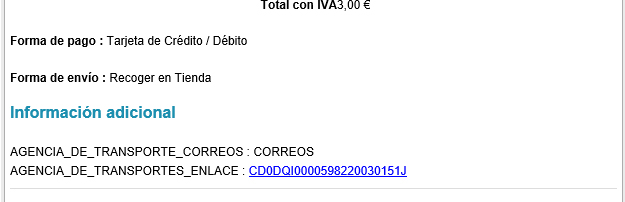

But when receiving the emails the value of the label is not shown, if not the name, how it could be solved. I attach images.
I have created two custom fields and assigned a label to it, in the value. They are inside additional information in the order.
But when receiving the emails the value of the label is not shown, if not the name, how it could be solved. I attach images.
Please Log in or Create an account to join the conversation.
7 years 3 months ago #308935
by nicolas
Replied by nicolas on topic Custom field in email notification
Hi,
I'm sorry but I don't understand your question.
On your custom fields listing screenshot I see the exact same name as on the email.
So it looks like it's working for me ? Or maybe we're talking about something else ?
Could you tell us more about the situation ? What did you expect to see ?
Could you provide a screenshot of the settings of the custom fields and not just the listing information ?
I'm sorry but I don't understand your question.
On your custom fields listing screenshot I see the exact same name as on the email.
So it looks like it's working for me ? Or maybe we're talking about something else ?
Could you tell us more about the situation ? What did you expect to see ?
Could you provide a screenshot of the settings of the custom fields and not just the listing information ?
The following user(s) said Thank You: dvddvd
Please Log in or Create an account to join the conversation.
7 years 3 months ago #308938
by dvddvd
Replied by dvddvd on topic Custom field in email notification
Hello Nicolas and thanks for yor aswer.
It is a translation chain
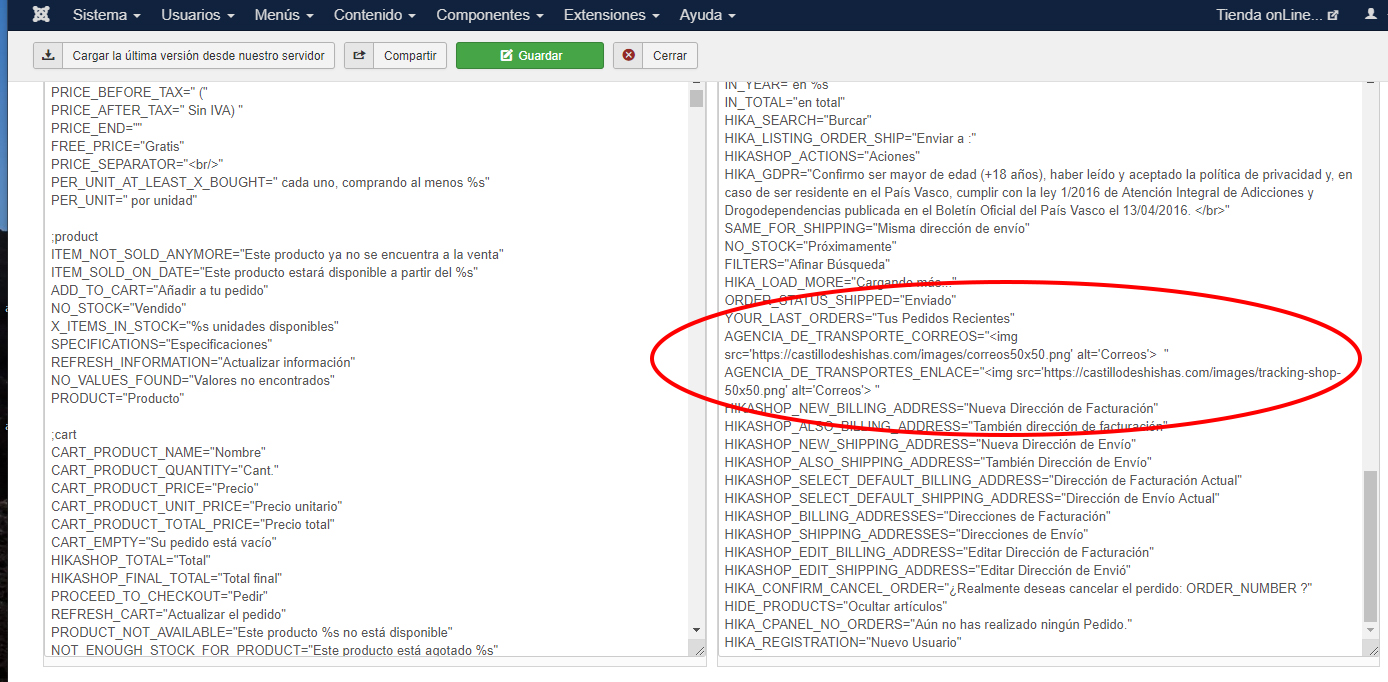
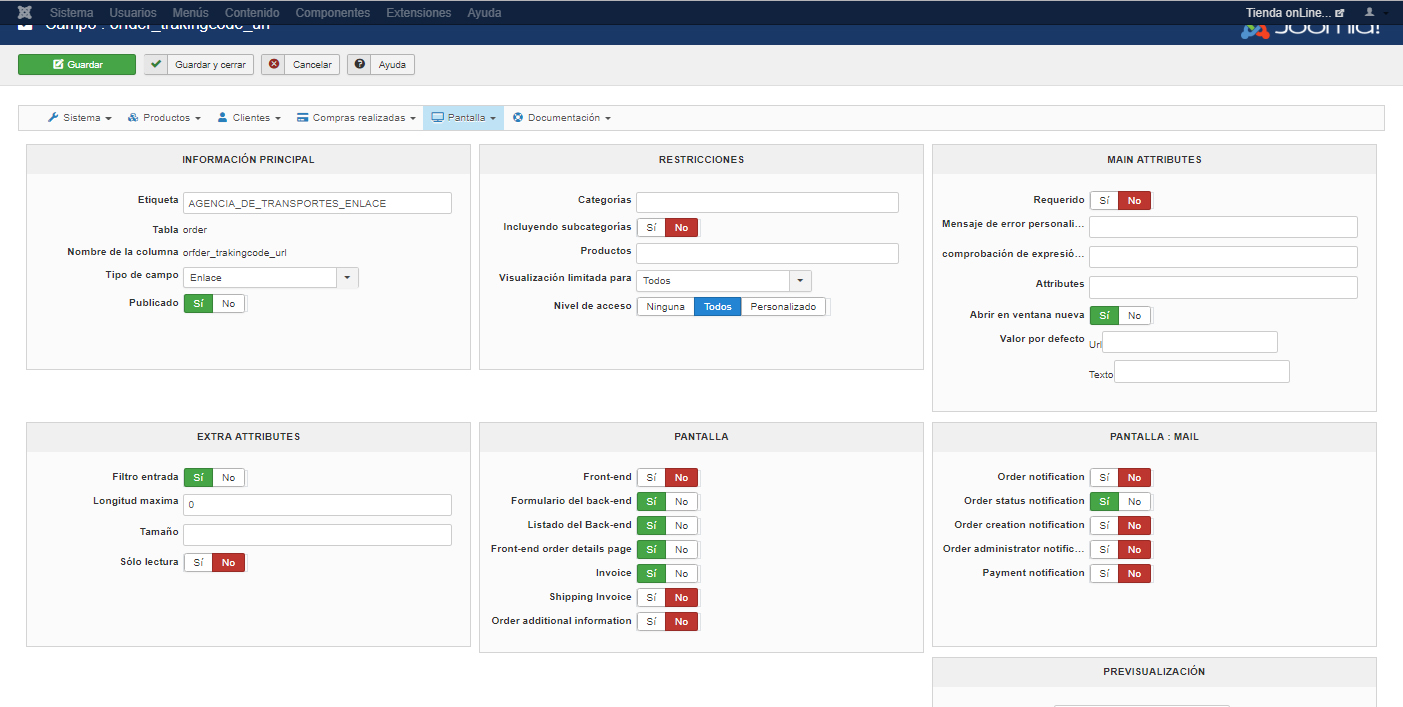
It is a translation chain
Please Log in or Create an account to join the conversation.
7 years 3 months ago #308939
by nicolas
Replied by nicolas on topic Custom field in email notification
Hi,
Note that in the backend, translation keys of custom fields with HTML tags are not replaced to avoid issues, such as not being able to click on the custom field edition link, etc.
So if the email was generated as a preview or by changing the status of the order manually in the backend, it's normal that the label of the custom field is not translated. However, if the email is sent after an automatic order status change, the email should have the label translated.
I suppose that you're in this exact situation.
If that's a problem for you, then you'll have to edit the email and in the preload version, you can change the line:
to:
Note that in the backend, translation keys of custom fields with HTML tags are not replaced to avoid issues, such as not being able to click on the custom field edition link, etc.
So if the email was generated as a preview or by changing the status of the order manually in the backend, it's normal that the label of the custom field is not translated. However, if the email is sent after an automatic order status change, the email should have the label translated.
I suppose that you're in this exact situation.
If that's a problem for you, then you'll have to edit the email and in the preload version, you can change the line:
Code:
echo $sep . $fieldsClass->trans($oneExtraField->field_realname).' : '.$fieldsClass->show($oneExtraField, @$data->cart->$fieldName,'user_email');
Code:
echo $sep . JText::_($oneExtraField->field_realname).' : '.$fieldsClass->show($oneExtraField, @$data->cart->$fieldName,'user_email');
The following user(s) said Thank You: dvddvd
Please Log in or Create an account to join the conversation.
Time to create page: 0.207 seconds