
- Posts: 43
- Thank you received: 3
Intermittant Paypal failures
- eskimoroll
-
 Topic Author
- Offline
Less
More
7 years 10 months ago #301192
by eskimoroll
Intermittant Paypal failures was created by eskimoroll
-- HikaShop version -- : 4.0.1
-- Joomla version -- : 3.9.0
-- PHP version -- : 7.2
Hello,
We put a new website into production on Nov. 16th and received a bunch of orders through Paypal. There was 0 errors/warnings for about a week, all worked perfectly.
Then starting around black friday (nov 23), clients started receiving failures at Paypal. Apparently, according to multiple clients, they complete the order with hikashop (we receive the appropriate confirmation emails) and they are transferred to Paypal....where it fails.
Once at Paypal, they can choose to log in or use the "guest" payment method. Either one intermittently fails. I say Intermittently because sometimes it works, sometimes it doesn't. We contacted Paypal and they said their systems were fine. So we did 2 transactions while on the phone with them, the first failed, then the second passed....both were done in the same way....So the person on the phone FINALLY admitted that yes, there were some bugs they were working on....good lord!
Anyhow, we were just wondering if anyone else has been having issues like this?
-- Joomla version -- : 3.9.0
-- PHP version -- : 7.2
Hello,
We put a new website into production on Nov. 16th and received a bunch of orders through Paypal. There was 0 errors/warnings for about a week, all worked perfectly.
Then starting around black friday (nov 23), clients started receiving failures at Paypal. Apparently, according to multiple clients, they complete the order with hikashop (we receive the appropriate confirmation emails) and they are transferred to Paypal....where it fails.
Once at Paypal, they can choose to log in or use the "guest" payment method. Either one intermittently fails. I say Intermittently because sometimes it works, sometimes it doesn't. We contacted Paypal and they said their systems were fine. So we did 2 transactions while on the phone with them, the first failed, then the second passed....both were done in the same way....So the person on the phone FINALLY admitted that yes, there were some bugs they were working on....good lord!
Anyhow, we were just wondering if anyone else has been having issues like this?
Please Log in or Create an account to join the conversation.

7 years 9 months ago #301202
by nicolas
Replied by nicolas on topic Intermittant Paypal failures
Hi,
Nothing was reported on our own website.
And we had people purchasing with PayPal without issue the whole weekend and today.
Nothing was reported on our own website.
And we had people purchasing with PayPal without issue the whole weekend and today.
The following user(s) said Thank You: eskimoroll
Please Log in or Create an account to join the conversation.
- eskimoroll
-
Topic Author
- Offline
Less
More
- Posts: 43
- Thank you received: 3
7 years 9 months ago #301237
by eskimoroll
Replied by eskimoroll on topic Intermittant Paypal failures
Would someone mind validating this config for the Paypal plugin?
URL - www.paypal.com/cgi-bin/webscr
Email - filled out
Customer address - Billing Address
Address Override - No
No Shipping - Yes
Allow Notifications - Yes
Send details of the order - No
Show notes - No
Enable Validation Mode - No
Debug - No
Paypal return method - Yes
*******************************************************
Question: I just regenerated the IP list....but if any of those were invalid, could it explain the intermittent failures?
Thanks
URL - www.paypal.com/cgi-bin/webscr
Email - filled out
Customer address - Billing Address
Address Override - No
No Shipping - Yes
Allow Notifications - Yes
Send details of the order - No
Show notes - No
Enable Validation Mode - No
Debug - No
Paypal return method - Yes
*******************************************************
Question: I just regenerated the IP list....but if any of those were invalid, could it explain the intermittent failures?
Thanks
Please Log in or Create an account to join the conversation.
7 years 9 months ago #301240
by nicolas
Replied by nicolas on topic Intermittant Paypal failures
Hi,
The IP list is for the payment notification.
It won't change anything for the redirection to PayPal.
As far as I can see these settings are the safest to avoid issues with the redirection to PayPal.
The IP list is for the payment notification.
It won't change anything for the redirection to PayPal.
As far as I can see these settings are the safest to avoid issues with the redirection to PayPal.
The following user(s) said Thank You: eskimoroll
Please Log in or Create an account to join the conversation.
Less
More
- Posts: 259
- Thank you received: 22
7 years 9 months ago #301418
by rodfarrell
Replied by rodfarrell on topic Intermittant Paypal failures
I've just had a client reporting similar issues with Paypal over the last week. Intermittent failure with no apparent reason.
The following user(s) said Thank You: eskimoroll
Please Log in or Create an account to join the conversation.
7 years 9 months ago #301426
by nicolas
Replied by nicolas on topic Intermittant Paypal failures
Hi,
First, you should make sure of what is the exact error message that PayPal displays to the customers. Once you know that, it would be great if you could give the exact message to us, and check with the PayPal merchant support. Maybe they can give you more information on that issue or even tell you what to do.
Then, check the orders to see if you see anything special.
For example, only orders from a country are affected, or only with products from a specific group, or only when there is a coupon, etc.
Then, try to reproduce the issue. Being able to reproduce the issue is a good way for paypal support or us to be able to check into the issue.
First, you should make sure of what is the exact error message that PayPal displays to the customers. Once you know that, it would be great if you could give the exact message to us, and check with the PayPal merchant support. Maybe they can give you more information on that issue or even tell you what to do.
Then, check the orders to see if you see anything special.
For example, only orders from a country are affected, or only with products from a specific group, or only when there is a coupon, etc.
Then, try to reproduce the issue. Being able to reproduce the issue is a good way for paypal support or us to be able to check into the issue.
Please Log in or Create an account to join the conversation.

7 years 9 months ago #301449
by jazzmang
Replied by jazzmang on topic Intermittant Paypal failures
I just had a client report this to me this morning with two of his sites running 4.0.0, both in the USA.
Unfortunately I have nothing else to go on since I'm not in direct contact with customers and the site owner isn't technical. I asked my client to get more information from his customers but I doubt I'll get anything useful 2nd hand.
We are still still seeing PayPal orders go through. But we also offer Authorize.Net as our default method so PayPal is a fraction of the total orders made on either of the sites in questions. None of our other managed sites that offer PayPal have mentioned anything but their volume order is very load in comparison so may not be noticing is (yet)..
When I do a quick test, I get all the way to PayPal.com just fine and it looks good (I don't complete an order however).
PayPal's status page says green and last maintenance windows were for unrelated services.
Not a lot of information to go on, but feels like a service or connectivity level on PayPal's end. Perhaps they having a holiday load issue? Pure speculation based on past experiences with such service.
Right now I'm trying to figure out if the customers are getting to the create order step.
We always see people get that far and then fail on PayPal's end for what ever reason (don't understand PayPal, cannot find their account, notice something wrong, etc). They almost always follow up with a "successful" order shortly afterwards either with PayPal or CC. I'm not seeing what I call a excessive amount of abandoned "created" order either.
At any rate, I wanted to chime in as if it is impacting more than one of us it could be something after all.
Unfortunately I have nothing else to go on since I'm not in direct contact with customers and the site owner isn't technical. I asked my client to get more information from his customers but I doubt I'll get anything useful 2nd hand.
We are still still seeing PayPal orders go through. But we also offer Authorize.Net as our default method so PayPal is a fraction of the total orders made on either of the sites in questions. None of our other managed sites that offer PayPal have mentioned anything but their volume order is very load in comparison so may not be noticing is (yet)..
When I do a quick test, I get all the way to PayPal.com just fine and it looks good (I don't complete an order however).
PayPal's status page says green and last maintenance windows were for unrelated services.
Not a lot of information to go on, but feels like a service or connectivity level on PayPal's end. Perhaps they having a holiday load issue? Pure speculation based on past experiences with such service.
Right now I'm trying to figure out if the customers are getting to the create order step.
We always see people get that far and then fail on PayPal's end for what ever reason (don't understand PayPal, cannot find their account, notice something wrong, etc). They almost always follow up with a "successful" order shortly afterwards either with PayPal or CC. I'm not seeing what I call a excessive amount of abandoned "created" order either.
At any rate, I wanted to chime in as if it is impacting more than one of us it could be something after all.
The following user(s) said Thank You: eskimoroll
Please Log in or Create an account to join the conversation.
- eskimoroll
-
Topic Author
- Offline
Less
More
- Posts: 43
- Thank you received: 3
7 years 9 months ago #301451
by eskimoroll
Replied by eskimoroll on topic Intermittant Paypal failures
Ok thanks for the feedback, everyone.
My client is still receiving errors...so far about a 50/50 success rate. We are in Canada.
A small workaround we have is to get our clients to manually pay through Paypal (which some have done)...and it works 100% of the time.
So assuming the main web app for PP (paypal.com) is working well, could it be that our API calls are directed elsewhere, ie: another server cluster? (ok totally not a cloud architect here...) maybe even occasionally load-balanced to a faulty cluster?
grasping at straws, i know.
@Nicolas, we searched for some commonality but found none yet. It is happening on desktops as well as tablets and on Macs...also Chrome & FF.
My client is still receiving errors...so far about a 50/50 success rate. We are in Canada.
A small workaround we have is to get our clients to manually pay through Paypal (which some have done)...and it works 100% of the time.
So assuming the main web app for PP (paypal.com) is working well, could it be that our API calls are directed elsewhere, ie: another server cluster? (ok totally not a cloud architect here...) maybe even occasionally load-balanced to a faulty cluster?
grasping at straws, i know.
@Nicolas, we searched for some commonality but found none yet. It is happening on desktops as well as tablets and on Macs...also Chrome & FF.
Please Log in or Create an account to join the conversation.
7 years 9 months ago #301459
by nicolas
Replied by nicolas on topic Intermittant Paypal failures
Hi,
In your first message ( www.hikashop.com/forum/payment-methods/8...failures.html#301192 ) you said that you were able to reproduce the problem while on the phone with PayPal support.
Are you still able to reproduce the problem ? If so, what is the exact error message that you get ? Could you also provide a screenshot and URL of the page where you have the error ?
Without that information, I can only speculate, and it could be anything really. It could be some faulty cluster at PayPal, but normally, in that case, it should quickly go away as they fix their infrastructure.
Also, you said that they were working on the issue when you had them on the phone. I suppose that they didn't know what they were talking about and just gave you a standard message without really looking into it ? Or did you get back any information from them after that ? It's been one week, if they were working on the problem, they should already have fixed it by now...
Also, if you contact their support again (which I recommend), you should ask them to speak to a tech support who can look at the logs, and you can provide him with the exact error, the URL, the screenshot (like I asked above) so that they can look deeper into it, because the first level support can't really look into that kind of problem on their end...
In your first message ( www.hikashop.com/forum/payment-methods/8...failures.html#301192 ) you said that you were able to reproduce the problem while on the phone with PayPal support.
Are you still able to reproduce the problem ? If so, what is the exact error message that you get ? Could you also provide a screenshot and URL of the page where you have the error ?
Without that information, I can only speculate, and it could be anything really. It could be some faulty cluster at PayPal, but normally, in that case, it should quickly go away as they fix their infrastructure.
Also, you said that they were working on the issue when you had them on the phone. I suppose that they didn't know what they were talking about and just gave you a standard message without really looking into it ? Or did you get back any information from them after that ? It's been one week, if they were working on the problem, they should already have fixed it by now...
Also, if you contact their support again (which I recommend), you should ask them to speak to a tech support who can look at the logs, and you can provide him with the exact error, the URL, the screenshot (like I asked above) so that they can look deeper into it, because the first level support can't really look into that kind of problem on their end...
Please Log in or Create an account to join the conversation.
- eskimoroll
-
Topic Author
- Offline
Less
More
- Posts: 43
- Thank you received: 3
7 years 9 months ago #301472
by eskimoroll
Replied by eskimoroll on topic Intermittant Paypal failures
We have only tried a few times, with intermittent results. The error was (from memory): "Unable to process your payment now, please try again later". This seems to be the most common message. Each trial obviously costs us money so we have not tried more than a few times.
We do not have a screenshot.
The support we received on the phone was level1, they have no clue...and seem to be more concerned with branding.
We have opened a ticket with tech support (we have a ticket number), it has been almost a week without any feedback from them.
Lastly, we have looked at the Paypal TX report in Hikashop and found no errors.
We are considering Stripe or Authorize.net or any other payment gateway right now....any recommendations would be appreciated for a gateway in Canada.
We do not have a screenshot.
The support we received on the phone was level1, they have no clue...and seem to be more concerned with branding.
We have opened a ticket with tech support (we have a ticket number), it has been almost a week without any feedback from them.
Lastly, we have looked at the Paypal TX report in Hikashop and found no errors.
We are considering Stripe or Authorize.net or any other payment gateway right now....any recommendations would be appreciated for a gateway in Canada.
Please Log in or Create an account to join the conversation.
7 years 9 months ago #301478
by nicolas
Replied by nicolas on topic Intermittant Paypal failures
Hi,
How come this costs you money ? Normally, no money was yet transfered when you get that message as usually it happens just when you arrive on paypal. Or do you mean that the error happens after that ?
PayPal is a big monster. While it's great when it works, when it doesn't it's a pain to be able to talk with someone who can really help.
I know Authorize.net is used a lot in the USA. I don't know about Canada.
Regarding Stripe, I've heard a lot of good things from them and the integration we have with it is quite nice.
And there is the improved Stripe connect integration developed by Obsidev, our long time partner. I've heard that they are working on the next version of the Stripe connect plugin which will allow the credit card form directly inside the checkout without increasing the security requirements (PCI compliance, etc) and other things.
How come this costs you money ? Normally, no money was yet transfered when you get that message as usually it happens just when you arrive on paypal. Or do you mean that the error happens after that ?
PayPal is a big monster. While it's great when it works, when it doesn't it's a pain to be able to talk with someone who can really help.
I know Authorize.net is used a lot in the USA. I don't know about Canada.
Regarding Stripe, I've heard a lot of good things from them and the integration we have with it is quite nice.
And there is the improved Stripe connect integration developed by Obsidev, our long time partner. I've heard that they are working on the next version of the Stripe connect plugin which will allow the credit card form directly inside the checkout without increasing the security requirements (PCI compliance, etc) and other things.
The following user(s) said Thank You: eskimoroll
Please Log in or Create an account to join the conversation.
- eskimoroll
-
Topic Author
- Offline
Less
More
- Posts: 43
- Thank you received: 3
7 years 9 months ago - 7 years 9 months ago #301519
by eskimoroll
Replied by eskimoroll on topic Intermittant Paypal failures
Yes the errors happens ONLY once we are at the Paypal site. There is no error with the website, nor Hikashop. It is exactly at the moment you pay (on PP) that the errors occur...on the "Pay now" button (or whatever..). Only half (about) of the transactions are completing correctly.
Thanks for the info on Stripe, we will def look at it.
Lastly, I did get a screenshot see attached.
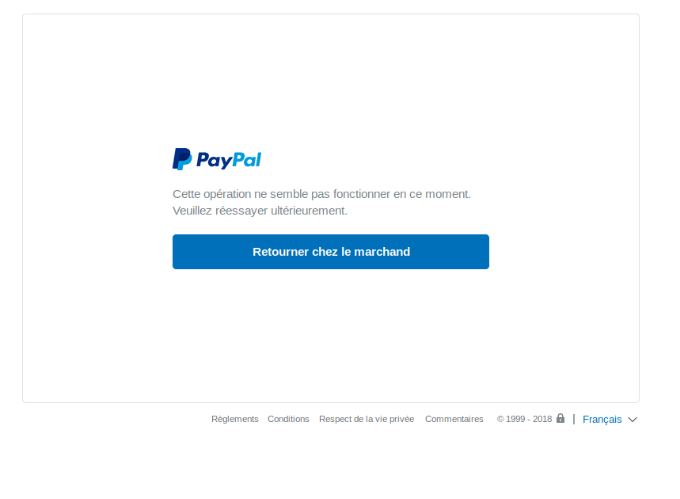
Thanks for the info on Stripe, we will def look at it.
Lastly, I did get a screenshot see attached.
Last edit: 7 years 9 months ago by eskimoroll.
Please Log in or Create an account to join the conversation.
7 years 9 months ago #301525
by nicolas
Replied by nicolas on topic Intermittant Paypal failures
Hi,
Thanks for the additional information.
Usually, the errors for which you can do something about in HikaShop (like changing some setting in the PayPal payment method) happen right when you arrive on PayPal, before clicking on anything.
From what you're saying, I understand that it happens after that, when you click on the pay button on the PayPal interface. In that case, only PayPal will be able to help as this is only something on their end.
Thanks for the additional information.
Usually, the errors for which you can do something about in HikaShop (like changing some setting in the PayPal payment method) happen right when you arrive on PayPal, before clicking on anything.
From what you're saying, I understand that it happens after that, when you click on the pay button on the PayPal interface. In that case, only PayPal will be able to help as this is only something on their end.
Please Log in or Create an account to join the conversation.
Time to create page: 0.297 seconds