

- Posts: 71
- Thank you received: 0
Display value characteristics in name product
10 years 8 months ago - 6 years 9 months ago #232145
by vaughan
Display value characteristics in name product was created by vaughan
-- url of the page with the problem -- :
www.wpb.es/index.php/calendario/listado-...9-albacete-20-8-2016
-- HikaShop version -- : 2.6.1
-- Joomla version -- : 3.4.8
-- PHP version -- : 5.5
-- Browser(s) name and version -- : all
-- Error-message(debug-mod must be tuned on) -- : No error
Hi
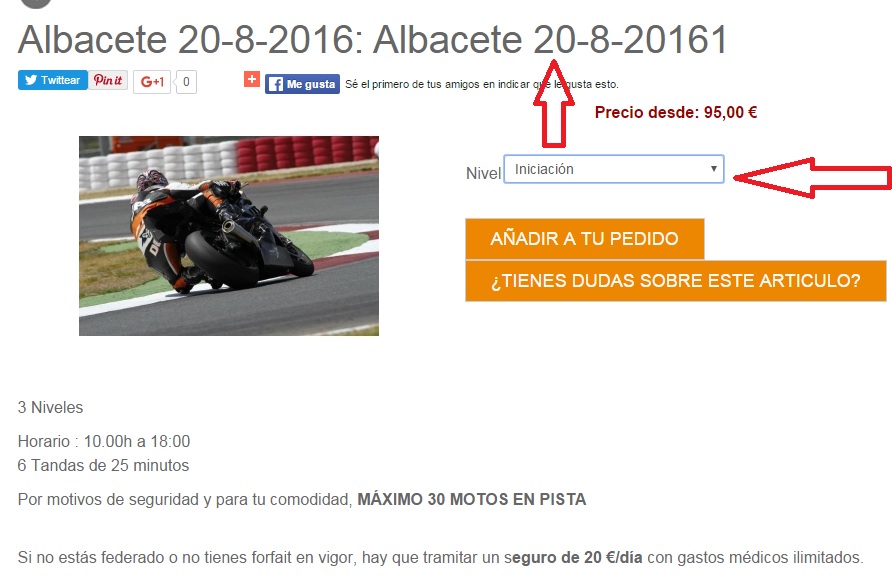
Since I updated my version of hikashop , the name of the product does not add the value of the selected charactiristic, displays the name of the product but not the characteristicvalue.
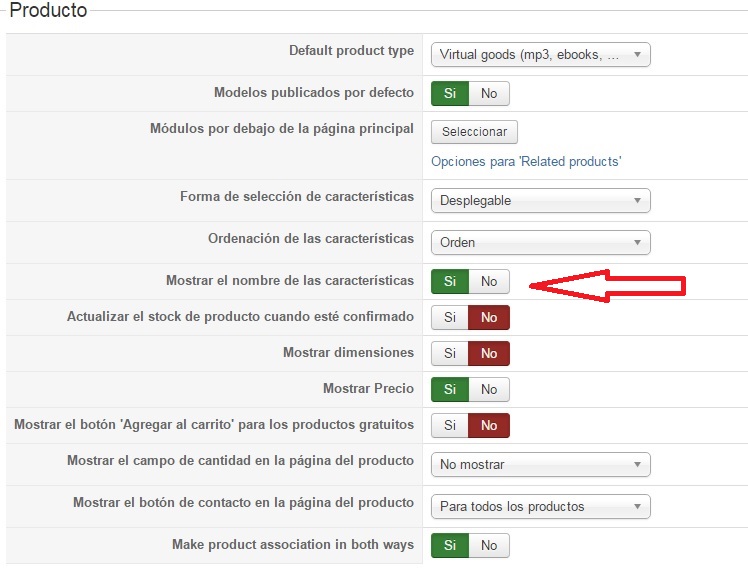
I have not changed anything on the configuration and the previous version did appear correctly , if I change "Show the name of the characteristics " the result is the same . I not edited the file product view ( only modified quantity view)
I attached screens
What can be?
Thanks for all
-- HikaShop version -- : 2.6.1
-- Joomla version -- : 3.4.8
-- PHP version -- : 5.5
-- Browser(s) name and version -- : all
-- Error-message(debug-mod must be tuned on) -- : No error
Hi
Since I updated my version of hikashop , the name of the product does not add the value of the selected charactiristic, displays the name of the product but not the characteristicvalue.
I have not changed anything on the configuration and the previous version did appear correctly , if I change "Show the name of the characteristics " the result is the same . I not edited the file product view ( only modified quantity view)
I attached screens
What can be?
Thanks for all
Last edit: 6 years 9 months ago by vaughan.
Please Log in or Create an account to join the conversation.

Less
More
- Posts: 12953
- Thank you received: 1778
10 years 8 months ago - 10 years 8 months ago #232148
by Mohamed Thelji
Replied by Mohamed Thelji on topic Display value characteristics in name product
Hello,
Using that option will only display or hide the name of your characteristic in front of the characteristic dropdown, "Nivel" in your case.
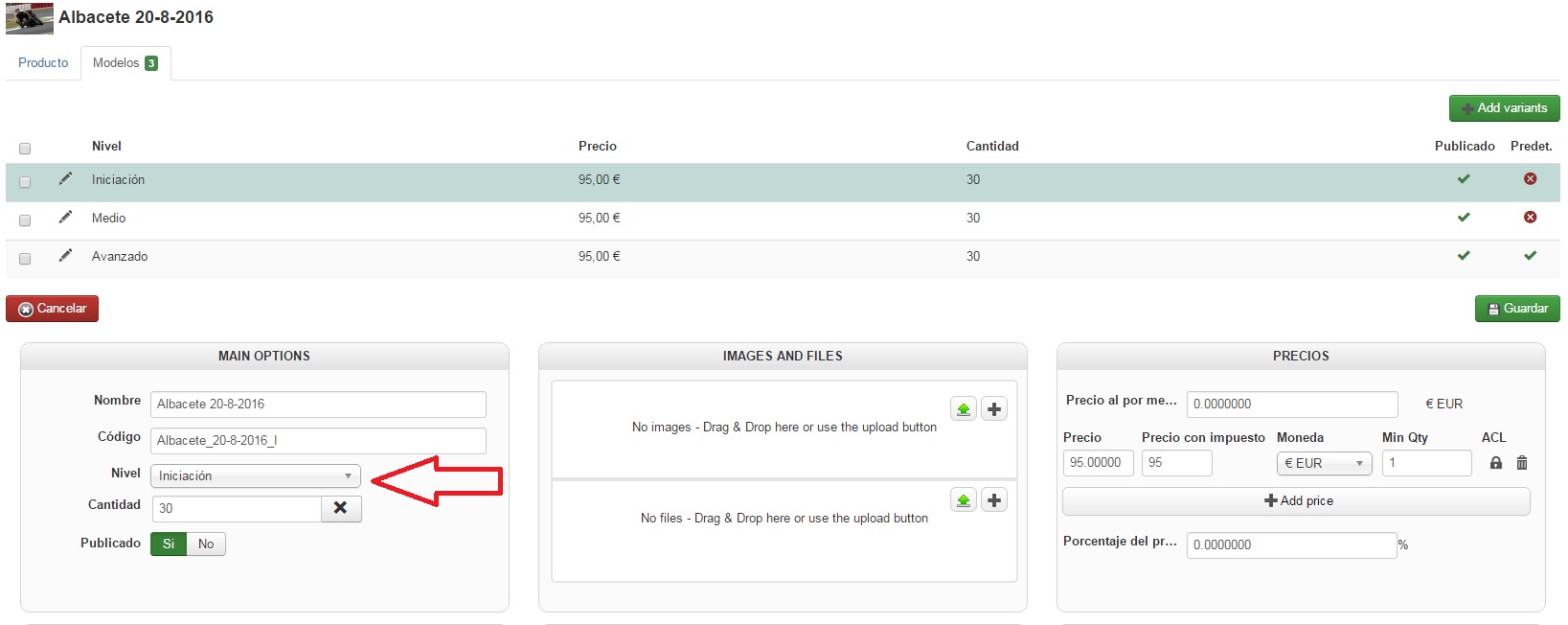
Your issue is coming from the fact that you have set a name on the variant of your product, you should set it to what you want to be displayed OR unset it so that it can automatically display the name of the characteristic value of your variant.
Using that option will only display or hide the name of your characteristic in front of the characteristic dropdown, "Nivel" in your case.
Your issue is coming from the fact that you have set a name on the variant of your product, you should set it to what you want to be displayed OR unset it so that it can automatically display the name of the characteristic value of your variant.
Last edit: 10 years 8 months ago by Mohamed Thelji.
The following user(s) said Thank You: vaughan
Please Log in or Create an account to join the conversation.
10 years 7 months ago - 10 years 7 months ago #232439
by vaughan
Replied by vaughan on topic Display value characteristics in name product
Thanks for your help.
Is there any way to change the product view to display the name of the characteristic value of my variant without unset the name of the variant ? Like previous version
I need this name beacuse I use this field to make reports with fabrik.
Is there any way to change the product view to display the name of the characteristic value of my variant without unset the name of the variant ? Like previous version
I need this name beacuse I use this field to make reports with fabrik.
Last edit: 10 years 7 months ago by vaughan.
Please Log in or Create an account to join the conversation.

10 years 7 months ago #232460
by nicolas
Replied by nicolas on topic Display value characteristics in name product
Hi,
The fix that we did to properly support the variant names is to add the line:
if(!empty($variant->variant_name)) $variant->characteristics_text = $variant->variant_name;
in the file administrator/components/com_hikashop/classes/product.php
So remove that line and that will work like you want.
The fix that we did to properly support the variant names is to add the line:
if(!empty($variant->variant_name)) $variant->characteristics_text = $variant->variant_name;
in the file administrator/components/com_hikashop/classes/product.php
So remove that line and that will work like you want.
The following user(s) said Thank You: vaughan
Please Log in or Create an account to join the conversation.
10 years 7 months ago #232926
by vaughan
Replied by vaughan on topic Display value characteristics in name product
Great!!!
Thanks for all works fine.
Always Great support
Thanks for all works fine.
Always Great support
Please Log in or Create an account to join the conversation.
10 years 3 months ago - 10 years 3 months ago #245049
by vaughan
Replied by vaughan on topic Display value characteristics in name product
Hi again
How I can make it work the same method in the email notification system administrator and client ?
Thanks
Best regards
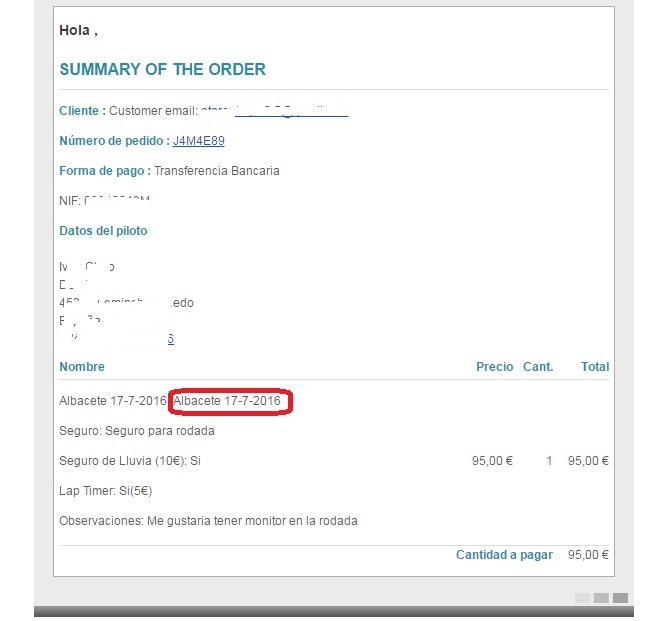
How I can make it work the same method in the email notification system administrator and client ?
Thanks
Best regards
Last edit: 10 years 3 months ago by vaughan.
Please Log in or Create an account to join the conversation.
10 years 3 months ago #245050
by nicolas
Replied by nicolas on topic Display value characteristics in name product
Hi,
The name displayed in the order notifications come from the product name stored in hikashop_order_name.
So if you have it like that there, it must be the same in the back end order details. So name is added there when the order is created at the end of the checkout and it uses the name from the cart. And the name in the cart is loaded by the same function in classes/product.php
So if you changed the code there, you not have the issue in the cart/order/emails.
So I'm not sure why you would have that.
Try changing the code:
$orderProduct->order_product_name = $text;
to:
$orderProduct->order_product_name = $product->variant_name;
or to:
$orderProduct->order_product_name = $product->product_name;
in the file components/com_hikashop/controllers/checkout.php, that might help for new orders.
The name displayed in the order notifications come from the product name stored in hikashop_order_name.
So if you have it like that there, it must be the same in the back end order details. So name is added there when the order is created at the end of the checkout and it uses the name from the cart. And the name in the cart is loaded by the same function in classes/product.php
So if you changed the code there, you not have the issue in the cart/order/emails.
So I'm not sure why you would have that.
Try changing the code:
$orderProduct->order_product_name = $text;
to:
$orderProduct->order_product_name = $product->variant_name;
or to:
$orderProduct->order_product_name = $product->product_name;
in the file components/com_hikashop/controllers/checkout.php, that might help for new orders.
Please Log in or Create an account to join the conversation.
6 years 9 months ago #314434
by vaughan
Replied by vaughan on topic Display value characteristics in name product
Hi
I updated my hikashop version and now y show again name product without characteristics name, like before this changes, now the code don't work
I have in product.php the line
But I don't see again characteristic in name
What can i do?? is now another code?
I updated my hikashop version and now y show again name product without characteristics name, like before this changes, now the code don't work
I have in product.php the line
Code:
if(!empty($variant->variant_name))
$variant->characteristics_text = $variant->variant_name;
What can i do?? is now another code?
Please Log in or Create an account to join the conversation.
6 years 9 months ago #314450
by nicolas
Replied by nicolas on topic Display value characteristics in name product
Hi,
You're using the new checkout of HikaShop 3 and 4 while before you were using the (now) old checkout.
So the line :
$orderProduct->order_product_name = $text;
is not in components/com_hikashop/controllers/checkout.php anymore.
You now have the lines:
in the file administrator/components/com_hikashop/classes/order.php which replace the one you had to modify before.
So that's where you'll want to make your change as per www.hikashop.com/forum/product-category-...-product.html#245050
However the code you're providing in your message is in administrator/components/com_hikashop/classes/product.php and this didn't change much. So I'm not sure.
You're using the new checkout of HikaShop 3 and 4 while before you were using the (now) old checkout.
So the line :
$orderProduct->order_product_name = $text;
is not in components/com_hikashop/controllers/checkout.php anymore.
You now have the lines:
Code:
if(!empty($product->product_name_original))
$orderProduct->order_product_name = $product->product_name_original;
else
$orderProduct->order_product_name = $product->product_name;
So that's where you'll want to make your change as per www.hikashop.com/forum/product-category-...-product.html#245050
However the code you're providing in your message is in administrator/components/com_hikashop/classes/product.php and this didn't change much. So I'm not sure.
The following user(s) said Thank You: vaughan
Please Log in or Create an account to join the conversation.
6 years 9 months ago - 6 years 9 months ago #314479
by vaughan
Replied by vaughan on topic Display value characteristics in name product
Hi thanks for your help.
I delete the line if(!empty($variant->variant_name))
$variant->characteristics_text = $variant->variant_name;
in administrator/components/com_hikashop/classes/product.php, and works fine.
Thanks for all
I delete the line if(!empty($variant->variant_name))
$variant->characteristics_text = $variant->variant_name;
in administrator/components/com_hikashop/classes/product.php, and works fine.
Thanks for all
Last edit: 6 years 9 months ago by vaughan.
Please Log in or Create an account to join the conversation.
Time to create page: 0.093 seconds