

- Posts: 39
- Thank you received: 3
size of the variants button
2 years 11 months ago #357473
by C3zehn
size of the variants button was created by C3zehn
-- url of the page with the problem -- :
www.wolfundbaer.info
-- HikaShop version -- : 5.0.2.
-- Joomla version -- : 5.0.0
-- PHP version -- : 8.2
Hello everyone,
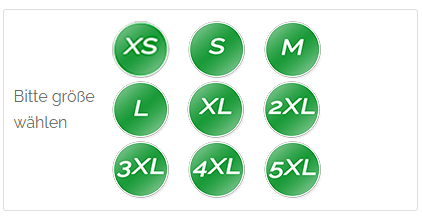
if I have the variants (as image button) and I want to change the size of the button (now the image that I have uploaded has 60x60px) can I just make it 40x40px or do I have to upload new images with the size)?
Thank you
Andy
-- HikaShop version -- : 5.0.2.
-- Joomla version -- : 5.0.0
-- PHP version -- : 8.2
Hello everyone,
if I have the variants (as image button) and I want to change the size of the button (now the image that I have uploaded has 60x60px) can I just make it 40x40px or do I have to upload new images with the size)?
Thank you
Andy
Please Log in or Create an account to join the conversation.
2 years 11 months ago - 2 years 11 months ago #357482
by Philip
Replied by Philip on topic size of the variants button
Hello,
A little like a previous thread, it's possible to define the size of your icon via custom Css, see my screenshot :

Hope this will help you to achieve your needs.
Regards
A little like a previous thread, it's possible to define the size of your icon via custom Css, see my screenshot :
Hope this will help you to achieve your needs.
Regards
Last edit: 2 years 11 months ago by Philip.
Please Log in or Create an account to join the conversation.
2 years 11 months ago #357507
by SNAP-GT
It's very nice, can you explain how you make that. Is it a standard option of Hikashop?
Regards,
Stephan
Replied by SNAP-GT on topic size of the variants button
C3zehn wrote: if I have the variants (as image button)
It's very nice, can you explain how you make that. Is it a standard option of Hikashop?
Regards,
Stephan
Please Log in or Create an account to join the conversation.
2 years 11 months ago #357514
by C3zehn
Replied by C3zehn on topic size of the variants button
Hi,
if i do this in the CSS than it looks like this:
small, big and also in the up Pic
andy
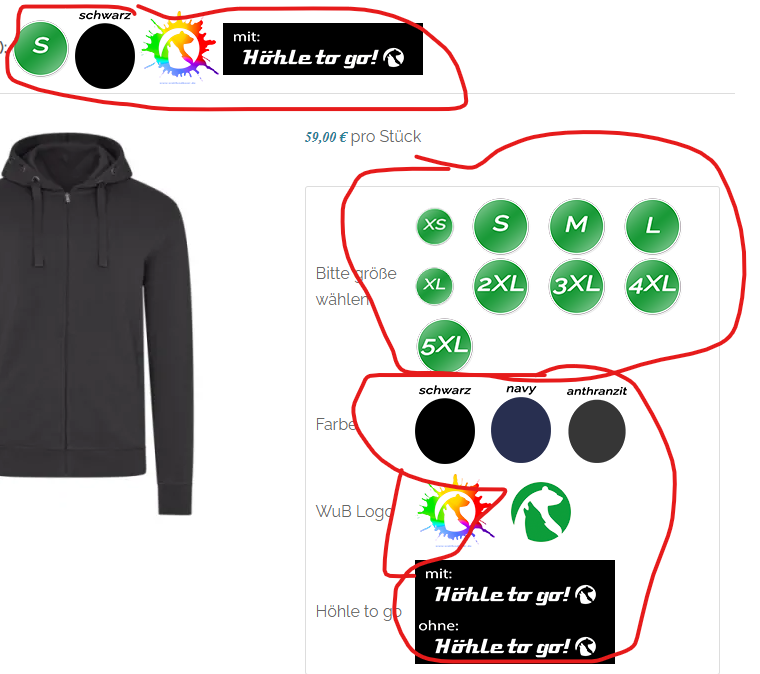
if i do this in the CSS than it looks like this:
small, big and also in the up Pic
andy
Please Log in or Create an account to join the conversation.
2 years 11 months ago #357515
by Philip
Replied by Philip on topic size of the variants button
Hello,
You have to add custom Css in your style custom file, like explained in this topic of our forum.
The command shown in my screenshot to add is :
Where the ".hikashop_characteristic_line_24" will restrict your command to be apply only on the required characteristic.
Regards
You have to add custom Css in your style custom file, like explained in this topic of our forum.
The command shown in my screenshot to add is :
Code:
.hikashop_characteristic_line_24 .form-check.form-check-inline label img {
width: 40px;
}
Regards
Please Log in or Create an account to join the conversation.
2 years 11 months ago #357545
by C3zehn
Replied by C3zehn on topic size of the variants button
Hello Stephan,
I use Hika Buisness, this is possible via the properties.
I have created small buttons (i.e. images) and uploaded them and added them to my product via the properties
Greetings
Andy
I use Hika Buisness, this is possible via the properties.
I have created small buttons (i.e. images) and uploaded them and added them to my product via the properties
Greetings
Andy
The following user(s) said Thank You: SNAP-GT
Please Log in or Create an account to join the conversation.
2 years 11 months ago - 2 years 11 months ago #357558
by SNAP-GT
Thank you for your reply.
@Philip : Is these feature also in Essential version or only in Business version?
Replied by SNAP-GT on topic size of the variants button
C3zehn wrote: Hello Stephan,
I use Hika Buisness, this is possible via the properties.
I have created small buttons (i.e. images) and uploaded them and added them to my product via the properties
Greetings
Andy
Thank you for your reply.
@Philip : Is these feature also in Essential version or only in Business version?
Last edit: 2 years 11 months ago by SNAP-GT.
Please Log in or Create an account to join the conversation.
2 years 11 months ago - 2 years 11 months ago #357570
by Philip
Replied by Philip on topic size of the variants button
Hello,
That's not a feature or an option, it's a custom Css, you have to click on the link "this topic" in this message in order to learn how to add your custom Css (shown in the same message).
Regards
That's not a feature or an option, it's a custom Css, you have to click on the link "this topic" in this message in order to learn how to add your custom Css (shown in the same message).
Regards
Last edit: 2 years 11 months ago by Philip.
Please Log in or Create an account to join the conversation.
2 years 11 months ago #357596
by SNAP-GT
OK, I'll check that.
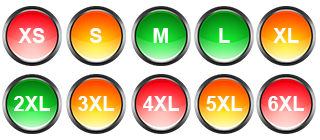
I have a question about these style of button. Do you think it is possible to combine this button style with stock states? For example, if the stock is at 1, we would display an orange button, if the stock is at 0, a red button and in other cases, a green button?
I'm a beginner in php/css but I never give up. If it's feasible, I'll manage to do it.
Regards,
Stephan
Replied by SNAP-GT on topic size of the variants button
Philip wrote: Hello,
That's not a feature or an option, it's a custom Css, you have to click on the link "this topic" in this message in order to learn how to add your custom Css (shown in the same message).
Regards
OK, I'll check that.
I have a question about these style of button. Do you think it is possible to combine this button style with stock states? For example, if the stock is at 1, we would display an orange button, if the stock is at 0, a red button and in other cases, a green button?
I'm a beginner in php/css but I never give up. If it's feasible, I'll manage to do it.
Regards,
Stephan
Please Log in or Create an account to join the conversation.
2 years 11 months ago - 2 years 11 months ago #357597
by Philip
Replied by Philip on topic size of the variants button
Hello,
We can guide you to achieve this, but then provide these elements :
- And Url link to allow us to see the context.
- A screenshot showing your "+" button (in red bordered) in order to be sure that we speak about the same button.
=> The custom can be widely different from a button to another (and from a context too).
Awaiting your elements.
Regards
Last edit: 2 years 11 months ago by Philip.
Please Log in or Create an account to join the conversation.
2 years 11 months ago #357614
by SNAP-GT
It's something like this :
Is it possible?
Regards
Replied by SNAP-GT on topic size of the variants button
Philip wrote: Hello,
We can guide you to achieve this, but then provide these elements :
- And Url link to allow us to see the context.
- A screenshot showing your "+" button (in red bordered) in order to be sure that we speak about the same button.
=> The custom can be widely different from a button to another (and from a context too).
Awaiting your elements.
Regards
It's something like this :
Is it possible?
Regards
Please Log in or Create an account to join the conversation.
2 years 11 months ago - 2 years 11 months ago #357643
by Philip
Replied by Philip on topic size of the variants button
Hello,
Without context, it's almost impossible to answer.
We need to see the page, with his settings and situation, that's why we need the url link where you want ot have this.
Regards
Without context, it's almost impossible to answer.
We need to see the page, with his settings and situation, that's why we need the url link where you want ot have this.
Regards
Last edit: 2 years 11 months ago by Philip.
Please Log in or Create an account to join the conversation.
Time to create page: 0.077 seconds