

- Posts: 7
- Thank you received: 0
additional fields in Specifications
2 years 1 month ago #362744
by lightning
additional fields in Specifications was created by lightning
-- HikaShop version -- : 5.1.10
-- Joomla version -- : 5.1.2
-- PHP version -- : 8.1
Hello. First I would like to thank you for a great product. Very glad I found it.
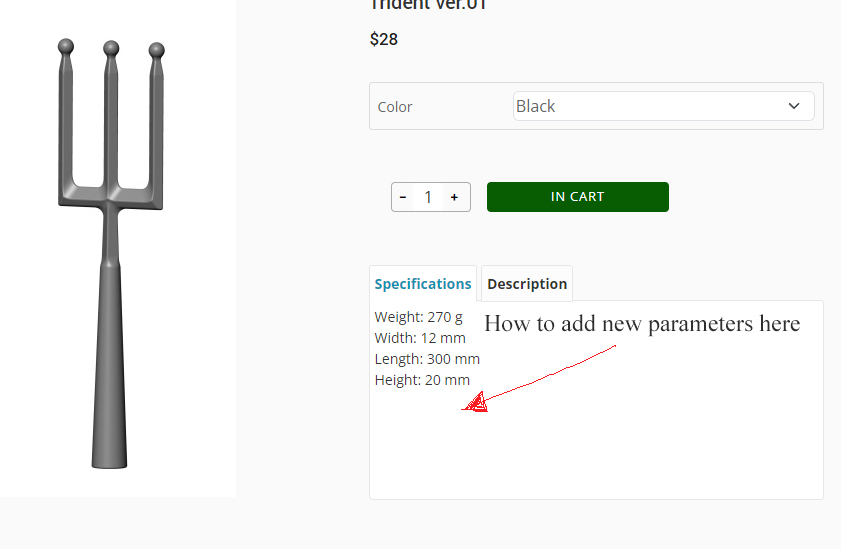
Now a question: how to add new fields to the specification. I would like to add specific parameters for our products.
material
blade width
shaft port
and others.
Thank you very much.
-- Joomla version -- : 5.1.2
-- PHP version -- : 8.1
Hello. First I would like to thank you for a great product. Very glad I found it.
Now a question: how to add new fields to the specification. I would like to add specific parameters for our products.
material
blade width
shaft port
and others.
Thank you very much.
Please Log in or Create an account to join the conversation.

2 years 1 month ago #362750
by nicolas
Replied by nicolas on topic additional fields in Specifications
Hi,
You want to go to the menu Display>Custom fields and create new fields of the table "product":
www.hikashop.com/support/documentation/4...shop-field-form.html
You want to go to the menu Display>Custom fields and create new fields of the table "product":
www.hikashop.com/support/documentation/4...shop-field-form.html
Please Log in or Create an account to join the conversation.
1 year 7 months ago #365924
by Uniweb
Replied by Uniweb on topic additional fields in Specifications
Hi Nicolas
Where do I find the place in the backend were I can add specifications so it would have the 2 tabs
1 says description
2 say specifications
I can not finger out how to find the specifications part in the backend.
Thanks
Where do I find the place in the backend were I can add specifications so it would have the 2 tabs
1 says description
2 say specifications
I can not finger out how to find the specifications part in the backend.
Thanks
Please Log in or Create an account to join the conversation.
1 year 7 months ago #365925
by nicolas
Replied by nicolas on topic additional fields in Specifications
Hi,
In the HikaShop configuration, you have the setting "layout on product page":
www.hikashop.com/support/documentation/5...html#display_product
Set it to "tabular".
The tabular layout will automatically add a tab for the description, and then will add a tab of the custom fields of the table "product" which are filled in the product.
So you can then go to the Display>Custom fields menu to create custom fields of the table "product":
www.hikashop.com/support/documentation/4...shop-field-form.html
And then, you can edit each product to fill in these custom product fields.
Make sure that the display settings of the custom fields are configured properly.
In the HikaShop configuration, you have the setting "layout on product page":
www.hikashop.com/support/documentation/5...html#display_product
Set it to "tabular".
The tabular layout will automatically add a tab for the description, and then will add a tab of the custom fields of the table "product" which are filled in the product.
So you can then go to the Display>Custom fields menu to create custom fields of the table "product":
www.hikashop.com/support/documentation/4...shop-field-form.html
And then, you can edit each product to fill in these custom product fields.
Make sure that the display settings of the custom fields are configured properly.
Please Log in or Create an account to join the conversation.
1 year 7 months ago - 1 year 7 months ago #365940
by Uniweb
Replied by Uniweb on topic additional fields in Specifications
Hi Nicolas
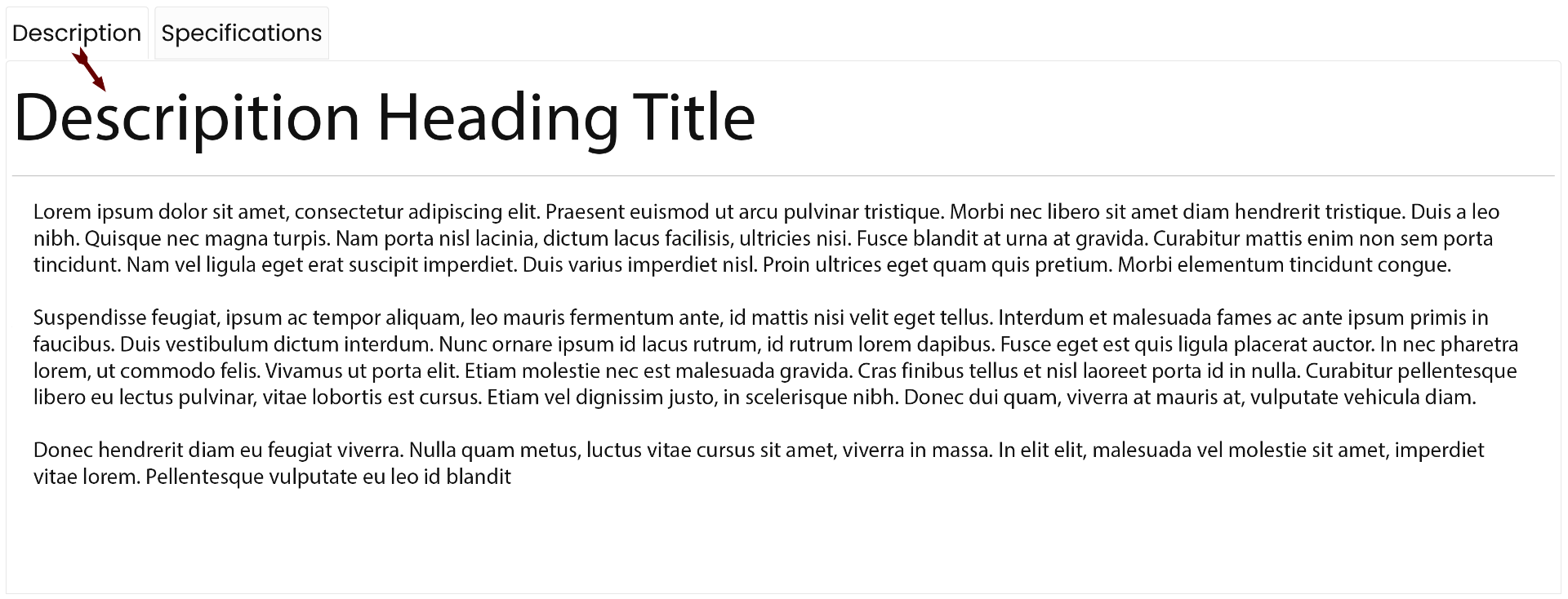
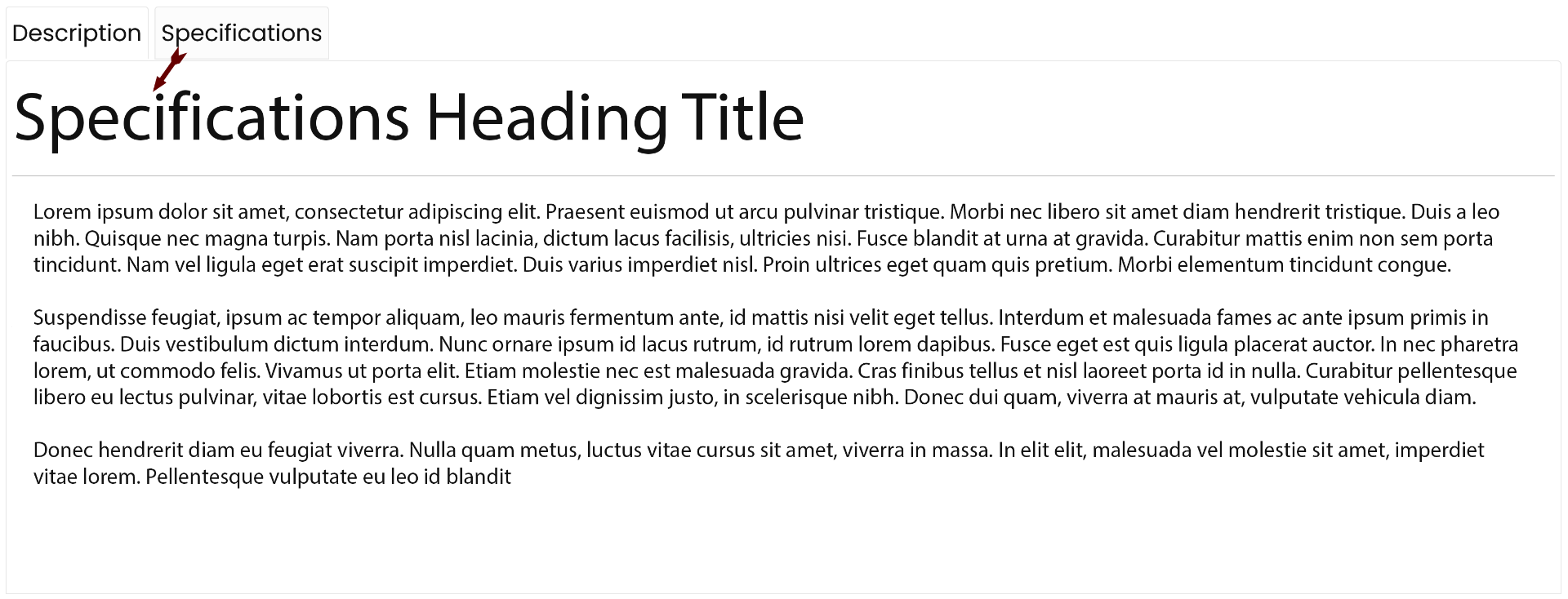
I have done all that stuff about Setting it to "tabular". Bu what i can not figger out is how do i fill in the specifications bit of the product.
Were do i find it please help me. I have attached a photo.
Thaks
I have done all that stuff about Setting it to "tabular". Bu what i can not figger out is how do i fill in the specifications bit of the product.
Were do i find it please help me. I have attached a photo.
Thaks
Last edit: 1 year 7 months ago by Uniweb.
Please Log in or Create an account to join the conversation.
1 year 7 months ago #365942
by nicolas
Replied by nicolas on topic additional fields in Specifications
Hi,
Did you already create custom fields of the table "product" ?
If not, please do.
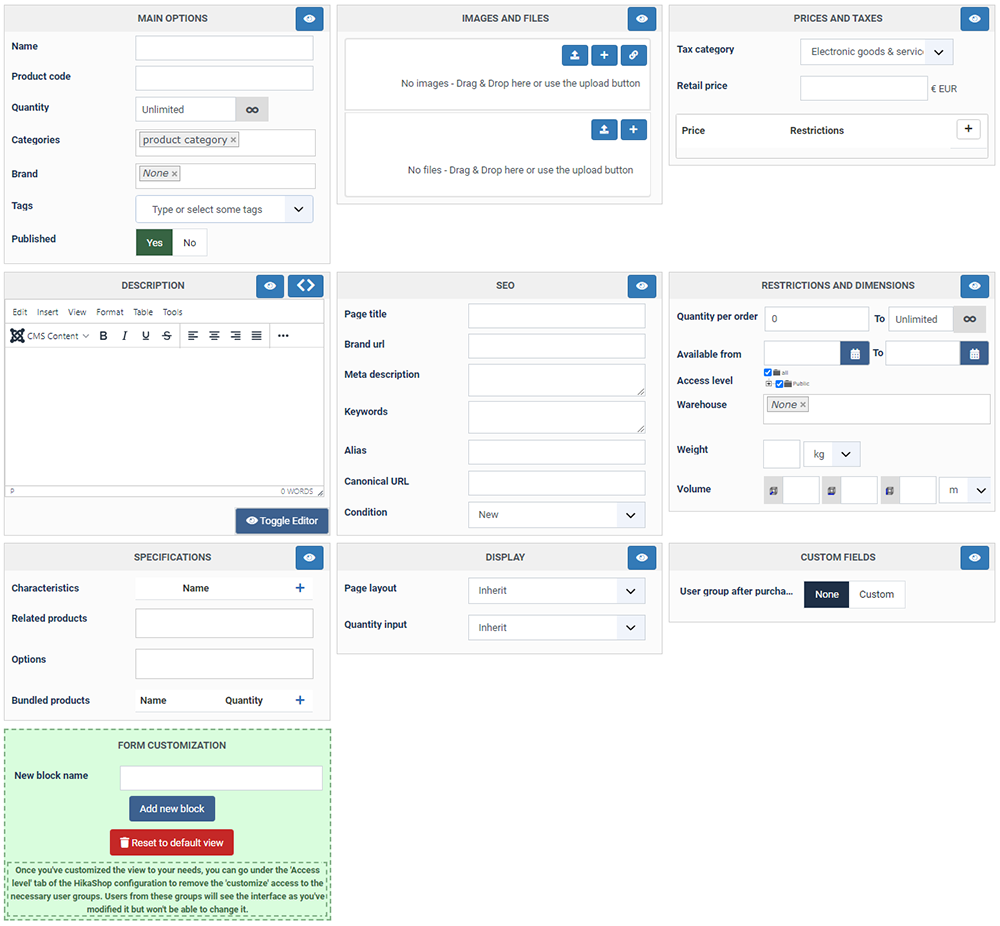
Then, when you edit a product, you have an area "custom fields":
www.hikashop.com/images/stories/tutorial...rface/interface0.png
You can see it on the bottom right side of the edit page.
There, the custom fields you've created for the table "product" will appear so that you can fill them.
Once they are filled, the system will automatically add them under the "Specifications" tab of the product page.
Did you already create custom fields of the table "product" ?
If not, please do.
Then, when you edit a product, you have an area "custom fields":
www.hikashop.com/images/stories/tutorial...rface/interface0.png
You can see it on the bottom right side of the edit page.
There, the custom fields you've created for the table "product" will appear so that you can fill them.
Once they are filled, the system will automatically add them under the "Specifications" tab of the product page.
Please Log in or Create an account to join the conversation.
1 year 7 months ago - 1 year 7 months ago #365962
by Uniweb
Replied by Uniweb on topic additional fields in Specifications
Hi Nicolas
I have tryed to make one but it did not work. All it said was Specifications but nothing else, what i wont to do is to edit all the Specifications difretley so 1 could say hight 1.2m and 2 could say hight 2.5m.
Can you please show me how to do it, or can you show me how to get rid of the wordd Specifications in the tab so it just says the work Description.
Thaks
I have tryed to make one but it did not work. All it said was Specifications but nothing else, what i wont to do is to edit all the Specifications difretley so 1 could say hight 1.2m and 2 could say hight 2.5m.
Can you please show me how to do it, or can you show me how to get rid of the wordd Specifications in the tab so it just says the work Description.
Thaks
Last edit: 1 year 7 months ago by Uniweb.
Please Log in or Create an account to join the conversation.
1 year 7 months ago #365964
by nicolas
Replied by nicolas on topic additional fields in Specifications
Hi,
Please provide the URL of that product page and a backend access via our contact form and we can check on the situation :
www.hikashop.com/support/contact-us.html
Please provide the URL of that product page and a backend access via our contact form and we can check on the situation :
www.hikashop.com/support/contact-us.html
Please Log in or Create an account to join the conversation.
1 year 7 months ago #365977
by Uniweb
Replied by Uniweb on topic additional fields in Specifications
HI Nicolas
Email sent.
Email sent.
Please Log in or Create an account to join the conversation.
1 year 7 months ago #365980
by nicolas
Replied by nicolas on topic additional fields in Specifications
Hi,
Thank you for the access.
However, I was not able to access the Fields management area. This requires a super administrator access, unless you change the default ACL settings of HikaShop.
I can see that you created a "specifications" field, and it was filled for the product "Milano Oak" and it does display its content under the "Specifications" tab of that product.
So I think that you're on the right track.
You don't need to call the custom field specifications. You can call it "height" and only enter the height of the product in it.
Then, create another custom field in the same way, and call it "width" and only enter the width of the product in it.
You'll then have two rows in the Specifications tab, one for the height and one for the width.
And like that, you can create as many fields as you want to have as many specifications as you want under the Specifications tab.
Thank you for the access.
However, I was not able to access the Fields management area. This requires a super administrator access, unless you change the default ACL settings of HikaShop.
I can see that you created a "specifications" field, and it was filled for the product "Milano Oak" and it does display its content under the "Specifications" tab of that product.
So I think that you're on the right track.
You don't need to call the custom field specifications. You can call it "height" and only enter the height of the product in it.
Then, create another custom field in the same way, and call it "width" and only enter the width of the product in it.
You'll then have two rows in the Specifications tab, one for the height and one for the width.
And like that, you can create as many fields as you want to have as many specifications as you want under the Specifications tab.
Please Log in or Create an account to join the conversation.
1 year 7 months ago #366015
by Uniweb
Replied by Uniweb on topic additional fields in Specifications
Hi Nicolas
Thanks for all your help i under stand now. But can you help me with something eles. I have attached a photo of what i have done but how do i change the sacing between the the end of the custom text and the answer.
Do i still need to change your assess to sort this.
Thanks
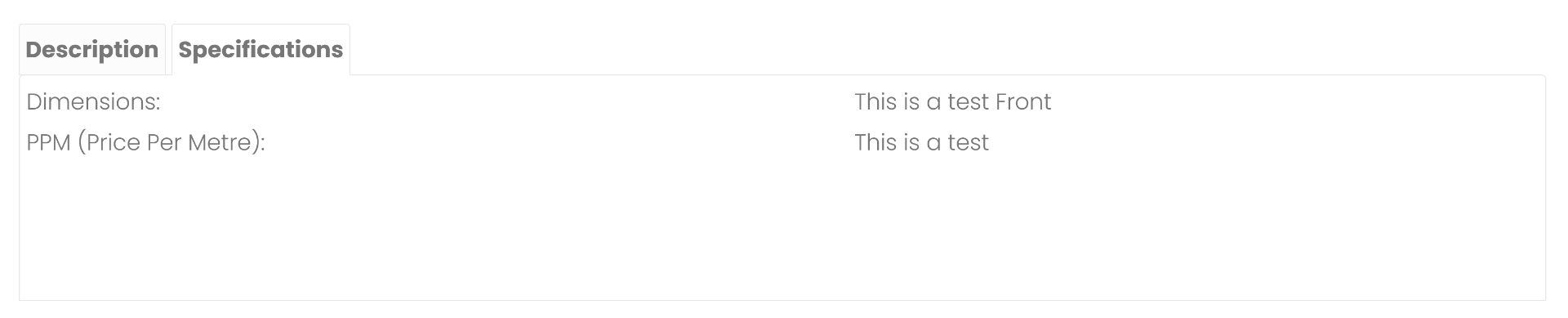
Thanks for all your help i under stand now. But can you help me with something eles. I have attached a photo of what i have done but how do i change the sacing between the the end of the custom text and the answer.
Do i still need to change your assess to sort this.
Thanks
Please Log in or Create an account to join the conversation.
1 year 7 months ago #366017
by nicolas
Replied by nicolas on topic additional fields in Specifications
Hi,
You don't need to change things in HikaShop for this.
You can add custom CSS in your Joomla template to handle this.
For example:
would limit the width of the custom fields area to 600px.
You don't need to change things in HikaShop for this.
You can add custom CSS in your Joomla template to handle this.
For example:
Code:
table.hikashop_product_custom_info_main_table {
max-width: 600px;
}
Please Log in or Create an account to join the conversation.
1 year 7 months ago #366076
by Uniweb
Replied by Uniweb on topic additional fields in Specifications
Hi Nicolas
Thanks for your help.
Can you help with with this problem i can not find out out to get rid for the contact button on the product page i have attached a phone for you to have a look.
Thanks
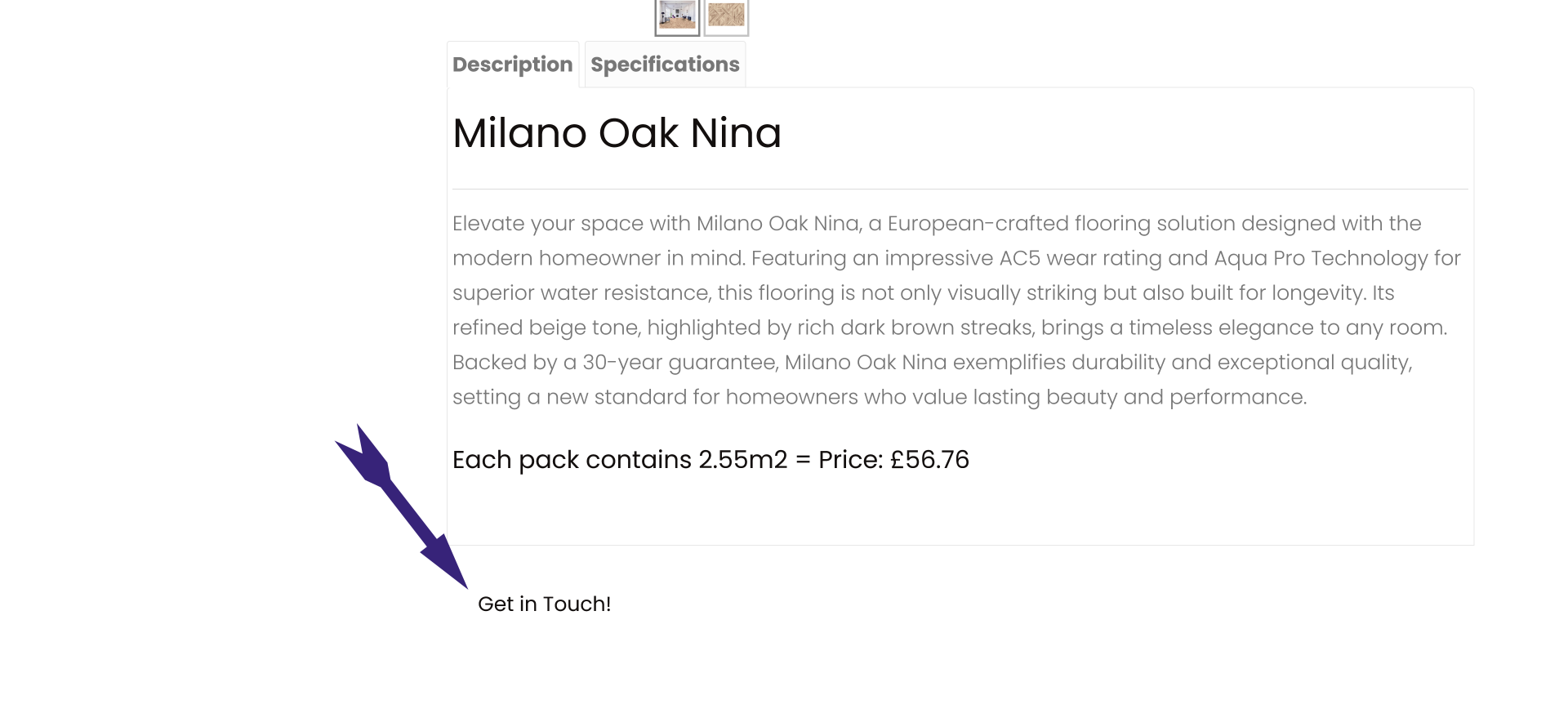
Thanks for your help.
Can you help with with this problem i can not find out out to get rid for the contact button on the product page i have attached a phone for you to have a look.
Thanks
Please Log in or Create an account to join the conversation.
1 year 7 months ago #366078
by nicolas
Replied by nicolas on topic additional fields in Specifications
Hi,
If it's the contact button added by HikaShop, you can turn it off with the setting "Display a contact button on the product page" in the HikaShop configuration page :
www.hikashop.com/support/documentation/5...html#display_product
If it's the contact button added by HikaShop, you can turn it off with the setting "Display a contact button on the product page" in the HikaShop configuration page :
www.hikashop.com/support/documentation/5...html#display_product
Please Log in or Create an account to join the conversation.
1 year 7 months ago #366118
by Uniweb
Replied by Uniweb on topic additional fields in Specifications
Hi Nicolas
That is not switched on -- I thourght of that but i can not find anything else. Can you help me.
That is not switched on -- I thourght of that but i can not find anything else. Can you help me.
Please Log in or Create an account to join the conversation.
1 year 7 months ago #366120
by nicolas
Replied by nicolas on topic additional fields in Specifications
Hi,
Then this button is not added by HikaShop. I would need the URL of that page to be able to look at the situation. Could you provide it ?
Then this button is not added by HikaShop. I would need the URL of that page to be able to look at the situation. Could you provide it ?
Please Log in or Create an account to join the conversation.
1 year 7 months ago #366162
by Uniweb
Replied by Uniweb on topic additional fields in Specifications
Hi Nicolas
How ould you like me to the information to you
Thanks
How ould you like me to the information to you
Thanks
Please Log in or Create an account to join the conversation.
1 year 7 months ago #366163
by nicolas
Replied by nicolas on topic additional fields in Specifications
Hi,
Please go through our contact form:
www.hikashop.com/support/contact-us.html
Make sure you include a link to this thread for reference in your message.
Please go through our contact form:
www.hikashop.com/support/contact-us.html
Make sure you include a link to this thread for reference in your message.
Please Log in or Create an account to join the conversation.
1 year 6 months ago #366247
by nicolas
Replied by nicolas on topic additional fields in Specifications
Hi,
Thanks for your access.
In the Joomla modules manager, you've created a custom module called "Taking Care Buttons" which has the HTML of that contact button.
And then, in the HikaShop configuration page, under the Display tab, you've selected that module in the "Modules under the product page" setting.
So, if you want to remove it, unselect it from that setting and you'll be done.
Thanks for your access.
In the Joomla modules manager, you've created a custom module called "Taking Care Buttons" which has the HTML of that contact button.
And then, in the HikaShop configuration page, under the Display tab, you've selected that module in the "Modules under the product page" setting.
So, if you want to remove it, unselect it from that setting and you'll be done.
Please Log in or Create an account to join the conversation.
1 year 6 months ago - 1 year 6 months ago #366293
by Uniweb
Replied by Uniweb on topic additional fields in Specifications
Hi Nicolas
Thanks
Thanks
Last edit: 1 year 6 months ago by Uniweb.
Please Log in or Create an account to join the conversation.
Time to create page: 0.315 seconds