
NMI
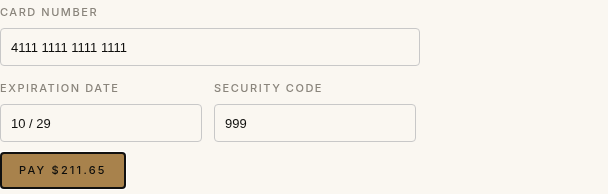
This plugin adds card payments through NMI to your HikaShop store, on NMI's own gateway or on the one your merchant account provider sells under its name: Merchant One Gateway, CAMS, Inspire Commerce, Metrics Global, MoneyMovers, TransNational or any other NMI white label. Your customer types the card on the last step of your checkout, in NMI's secure fields, and the order is confirmed at once.
Features- Cards (Visa, Mastercard, American Express, Discover and the others your processor takes) paid on your own checkout page, without leaving the shop.
- The card fields are NMI's secure fields (Collect.js), loaded from your gateway: the card number never reaches your website, which keeps your PCI scope small.
- Works with NMI and with every gateway built on it: choose yours in a list, or type its address for one not listed.
- Sale, or authorization then capture: in the second case the card is only charged when you move the order to the status of your choice, for instance shipped.
- Cancelling an order voids its payment, and moving it to the refunded status refunds what is left of it, from HikaShop.
- The order history shows the transaction, the card, the authorization code and the address (AVS) and security code (CVV) checks.
- A declined card leaves the order unpaid and the customer can try another card on the same page; the gateway's own duplicate check stops a payment made twice.
- A test mode runs the whole checkout on a free NMI sandbox account, with NMI's test cards. The payment method then shows "test mode" at the checkout.
 How it works
- 1. The customer confirms the order and sees the card fields with a pay button.
- 2. NMI's fields turn the card into a one-time token, which your shop charges on your gateway for the total of the order.
- 3. An approved payment confirms the order (or puts it in the authorized status) and shows the thank you page; a declined one shows the reason and lets the customer try again.
- 4. Later, the order status captures, voids or refunds the payment on the gateway.
- 1) Get a merchant account with a gateway on NMI (from NMI, Merchant One or another provider). To try the plugin first, open a free sandbox account at NMI's developer portal (guide.nmi.com).
- 2) Download the NMI plugin from our website, install it on your website and enable it.
- 3) In your gateway's merchant portal, open Settings, Security Keys: create a private key with the API permission, and a public key of the tokenization (Collect.js) type. Copy both.
- 4) In HikaShop, go to System > Payment methods, create an NMI payment method, choose your gateway, set Test mode to match the keys, and paste the two keys. Saving checks the private key with the gateway.
- 5) Restrict the method to the currencies your processor takes (Merchant One accounts are in US dollars), in the method's restrictions.
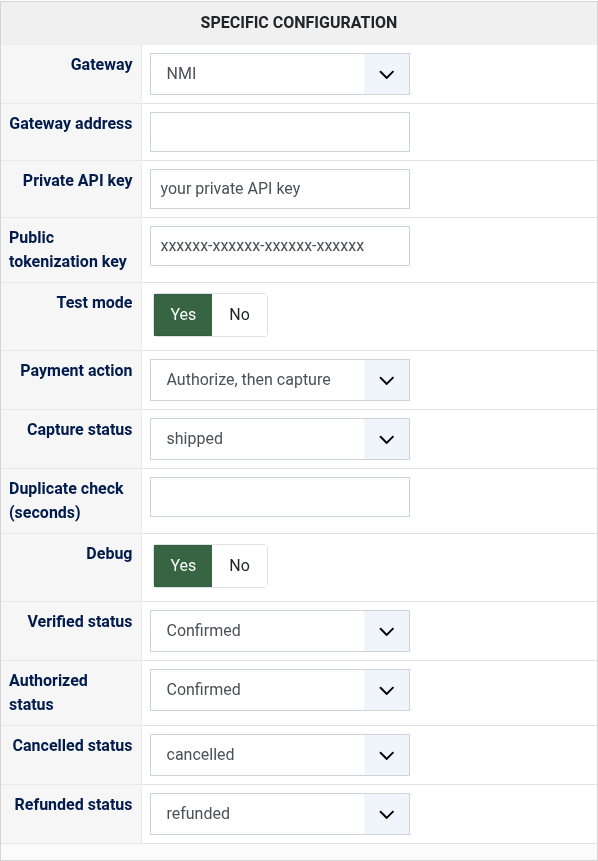
- Gateway: the gateway of your merchant account, NMI or the provider that sold it to you. Other for one not listed.
- Gateway address: only with Other: the address of your gateway's merchant login, such as https://secure.yourgateway.com.
- Private API key: the private key of Security Keys. Keep it secret.
- Public tokenization key: the tokenization key of Security Keys; without it the card fields cannot be shown.
- Test mode: Yes with the keys of an NMI sandbox account, whatever the gateway chosen; No with the keys of your merchant account.
- Payment action: Sale charges the card at once; Authorize, then capture only holds the amount until the capture status.
- Capture status: with Authorize, the status that charges the card, for the order's total and at most what was authorized.
- Duplicate check (seconds): leave empty to keep your gateway's own duplicate check. Some processors refuse any other value.
- Debug: writes every exchange with the gateway in the payment log of HikaShop.
- Verified status: the status of a paid order.
- Authorized status: with Authorize, the status of an order whose amount is held, waiting for the capture.
- Cancelled status: moving an order to it voids the transaction while the gateway has not settled it.
- Refunded status: moving an order to it refunds what is left of the payment (or voids an authorization never captured).
- "The gateway refused the private API key" when saving: the key is not one of this gateway's account, or Test mode does not match it (a sandbox key needs Test mode on).
- "The card fields could not be loaded" at the checkout: the public tokenization key is missing, of another gateway or of the other mode.
- "The payment was refused" with the gateway's reason: the reason says what to change, for instance a currency or a card brand your processor does not take.
- "This payment was just made with the same card and amount": the gateway's duplicate check refused a second identical payment made within a few minutes. Check the order before charging again.
- A refund refused because the payment is not settled yet: only the whole payment can be cancelled until the gateway's next batch (move the order to the refunded or cancelled status); refund part of it the day after.
Use
- Compatible with all the editions of HikaShop
- Requires a merchant account on NMI's gateway or one of its white labels (Merchant One Gateway and others), with the API and Collect.js keys
- Requires the PHP cURL extension and HTTPS on the checkout
- 3-D Secure (NMI's Payer Authentication) is not handled by this version
- In English and French
- Compatible with PHP 7.4 minimum
- Compatible with Joomla and WordPress
- No limit of time
- No limit of use
Changelog
1.0.0 on the 3rd of November 2026
- First version.
€ 40,00
The add to cart button will appear once you select the values above
- Type
- Payment plugin
Access to updates included for 4 years
A tax rate (between 17% and 27% based on your country) will be added if your address is in the European Union and that you don't provide a valid VAT number or if your address is in France as per the European Union law.