1) Get a merchant account with a gateway on NMI (from NMI, Merchant One or another provider). To try the plugin first, open a free sandbox account at NMI's developer portal (guide.nmi.com).
2) Download the NMI plugin from our website, install it on your website and enable it.
3) In your gateway's merchant portal, open Settings, Security Keys: create a private key with the API permission, and a public key of the tokenization (Collect.js) type. Copy both.
4) In HikaShop, go to System > Payment methods, create an NMI payment method, choose your gateway, set Test mode to match the keys, and paste the two keys. Saving checks the private key with the gateway.
5) Restrict the method to the currencies your processor takes (Merchant One accounts are in US dollars), in the method's restrictions.
Configuration
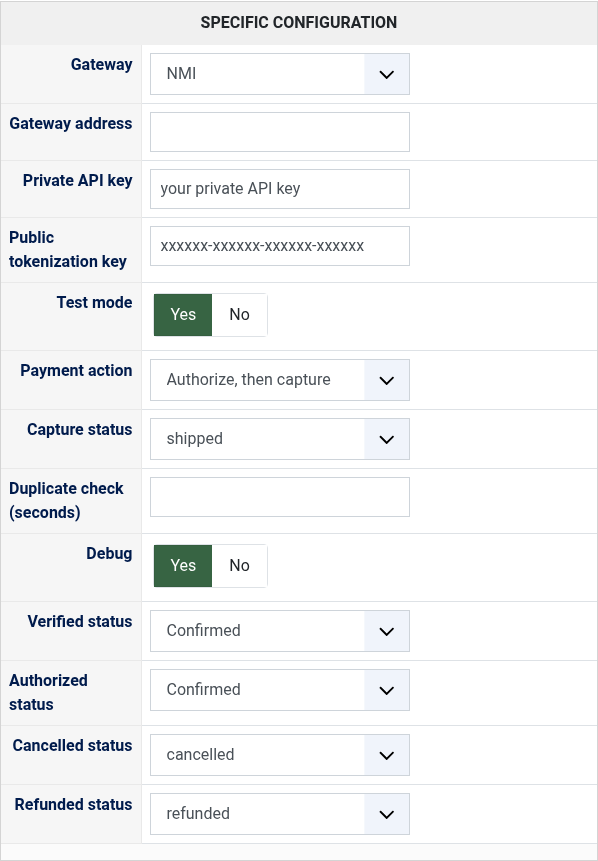
Gateway: the gateway of your merchant account, NMI or the provider that sold it to you. Other for one not listed.
Gateway address: only with Other: the address of your gateway's merchant login, such as https://secure.yourgateway.com.
Private API key: the private key of Security Keys. Keep it secret.
Public tokenization key: the tokenization key of Security Keys; without it the card fields cannot be shown.
Test mode: Yes with the keys of an NMI sandbox account, whatever the gateway chosen; No with the keys of your merchant account.
Payment action: Sale charges the card at once; Authorize, then capture only holds the amount until the capture status.
Capture status: with Authorize, the status that charges the card, for the order's total and at most what was authorized.
Duplicate check (seconds): leave empty to keep your gateway's own duplicate check. Some processors refuse any other value.
Debug: writes every exchange with the gateway in the payment log of HikaShop.
Verified status: the status of a paid order.
Authorized status: with Authorize, the status of an order whose amount is held, waiting for the capture.
Cancelled status: moving an order to it voids the transaction while the gateway has not settled it.
Refunded status: moving an order to it refunds what is left of the payment (or voids an authorization never captured).
Troubleshooting
"The gateway refused the private API key" when saving: the key is not one of this gateway's account, or Test mode does not match it (a sandbox key needs Test mode on).
"The card fields could not be loaded" at the checkout: the public tokenization key is missing, of another gateway or of the other mode.
"The payment was refused" with the gateway's reason: the reason says what to change, for instance a currency or a card brand your processor does not take.
"This payment was just made with the same card and amount": the gateway's duplicate check refused a second identical payment made within a few minutes. Check the order before charging again.
A refund refused because the payment is not settled yet: only the whole payment can be cancelled until the gateway's next batch (move the order to the refunded or cancelled status); refund part of it the day after.