
Booking
This plugin adds a booking and capacity management system to HikaShop. It allows you to limit the number of orders or product purchases per combination of custom field values such as time slots, dates, room types, or any other custom field. It supports both order-level booking (checkout fields shared across the whole order) and item-level booking (per-product fields on the product page).
Features- Order-level booking: limit the number of orders per combination of order custom field values (e.g. delivery time slots at checkout).
- Item-level booking: limit the number of purchases per product per combination of item custom field values (e.g. event dates, room types).
- Configurable default capacity per field combination, with the option to take product quantities into account.
- Capacity overrides: define specific capacities for individual field value combinations, products, weekday patterns (e.g. "friday-sunday"), or date wildcards (e.g. "25/12/*" for every Christmas).
- Date range support: works with the datepicker field type's range mode for hotel-style check-in / check-out bookings with per-night capacity tracking.
- Frontend availability display: color-coded datepicker calendars (green/orange/red), option indicators on dropdowns, radio buttons, and checkboxes, with configurable exact spot count or generic message.
- Real-time AJAX availability checks on both the product page and checkout, preventing customers from selecting fully booked combinations.
- Stock validation on add-to-cart and order creation, with clear error messages when capacity is reached.
- Automatic stock release on order cancellation/refund, and re-consumption on un-cancellation.
- Backend bookings listing with per-column filters: order number, type, product, field values, date period, and order status. Sortable columns and pagination.
- Backend capacity overrides management with add/edit form, product selector, and field-type-specific inputs (multi-select for dropdowns, textarea with date patterns for datepickers).
- Capacity override popup accessible directly from the product edit page for quick per-product configuration.
- Product listing filter integration: when a datepicker or range datepicker filter is configured on a booking item field, the product listing automatically filters by availability, hiding products that are fully booked for the selected date(s). Works with single dates, date ranges, and margin days.
- Filter-to-product pre-fill: when a customer selects dates in the listing filter and clicks on a product, the booking date field on the product page is automatically pre-filled with the selected dates.
- CSV export of bookings, respecting all active filters.
- Booking settings block on the product edit form with enable toggle, item fields multi-select, and default capacity.
- Product copy copies capacity overrides, product delete cleans up overrides and bookings.
- Hotel/lodging structured data: automatically enrich the product page JSON-LD with schema.org Hotel, HotelRoom, LodgingBusiness, or other accommodation types, including check-in/check-out times, occupancy, amenities, star rating, and bed details. Configurable via plugin settings with custom product field mappings or hardcoded values, and per-product schema type override.
- Compatible with Joomla and WordPress.
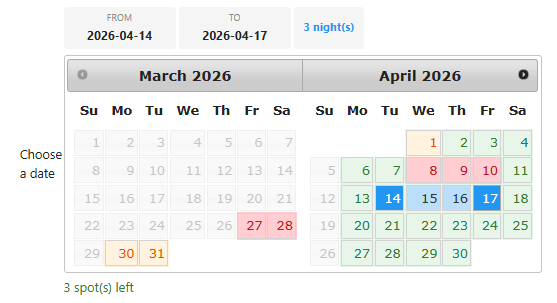
Date range mode on the product page, with per-night availability colors guiding the customer's check-in / check-out selection.
Installation- 1) Download the plugin on our website via the download link provided to you after the purchase.
- 2) Install it on your Joomla website via the extension manager and via the "Install plugin" button of System>Plugins on WordPress.
- 3) Enable the plugin in Extensions > Plugins.
- 4) In the plugin settings, select the order custom fields you want to use for booking capacity (e.g. delivery date, time slot).
- 5) Set the default capacity (number of bookings allowed per field combination).
- 6) For per-product booking, edit a product, enable booking in the Booking settings block, and select the item custom fields to track.
- 7) Optionally, create capacity overrides via Orders > Bookings > Capacity Overrides to define specific limits for certain field value combinations.
- Order fields: select the order custom fields to track for booking capacity at checkout.
- Default capacity: the default number of bookings allowed per combination of field values, when no specific capacity override is defined.
- Take into account product quantity: when enabled, the stock reserved is based on the product quantities in the cart. When disabled, each order line counts as 1 regardless of quantity.
- Show availability: display availability indicators (spot count, color-coding) on the frontend next to field options.
- Show exact count: show the exact number of remaining spots. When disabled, a generic message is shown instead.
These settings control the structured data (JSON-LD) output on product pages for booking-enabled products. Each field mapping can be either a product custom field name (the value will be read from the product) or a hardcoded value.
- Schema type: the schema.org type to use (Hotel, HotelRoom, LodgingBusiness, BedAndBreakfast, Hostel, Resort). Leave empty to keep the default Product type. Can be overridden per product.
- Check-in time: check-in time (e.g. "14:00" or a custom product field name).
- Check-out time: check-out time (e.g. "11:00" or a custom product field name).
- Occupancy: maximum number of guests.
- Amenities: comma-separated list of amenities (e.g. "WiFi, Air Conditioning, Minibar").
- Star rating: hotel star rating (1-5).
- Bed type: type of bed (e.g. King, Queen, Twin).
- Number of beds: number of beds in the room.
- Number of rooms: number of rooms available.
- Bakery / restaurant: limit the number of orders per delivery time slot (e.g. 10 orders for the 11 AM slot).
- Event / workshop: limit the number of registrations per event date and session.
- Hotel / rental: limit the number of rooms available per night using the datepicker range mode for check-in / check-out selection.
- Appointment / service: limit the number of bookings per time slot per service provider.
- Subscription box: limit the number of subscriptions starting on a given date.
- Requires HikaShop 6.4.1 or later
- Requires the HikaShop Business edition (the plugin relies on custom item and order fields)
- Compatible with PHP 7.4 minimum
- Compatible with Joomla and WordPress
- No limit of time
- No limit of use
1.1.1 - 06 August 2026
- Added the update system so the plugin now detects and offers its own new versions in the Joomla updater.
1.1.0 - 07 July 2026
- The plugin interface is now available in 20 languages: English, German (Germany, Austria, Switzerland), French, Dutch, Japanese, Spanish, Italian, Portuguese (Portugal and Brazil), Polish, Swedish, Danish, Norwegian, Finnish, Russian, Chinese, Arabic and Turkish.
1.0.0 - 17 April 2026
- Initial release of the plugin.

- Type
- Integration
Access to updates included for 4 years
A tax rate (between 17% and 27% based on your country) will be added if your address is in the European Union and that you don't provide a valid VAT number or if your address is in France as per the European Union law.