
Domains
The Domains plugin serves several websites from one Joomla installation, one domain name each. Each domain can have its own home page, its own template, its own menu and its own name, while the content, the extensions and the administration stay in a single Joomla. It works on any Joomla website, with or without a shop, and when HikaShop is there it knows what to do with it.
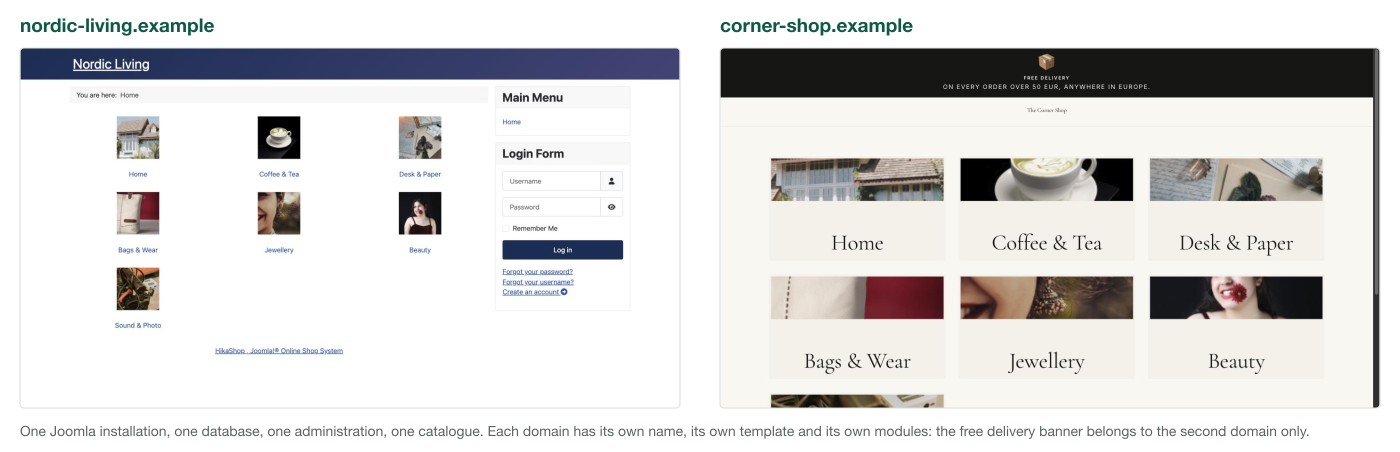
Two domain names, one Joomla, one database, one administration, one catalogue. Each one answers under its own name, with its own template, its own home page and its own modules: here the same shop on Cassiopeia and on Vessel, and a free delivery banner published on one of the two websites only.
 On any Joomla website
None of this needs a shop. On a plain Joomla, each domain you add to the plugin can set:
- The home page displayed on the root of that domain
- The template style used on that domain, a child template included
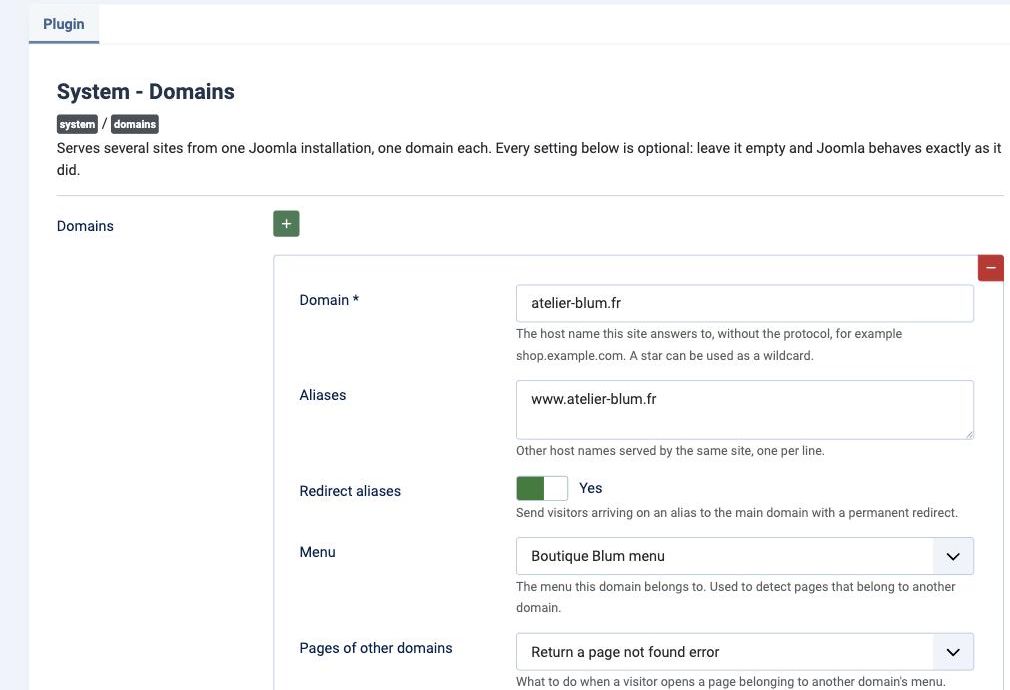
- The menu the domain belongs to, and what happens when a visitor opens a page of another domain: display it, redirect it to its own domain, or return a page not found
- The other domain names it answers to, each of them either redirected to it or served as it is
- The language the domain opens in, while your visitors can still switch it
- The site name used in page titles and in the emails sent from that domain
- The name and the address its emails are sent from
- The search engine indexing, and whether that domain is online or offline
- A favicon and an extra stylesheet
- Which modules appear on it: each module can name the domains it belongs to, on its own edit form, for the case where several domains share one menu
- Which content belongs to it: name a user group for the domain, put the matching access level on the articles, the categories and the other content of that website, and they are shown there and nowhere else. What you leave public belongs to every domain
Every setting is optional. A domain that only sets a template style changes nothing else, and a domain name that is not in the list is served exactly as before.
Everything lives in the settings of the plugin, one line per domain. There is no component to learn and no table of its own: your domains travel with a backup of your website like any other setting.
 With HikaShop, and with HikaMarket
When your website sells, each domain gains the settings that only mean something to a shop. They are simply not displayed on a Joomla which has no shop installed.
- The currency the domain opens in, while your visitors can still switch it
- Whether the cart, the address book and the order history of a customer are shared with your other domains or belong to this one, one choice each. A cart of its own needs HikaShop 6.6.1 or newer
- Your products and your categories follow the content group of the domain through their own access setting, so a product of one website is not listed, not found and not opened on another. This part needs HikaShop 6.6.1 or newer, on the Business edition, where access on products and categories exists
- A customer registering on this domain is recorded as having registered here, which is what tells you and your vendors where each of your customers came from
- An order placed on that domain keeps it, so the emails sent later, by the scheduled tasks for instance, link back to the domain the customer ordered on and not to your main address
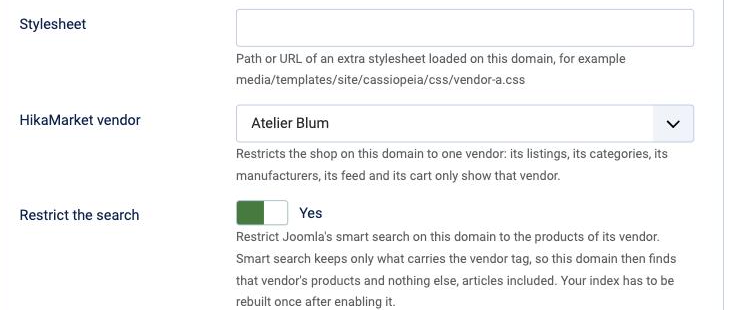
- With HikaMarket, a vendor, so that the shop on that domain only lists this vendor's products, in its listings, its categories, its manufacturers, its feed, its links and its cart. When several vendors sell the same product of your shop, each through their own variant, that product appears on each of their websites showing only their own version
- A sitemap and a product feed of its own for that domain, listing what it actually sells with its own addresses, and, if you want it, the Joomla smart search of that domain restricted to that vendor as well
A domain given to a vendor becomes their own website: their name, their template, their products, their emails, and a checkout that only accepts what they sell.
 Installation
- Easy and quick !
- 1) Download the plugin on our website
2) Install it on your Joomla website (extension manager)
3) Enable the plugin
4) Add one line per domain in its settings
Links stay on the domain they were built on by themselves, since Joomla writes them relative to
the site root. When you do want to link from one domain to another, for instance from a
marketplace to the website of one of its vendors, the plugin offers two calls:
SiteRegistry::known() lists the configured domains, and
SiteRegistry::urlFor($domain, $path) builds an address on one of them. Two
events are available as well: onCollectDomainSites, to add domains stored
somewhere else, and onDomainSiteResolved, fired once the domain of the current
request is known.
- The Domains plugin works on any Joomla website, with or without HikaShop
- Restricting a domain to a vendor requires HikaShop 6.6.0 or newer and HikaMarket. The plugin adds the "Domain name" field to your vendors by itself, there is nothing to install on the HikaMarket side
- Each domain name must already point to the website on your hosting, with its own certificate
- Your domains are part of the plugin's settings: disabling the plugin keeps them, uninstalling it does not
- The Site URL setting of your Joomla configuration must be left empty
- To give a domain a language, keep the "Remove URL Language Code" option of the Joomla language filter plugin turned off, and do not enable the Yireo "Language Domains" plugin next to this one
- The cart, the address book and the order history are shared by default, exactly as they are today, and each of them becomes the domain's own when you ask for it. A cart then belongs to the domain it was started on, an address to the domain it was typed on, and the history holds the orders placed on that domain. What was saved before you installed the plugin belongs to no domain and stays available everywhere
- Your customers have a single account for all of your domains, since Joomla keeps one list of users, one email address per person. A visitor who registered on one of your websites signs in on the others with the same account
- On a domain given to a vendor, the cart of a customer never holds another vendor's products, whichever of the two choices above you made
- List every domain your website answers on, the main one included: a domain which is not in the list is served exactly as it was before, and shares what your website shares
- Your articles, your categories and your other content stay reachable on every domain: the menu a domain uses decides what is linked on it, not what exists on your website
- Joomla 5 or newer required
- Compatible with PHP 8 minimum
- GPL v3
- No limit of time
- No limit of use
1.0.0 on the 7th of September 2026
- Initial release of the plugin

- Type
- Integration
- Compatibility
- Joomla 5 and up
HikaShop 6.6.0 and up