
Avalara AvaTax
This plugin connects your shop to Avalara AvaTax, the sales tax service US merchants rely on once their sales cross state lines. AvaTax gives the cart the exact sales tax of the customer's address, down to the county, the city and the special districts, with the right rule for each product and for shipping, and keeps each order as a sales invoice in your AvaTax account, ready for your returns.
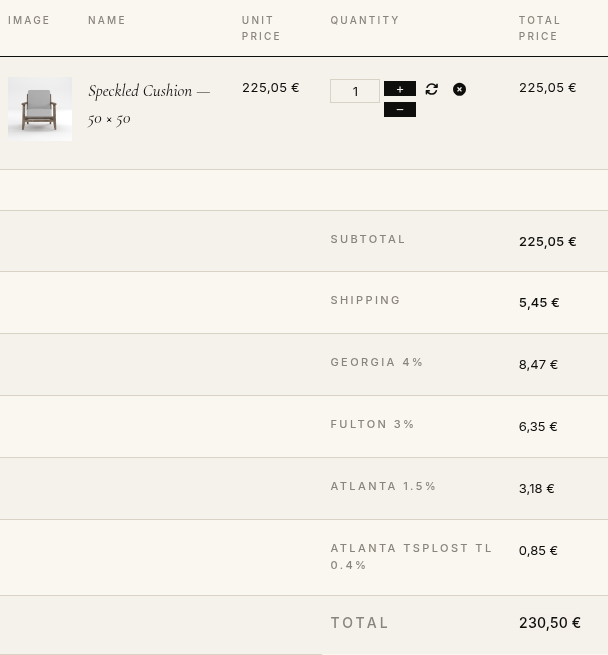
Features- Shows the sales tax of each jurisdiction in the cart, the checkout, the order, the invoice and the emails: "GEORGIA 4%", "FULTON 3%", "ATLANTA 1.5%"...
- Gives each shipping method offered its own tax, as the state of the address taxes shipping or not.
- Lets you give each product the AvaTax tax code of what it is (clothing, food, books...), found with a search in AvaTax's codes from the product form, so that the exemptions and reduced rates of each state apply. The others take the default code of the settings.
- Records each order in AvaTax as a sales invoice when it reaches an invoice status, committed for your returns, with the coupon as AvaTax's discount.
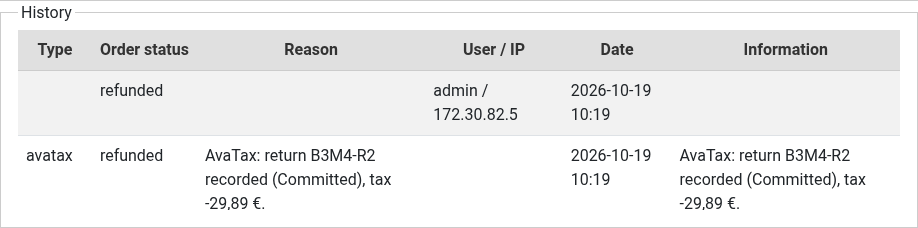
- Returns in AvaTax the products you remove from an order in your backend, returns the whole order when it is refunded, with the tax that was recorded, and voids it when the order is cancelled.
- Tells you in the order's history what AvaTax recorded, and when the tax of the order differs from AvaTax's.
- Exempts the customers of the user groups you choose (resellers, charities, schools...) with their entity use code, and the customers who have an exemption certificate number in a user field.
- Checks your origin address and, if you wish, your customers' shipping addresses with AvaTax's address validation, and suggests the corrected address at the checkout.
- Asks AvaTax only on the cart and checkout pages, and once for the same cart and address, so your AvaTax transactions stay few.
- Keeps HikaShop's own taxes for the countries you do not ask AvaTax for: your EU VAT stays as it is.
- Can calculate only, for a shop whose ERP records the sales in AvaTax.
- An AvaTax log writes every request and answer to the HikaShop log file, for setting up and for Avalara's support.
 How it works
- 1. The customer enters a US shipping address: the cart shows the tax AvaTax answers for it.
- 2. The shipping methods show their price with their tax.
- 3. The order is placed with these taxes.
- 4. When the order reaches an invoice status (confirmed, shipped...), it is recorded in AvaTax as a committed sales invoice, under its order number.
- 5. A refund, a cancellation or a product removed from the order later is sent to AvaTax as a return or a void.
Use
- Compatible with all the editions of HikaShop
- Compatible with Joomla and WordPress
- Requires an Avalara AvaTax account (paid, or Avalara's free trial)
- Requires the PHP cURL extension
- No limit of time
- No limit of use
Changelog
1.0.0 on the 19th of October 2026
- First version.
€ 30,00


The add to cart button will appear once you select the values above
- Type
- Integration
Access to updates included for 4 years
A tax rate (between 17% and 27% based on your country) will be added if your address is in the European Union and that you don't provide a valid VAT number or if your address is in France as per the European Union law.