1) Have an Avalara AvaTax account: a paid account, or Avalara's free developer trial (developer.avalara.com, 90 days). In the AvaTax console, set up your company and, under Settings, Where you collect tax, the states where you must collect sales tax: AvaTax answers no tax for the others.
2) In the AvaTax console, open Settings, License and API keys, note your Account ID and generate a licence key (generating a new one revokes the previous one).
3) Install this plugin and enable it in Extensions > Plugins (on WordPress: HikaShop > Plugins).
4) Fill in the account ID, the licence key and the environment, save, and click Test connection: it checks the keys and loads your companies. Choose your company.
5) Fill in the address your products ship from, save, and check it with Validate the origin address.
6) Give an AvaTax tax code to the products that are not general merchandise (clothing, food, digital goods...), in their product form.
7) Check in System > Configuration that your invoice statuses are the ones that should record the orders in AvaTax (confirmed and shipped by default).
8) To keep a log, set a log file in System > Configuration, Files, and turn the AvaTax log on.
Configuration
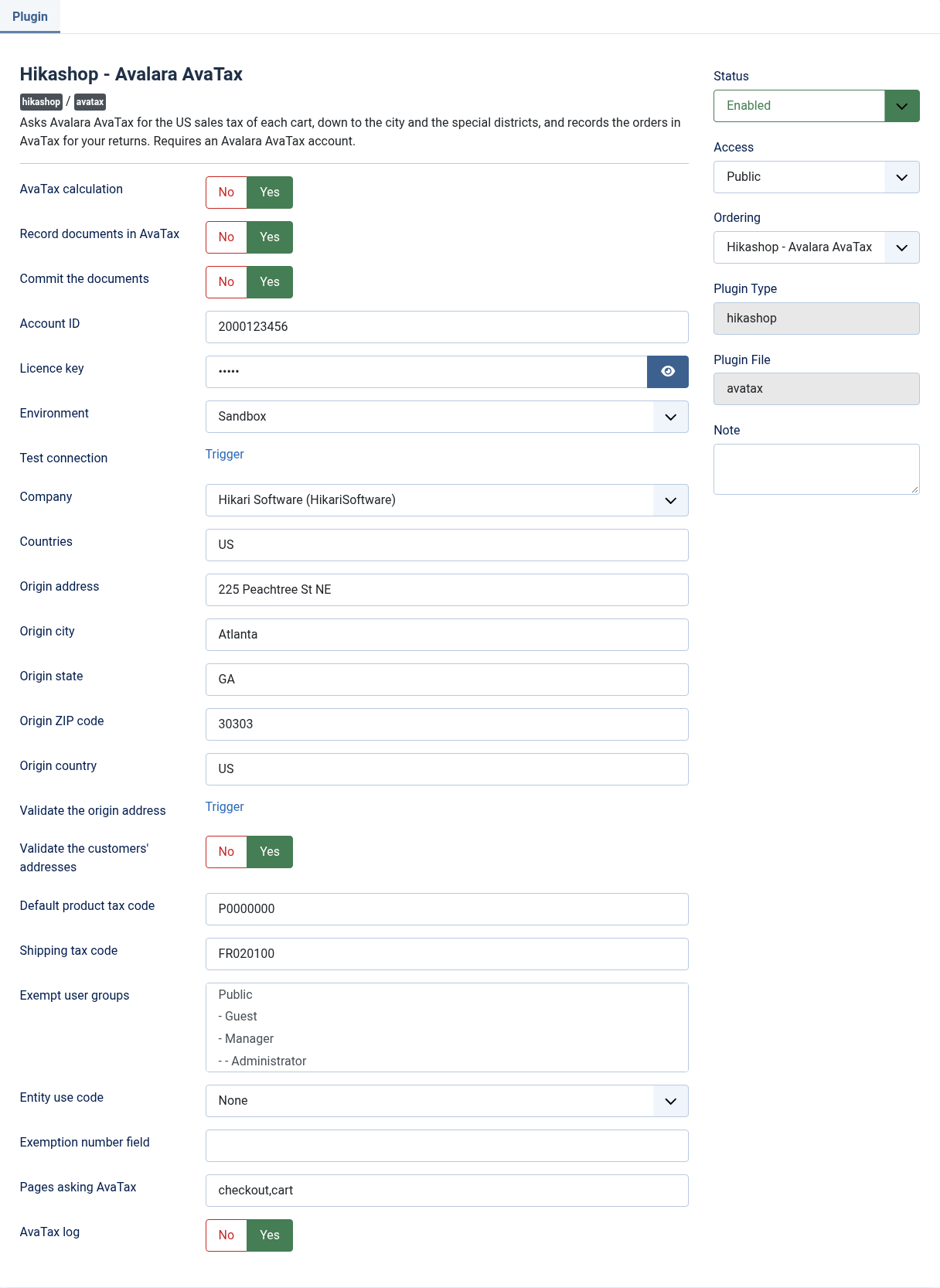
AvaTax calculation: asks AvaTax for the sales tax of the carts and orders shipped to the countries below. Off, HikaShop's own tax rules apply everywhere.
Record documents in AvaTax: records the orders in AvaTax as sales invoices. Turn it off when another application, your ERP for instance, records your sales in AvaTax: the tax is then only calculated.
Commit the documents: commits the sales invoices, ready for your returns (yes by default). No records them uncommitted, for you to commit them in AvaTax.
Document code prefix: put before the order number to make the code of the document in AvaTax, when two shops record in the same AvaTax company. Empty, the code is the order number.
Account ID: the number of your Avalara account, shown in the AvaTax console under Settings, License and API keys.
Licence key: the licence key generated there. Generating a new one revokes the previous one.
Environment: Production for your AvaTax account and Avalara's free trial (admin.avalara.com), Sandbox for a sandbox account Avalara gave you (sandbox.admin.avalara.com). The keys of one do not work on the other.
Test connection: checks the account ID and licence key once saved, and loads your companies in the setting below.
Company: the company of your AvaTax account the shop sells as.
Countries: the two letter codes of the countries AvaTax is asked for, separated by commas: US by default. Elsewhere, HikaShop's own taxes apply.
Origin address: the street address your products ship from, as AvaTax needs it to find the taxes of each sale.
Origin city: the city your products ship from.
Origin state: the two letter code of the state your products ship from (WA, GA...).
Origin ZIP code: the ZIP code your products ship from.
Origin country: the two letter code of the country your products ship from (US by default).
Validate the origin address: shows how AvaTax reads the origin address once saved, or why it cannot find it.
Validate the customers' addresses: at the checkout, shows US customers the corrected shipping address AvaTax suggests, or a warning when it cannot find it. Off by default.
Default product tax code: the AvaTax tax code of the products without one, P0000000 (tangible personal property) by default.
Shipping tax code: the tax code of the shipping charges, FR020100 (shipping by common carrier) by default.
Exempt user groups: the customers of these groups (WordPress: roles) buy without sales tax: your resellers, charities or schools, for example. Empty, nobody is exempt by group.
Entity use code: why the customers of the exempt groups buy without tax (resale, charitable organisation...), as AvaTax names it. AvaTax applies the exemption of that use in each state.
Exemption number field: the column name of a HikaShop user custom field holding a customer's exemption certificate number: a customer with a number there buys without sales tax, the number recorded in AvaTax. Empty, not used.
Pages asking AvaTax: the HikaShop pages where AvaTax is asked, checkout and cart by default; the other pages show what was already asked. Empty, every page asks.
AvaTax log: writes every request to AvaTax and its answer to the HikaShop log file, without your licence key.
Troubleshooting
"AvaTax refused the connection": the account ID or the licence key is wrong, or they belong to the other environment. Generate a new key if you are not sure of it.
"The sales tax could not be calculated" at the checkout, with AvaTax's reason: no tax is added to the cart. The reason says what to fix: a company code that does not exist, an address whose ZIP code does not match its state...
No tax for a US address: AvaTax only taxes the states where your company collects tax, as set in your AvaTax console, and an exempt customer.
"AvaTax: the order could not be recorded" in an order's history: the reason follows. Change the order's status again once fixed to record it.
"The order holds a tax of ..., AvaTax answered ..." in an order's history: the order's tax and AvaTax's differ, usually by a cent of rounding with a coupon; AvaTax recorded its own.
To see what was sent to AvaTax and what it answered, turn the AvaTax log on and open the log file of System > Configuration, Files.