
Packlink PRO
This plugin connects your shop to Packlink PRO, the free shipping platform of Packlink, with pre-negotiated rates of Colissimo, Chronopost, Mondial Relay, UPS, DHL, FedEx and many more carriers in Spain, France, Italy, Germany and the United Kingdom.
Features- One shipping method per Packlink service you want to offer, each with its own name, restrictions and price, the service chosen in a list of the carriers and services of your Packlink PRO account.
- Shows in the method's settings whether Packlink accepts your API key, and for which account.
- Ships from the sender address of your choice among those of your Packlink PRO account.
- Packlink's own price at checkout: the quote Packlink PRO gives for the cart's parcel and the customer's address, with your markup (a percentage, an amount) and rounding.
- Or HikaShop's usual shipping prices instead: a fixed price, a percentage, a formula, by weight or with the prices table.
- The method only shows when its service delivers to the customer's address: a national service is not offered abroad.
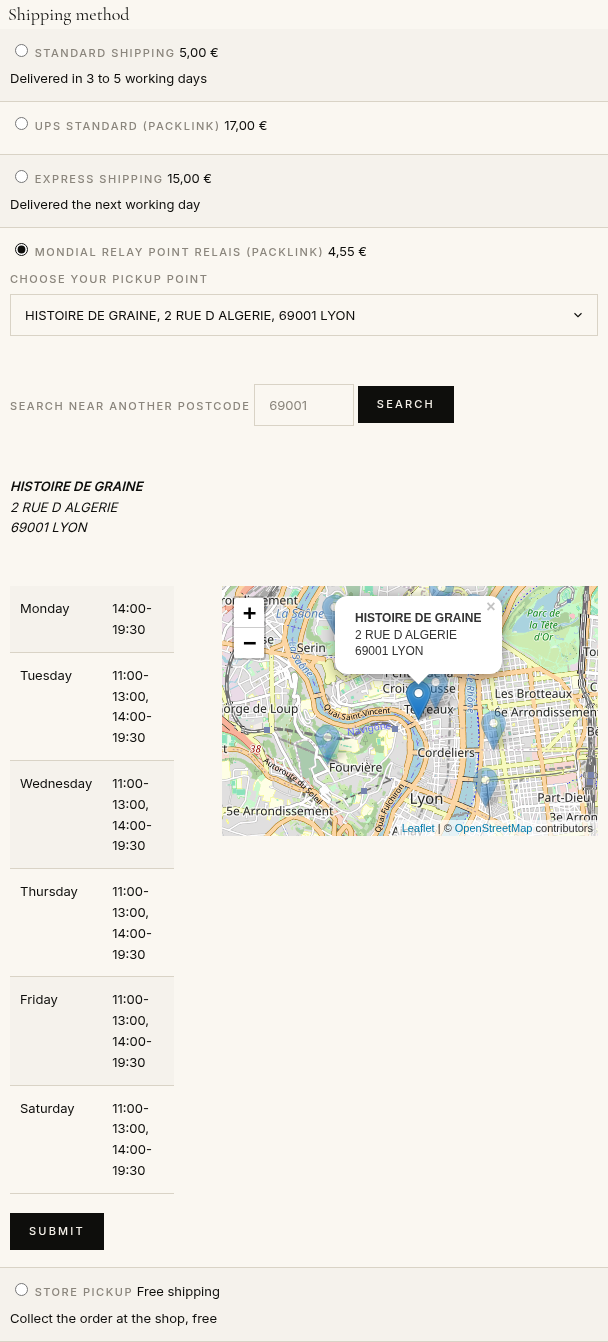
- For the services to a pickup point (Mondial Relay, Chronopost Relais, UPS Access Point...), your customer picks the point at checkout in a list and on a map, with its opening hours, and can search near another postcode. The point goes to Packlink PRO with the order and shows as the shipping address in the order and its e-mails.
- A default parcel for the products that have no weight or no dimensions.
- Sends your orders to Packlink PRO as shipments ready to pay and print, when they reach the status you choose or with a button on the order page: the customer's address, the parcel, the service chosen at checkout, the content and its value, the order number as reference.
- Makes the customs invoice of the parcels that leave the customs union (Switzerland, the United Kingdom, the Canary Islands...), from the HS code and country of origin of your products.
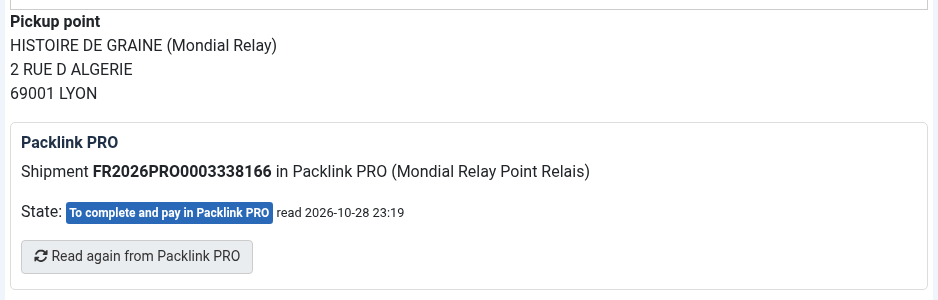
- Shows on the order page the shipment's reference in Packlink PRO, or the reason it could not be sent, and keeps it in the order's history.
- Brings back from Packlink PRO the shipment's state, the tracking number, the labels and the carrier's tracking events, on the order page, as soon as Packlink notifies the shop, and with the HikaShop cron or a button.
- Moves the order to "shipped" when the carrier has the parcel and, if you wish, to another status once it is delivered; your customer gets the tracking number and link on the order page and in the e-mail.
 How it works
- 1. At checkout, the plugin asks Packlink the price of the method's service for the cart's weight and size and the customer's address, and shows it with your markup.
- 2. Your customer chooses the Packlink method, and the pickup point for a service to a pickup point, and pays.
- 3. When the order is confirmed (or the status you choose), it appears in Packlink PRO as a shipment with everything filled in.
- 4. You pay and print the label in Packlink PRO, alone or with the other shipments of the day.
- 5. The plugin reads the shipment back: the order shows the label and the tracking number, moves to "shipped" when the carrier has the parcel, and your customer is told how to follow it.
Use
- Compatible with all the editions of HikaShop
- Compatible with Joomla and WordPress
- Requires the PHP cURL extension
- Requires a Packlink PRO account (free)
- The map of the pickup points uses OpenStreetMap
- No limit of time
- No limit of use
Changelog
1.0.0 on the 29th of October 2026
- First version.
€ 40,00


The add to cart button will appear once you select the values above
- Type
- Shipping
Access to updates included for 4 years
A tax rate (between 17% and 27% based on your country) will be added if your address is in the European Union and that you don't provide a valid VAT number or if your address is in France as per the European Union law.