
- Details
- Written by: Jerome
- Category: HikaSerial
- Hits: 10961
Generator Plugins
A generator plugin is a plugin which could dynamically create serials.
It could be a workflow plugin (require an order to extract some information) or a populate plugin which can populate your database.
Consumer Plugins
- Group Association Consumer
- Product Add Consumer
- Points Consumer
Generic Plugins
- Details
- Written by: Jerome
- Category: HikaSerial
- Hits: 22014
The random generator plugin is a basic serial generator.
It allow you to specify a serial format in his own syntax.
Parameters of the plugin
Name - The name for the generator. This name is only display in the backend and users won't see it.
Published - Does the generator could be use, or not.
Serial Size - This is a value which could be used in the serial format.
Serial Format - The format for the serial (see the serial format syntax)
Serial Examples - HikaSerial would display some serial examples for the last saved format.
Serial format syntax
The default format is [a-zA-Z0-9]{size}.
The format is composed of defined characters, random characters and variables.
For the moment, there is not a lot of variables which could be used but with the time, some parameters would appear.
When you can to have random characters, you have to use brackets []
- [a-z] would display one character between "a" (lowercase) and "z" (lowercase).
- [a-e] would display one character between "a" (lowercase) and "e" (lowercase).
- [0-9] would display one digit (number).
- [a-zA-Z] would display one character between "a" and "z" (lowercase or upercase).
- [0-9]{3} would display three digits (number).
- [aeiouy@#] would display one character from the list: a, e, i , o, u, y , "@", "#".
- [a-z]{size} would display several characters depending the value of the "serial size".
Some serial format examples:
- [a-z]{size}-[0-9]{size}-[a-z]{size}
- [A-Z]{2}[ABCDEFGHKLMNPQRSTUVXYZ0-9]{size}
- Details
- Written by: Jerome
- Category: HikaSerial
- Hits: 30079
The coupon generator plugin is a basic serial generator.
It allow you to specify a serial format in his own syntax.
Parameters of the plugin
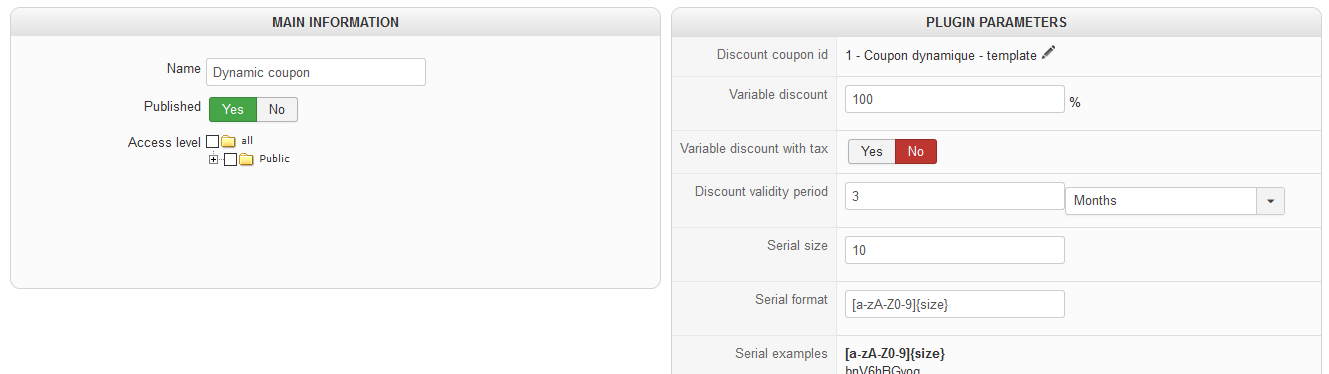
Name - The name for the generator. This name is only display in the backend and users won't see it.
Published - Does the generator could be use, or not.
Discount coupon id - This is a identifier of the template coupon.
Variable discount - If not empty, it would override the coupon flat amount by the percentage of the linked product price.
Discount validity period - The override of the coupon validity. If 0, no override.
Serial Size - This is a value which could be used in the serial format.
Serial Format - The format for the serial (see the serial format syntax)
Serial Examples - HikaSerial would display some serial examples for the last saved format.
Coupon template
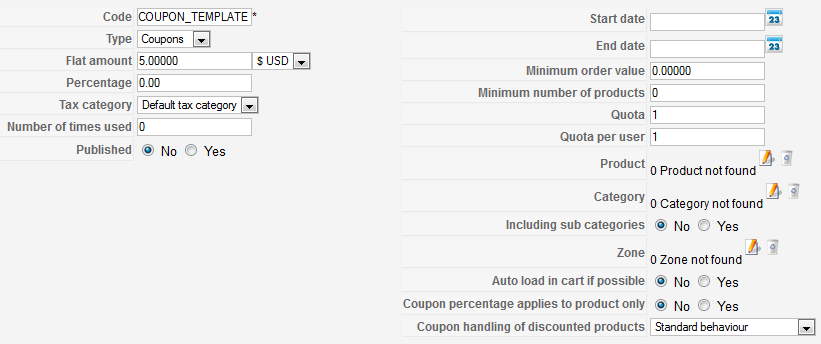
The Discount coupon id is the id of the HikaShop coupon that would be used as template.
Your coupon have to be unpublished. When the plugin would duplicate the coupon, it would automatically published it (and set the "used times" to zero).
Serial format syntax
The default format is [a-zA-Z0-9]{size}.
The format is composed of defined characters, random characters and variables.
For the moment, there is not a lot of variables which could be used but with the time, some parameters would appear.
When you can to have random characters, you have to use brackets []
- [a-z] would display one character between "a" (lowercase) and "z" (lowercase).
- [a-e] would display one character between "a" (lowercase) and "e" (lowercase).
- [0-9] would display one digit (number).
- [a-zA-Z] would display one character between "a" and "z" (lowercase or upercase).
- [0-9]{3} would display three digits (number).
- [aeiouy@#] would display one character from the list: a, e, i , o, u, y , "@", "#".
- [a-z]{size} would display several characters depending the value of the "serial size".
Some serial format examples:
- [a-z]{size}-[0-9]{size}-[a-z]{size}
- [A-Z]{2}[ABCDEFGHKLMNPQRSTUVXYZ0-9]{size}
- Details
- Written by: Jerome
- Category: HikaSerial
- Hits: 1567
This screen allow you to configure the plugin parameters.
- Details
- Written by: Jerome
- Category: HikaSerial
- Hits: 637
This view list all HikaSerial plugins and allow you to enable or disable them.
There are different types of HikaSerial plugin:
- Generator
- Consumer
- Plugin (generic)
If you click on a plugin, you would access to his configuration.
Most of HikaSerial plugin have "multiple" configuration ; it means that you can create different cases for the same plugin.
For example, you can create a lot of "Random Generators", each "random generator" would have a specific configuration with different sizes, different characters, etc.
In the same way, you can have multiple "coupon generator" for different HikaShop coupons. One generator would generate "$5 coupons" and another would generate "$10 coupons".
When you enter the multiple configuration screen, you would be able to create, copy, delete, publish and unpublish these sub-plugins.