
- Posts: 640
- Thank you received: 16
HikaMarket doesn't retain current category on save
- PeterChain
-
 Topic Author
- Offline
Less
More
13 years 3 months ago #107354
by PeterChain
HikaMarket doesn't retain current category on save was created by PeterChain
I need to fix an annoying behaviour of HikaMarket Product listing screen.
If I click a product of a subcategory for edit I get two different behaviours:
1. If I don't save contents and click the back button the listing stays in the subcategory I got on screen. THIS IS LOGICAL AND GOOD.
2. If I save changes the listing screen goes back to the main category which is WRONG WRONG WRONG because it prevent me to manage products on an organized manner.
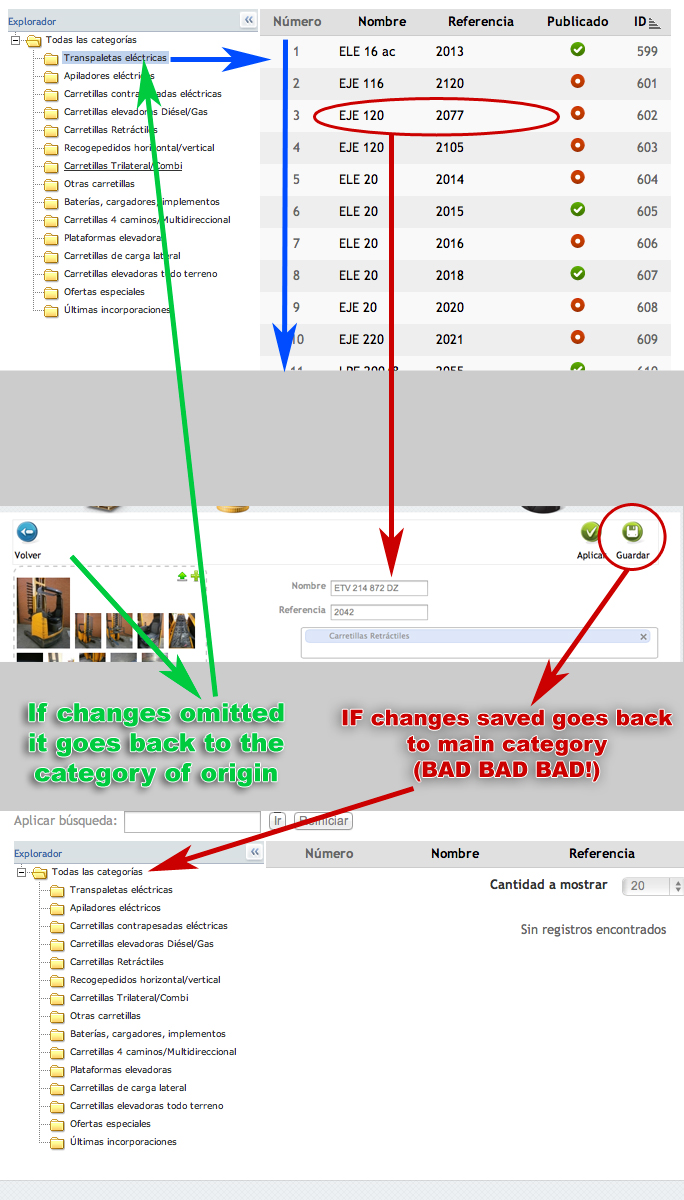
If I click a product of a subcategory for edit I get two different behaviours:
1. If I don't save contents and click the back button the listing stays in the subcategory I got on screen. THIS IS LOGICAL AND GOOD.
2. If I save changes the listing screen goes back to the main category which is WRONG WRONG WRONG because it prevent me to manage products on an organized manner.
Please Log in or Create an account to join the conversation.

13 years 3 months ago #107357
by Jerome
Jerome - Obsidev.com
HikaMarket & HikaSerial developer / HikaShop core dev team.
Replied by Jerome on topic HikaMarket doesn't retain current category on save
Hi,
Which version of HikaMarket Front-end are you using ?
Regards,
Which version of HikaMarket Front-end are you using ?
Regards,
Jerome - Obsidev.com
HikaMarket & HikaSerial developer / HikaShop core dev team.
Please Log in or Create an account to join the conversation.
- PeterChain
-
Topic Author
- Offline
Less
More
- Posts: 640
- Thank you received: 16
13 years 3 months ago #107363
by PeterChain
Replied by PeterChain on topic HikaMarket doesn't retain current category on save
You have the latest stable version : 1.1.3
with some code tweaks to make it simpler for the user. Those code tweaks were suggested by your support team under my petitions. The main one removes Unwanted categories like Brands.
with some code tweaks to make it simpler for the user. Those code tweaks were suggested by your support team under my petitions. The main one removes Unwanted categories like Brands.
Please Log in or Create an account to join the conversation.
13 years 3 months ago #107368
by Jerome
Jerome - Obsidev.com
HikaMarket & HikaSerial developer / HikaShop core dev team.
Replied by Jerome on topic HikaMarket doesn't retain current category on save
Hi,
You can download the latest verssion (1.1.4) which contains several fixes and new features.
( I will push this version to stable during this week )
In the view "productmarket | listing" change the code
By:
and the manufacturers won't be displayed in the list anymore.
Regards,
You can download the latest verssion (1.1.4) which contains several fixes and new features.
( I will push this version to stable during this week )
In the view "productmarket | listing" change the code
Code:
echo $this->shopCategoryType->displayTree('hikam_categories', $this->rootCategory, null, true, true);
Code:
echo $this->shopCategoryType->displayTree('hikam_categories', $this->rootCategory, array('product','vendor'), true, true);
Regards,
Jerome - Obsidev.com
HikaMarket & HikaSerial developer / HikaShop core dev team.
Please Log in or Create an account to join the conversation.
- PeterChain
-
Topic Author
- Offline
Less
More
- Posts: 640
- Thank you received: 16
13 years 3 months ago #107369
by PeterChain
Replied by PeterChain on topic HikaMarket doesn't retain current category on save
Sorry,
but you mean this "current category retention after saving" feature is inside your new features/corrections?
but you mean this "current category retention after saving" feature is inside your new features/corrections?
Please Log in or Create an account to join the conversation.
13 years 3 months ago #107394
by Jerome
Jerome - Obsidev.com
HikaMarket & HikaSerial developer / HikaShop core dev team.
Replied by Jerome on topic HikaMarket doesn't retain current category on save
Hi,
www.hikashop.com/en/hikashop/147-hikamarket-change-log.html
The product listing has been improved but I didn't write all modifications.
But I can't reproduce your problem in my local website (with the latest package).
You can see and test the new version in our demo website.
Regards,
www.hikashop.com/en/hikashop/147-hikamarket-change-log.html
The product listing has been improved but I didn't write all modifications.
But I can't reproduce your problem in my local website (with the latest package).
You can see and test the new version in our demo website.
Regards,
Jerome - Obsidev.com
HikaMarket & HikaSerial developer / HikaShop core dev team.
Please Log in or Create an account to join the conversation.
- PeterChain
-
Topic Author
- Offline
Less
More
- Posts: 640
- Thank you received: 16
13 years 3 months ago #107398
by PeterChain
Replied by PeterChain on topic HikaMarket doesn't retain current category on save
Product publish/unpublish/delete in listing
I upgraded but I can't see nowhere this feature stated in the Improvements sections of the change log.
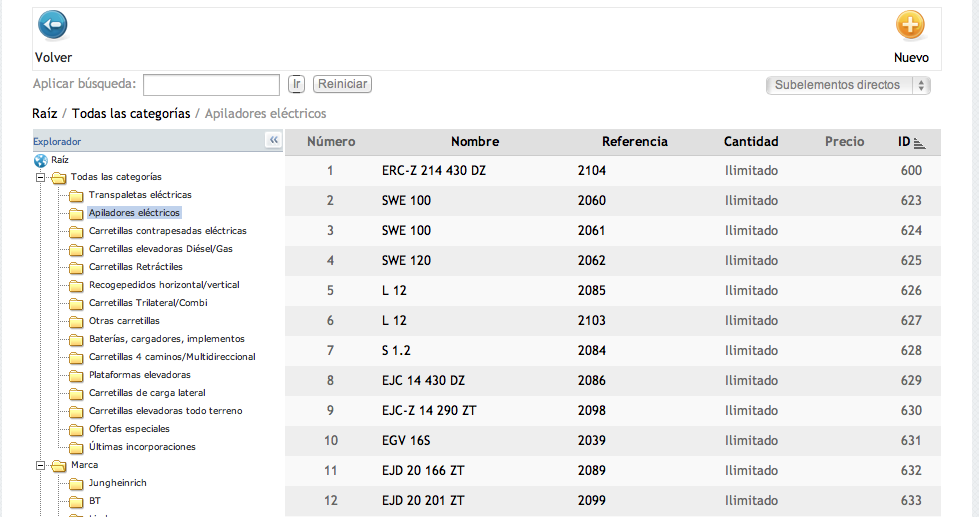
I upgraded but I can't see nowhere this feature stated in the Improvements sections of the change log.
Please Log in or Create an account to join the conversation.
13 years 3 months ago #107399
by Jerome
Jerome - Obsidev.com
HikaMarket & HikaSerial developer / HikaShop core dev team.
Replied by Jerome on topic HikaMarket doesn't retain current category on save
Hi,
Sure, you have a view override.
Regards,
Sure, you have a view override.
Regards,
Jerome - Obsidev.com
HikaMarket & HikaSerial developer / HikaShop core dev team.
Please Log in or Create an account to join the conversation.
- PeterChain
-
Topic Author
- Offline
Less
More
- Posts: 640
- Thank you received: 16
13 years 3 months ago #107402
by PeterChain
Replied by PeterChain on topic HikaMarket doesn't retain current category on save
I never had it before. I just had some hack in the original view file that is gone after the upgrade, so I understand the view file has been replaced by the upgrade.
I can see published icon when listing categories, but not in products. Are products also supposed to show the publish/unpublish?
If so, where should a override file be located? (in the case I forgot or didn't realize of something)
I can see published icon when listing categories, but not in products. Are products also supposed to show the publish/unpublish?
If so, where should a override file be located? (in the case I forgot or didn't realize of something)
Please Log in or Create an account to join the conversation.
- PeterChain
-
Topic Author
- Offline
Less
More
- Posts: 640
- Thank you received: 16
13 years 3 months ago #107405
by PeterChain
Replied by PeterChain on topic HikaMarket doesn't retain current category on save
CONFIRMED THAT I HAVE NO OVERRIDE.
Whatever I do in listing.php inside /components/com_hikamarket/views/productmarket/tmpl/listing.php is affecting the output, therefore I understand there is no override.
Can you confirm if this feature is only intended for categories?
Whatever I do in listing.php inside /components/com_hikamarket/views/productmarket/tmpl/listing.php is affecting the output, therefore I understand there is no override.
Can you confirm if this feature is only intended for categories?
Please Log in or Create an account to join the conversation.
13 years 3 months ago #107502
by Jerome
Jerome - Obsidev.com
HikaMarket & HikaSerial developer / HikaShop core dev team.
Replied by Jerome on topic HikaMarket doesn't retain current category on save
Hi,
Before in this thread, I recommend you to make a view override.
Editing directly the HikaShop/HikaMarket views are not recommended, it is possible that, after the modification, the website can't edit anymore the file. So it is possible that your view is not up to date.
You have to check the begin of the file, there is a "header" with the HikaMarket version number.
You can check the demo website in order to see how the latest version works.
demo.hikashop.com/index.php?option=com_h...4&Itemid=844&lang=en
If you do not have the same display with the same version (1.1.4) it means that your view is not up-to-date.
So no, I can't confirm that this feature is only for categories because it is for products too.
I think that your view is not up to date if you do not have this new column. If you delete the file and re-install HikaMarket, it will be restored (by deleting the file, some special access file will be delete too).
After the view restoration, please use the HikaShop "Display > View" listing (using the filter "HikaMarket" at the top right) in order to make some view overrides.
At this moment you will use the HikaShop system which will keep your modifications with updates and allow you to remove easily an override if required.
Regards,
Before in this thread, I recommend you to make a view override.
Editing directly the HikaShop/HikaMarket views are not recommended, it is possible that, after the modification, the website can't edit anymore the file. So it is possible that your view is not up to date.
You have to check the begin of the file, there is a "header" with the HikaMarket version number.
You can check the demo website in order to see how the latest version works.
demo.hikashop.com/index.php?option=com_h...4&Itemid=844&lang=en
If you do not have the same display with the same version (1.1.4) it means that your view is not up-to-date.
So no, I can't confirm that this feature is only for categories because it is for products too.
I think that your view is not up to date if you do not have this new column. If you delete the file and re-install HikaMarket, it will be restored (by deleting the file, some special access file will be delete too).
After the view restoration, please use the HikaShop "Display > View" listing (using the filter "HikaMarket" at the top right) in order to make some view overrides.
At this moment you will use the HikaShop system which will keep your modifications with updates and allow you to remove easily an override if required.
Regards,
Jerome - Obsidev.com
HikaMarket & HikaSerial developer / HikaShop core dev team.
Please Log in or Create an account to join the conversation.
- PeterChain
-
Topic Author
- Offline
Less
More
- Posts: 640
- Thank you received: 16
13 years 3 months ago - 13 years 3 months ago #107641
by PeterChain
Replied by PeterChain on topic HikaMarket doesn't retain current category on save
OK.
FINALLY I got the problem!!!!!!!!!!
It is not about template overrides or nothing suggested in this thread. I THINK THIS CAN BE NAMED A BUG, and I hope so because I have spent almost 10 hours trying to fix it and find my mistake.
The column actions gets rendered only when all fields en HikaMarket->Main->Access Level -> Product -> Edit ARE ENABLEd.
If I disable a single field I loose the actions column!
This took me several reinstalls and experiments to figure it out as it has (as far as I know) any logical connection.
Please I NEED A fix as soon as possible for this.
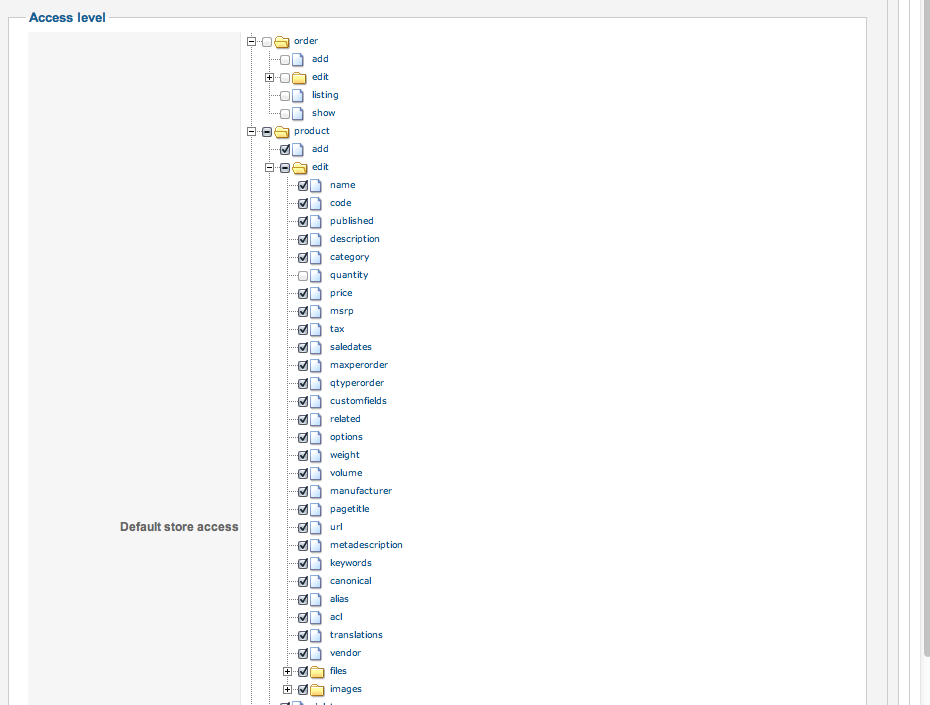
UPDATE: Doesn't matter what field I uncheck, all of them remove the Actions Columns in the listing view.
FINALLY I got the problem!!!!!!!!!!
It is not about template overrides or nothing suggested in this thread. I THINK THIS CAN BE NAMED A BUG, and I hope so because I have spent almost 10 hours trying to fix it and find my mistake.
The column actions gets rendered only when all fields en HikaMarket->Main->Access Level -> Product -> Edit ARE ENABLEd.
If I disable a single field I loose the actions column!
This took me several reinstalls and experiments to figure it out as it has (as far as I know) any logical connection.
Please I NEED A fix as soon as possible for this.
UPDATE: Doesn't matter what field I uncheck, all of them remove the Actions Columns in the listing view.
Last edit: 13 years 3 months ago by PeterChain.
Please Log in or Create an account to join the conversation.
13 years 3 months ago #107686
by Jerome
Jerome - Obsidev.com
HikaMarket & HikaSerial developer / HikaShop core dev team.
Replied by Jerome on topic HikaMarket doesn't retain current category on save
Jerome - Obsidev.com
HikaMarket & HikaSerial developer / HikaShop core dev team.
Please Log in or Create an account to join the conversation.
- PeterChain
-
Topic Author
- Offline
Less
More
- Posts: 640
- Thank you received: 16
13 years 3 months ago #108634
by PeterChain
Replied by PeterChain on topic HikaMarket doesn't retain current category on save
After updating HikaMarket and HikaShop to their latest stable versions the problem persists.
If I save a product in HikaMarket the listing page comes back to the Main Category and doesn't stay in the last selected category, let's say, where my product was coming from.
This is inconvenient and unrealistic for the daily work as it doesn't allow to make serial review of you catalog.
Please try to fix it!
Thank you.
If I save a product in HikaMarket the listing page comes back to the Main Category and doesn't stay in the last selected category, let's say, where my product was coming from.
This is inconvenient and unrealistic for the daily work as it doesn't allow to make serial review of you catalog.
Please try to fix it!
Thank you.
Please Log in or Create an account to join the conversation.
13 years 3 months ago #108671
by Jerome
Jerome - Obsidev.com
HikaMarket & HikaSerial developer / HikaShop core dev team.
Replied by Jerome on topic HikaMarket doesn't retain current category on save
Hi,
I can't reproduce your problem in my local website and I don't know why.
But I finally reproduced it in the demo website. So I found a patch for it.
Replace in the file "components/com_hikamarket/controllers/product.php":
By:
Now I know what is the real problem, I will see to make a nicer patch for the next package.
But with this, it will work.
Regards,
I can't reproduce your problem in my local website and I don't know why.
But I finally reproduced it in the demo website. So I found a patch for it.
Replace in the file "components/com_hikamarket/controllers/product.php":
Code:
if(!empty($cancel_action) && !empty($product_id)) {
$app = JFactory::getApplication();
switch($cancel_action) {
case 'product':
$app->redirect( hikamarket::completeLink('shop.product&task=show&cid='.$product_id, false, true) );
break;
}
}
return $this->listing();
Code:
if(!empty($cancel_action) && !empty($product_id)) {
$app = JFactory::getApplication();
switch($cancel_action) {
case 'product':
$app->redirect( hikamarket::completeLink('shop.product&task=show&cid='.$product_id, false, true) );
break;
}
}
JRequest::setVar('cid', null);
return $this->listing();
But with this, it will work.
Regards,
Jerome - Obsidev.com
HikaMarket & HikaSerial developer / HikaShop core dev team.
The following user(s) said Thank You: PeterChain
Please Log in or Create an account to join the conversation.
- PeterChain
-
Topic Author
- Offline
Less
More
- Posts: 640
- Thank you received: 16
13 years 3 months ago #108689
by PeterChain
Replied by PeterChain on topic HikaMarket doesn't retain current category on save
SOLVED!
Please Log in or Create an account to join the conversation.
- PeterChain
-
Topic Author
- Offline
Less
More
- Posts: 640
- Thank you received: 16
11 years 8 months ago #187815
by PeterChain
Replied by PeterChain on topic HikaMarket doesn't retain current category on save
I'm sad to inform that this problem is happening again. After editing any product form a second page in a category listing in the frontend edition once I save the proudct it gets back to the first page of the listing, it stays in the same category but if I was editing product 61 and I am viewing 20 products per page then I'm brought back to the first page...
I use the last HikaShop 2.3.5 and the HikaMarket 1.5.1.
Joomla 3.3.6
Please could you give this some priority? is really terrible when you edit long list of products one by one to land always to the first page.
Thank you.
I use the last HikaShop 2.3.5 and the HikaMarket 1.5.1.
Joomla 3.3.6
Please could you give this some priority? is really terrible when you edit long list of products one by one to land always to the first page.
Thank you.
Please Log in or Create an account to join the conversation.
11 years 8 months ago #187970
by Jerome
Jerome - Obsidev.com
HikaMarket & HikaSerial developer / HikaShop core dev team.
Replied by Jerome on topic HikaMarket doesn't retain current category on save
Hi,
The pagination is stored in the user session (like the category id).
So unless you perform some specific tasks to change the pagination number in the user session (for the same session pagination key), when you save a product you return to the page you were looking at.
I perform several tests and I couldn't reproduce your issue ; I still got the same page and the same limit that I got previously.
But the pagination can be reset if some data is sent though the page, like "search" or "limit".
We might see to clean them like we clean the "cid" variable (see my previous post) but we have to know if it is really like that you "break" the pagination in the session.
Regards,
The pagination is stored in the user session (like the category id).
So unless you perform some specific tasks to change the pagination number in the user session (for the same session pagination key), when you save a product you return to the page you were looking at.
I perform several tests and I couldn't reproduce your issue ; I still got the same page and the same limit that I got previously.
But the pagination can be reset if some data is sent though the page, like "search" or "limit".
We might see to clean them like we clean the "cid" variable (see my previous post) but we have to know if it is really like that you "break" the pagination in the session.
Regards,
Jerome - Obsidev.com
HikaMarket & HikaSerial developer / HikaShop core dev team.
Please Log in or Create an account to join the conversation.
- PeterChain
-
Topic Author
- Offline
Less
More
- Posts: 640
- Thank you received: 16
11 years 8 months ago #188004
by PeterChain
Replied by PeterChain on topic HikaMarket doesn't retain current category on save
Ok, I'll do further testing and come back to you with detailed description of circumstances and procedures.
This is happening under localhost in a Mac with MAMP and there is no directives set yet for the cookies settings in the Global Configuration.
Could this be a reason?
This is happening under localhost in a Mac with MAMP and there is no directives set yet for the cookies settings in the Global Configuration.
Could this be a reason?
Please Log in or Create an account to join the conversation.
11 years 8 months ago #188009
by Jerome
Jerome - Obsidev.com
HikaMarket & HikaSerial developer / HikaShop core dev team.
Replied by Jerome on topic HikaMarket doesn't retain current category on save
Hi,
No, it can't.
The simple fact that you are still login in the website indicate that you got a user session.
Regards,
No, it can't.
The simple fact that you are still login in the website indicate that you got a user session.
Regards,
Jerome - Obsidev.com
HikaMarket & HikaSerial developer / HikaShop core dev team.
Please Log in or Create an account to join the conversation.
Moderators: Obsidev
Time to create page: 0.272 seconds