

- Posts: 324
- Thank you received: 4
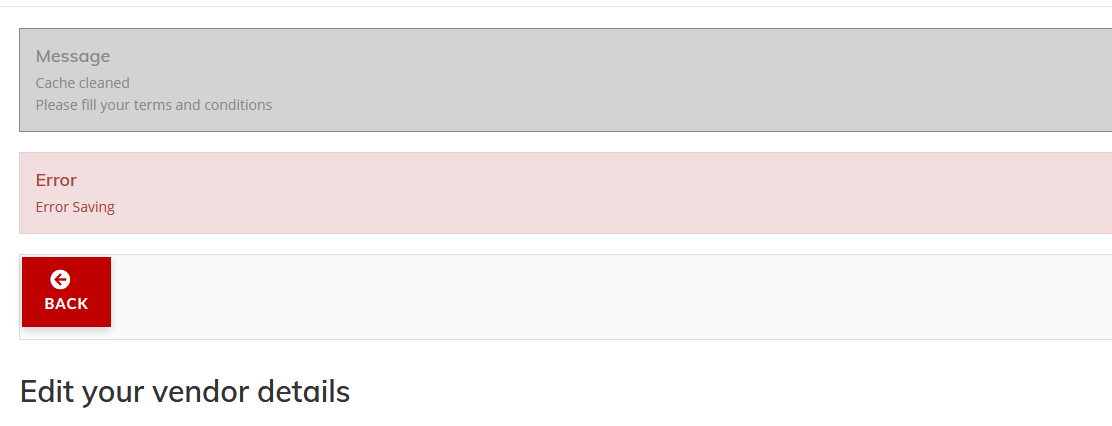
Error - Please fill your terms and conditions
6 years 2 months ago - 6 years 2 months ago #321976
by DogPeople
Error - Please fill your terms and conditions was created by DogPeople
-- HikaShop version -- : 4.3.0
-- HikaMarket version -- : 3.1.0
Hi,
Just tried to update the vendor location from my vendor dashboard, and I got "Error saving."
I tried to edit the description, and got the same error.
Could you please advise how to fix this?
Edit: I just checked the error log files, and I found this:
#Fields: datetime priority clientip category message
2020-07-13T05:44:47+00:00 INFO 184.64.117.57 joomlafailure Username and password do not match or you do not have an account yet.
2020-07-13T17:54:10+00:00 INFO 184.64.117.57 joomlafailure Username and password do not match or you do not have an account yet.
I definitely have a user account, so not sure what I am doing wrong?
Update: I created a test vendor, and that one I can save changes properly. So it's definitely some sort of setting somewhere! I have added my vendor account, and I have assigned myself to the Joomla Vendor group, which is the one assigned to vendors.
Thanks.
-- HikaMarket version -- : 3.1.0
Hi,
Just tried to update the vendor location from my vendor dashboard, and I got "Error saving."
I tried to edit the description, and got the same error.
Could you please advise how to fix this?
Edit: I just checked the error log files, and I found this:
#Fields: datetime priority clientip category message
2020-07-13T05:44:47+00:00 INFO 184.64.117.57 joomlafailure Username and password do not match or you do not have an account yet.
2020-07-13T17:54:10+00:00 INFO 184.64.117.57 joomlafailure Username and password do not match or you do not have an account yet.
I definitely have a user account, so not sure what I am doing wrong?
Update: I created a test vendor, and that one I can save changes properly. So it's definitely some sort of setting somewhere! I have added my vendor account, and I have assigned myself to the Joomla Vendor group, which is the one assigned to vendors.
Thanks.
Last edit: 6 years 2 months ago by DogPeople.
Please Log in or Create an account to join the conversation.

6 years 2 months ago #321985
by Jerome
Jerome - Obsidev.com
HikaMarket & HikaSerial developer / HikaShop core dev team.
Replied by Jerome on topic Error - Please fill your terms and conditions
Hello,
In top of your screenshot you can see the message "Please fill your terms and conditions".
It means that your configured that field to be required and you need to set a value for it if you want to save the vendor.
Regards,
In top of your screenshot you can see the message "Please fill your terms and conditions".
It means that your configured that field to be required and you need to set a value for it if you want to save the vendor.
Regards,
Jerome - Obsidev.com
HikaMarket & HikaSerial developer / HikaShop core dev team.
Please Log in or Create an account to join the conversation.
6 years 2 months ago #322018
by DogPeople
Replied by DogPeople on topic Error - Please fill your terms and conditions
Hi,
Thanks. I figured that out afterwards too.
Weirdly, it seems like MY vendor account has to be edited from the Hikashop dashboard, but I can do other vendor accounts on the frontend.
I still can't get the location maps on ANY to work though. Any idea how to fix that?
Regards,
Tamara
Thanks. I figured that out afterwards too.
Weirdly, it seems like MY vendor account has to be edited from the Hikashop dashboard, but I can do other vendor accounts on the frontend.
I still can't get the location maps on ANY to work though. Any idea how to fix that?
Regards,
Tamara
Please Log in or Create an account to join the conversation.
6 years 2 months ago #322019
by Jerome
Jerome - Obsidev.com
HikaMarket & HikaSerial developer / HikaShop core dev team.
Replied by Jerome on topic Error - Please fill your terms and conditions
Hello,
Please do not duplicate your questions in multiple posts.
www.hikashop.com/forum/19-hikamarket/900...ing-page.html#322012
Regards,
Please do not duplicate your questions in multiple posts.
www.hikashop.com/forum/19-hikamarket/900...ing-page.html#322012
Regards,
Jerome - Obsidev.com
HikaMarket & HikaSerial developer / HikaShop core dev team.
Please Log in or Create an account to join the conversation.
Moderators: Obsidev
Time to create page: 0.208 seconds