

- Posts: 324
- Thank you received: 4
Problems with Stripe Connect
5 years 5 months ago - 5 years 5 months ago #333686
by DogPeople
Problems with Stripe Connect was created by DogPeople
Hi,
When I test my Stripe Connect Oauth URL, which is connect.stripe.com/oauth/authorize?respo...VBI&scope=read_write it works fine.
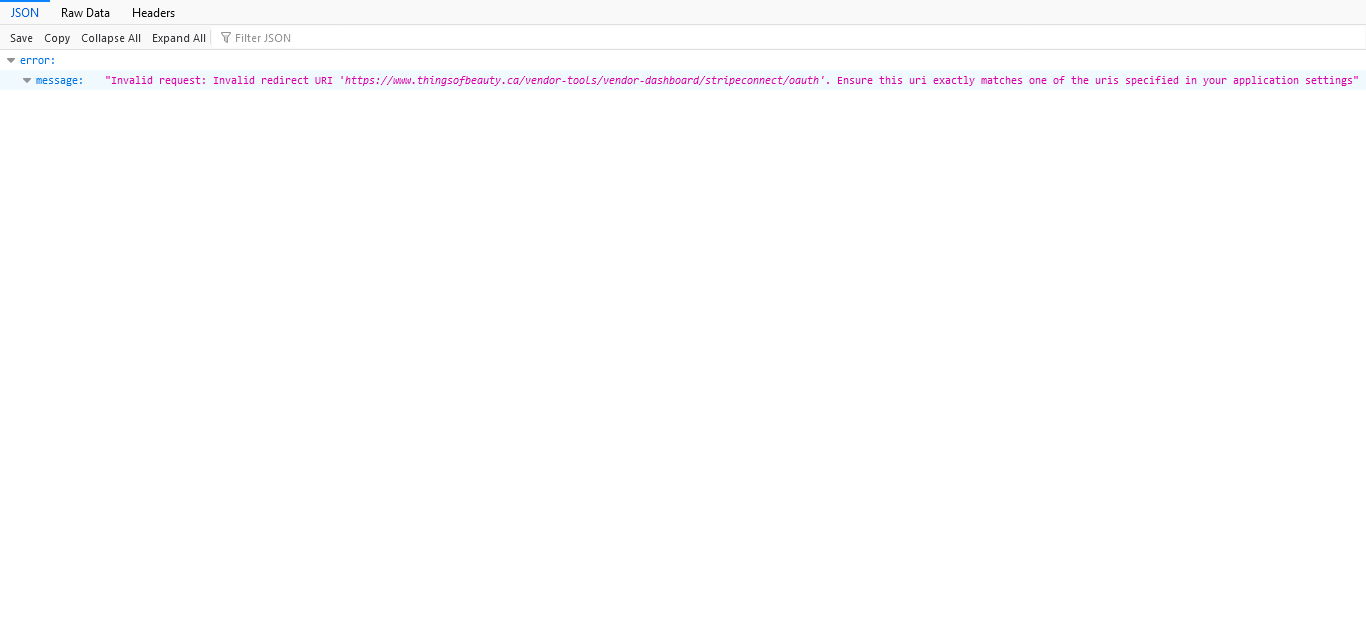
However, when It try to access it from my vendor dashboard using the Stripe Connect button, I get the attached error.
Since the Stripe side is working, I assume this is a problem on the Hikamarket side?
Please advise ASAP. Thanks.
EDIT: I had another look, and the link that I get form Stripe is
connect.stripe.com/oauth/authorize?respo...VBI&scope=read_write
YOUR plugin generates this when I click on Stripe connect:
connect.stripe.com/oauth/v2/authorize?sc...I&response_type=code
They seem to be VERY different. I have passed both on to Stripe's help team, and they keep telling me to use THEIR URL, but of course, I can't. So this seems to be an issue with your plugin, which does not send me to the correct place.
I need this to be fixed pretty much immediately. Thanks.
When I test my Stripe Connect Oauth URL, which is connect.stripe.com/oauth/authorize?respo...VBI&scope=read_write it works fine.
However, when It try to access it from my vendor dashboard using the Stripe Connect button, I get the attached error.
Since the Stripe side is working, I assume this is a problem on the Hikamarket side?
Please advise ASAP. Thanks.
EDIT: I had another look, and the link that I get form Stripe is
connect.stripe.com/oauth/authorize?respo...VBI&scope=read_write
YOUR plugin generates this when I click on Stripe connect:
connect.stripe.com/oauth/v2/authorize?sc...I&response_type=code
They seem to be VERY different. I have passed both on to Stripe's help team, and they keep telling me to use THEIR URL, but of course, I can't. So this seems to be an issue with your plugin, which does not send me to the correct place.
I need this to be fixed pretty much immediately. Thanks.
Last edit: 5 years 5 months ago by DogPeople.
Please Log in or Create an account to join the conversation.

5 years 5 months ago #333724
by Jerome
Jerome - Obsidev.com
HikaMarket & HikaSerial developer / HikaShop core dev team.
Replied by Jerome on topic Problems with Stripe Connect
Hello,
Without the redirect URI, Stripe will redirect the user to an URL you have configured for the application.
But in order to finalize the "connection" with the plugin, it requires a redirection to a special URL so the plugin will be triggered and will catch the Stripe response.
It would be better to configure the application to authorize the plugin URL in your application settings.
So it will be allowed by the Stripe platform and the plugin will be able to perform its task.
Regards,
Without the redirect URI, Stripe will redirect the user to an URL you have configured for the application.
But in order to finalize the "connection" with the plugin, it requires a redirection to a special URL so the plugin will be triggered and will catch the Stripe response.
It would be better to configure the application to authorize the plugin URL in your application settings.
So it will be allowed by the Stripe platform and the plugin will be able to perform its task.
Regards,
Jerome - Obsidev.com
HikaMarket & HikaSerial developer / HikaShop core dev team.
Please Log in or Create an account to join the conversation.
5 years 5 months ago #333728
by DogPeople
Replied by DogPeople on topic Problems with Stripe Connect
Hi,
Um... I just put in the client ID, public and secret keys, as required in the plugin.
It's generating this crazy URL on it's own. That's kind of why I contacted you?
How do I make your plugin use the correct URL? I thought that's what this thing does? There's no documentation, so I had to ask here.
Thanks.
Um... I just put in the client ID, public and secret keys, as required in the plugin.
It's generating this crazy URL on it's own. That's kind of why I contacted you?
How do I make your plugin use the correct URL? I thought that's what this thing does? There's no documentation, so I had to ask here.
Thanks.
Please Log in or Create an account to join the conversation.
5 years 5 months ago #333730
by DogPeople
Replied by DogPeople on topic Problems with Stripe Connect
Maybe we should do this a different way, in the absence of documentation.
Can you tell me, step by step, how to make your plugins work? I have connected with Stripe, and everything works on their side, so clearly there's a configuration problem with your plugin, and since there is no documentation that states how to do this, I need you to tell me.
It's not working, and it's DEFINITELY because of the Hikashop / Hikamarket side, because Stripe Connect is working 100% from their site.
Thanks.
Can you tell me, step by step, how to make your plugins work? I have connected with Stripe, and everything works on their side, so clearly there's a configuration problem with your plugin, and since there is no documentation that states how to do this, I need you to tell me.
It's not working, and it's DEFINITELY because of the Hikashop / Hikamarket side, because Stripe Connect is working 100% from their site.
Thanks.
Please Log in or Create an account to join the conversation.
5 years 5 months ago - 5 years 5 months ago #333732
by DogPeople
Replied by DogPeople on topic Problems with Stripe Connect
Also, I should add that the URL from Stripe is the OAuth test URL from their site.
My site is using the URL generated from YOUR plugin, which does not work.
So I really need you to explain how I should fix this. I've put in the client ID and API keys, but it's STILL NOT WORKING.
YOUR plugin is generating a URL that does not work.
My site is using the URL generated from YOUR plugin, which does not work.
So I really need you to explain how I should fix this. I've put in the client ID and API keys, but it's STILL NOT WORKING.
YOUR plugin is generating a URL that does not work.
Last edit: 5 years 5 months ago by DogPeople.
Please Log in or Create an account to join the conversation.
5 years 4 months ago #333733
by Jerome
Jerome - Obsidev.com
HikaMarket & HikaSerial developer / HikaShop core dev team.
Replied by Jerome on topic Problems with Stripe Connect
Hello,
When I'm talking the Stripe Application, I'm talking about your Stripe dashboard :
pasteboard.co/K7Gxwsi.png
The connect URL give you that result
Which means that you need to configure the Stripe application (in the Stripe Dashboard) in order to add that URL in the authorized URL.
I'm sorry if Stripe added more security measures for that URL filtering but the part of the Stripe Dashboard/Website evolve with Stripe and its documentation.
Stripe Connect is working with HikaShop and HikaMarket since there are a lot of websites in production.
Regards,
When I'm talking the Stripe Application, I'm talking about your Stripe dashboard :
pasteboard.co/K7Gxwsi.png
The connect URL give you that result
Code:
{"error":{"message":"Invalid request: Invalid redirect URI 'https://www.thingsofbeauty.ca/vendor-tools/vendor-dashboard/stripeconnect/oauth'. Ensure this uri exactly matches one of the uris specified in your application settings"}}
I'm sorry if Stripe added more security measures for that URL filtering but the part of the Stripe Dashboard/Website evolve with Stripe and its documentation.
Stripe Connect is working with HikaShop and HikaMarket since there are a lot of websites in production.
Regards,
Jerome - Obsidev.com
HikaMarket & HikaSerial developer / HikaShop core dev team.
Please Log in or Create an account to join the conversation.
5 years 4 months ago #333753
by DogPeople
Replied by DogPeople on topic Problems with Stripe Connect
Thanks. Maybe you could put that in your documentation? And make some for this plugin? Would be nice.
Please Log in or Create an account to join the conversation.
5 years 4 months ago #333754
by DogPeople
Replied by DogPeople on topic Problems with Stripe Connect
Also, just did that. Copied the URL from the error, added it to Stripe...

Didn't work.
Please advise. VERY frustrating. Thanks.
Didn't work.
Please advise. VERY frustrating. Thanks.
Please Log in or Create an account to join the conversation.
5 years 4 months ago #333758
by DogPeople
Replied by DogPeople on topic Problems with Stripe Connect
Please Log in or Create an account to join the conversation.
5 years 4 months ago #333782
by DogPeople
Replied by DogPeople on topic Problems with Stripe Connect
Has there been any progress on this? I am only using Stripe on my site, so that I can have adaptive payments, so until this WORKS I can't make my site live.
I have double checked all the settings I have any control over, and it doesn't seem like there's anything I can do to fix this.
I have double checked all the settings I have any control over, and it doesn't seem like there's anything I can do to fix this.
Please Log in or Create an account to join the conversation.

5 years 4 months ago #333817
by nicolas
Replied by nicolas on topic Problems with Stripe Connect
Hi,
The Stripe Connect plugin is working for many other users. So there is nothing to fix in the plugin. It's working too. I think the issue is a setup issue, not a bug.
If you entered the URI in the redirects area of your account settings as I can see in the screenshots of www.hikashop.com/forum/19-hikamarket/902...-connect.html#333754 but it still complains of that URI being invalid, then I can think of 2 things why it doesn't work:
- You might have added that URI to the wrong Stripe account (one of the vendors, and not one of the main account linked to Stripe Connect)
- You might have added that URI for the "test data" mode instead of the live mode while you configured the live API keys on your website, or vice-versa
- The "OAuth settings" setting above the "Redirects" setting where you entered the URI might need to be switched
So I would recommend you to check these different points.
The support of Stripe should be able to help you with these. And if it's not one of these, then I don't see how that's possible. You should request help from a higher level of support at Stripe as it requires someone to properly look into the way the account is setup.
The Stripe Connect plugin is working for many other users. So there is nothing to fix in the plugin. It's working too. I think the issue is a setup issue, not a bug.
If you entered the URI in the redirects area of your account settings as I can see in the screenshots of www.hikashop.com/forum/19-hikamarket/902...-connect.html#333754 but it still complains of that URI being invalid, then I can think of 2 things why it doesn't work:
- You might have added that URI to the wrong Stripe account (one of the vendors, and not one of the main account linked to Stripe Connect)
- You might have added that URI for the "test data" mode instead of the live mode while you configured the live API keys on your website, or vice-versa
- The "OAuth settings" setting above the "Redirects" setting where you entered the URI might need to be switched
So I would recommend you to check these different points.
The support of Stripe should be able to help you with these. And if it's not one of these, then I don't see how that's possible. You should request help from a higher level of support at Stripe as it requires someone to properly look into the way the account is setup.
Please Log in or Create an account to join the conversation.
5 years 4 months ago #333818
by DogPeople
Replied by DogPeople on topic Problems with Stripe Connect
Nope. It's entered into my account. I don't have any vendors yet, since the site can't be live, because Stripe Connect is not working. So....
Nope. Stripe settings are live.
Nope. If I turn off OAuth, I get an error that OAuth is not live.
Stripe said the following:
Hi there,
Thank you for chatting with me earlier. I wanted to quickly follow up with you in case our chat ended prematurely and if there were any outstanding questions.
After reaching a specialized team regarding your issue, they told me that you'll need to inspect the code on your website to generate links that don't include the redirect URI. Either that or the URI needs to exactly match that of the one in your Dashboard settings.
I'm happy to continue where our chat left off and help. Just reply to this email to get in touch with me directly, or feel free to reach out to us through chat [0] or phone [1] for further help with one of my colleagues.
Looking forward to helping,
Javier
[0] Chat: support.stripe.com/contact/chat
[1] Phone: support.stripe.com/contact/call
I spoke to them before I contacted you.
In the absence of ANY documentation indicating how your plugin should be set up, and since none of these things apply, I am still waiting for a solution that works.
Thanks.
Nope. Stripe settings are live.
Nope. If I turn off OAuth, I get an error that OAuth is not live.
Stripe said the following:
Hi there,
Thank you for chatting with me earlier. I wanted to quickly follow up with you in case our chat ended prematurely and if there were any outstanding questions.
After reaching a specialized team regarding your issue, they told me that you'll need to inspect the code on your website to generate links that don't include the redirect URI. Either that or the URI needs to exactly match that of the one in your Dashboard settings.
I'm happy to continue where our chat left off and help. Just reply to this email to get in touch with me directly, or feel free to reach out to us through chat [0] or phone [1] for further help with one of my colleagues.
Looking forward to helping,
Javier
[0] Chat: support.stripe.com/contact/chat
[1] Phone: support.stripe.com/contact/call
I spoke to them before I contacted you.
In the absence of ANY documentation indicating how your plugin should be set up, and since none of these things apply, I am still waiting for a solution that works.
Thanks.
Please Log in or Create an account to join the conversation.
5 years 4 months ago #333819
by DogPeople
Replied by DogPeople on topic Problems with Stripe Connect
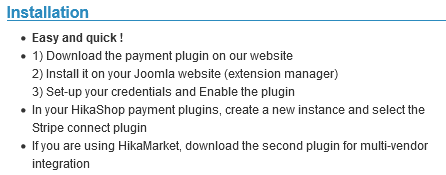
I would like to point out that the product page for this plugin says "easy and quick." This is neither.
Please Log in or Create an account to join the conversation.
5 years 4 months ago #333821
by nicolas
Replied by nicolas on topic Problems with Stripe Connect
Hi,
Did you tell them that the URI that you entered in your Dashboard settings is already exactly the URI that the error message from Stripe says needs to be added with your previous screenshots from www.hikashop.com/forum/19-hikamarket/902...-connect.html#333754 ?
Because, if the error messages says to do something, and you do it and it still complains about it, then there is a problem with either what you did or the error message.
And both things are on Stripe's end...
I'm sorry for the issue you have with your Stripe account setup but I can't do much about it from here.
If Stripe support can't help you with this, all I can propose is to refund you for the purchase of that plugin as per our money back policy:
www.hikashop.com/money-back-policy.html
Did you tell them that the URI that you entered in your Dashboard settings is already exactly the URI that the error message from Stripe says needs to be added with your previous screenshots from www.hikashop.com/forum/19-hikamarket/902...-connect.html#333754 ?
Because, if the error messages says to do something, and you do it and it still complains about it, then there is a problem with either what you did or the error message.
And both things are on Stripe's end...
I'm sorry for the issue you have with your Stripe account setup but I can't do much about it from here.
If Stripe support can't help you with this, all I can propose is to refund you for the purchase of that plugin as per our money back policy:
www.hikashop.com/money-back-policy.html
Please Log in or Create an account to join the conversation.
5 years 4 months ago #333823
by DogPeople
Replied by DogPeople on topic Problems with Stripe Connect
I am talking to them right now.
All I can say is that this is very much NOT as advertised.
All I can say is that this is very much NOT as advertised.
Please Log in or Create an account to join the conversation.
5 years 4 months ago #333824
by DogPeople
Replied by DogPeople on topic Problems with Stripe Connect
Stripe has escalated this to their tech team. I made them a video to show them the backend of my site, and how the plugin works from the Joomla backend.
They suggested that I might add you as a team member on my Stripe account, so that you can collaborate directly with them? It seems like that might be a better idea than me trying to be the middle man?
If so, can you provide an email account that I can send the invitation to? I would delete it and the team membership once this is figured out.
But if I am having trouble, then I am probably not the only person, and this might help you to develop some comprehensive documentation for the plugin.
They suggested that I might add you as a team member on my Stripe account, so that you can collaborate directly with them? It seems like that might be a better idea than me trying to be the middle man?
If so, can you provide an email account that I can send the invitation to? I would delete it and the team membership once this is figured out.
But if I am having trouble, then I am probably not the only person, and this might help you to develop some comprehensive documentation for the plugin.
Please Log in or Create an account to join the conversation.
5 years 4 months ago #333855
by Jerome
Jerome - Obsidev.com
HikaMarket & HikaSerial developer / HikaShop core dev team.
Replied by Jerome on topic Problems with Stripe Connect
Hello,
The plugin is using the OAuth reference API, you can find the technical documentation here :
stripe.com/docs/connect/oauth-reference
stripe.com/docs/connect/oauth-standard-accounts
Regarding your screenshots, I can see in your Stripe dashboard settings that the URL have a final single quote in the URL.
While the correct URL should not contain that character :
I do think that if you remove that character, it should work better.
Regards,
The plugin is using the OAuth reference API, you can find the technical documentation here :
stripe.com/docs/connect/oauth-reference
stripe.com/docs/connect/oauth-standard-accounts
Regarding your screenshots, I can see in your Stripe dashboard settings that the URL have a final single quote in the URL.
Code:
https://www.thingsofbeauty.ca/vendor-tools/vendor-dashboard/stripeconnect/oauth'
Code:
https://www.thingsofbeauty.ca/vendor-tools/vendor-dashboard/stripeconnect/oauth
Regards,
Jerome - Obsidev.com
HikaMarket & HikaSerial developer / HikaShop core dev team.
Please Log in or Create an account to join the conversation.
5 years 4 months ago #333856
by DogPeople
Replied by DogPeople on topic Problems with Stripe Connect
Thanks. If only someone had said that sooner. That solved the problem. Could have saved me a lot of time and hassle trying to figure this out. But I do love a good portion of patronizing sarcasm, so thanks for that. Don't get enough of that from people I pay.
Maybe you should create some documentation for this plugin? I am a professional writer, if you need some help with that? Let me know if you want a quote. There are so many things that either aren't covered or out of date.
So I assume that now that this is working, when someone is paid on the site, the plugin will automatically deduct the commission and then send them the money?
Maybe you should create some documentation for this plugin? I am a professional writer, if you need some help with that? Let me know if you want a quote. There are so many things that either aren't covered or out of date.
So I assume that now that this is working, when someone is paid on the site, the plugin will automatically deduct the commission and then send them the money?
Please Log in or Create an account to join the conversation.
5 years 4 months ago #333881
by Jerome
Jerome - Obsidev.com
HikaMarket & HikaSerial developer / HikaShop core dev team.
Replied by Jerome on topic Problems with Stripe Connect
Hello,
There is already a documentation page for the plugin but which is not oriented on the "connect" feature.
Even if English is not our mother tongue, the documentation is still handle by the team.
Regarding the commission dispatch ; if your vendors are not "connected" to the store, they will receive their part of the money directly in their Stripe Account and your store will receive automatically its commission.
The commission process is still made by HikaMarket based on the "fee" rules and the Connect API allows to perform "transfer" actions for payment transaction to send money to connected accounts.
Regards,
There is already a documentation page for the plugin but which is not oriented on the "connect" feature.
Even if English is not our mother tongue, the documentation is still handle by the team.
Regarding the commission dispatch ; if your vendors are not "connected" to the store, they will receive their part of the money directly in their Stripe Account and your store will receive automatically its commission.
The commission process is still made by HikaMarket based on the "fee" rules and the Connect API allows to perform "transfer" actions for payment transaction to send money to connected accounts.
Regards,
Jerome - Obsidev.com
HikaMarket & HikaSerial developer / HikaShop core dev team.
Please Log in or Create an account to join the conversation.
Moderators: Obsidev
Time to create page: 0.103 seconds