

- Posts: 92
- Thank you received: 1
Shipping Methods Question
15 years 5 months ago #16313
by mortk1
Shipping Methods Question was created by mortk1
My client has hundreds of products and ships to many different locations via UPS.
He wants me to input all the weights and geographic zones from the UPS Standard Shipping Chart into the HikaShop Shipping Methods feature.
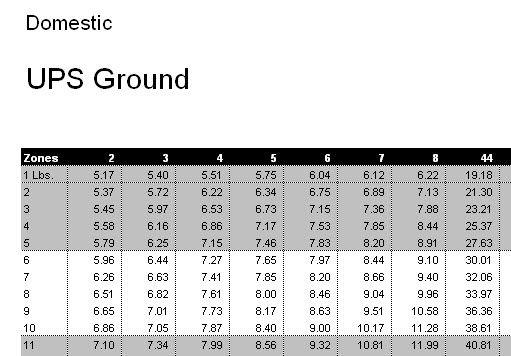
Questions:
1) Is there an easy way to import all this information?
2) On the first checkout screen, the cost that appears for the shipping will be based on the weight of each product. After the customer inputs the contact information with his city, state and country, will the shipping cost then change to reflect the geographic zone where the product needs to be shipped? At what point in the checkout process will the zone information be accounted for to update the shipping cost?
He wants me to input all the weights and geographic zones from the UPS Standard Shipping Chart into the HikaShop Shipping Methods feature.
Questions:
1) Is there an easy way to import all this information?
2) On the first checkout screen, the cost that appears for the shipping will be based on the weight of each product. After the customer inputs the contact information with his city, state and country, will the shipping cost then change to reflect the geographic zone where the product needs to be shipped? At what point in the checkout process will the zone information be accounted for to update the shipping cost?
Please Log in or Create an account to join the conversation.

15 years 5 months ago #16319
by nicolas
Replied by nicolas on topic Re: Shipping Methods Question
1. There is no shipping methods import function.
2. Yes. By default, the shipping methods are filtered based ont he "main tax zone" setting. Then, when the user input his address, the shipping methods are filtered based on his address. If the user is already logged in and already has an address, he will see directly the shipping methods for his address.
2. Yes. By default, the shipping methods are filtered based ont he "main tax zone" setting. Then, when the user input his address, the shipping methods are filtered based on his address. If the user is already logged in and already has an address, he will see directly the shipping methods for his address.
Please Log in or Create an account to join the conversation.
15 years 5 months ago #16390
by mortk1
Replied by mortk1 on topic Re: Shipping Methods Question
Thanks again for all your help Nicolas!
Please Log in or Create an account to join the conversation.
15 years 4 months ago #17343
by mortk1
Replied by mortk1 on topic Re: Shipping Methods Question
My client sells products weighing up to 100 pounds and ships via UPS standard ground to 10 different shipping zones. It looks like I will need to set up 100 x 10 = 1000 shipping methods.
If I worked quickly and were able to create 1 shipping method every 3 minutes, it would still take me 3000 minutes or 50 hours to create the 1000 shipping methods.
Can you suggest some easy way to do this?
How do other people bring UPS shipping data into HikaShop?
If I worked quickly and were able to create 1 shipping method every 3 minutes, it would still take me 3000 minutes or 50 hours to create the 1000 shipping methods.
Can you suggest some easy way to do this?
How do other people bring UPS shipping data into HikaShop?
Please Log in or Create an account to join the conversation.
15 years 4 months ago #17344
by nicolas
Replied by nicolas on topic Re: Shipping Methods Question
I actually can't because there isn't.
Other people wanting to use ups and hikashop either are patient enough to create all these methods manually or they are us over the forum to build a ups plugin so that the rates are calculated automatically. We started looking at building such plugin but it has been 1 month that we are trying to get a test account from ups... It's a really pain to get that from them. The french branch of ups even told us that they couldn't create a test account because our company wouldn't ship anything with them...So we went directly to the USA upsand it takes them forever to process our application to their ups ready program for developers...
Other people wanting to use ups and hikashop either are patient enough to create all these methods manually or they are us over the forum to build a ups plugin so that the rates are calculated automatically. We started looking at building such plugin but it has been 1 month that we are trying to get a test account from ups... It's a really pain to get that from them. The french branch of ups even told us that they couldn't create a test account because our company wouldn't ship anything with them...So we went directly to the USA upsand it takes them forever to process our application to their ups ready program for developers...
Please Log in or Create an account to join the conversation.
15 years 4 months ago #17346
by mortk1
Replied by mortk1 on topic Re: Shipping Methods Question
Thanks Nicolas.
Please Log in or Create an account to join the conversation.
15 years 4 months ago #17572
by mortk1
Replied by mortk1 on topic Re: Shipping Methods Question
In order to ship via UPS, do we need to create one shipping zone for each US zip code that we can potentially ship to? Since there are over 40,000 US zip codes, must we create 40,000 shipping zones?
What would you suggest we do here?
My client is willing to ship by FedEx instead of UPS...does HikaShop offer a FedEx plugin?
What would you suggest we do here?
My client is willing to ship by FedEx instead of UPS...does HikaShop offer a FedEx plugin?
Please Log in or Create an account to join the conversation.
15 years 4 months ago #17577
by nicolas
Replied by nicolas on topic Re: Shipping Methods Question
If each zip code has a different shipping price, then yes.
But otherwise, you can put ranges of zip codes in the shipping methods.
There is not yet a shipping plugin for FedEx either. You will also have to enter the shipping prices manually.
Or you could ask someone to build a plugin for you... That could also be an option if you don't want to wait for us that we provide it for free to every one.
But otherwise, you can put ranges of zip codes in the shipping methods.
There is not yet a shipping plugin for FedEx either. You will also have to enter the shipping prices manually.
Or you could ask someone to build a plugin for you... That could also be an option if you don't want to wait for us that we provide it for free to every one.
Please Log in or Create an account to join the conversation.
15 years 4 months ago #17608
by mortk1
Replied by mortk1 on topic Re: Shipping Methods Question
I'll look forward to being able to use HikaShop shipping plugins at some point.
Thanks again for your help and quick response to my questions Nicolas.
Thanks again for your help and quick response to my questions Nicolas.
Please Log in or Create an account to join the conversation.
15 years 4 months ago #17704
by mortk1
Replied by mortk1 on topic Re: Shipping Methods Question
UPS divides the 40,000 US zip codes into 10 shipping zones and each zone has different shipping prices according to the weight of the package.
My client ships products that weigh from 1 to 60 pounds.
Given the above facts, I plan to manually input the entire UPS Standard shipping chart into HikaShop by following these steps:
*Create 10 shipping zones.
*Place all 40,000 zip codes into the 10 shipping zones by making the zip codes shipping sub-zones.
*Create 600 shipping methods (10 shipping zones x the weight of 1 through 60 pounds).
*For each of the 10 shipping methods, specify a shipping zone, a product weight and a price.
Questions:
1)Would this be the correct way to get all the UPS data into HikaShop?
Have I left out any steps?
2)How can I input a range of zip codes rather than all the individual zip codes?
What parameter or format should I use so that HikaShop recognizes zip codes as a range?
3)If I place all the zip codes into shipping sub-zones, will HikaShop then be able to recognize the zip codes and give the correct shipping price when customers type in their shipping address?
My client ships products that weigh from 1 to 60 pounds.
Given the above facts, I plan to manually input the entire UPS Standard shipping chart into HikaShop by following these steps:
*Create 10 shipping zones.
*Place all 40,000 zip codes into the 10 shipping zones by making the zip codes shipping sub-zones.
*Create 600 shipping methods (10 shipping zones x the weight of 1 through 60 pounds).
*For each of the 10 shipping methods, specify a shipping zone, a product weight and a price.
Questions:
1)Would this be the correct way to get all the UPS data into HikaShop?
Have I left out any steps?
2)How can I input a range of zip codes rather than all the individual zip codes?
What parameter or format should I use so that HikaShop recognizes zip codes as a range?
3)If I place all the zip codes into shipping sub-zones, will HikaShop then be able to recognize the zip codes and give the correct shipping price when customers type in their shipping address?
Please Log in or Create an account to join the conversation.
15 years 4 months ago #17714
by nicolas
Replied by nicolas on topic Re: Shipping Methods Question
Hi,
You cannot enter zip codes in the zones.
Zip codes are to be entered directly in the shipping methods.
So, you will have one shipping method per range of Zip codes.
In the options of each shipping methods, you will have a minimum and a maximum post code fields which you can use for that.
Also, the shipping methods are filtered based on the order total weight.So, your orders wheigt will vary between 1pound and several hundred pounds...(it depends on what your customers buy).
You cannot enter zip codes in the zones.
Zip codes are to be entered directly in the shipping methods.
So, you will have one shipping method per range of Zip codes.
In the options of each shipping methods, you will have a minimum and a maximum post code fields which you can use for that.
Also, the shipping methods are filtered based on the order total weight.So, your orders wheigt will vary between 1pound and several hundred pounds...(it depends on what your customers buy).
Please Log in or Create an account to join the conversation.
15 years 4 months ago #17745
by mortk1
Replied by mortk1 on topic Re: Shipping Methods Question
I'm not clear about where to enter the zip codes in the shipping methods options.
There is only minimum and maximum price, weight and volume.
Please explain further...
There is only minimum and maximum price, weight and volume.
Please explain further...
Please Log in or Create an account to join the conversation.
15 years 4 months ago #17746
by nicolas
Replied by nicolas on topic Re: Shipping Methods Question
Then, it means that you don't have the latest version of HikaShop.Please update.
Once logged in the back end of our demo website you can access a shipping method edition screen via this link:
www.demo.hikashop.com/administrator/inde...g_edit&shipping_id=3
You will find on the right the options:
Prefix
Minimum post code
Maximum post code
Suffix
Which can be used to setup your zip code ranges.
Once logged in the back end of our demo website you can access a shipping method edition screen via this link:
www.demo.hikashop.com/administrator/inde...g_edit&shipping_id=3
You will find on the right the options:
Prefix
Minimum post code
Maximum post code
Suffix
Which can be used to setup your zip code ranges.
Please Log in or Create an account to join the conversation.
15 years 4 months ago #17808
by mortk1
Replied by mortk1 on topic Re: Shipping Methods Question
That's great Nicolas...thanks!
Please Log in or Create an account to join the conversation.
Less
More
- Posts: 8
- Thank you received: 0
15 years 4 months ago #18138
by volodigital
Replied by volodigital on topic Re: Shipping Methods Question
I am a little confused at how complex this is becoming. We have a customer who want to ship UPS. The first problem is determining the shipping charge. It seems to me all you need to do is collect some basic information, Shipping zip, Receiving zip, weight and type of service. Send this request to UPS and a price is returned. A more complex version is to send all the details for a confirmed shipment which will generate the shipping label.
All the talk about loading the UPS zones and pricing does not seem to be necessary.
I understand the worldwide nature of Hika, but for large markets like USA I would think determining UPS Shipping cost is necessary, creating labels is a reasonable expectation.
All the talk about loading the UPS zones and pricing does not seem to be necessary.
I understand the worldwide nature of Hika, but for large markets like USA I would think determining UPS Shipping cost is necessary, creating labels is a reasonable expectation.
Please Log in or Create an account to join the conversation.
15 years 4 months ago #18143
by mortk1
Replied by mortk1 on topic Re: Shipping Methods Question
Yes, I can collect this information: shipping zip, receiving zip, weight and type of service but then I would need to link over to UPS to calculate the shipping charge and then download that cost back into the checkout form. This is all usually done automatically through a UPS shipping plugin attached to the shopping cart and this kind of plugin is not available for HikaShop. Without this plugin, we need to manually load all the zip code ranges, the price to ship to each range and all the possible product weights. If you can come up with an easy and fast way to do this, please let me know and please provide the steps/details.
Please Log in or Create an account to join the conversation.
15 years 4 months ago #18163
by nicolas
Replied by nicolas on topic Re: Shipping Methods Question
@volodigital : As mortk1 said, in order to simplify the job for everyone, we need to create a plugin to integrate hikashop and UPS so that hikashop sends the information of the package (weight, volume, source and destination, etc) and ups sends back the possible rates that we can then display. We have started working on such plugin. The problem is that it's been more than a month that we contacted UPS for a test account so that we can move forward with that plugin and we still don't have it...
Please Log in or Create an account to join the conversation.
Less
More
- Posts: 8
- Thank you received: 0
15 years 4 months ago #18173
by volodigital
Replied by volodigital on topic Re: Shipping Methods Question
Nicolas, I have a friend in UPS I/T. Please send me offline the id you used and a little about the request. I will see if I can move your request along.
Please Log in or Create an account to join the conversation.

15 years 4 months ago #18679
by dan c.
Replied by dan c. on topic Re: Shipping Methods Question
First off thanks for this wonderful eCommerce solution for Joomla!. I haven't found any hiccups other then this current issue. I have been racking my brain trying to figure out what to do about the shipping method. I was curious if there has been any progress. I really want to use this instead of the alternatives that are fully intergrated with joomla.
Please Log in or Create an account to join the conversation.
15 years 4 months ago #18693
by nicolas
Replied by nicolas on topic Re: Shipping Methods Question
No progress yet for UPS. We didn't hear back yet from the friend of volodigital.
Please Log in or Create an account to join the conversation.
Time to create page: 0.632 seconds