

- Posts: 96
- Thank you received: 0
UK only
15 years 10 months ago #3281
by manamaga
Is it possible or what is the best way to strip back hikashop, so that everything only applies to the UK. For example, remove all zones / contries (apart from UK), remove all currencies (apart from GBP) etc. I am using this for a client who only sells in the UK.
Please Log in or Create an account to join the conversation.

15 years 10 months ago #3291
by nicolas
Replied by nicolas on topic Re: UK only
Yes, you can unpublish the countries you don't need, unpublish the currencies you don't need, set the main zone as UK, the main currency as GBP, and set the default country in the address_country custom field to UK.
Please Log in or Create an account to join the conversation.
15 years 10 months ago #3300
by manamaga
Replied by manamaga on topic Re: UK only
Great, thanks for that. One more thing, the website I am working on is
www.everythingforthegirl.co.uk
, When clicking 'Shop' I have want the images to be clickable. Handbags for example will take the customer to a page with all handbags listed on the page. Please could you tell me which of the tutorials will cover this? Thanks.
Please Log in or Create an account to join the conversation.
15 years 10 months ago #3301
by nicolas
Replied by nicolas on topic Re: UK only
You can look on that page for the tutorials explaining how to display your content:
www.hikashop.com/en/support/documentatio...splay-front-end.html
For your case, you will want to follow the tutorial named "Listing of products with a menu".
www.hikashop.com/en/support/documentatio...splay-front-end.html
For your case, you will want to follow the tutorial named "Listing of products with a menu".
Please Log in or Create an account to join the conversation.
15 years 10 months ago #3302
by manamaga
Replied by manamaga on topic Re: UK only
'Listing of products with a menu'......gotcha! 
Please Log in or Create an account to join the conversation.
15 years 10 months ago #3303
by manamaga
Replied by manamaga on topic Re: UK only
Hang on, shouldnt that be 'listing of catagories'? As it is the catagories i want listed on the page, customer then clicks a catagory image and is then taken to the products within that catagory?
Please Log in or Create an account to join the conversation.
15 years 10 months ago #3304
by nicolas
Replied by nicolas on topic Re: UK only
Well, if you want to display categories, that's indeed the case 
You didn't talk about categories in your previous message but only listing of hand bags, so I assumed you were talking about listing your products directly, without categories.
You didn't talk about categories in your previous message but only listing of hand bags, so I assumed you were talking about listing your products directly, without categories.
Please Log in or Create an account to join the conversation.
15 years 10 months ago #3305
by manamaga
Replied by manamaga on topic Re: UK only
No worries, i used handbags as an example. My fault for not being clear.
Please Log in or Create an account to join the conversation.
15 years 10 months ago #3306
by manamaga
Replied by manamaga on topic Re: UK only
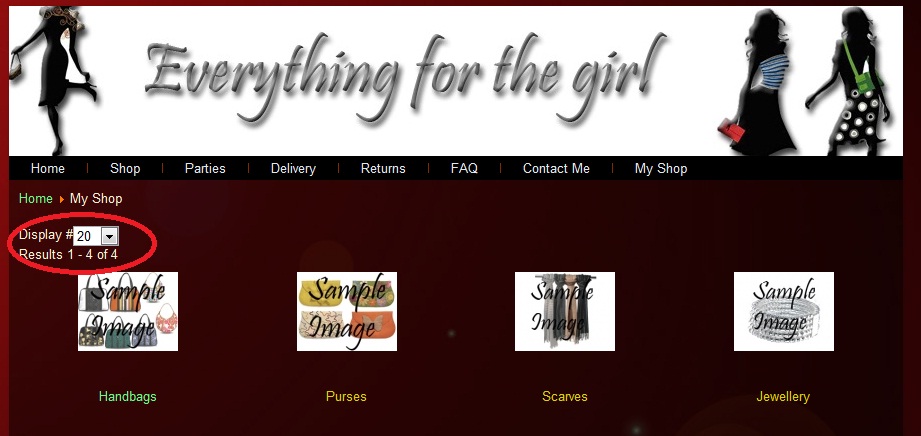
Now i have done that! haha! Is it possible to hide the 'display#' drop down box and the 'results':
Please Log in or Create an account to join the conversation.
15 years 10 months ago #3307
by nicolas
Replied by nicolas on topic Re: UK only
Sure. You can do that with some CSS.
Go in the configuration, under the tab display and edit the front end CSS.
There, you can disable the display# with:
And the results with:
Go in the configuration, under the tab display and edit the front end CSS.
There, you can disable the display# with:
Code:
.hikashop_products_pagination div.limit{ display:none; }
And the results with:
Code:
span.hikashop_results_counter{ display:none; }
Please Log in or Create an account to join the conversation.
15 years 10 months ago #3308
by manamaga
Replied by manamaga on topic Re: UK only
I take it i need to add this code? as i cant find it in the front end css
Please Log in or Create an account to join the conversation.
15 years 10 months ago #3309
by nicolas
Replied by nicolas on topic Re: UK only
Yes
Please Log in or Create an account to join the conversation.
15 years 10 months ago #3310
by manamaga
Replied by manamaga on topic Re: UK only
For some reason it wouldnt let me edit the css in joomla so i ftp`d the frontend_default.css to my local machine, added the code, then ftp`d it back again. The 'results' have now gone but the 'display' is still there. Any ideas?? thanks.
Please Log in or Create an account to join the conversation.
15 years 10 months ago #3311
by nicolas
Replied by nicolas on topic Re: UK only
By editing the file directly, you will loose your modifications when you update. You should make a copy of your file in the same folder. Call it frontend_custom.css for example. Then, in the configuration select your copy.
For the fact that the display is still there, it should definitely have worked. That's something already other users have done. There are even posts about it on the forum. Maybe you forgot something ?
Maybe you could give us the link to your page so that we could have a look at what you did ?
For the fact that the display is still there, it should definitely have worked. That's something already other users have done. There are even posts about it on the forum. Maybe you forgot something ?
Maybe you could give us the link to your page so that we could have a look at what you did ?
Please Log in or Create an account to join the conversation.
15 years 10 months ago #3312
by manamaga
Replied by manamaga on topic Re: UK only
Sure, the page is
everythingforthegirl.co.uk/index.php?opt...ut=listing&Itemid=11
Please Log in or Create an account to join the conversation.
15 years 10 months ago #3313
by nicolas
Replied by nicolas on topic Re: UK only
Actually, I forgot that it was a listing of categories and not product.
The CSS line I gave to hide the "display #" is only for the products listing.
For categories listing it's:
The CSS line I gave to hide the "display #" is only for the products listing.
For categories listing it's:
Code:
.hikashop_subcategories_pagination div.limit{ display:none; }
Please Log in or Create an account to join the conversation.
15 years 10 months ago #3314
by manamaga
Replied by manamaga on topic Re: UK only
Nice one! Thanks. I`ll also make a copy now.
Please Log in or Create an account to join the conversation.
15 years 10 months ago #3397
by manamaga
Replied by manamaga on topic Re: UK only
I think I have set everything to apply to UK only. I`ve had a look around but I cant work out how to make hikashop add £3.50 shipping costs to each order, is this possible??
Please Log in or Create an account to join the conversation.
15 years 10 months ago #3400
by nicolas
Replied by nicolas on topic Re: UK only
In the menu System->Shipping methods, then after clicking on the manual shipping methods plugin, you get a listing of shipping methods. There you can create new shipping methods or edit your existing shipping methods. When doing so, on the right side of the screen, you will get the option "Price" where you can put the amount to charge for that shipping method.
Please Log in or Create an account to join the conversation.
15 years 9 months ago #4758
by danny
Replied by danny on topic Re: UK only
I too have tried to do this by adding the 2 lines of css supplied yet the boxes are still showing? Is there a specific area in the code i need to insert them?
Cheers
Cheers
Please Log in or Create an account to join the conversation.
Time to create page: 0.274 seconds