

- Posts: 301
- Thank you received: 11
Support for Google No CAPTCHA reCAPTCHA
11 years 10 months ago #182834
by MSTACE
Support for Google No CAPTCHA reCAPTCHA was created by MSTACE
Will there be an update to the HikaShop reCaptcha plugin to support No CAPTCHA reCAPTCHA (reCAPTCHA v2)?
My clients are really asking for this.
Thank you.
My clients are really asking for this.
Thank you.
Please Log in or Create an account to join the conversation.

11 years 10 months ago - 11 years 10 months ago #182926
by Jerome
Jerome - Obsidev.com
HikaMarket & HikaSerial developer / HikaShop core dev team.
Replied by Jerome on topic Support for Google No CAPTCHA reCAPTCHA
Hi,
I created a feature request ticket in order to update the reCaptcha plugin.
[Edit] In fact, Nicolas already created the feature request one week ago
Regards,
I created a feature request ticket in order to update the reCaptcha plugin.
[Edit] In fact, Nicolas already created the feature request one week ago
Regards,
Jerome - Obsidev.com
HikaMarket & HikaSerial developer / HikaShop core dev team.
Last edit: 11 years 10 months ago by Jerome.
The following user(s) said Thank You: joomlavi
Please Log in or Create an account to join the conversation.

11 years 10 months ago #182974
by joomlavi
Joomla template club, Hikashop's partner: www.jpwebseo.com
Our Joomla 3.5 tutorials: joomlagroup.com
Replied by joomlavi on topic Support for Google No CAPTCHA reCAPTCHA
That's great!, thanks for new feature added.
Joomla template club, Hikashop's partner: www.jpwebseo.com
Our Joomla 3.5 tutorials: joomlagroup.com
Please Log in or Create an account to join the conversation.

11 years 9 months ago #188073
by nicolas
Replied by nicolas on topic Support for Google No CAPTCHA reCAPTCHA
Hi,
Here is a beta of the plugin with the support of noCAPTCHA reCAPTCHA:
Please note that this is a separate plugin from the other ReCaptcha plugin so you'll have to disable the old one and configure the new one if you're already using the old one.
Thank you in advance for your feedback so that we can publish it.
Here is a beta of the plugin with the support of noCAPTCHA reCAPTCHA:
This attachment is hidden for guests.
Please log in or register to see it.
Please log in or register to see it.
Please note that this is a separate plugin from the other ReCaptcha plugin so you'll have to disable the old one and configure the new one if you're already using the old one.
Thank you in advance for your feedback so that we can publish it.
The following user(s) said Thank You: ezoer
Please Log in or Create an account to join the conversation.
11 years 9 months ago #188084
by MSTACE
Replied by MSTACE on topic Support for Google No CAPTCHA reCAPTCHA
The error I got was:
Error
We couldn't contact the reCAPTCHA server to verify your answer. Please try again.
I installed this on our development site:
arthrem.co.nz/xla/
Error
We couldn't contact the reCAPTCHA server to verify your answer. Please try again.
I installed this on our development site:
arthrem.co.nz/xla/
Please Log in or Create an account to join the conversation.
11 years 9 months ago #188094
by nicolas
Replied by nicolas on topic Support for Google No CAPTCHA reCAPTCHA
Hi,
We don't have the problem on our end. This indicates an issue with the server-to-server communication when verifying the captcha.
Could it be that your server is not allowed to open connections to the outside ? That would explain why you get the error but not us.
We don't have the problem on our end. This indicates an issue with the server-to-server communication when verifying the captcha.
Could it be that your server is not allowed to open connections to the outside ? That would explain why you get the error but not us.
Please Log in or Create an account to join the conversation.
11 years 9 months ago #188114
by MSTACE
Replied by MSTACE on topic Support for Google No CAPTCHA reCAPTCHA
The error was on submission of the form.
Google reCaptcha2 is already working fine on the Contact Us page, so it isn't a server connection issue.
arthrem.co.nz/xla/contact-us
Google reCaptcha2 is already working fine on the Contact Us page, so it isn't a server connection issue.
arthrem.co.nz/xla/contact-us
Please Log in or Create an account to join the conversation.
11 years 9 months ago #188141
by nicolas
Replied by nicolas on topic Support for Google No CAPTCHA reCAPTCHA
Hi,
I did again a test on our end with the plugin on both the contact form and the registration form and both worked for me.
Could you temporarily add the code:
var_dump($getResponse);var_dump($answers);exit;
after the line:
$answers = json_decode($getResponse, true);
in the file plugins/system/recaptcha2/recaptcha2.php and do a test again ? It should display a blank page with the debug of the data coming back from Google. Please provide that data so that we can see what's going on.
I did again a test on our end with the plugin on both the contact form and the registration form and both worked for me.
Could you temporarily add the code:
var_dump($getResponse);var_dump($answers);exit;
after the line:
$answers = json_decode($getResponse, true);
in the file plugins/system/recaptcha2/recaptcha2.php and do a test again ? It should display a blank page with the debug of the data coming back from Google. Please provide that data so that we can see what's going on.
Please Log in or Create an account to join the conversation.
11 years 9 months ago #188271
by MSTACE
Replied by MSTACE on topic Support for Google No CAPTCHA reCAPTCHA
I got the response: bool(false) NULL
Please Log in or Create an account to join the conversation.
11 years 8 months ago #188277
by nicolas
Replied by nicolas on topic Support for Google No CAPTCHA reCAPTCHA
Hi,
This indicates that your server was not able to connect with the recaptcha server.
Normally, in that case, you should find a warning message in the PHP error log of your web server for that error.
That might provide more information on why it couldn't connect with it.
Could you look for that error message ?
This indicates that your server was not able to connect with the recaptcha server.
Normally, in that case, you should find a warning message in the PHP error log of your web server for that error.
That might provide more information on why it couldn't connect with it.
Could you look for that error message ?
Please Log in or Create an account to join the conversation.
11 years 8 months ago #188441
by MSTACE
Replied by MSTACE on topic Support for Google No CAPTCHA reCAPTCHA
As mentioned, the Contact Us form (RSForm Pro) also uses Google's reCaptcha v2 and it works just fine, so this does not seem to be a server issue.
arthrem.co.nz/xla/contact-us
arthrem.co.nz/xla/contact-us
Please Log in or Create an account to join the conversation.

11 years 8 months ago #188486
by wveencom
Kind regards,
William van Veen
Wveen.com
Replied by wveencom on topic Support for Google No CAPTCHA reCAPTCHA
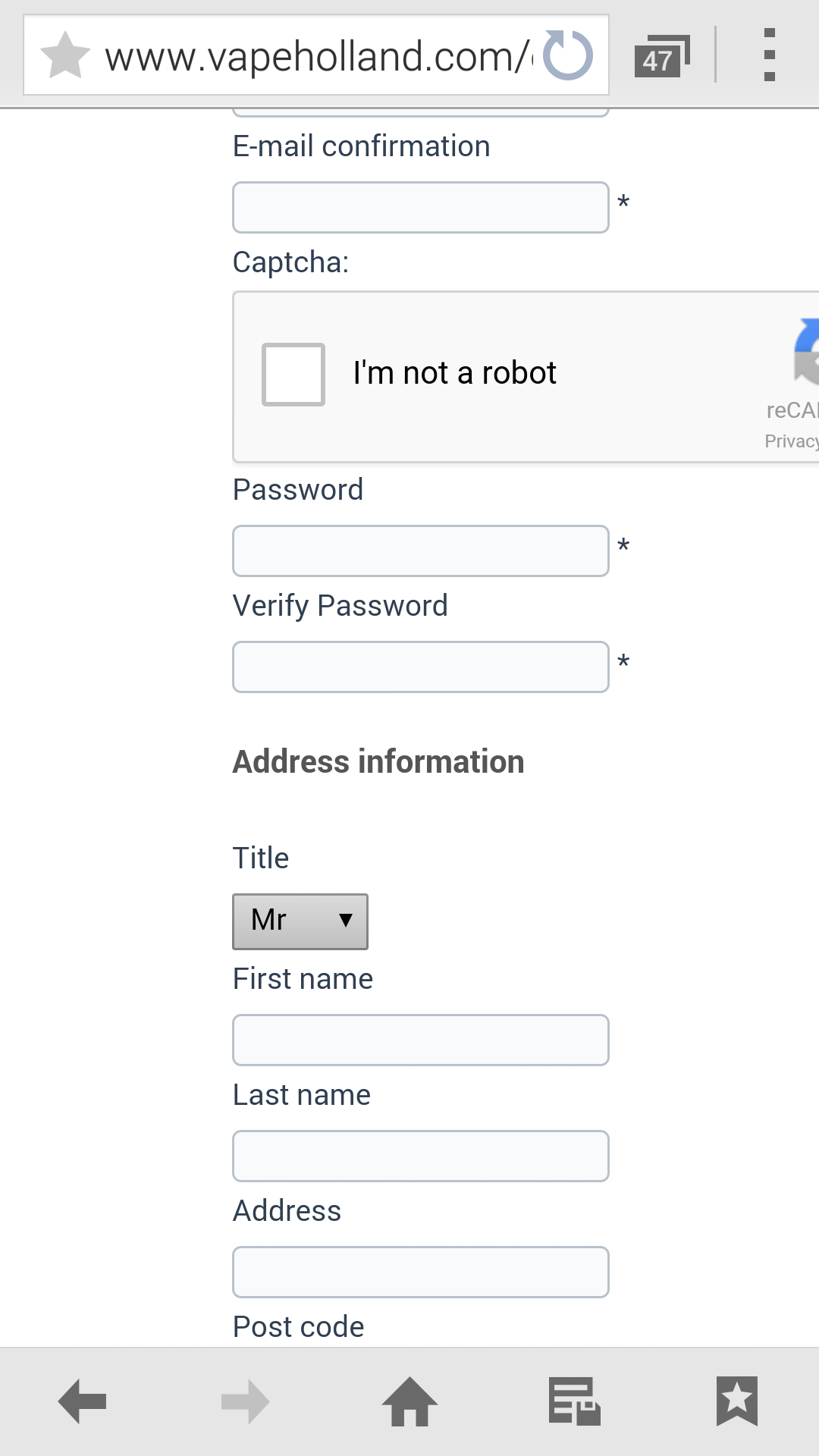
Match better! Great Job! On the mobile it's only litlebit to large. Check image on Samsung s5
EY
EY
Kind regards,
William van Veen
Wveen.com
Please Log in or Create an account to join the conversation.
11 years 8 months ago #188530
by nicolas
Replied by nicolas on topic Support for Google No CAPTCHA reCAPTCHA
@MSTACE:
So why do it works on my server and not yours ?
Especially that the error comes from the file_get_contents PHP function which is used to contact ReCaptcha.
I suppose that RSForm must use something else than file_get_contents to contact ReCaptcha and that's why they don't get the problem. Still, it's not because their method works than ours is wrong. So I still believe that it comes from a server issue.
Normally, in that case, you should find a warning message in the PHP error log of your web server for that error.
That might provide more information on why it couldn't connect with it.
Could you look for that error message ?
@wveencom:
I can't do much on that. The width of the zone is defined completely on the Google side. It's great that it works for you too.
So why do it works on my server and not yours ?
Especially that the error comes from the file_get_contents PHP function which is used to contact ReCaptcha.
I suppose that RSForm must use something else than file_get_contents to contact ReCaptcha and that's why they don't get the problem. Still, it's not because their method works than ours is wrong. So I still believe that it comes from a server issue.
Normally, in that case, you should find a warning message in the PHP error log of your web server for that error.
That might provide more information on why it couldn't connect with it.
Could you look for that error message ?
@wveencom:
I can't do much on that. The width of the zone is defined completely on the Google side. It's great that it works for you too.
The following user(s) said Thank You: wveencom
Please Log in or Create an account to join the conversation.

11 years 7 months ago #195544
by ivan599
Replied by ivan599 on topic Support for Google No CAPTCHA reCAPTCHA
How to set Google No Captcha ReCAPTCHA v2 Plugin for Joomla! 2.5 & 3.x?
After I entered the settings, verification is not displayed

After I entered the settings, verification is not displayed
Please Log in or Create an account to join the conversation.
11 years 7 months ago #195628
by nicolas
Replied by nicolas on topic Support for Google No CAPTCHA reCAPTCHA
Hi,
What do you mean by "verification is not displayed" ?
I don't understand your screenshot. What is the grey area on it ?
Could you provide a link to that page ?
What do you mean by "verification is not displayed" ?
I don't understand your screenshot. What is the grey area on it ?
Could you provide a link to that page ?
Please Log in or Create an account to join the conversation.
11 years 7 months ago #195639
by ivan599
Replied by ivan599 on topic Support for Google No CAPTCHA reCAPTCHA
Please Log in or Create an account to join the conversation.

11 years 7 months ago #195649
by lousyfool
This is a form from RSform, obviously having nothing to do with HikaShop... I don't even see anything HikaShop on that site. So, you're in the wrong forum...
However, and just for the record, RSform offers a free ReCaptcha 2 plugin, which you can download from their site when logged in with a valid, actual account.
Need help with customisations of layouts, style or other site development? PM me!
(Don't forget to turn on "E-mail notification of new messages" )
Replied by lousyfool on topic Support for Google No CAPTCHA reCAPTCHA
ivan599 wrote: poslovniweb.com/demo2/
This is a form from RSform, obviously having nothing to do with HikaShop... I don't even see anything HikaShop on that site. So, you're in the wrong forum...
However, and just for the record, RSform offers a free ReCaptcha 2 plugin, which you can download from their site when logged in with a valid, actual account.
Need help with customisations of layouts, style or other site development? PM me!
(Don't forget to turn on "E-mail notification of new messages" )
Please Log in or Create an account to join the conversation.
11 years 5 months ago - 11 years 5 months ago #200534
by mullu
Replied by mullu on topic Support for Google No CAPTCHA reCAPTCHA
Hello,
I have installed the second version of the Hikashop-recaptcha plugin.
I also experienced the following error after submitting the registration form.
"We couldn't contact the reCAPTCHA server to verify your answer. Please try again."
Anybody has an idea?
Thanks.
Ali
I have installed the second version of the Hikashop-recaptcha plugin.
I also experienced the following error after submitting the registration form.
"We couldn't contact the reCAPTCHA server to verify your answer. Please try again."
Anybody has an idea?
Thanks.
Ali
Last edit: 11 years 5 months ago by mullu.
Please Log in or Create an account to join the conversation.
11 years 5 months ago - 11 years 5 months ago #200536
by mullu
Replied by mullu on topic Support for Google No CAPTCHA reCAPTCHA
I did this and, the error message I see is as following:
string(22) "{ "success": false }" array(1) { ["success"]=> bool(false) }
string(22) "{ "success": false }" array(1) { ["success"]=> bool(false) }
nicolas wrote: Hi,
I did again a test on our end with the plugin on both the contact form and the registration form and both worked for me.
Could you temporarily add the code:
var_dump($getResponse);var_dump($answers);exit;
after the line:
$answers = json_decode($getResponse, true);
in the file plugins/system/recaptcha2/recaptcha2.php and do a test again ? It should display a blank page with the debug of the data coming back from Google. Please provide that data so that we can see what's going on.
Last edit: 11 years 5 months ago by mullu.
Please Log in or Create an account to join the conversation.
11 years 5 months ago #200607
by mullu
Replied by mullu on topic Support for Google No CAPTCHA reCAPTCHA
I realized the problem...
if you activate the Captcha - ReCaptcha plugin and insert the public and private keys once, even though you disable it again, it creates the problem. From the very beginning you should not use the Captcha - ReCaptcha plugin ever...
if you activate the Captcha - ReCaptcha plugin and insert the public and private keys once, even though you disable it again, it creates the problem. From the very beginning you should not use the Captcha - ReCaptcha plugin ever...
Please Log in or Create an account to join the conversation.
Time to create page: 0.598 seconds