

- Posts: 86575
- Thank you received: 14318
Support for Google No CAPTCHA reCAPTCHA
11 years 6 months ago #200617
by nicolas
Replied by nicolas on topic Support for Google No CAPTCHA reCAPTCHA
Thank you for your feedback.
That's the Captcha plugin of Joomla. Even if you disable it, Joomla can still call it because it needs to be turned off somewhere else.
That's the Captcha plugin of Joomla. Even if you disable it, Joomla can still call it because it needs to be turned off somewhere else.
Please Log in or Create an account to join the conversation.
10 years 11 months ago #224238
by huwhuw
Replied by huwhuw on topic Support for Google No CAPTCHA reCAPTCHA
Hi where can this recaptcha plugin be downloaded? does it work on the contact form for products?
Please Log in or Create an account to join the conversation.
10 years 11 months ago #224244
by nicolas
Replied by nicolas on topic Support for Google No CAPTCHA reCAPTCHA
Hi,
It's available here:
www.hikashop.com/support/support/documen...-with-recaptcha.html
And yes, it works on the contact form too.
It's available here:
www.hikashop.com/support/support/documen...-with-recaptcha.html
And yes, it works on the contact form too.
Please Log in or Create an account to join the conversation.

10 years 7 months ago #237281
by ben1265
Replied by ben1265 on topic Support for Google No CAPTCHA reCAPTCHA
Hi Nicolas, I think I have that exact same problem on my site (checkoutcds.com). Would you happen to know where else the Joomla captcha plugin needs to be turned off?
Please Log in or Create an account to join the conversation.
10 years 7 months ago - 10 years 7 months ago #237324
by Philip
Replied by Philip on topic Support for Google No CAPTCHA reCAPTCHA
Hello,
To reach your Captcha plugins :
- Go to Extensions => Plugins
- Use your search input by typing "captcha"
- And unpublished your plugin by clicking on little icon below "Status"
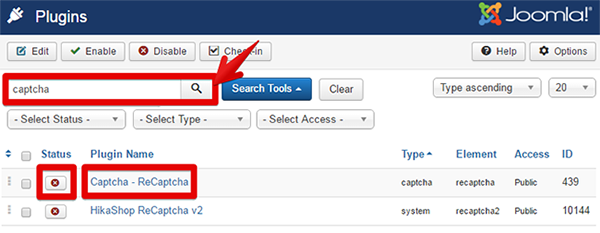
Note : On the screenshot, the Captcha plugin is already unpublished.
Hope this answer your question.
Regards,
To reach your Captcha plugins :
- Go to Extensions => Plugins
- Use your search input by typing "captcha"
- And unpublished your plugin by clicking on little icon below "Status"
Note : On the screenshot, the Captcha plugin is already unpublished.
Hope this answer your question.
Regards,
Last edit: 10 years 7 months ago by Philip.
Please Log in or Create an account to join the conversation.
Time to create page: 0.059 seconds