
- Posts: 51
- Thank you received: 4
How to change colour of icons in user control panel
- anders.drejer
-
 Topic Author
- Offline
Less
More
7 years 3 months ago #308651
by anders.drejer
How to change colour of icons in user control panel was created by anders.drejer
-- HikaShop version -- : 4.2.0
-- Joomla version -- : 3.9.10
-- PHP version -- : 7.2
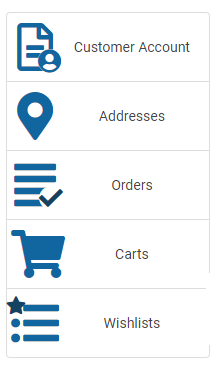
It does not seems like the colour of the icons in the user control panel is handelt by the template, so how do I change them, so they match the colours of the template?
Best Regards,
Anders
-- Joomla version -- : 3.9.10
-- PHP version -- : 7.2
It does not seems like the colour of the icons in the user control panel is handelt by the template, so how do I change them, so they match the colours of the template?
Best Regards,
Anders
Please Log in or Create an account to join the conversation.

7 years 3 months ago #308671
by nicolas
Replied by nicolas on topic How to change colour of icons in user control panel
Hi,
It's indeed not handled by the template.
It's blue by default.
We actually have a style pack available here:
www.hikashop.com/download/styles-for-hikashop.html
It's main goal is to adapt the color of the different elements and images used by HikaShop so that it matches with your template.
So that would be an easy way to do it.
Otherwise, you could add custom CSS to your template to modify the colors of the icons there:
www.hikashop.com/support/documentation/1...ize-the-display.html
But you need to know CSS for that.
It's indeed not handled by the template.
It's blue by default.
We actually have a style pack available here:
www.hikashop.com/download/styles-for-hikashop.html
It's main goal is to adapt the color of the different elements and images used by HikaShop so that it matches with your template.
So that would be an easy way to do it.
Otherwise, you could add custom CSS to your template to modify the colors of the icons there:
www.hikashop.com/support/documentation/1...ize-the-display.html
But you need to know CSS for that.
The following user(s) said Thank You: anders.drejer
Please Log in or Create an account to join the conversation.
Time to create page: 0.066 seconds