

- Posts: 1
- Thank you received: 0
Styles for Hika Shop not displaying
12 years 3 months ago - 12 years 3 months ago #164915
by jkammert
Styles for Hika Shop not displaying was created by jkammert
-- url of the page with the problem -- :
www.joshuacenter.com/me-and-my-world-games-and-curriculum
-- HikaShop version -- : 2.3.2
-- Joomla version -- : 3.3.1
-- PHP version -- : 5.3.28
-- Browser(s) name and version -- : Google Chrome 36.0.1985.125 m
I purchased the "Styles for Hikashop" today and installed as instructed. However it does not appear to be working. I have chosen the "Orange" style and not everything seems to be converting to the way it looks on the demo examples shown on your website.
I have attached a example of what it looks like.
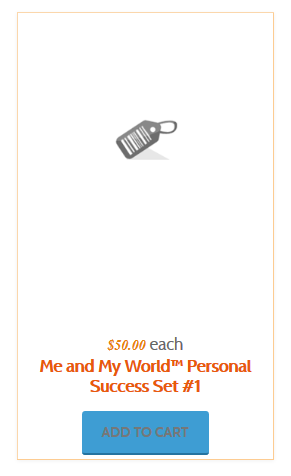
Can you please help explain what I have done incorrectly and how I can go about making my store front look more like the one in the demo example? The "ADD TO CART" buttons are not the same.
Thank you in advance for your help and support.
Jack
-- HikaShop version -- : 2.3.2
-- Joomla version -- : 3.3.1
-- PHP version -- : 5.3.28
-- Browser(s) name and version -- : Google Chrome 36.0.1985.125 m
I purchased the "Styles for Hikashop" today and installed as instructed. However it does not appear to be working. I have chosen the "Orange" style and not everything seems to be converting to the way it looks on the demo examples shown on your website.
I have attached a example of what it looks like.
Can you please help explain what I have done incorrectly and how I can go about making my store front look more like the one in the demo example? The "ADD TO CART" buttons are not the same.
Thank you in advance for your help and support.
Jack
Last edit: 12 years 3 months ago by jkammert.
Please Log in or Create an account to join the conversation.

Less
More
- Posts: 12953
- Thank you received: 1778
12 years 3 months ago #164923
by Mohamed Thelji
Replied by Mohamed Thelji on topic Styles for Hika Shop not displaying
Hello Jack,
What you installed is a style pack and not a template, so you'll still have to customize your website using some CSS code if your want it to display like you want to :
www.hikashop.com/support/documentation/1...the-display.html#css
www.hikashop.com/support/documentation/84-css-styling.html
What you installed is a style pack and not a template, so you'll still have to customize your website using some CSS code if your want it to display like you want to :
www.hikashop.com/support/documentation/1...the-display.html#css
www.hikashop.com/support/documentation/84-css-styling.html
Please Log in or Create an account to join the conversation.
Time to create page: 0.229 seconds