

- Posts: 10
- Thank you received: 2
Sprachdateien
12 years 1 month ago - 12 years 1 month ago #169659
by DIrk
Sprachdateien was created by DIrk
-- HikaShop version -- : 2.3.2
-- Joomla version -- : 3.3.3
Ich habe ein bis zwei Fragen zu den Sprachfiles und zu dem Datumsformat:
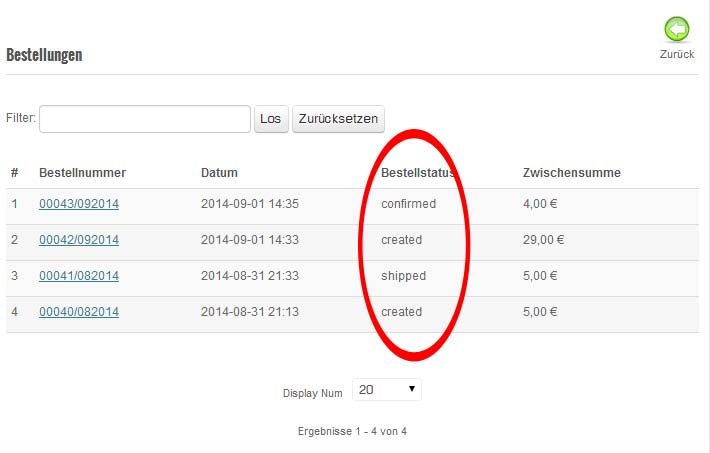
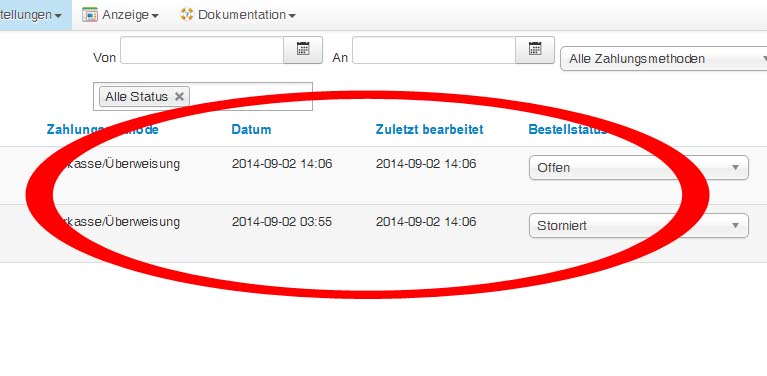
In der Bestellübersicht des Kunden steht -trotz deutscher Sprachfiles- der Status in englisch (cancelled, shipped...) usw. Wo finde ich die Sprachfiles zum Ändern?
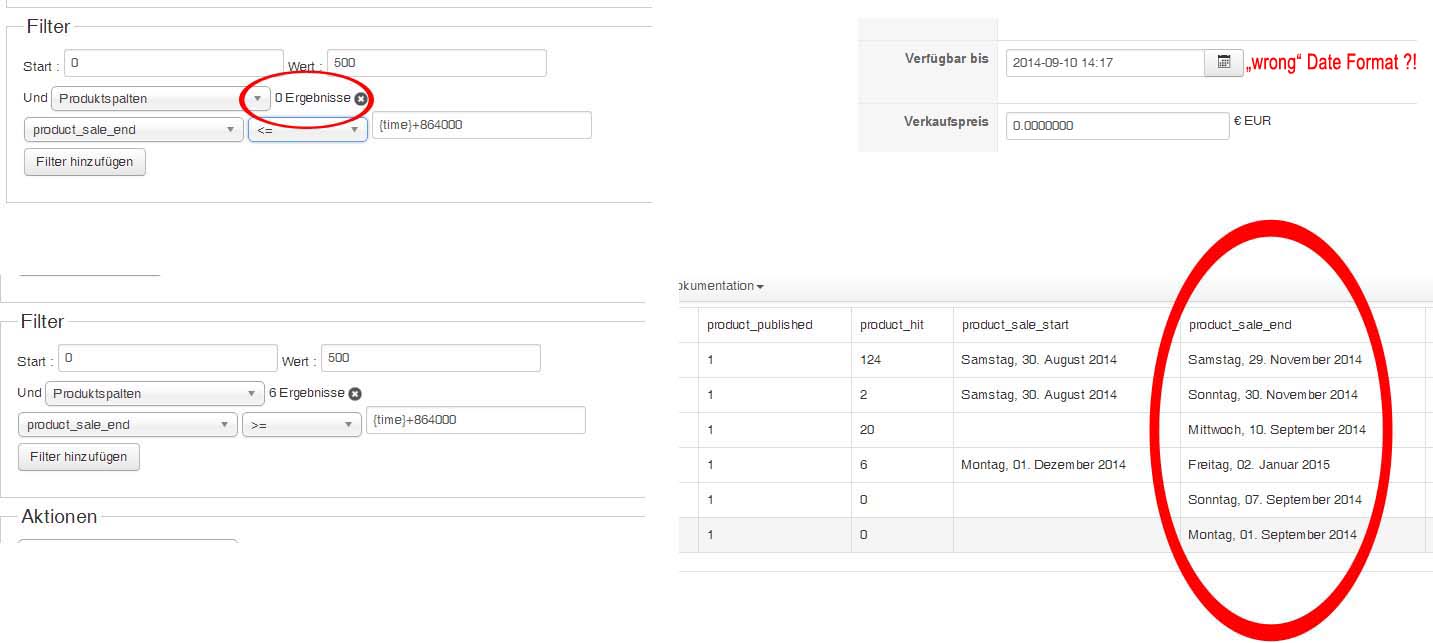
Ferner sind viele Datumsanzeigen nicht im deutschen Format, sondern ebenfalls im englischen Format. Wo kann das geändert werden? Kann es sein, das deswegen die Mass Action wie hier beschrieben nicht funktioniert? Ich kann eingeben was ich will, es werden immer alle Produkte angezeigt.
Was muss ich genau eingeben, wenn 10 Tage vor "product sales end" eine Aktion durchgeführt werden soll?
Hoffe ich habe es halbwegs verständlich formuliert. :oops: :oops: :blush:
-- Joomla version -- : 3.3.3
Ich habe ein bis zwei Fragen zu den Sprachfiles und zu dem Datumsformat:
In der Bestellübersicht des Kunden steht -trotz deutscher Sprachfiles- der Status in englisch (cancelled, shipped...) usw. Wo finde ich die Sprachfiles zum Ändern?
Ferner sind viele Datumsanzeigen nicht im deutschen Format, sondern ebenfalls im englischen Format. Wo kann das geändert werden? Kann es sein, das deswegen die Mass Action wie hier beschrieben nicht funktioniert? Ich kann eingeben was ich will, es werden immer alle Produkte angezeigt.
Was muss ich genau eingeben, wenn 10 Tage vor "product sales end" eine Aktion durchgeführt werden soll?
Hoffe ich habe es halbwegs verständlich formuliert. :oops: :oops: :blush:
Last edit: 12 years 1 month ago by DIrk.
Please Log in or Create an account to join the conversation.
12 years 1 month ago - 12 years 1 month ago #169661
by DIrk
Replied by DIrk on topic Sprachdateien
Ups, for the Date files i have found this
Topic
:blush: . When will be there a new Version of the Shop?
Last edit: 12 years 1 month ago by DIrk.
Please Log in or Create an account to join the conversation.

12 years 1 month ago - 12 years 1 month ago #169663
by nicolas
Replied by nicolas on topic Sprachdateien
Hi,
1. The order statuses are already translated in HikaShop. Please replace the content of the file administrator/components/com_hikashop/types/categorysub.php with this: pastebin.com/wJYf6Xrh
Then it should display the statuses in German.
2. The date formats come from translations. You can change these translations with an override
HIKASHOP_DATE_FORMAT="%d %B %Y"
HIKASHOP_EXTENDED_DATE_FORMAT="%d %B %Y %H:%M"
hikashop.com/download/languages.html#modify
3. The date display format is not related to the mass actions filtering system.
For such filtering rule, you want to have a product column filter like this:
product_sale_end <= {time}+864000
4. Next version of HikaShop will be released in a few weeks.
1. The order statuses are already translated in HikaShop. Please replace the content of the file administrator/components/com_hikashop/types/categorysub.php with this: pastebin.com/wJYf6Xrh
Then it should display the statuses in German.
2. The date formats come from translations. You can change these translations with an override
HIKASHOP_DATE_FORMAT="%d %B %Y"
HIKASHOP_EXTENDED_DATE_FORMAT="%d %B %Y %H:%M"
hikashop.com/download/languages.html#modify
3. The date display format is not related to the mass actions filtering system.
For such filtering rule, you want to have a product column filter like this:
product_sale_end <= {time}+864000
4. Next version of HikaShop will be released in a few weeks.
Last edit: 12 years 1 month ago by nicolas.
Please Log in or Create an account to join the conversation.
12 years 1 month ago - 12 years 1 month ago #169678
by DIrk
Replied by DIrk on topic Sprachdateien
I have the language files found  and new created :woohoo:
and new created :woohoo:
Last edit: 12 years 1 month ago by DIrk.
Please Log in or Create an account to join the conversation.
12 years 1 month ago - 12 years 1 month ago #169731
by DIrk
That doesn't work. Nothing happens. I tried and tried and tried but it didnt work. The Result is ever 0. At least one product (end date 07 September 2014) should be displayed or not ?! Where is the mistake?
When I changed to ">=" it will ever shown all Products. Thats correct i think.
Nice to see :silly:
Thanks for your patience :blush: :blush:
Replied by DIrk on topic Sprachdateien
That works fine :woohoo:nicolas wrote: Hi,
1. The order statuses are already translated in HikaShop. Please replace the content of the file administrator/components/com_hikashop/types/categorysub.php with this: pastebin.com/wJYf6Xrh
Then it should display the statuses in German.
The files are changed, but nothing happens in the order View (for example)nicolas wrote: 2. The date formats come from translations. You can change these translations with an override
HIKASHOP_DATE_FORMAT="%d %B %Y"
HIKASHOP_EXTENDED_DATE_FORMAT="%d %B %Y %H:%M"
hikashop.com/download/languages.html#modify
nicolas wrote: 3. The date display format is not related to the mass actions filtering system.
For such filtering rule, you want to have a product column filter like this:
product_sale_end <= {time}+864000
That doesn't work. Nothing happens. I tried and tried and tried but it didnt work. The Result is ever 0. At least one product (end date 07 September 2014) should be displayed or not ?! Where is the mistake?
When I changed to ">=" it will ever shown all Products. Thats correct i think.
nicolas wrote:
4. Next version of HikaShop will be released in a few weeks.
Nice to see :silly:
Thanks for your patience :blush: :blush:
Last edit: 12 years 1 month ago by DIrk.
Please Log in or Create an account to join the conversation.
12 years 1 month ago #169942
by nicolas
Replied by nicolas on topic Sprachdateien
Hi,
2. Not all the dates use yet these translations. For these, you need to edit the "listing" file of the "order" view for your backend template via the menu Display>Views and change the format in that file directly.
3. I'm pretty sure the mass action should work as I said. If you turn on the debug mode option of the Joomla configuration and process the mass action to display the products, what are the queries logged at the bottom of the result page ?
2. Not all the dates use yet these translations. For these, you need to edit the "listing" file of the "order" view for your backend template via the menu Display>Views and change the format in that file directly.
3. I'm pretty sure the mass action should work as I said. If you turn on the debug mode option of the Joomla configuration and process the mass action to display the products, what are the queries logged at the bottom of the result page ?
Please Log in or Create an account to join the conversation.
12 years 1 month ago #169945
by DIrk
Replied by DIrk on topic Sprachdateien
hi..
Ah, okay. Thx.nicolas wrote: Hi,
2. Not all the dates use yet these translations. For these, you need to edit the "listing" file of the "order" view for your backend template via the menu Display>Views and change the format in that file directly.
Are this the files you need? There are so many data there.nicolas wrote: 3. I'm pretty sure the mass action should work as I said. If you turn on the debug mode option of the Joomla configuration and process the mass action to display the products, what are the queries logged at the bottom of the result page ?
Code:
UPDATE `ah5we_hikashop_massaction`
SET `massaction_name`='test',`massaction_description`='',`massaction_published`='1',`massaction_table`='product',`massaction_triggers`='',`massaction_filters`='a:2:{i:0;O:8:\"stdClass\":2:{s:4:\"name\";s:5:\"
limit\";s:4:\"data\";a:2:{s:5:\"start\";s:1:\"0\";s:5:\"value\";s:3:\"500\";}}i:2;O:8:\"stdClass\":2:{s:4:\"name\";s:13:\"productColumn\";s:4:\"data\";a:3:{s:4:\"type\";s:16:\"product_sale_end\";s:8:\"operator\";s:2:\"<=\";s:5:\"value\";s:13:\"{time}+864000\";}}}',`massaction_actions`='a:1:{i:0;O:8:\"stdClass\":2:{s:4:\"name\";s:14:\"displayResults\";s:4:\"data\";a:1:{s:7:\"product\";a:8:{s:10:\"product_id\";s:10:\"product_id\";s:12:\"product_name\";s:12:\"product_name\";s:16:\"product_quantity\";s:16:\"product_quantity\";s:12:\"product_code\";s:12:\"product_code\";s:17:\"product_published\";s:17:\"product_published\";s:11:\"product_hit\";s:11:\"product_hit\";s:18:\"product_sale_start\";s:18:\"product_sale_start\";s:16:\"product_sale_end\";s:16:\"product_sale_end\";}}}}'
WHERE `massaction_id`='2'
„EXPLAIN“ unmöglich für Abfrage: UPDATE `ah5we_hikashop_massaction` SET `massaction_name`='test',`massaction_description`='',`massaction_published`='1',`massaction_table`='product',`massaction_triggers`='',`massaction_filters`='a:2:{i:0;O:8:\"stdClass\":2:{s:4:\"name\";s:5:\"limit\";s:4:\"data\";a:2:{s:5:\"start\";s:1:\"0\";s:5:\"value\";s:3:\"500\";}}i:2;O:8:\"stdClass\":2:{s:4:\"name\";s:13:\"productColumn\";s:4:\"data\";a:3:{s:4:\"type\";s:16:\"product_sale_end\";s:8:\"operator\";s:2:\"<=\";s:5:\"value\";s:13:\"{time}+864000\";}}}',`massaction_actions`='a:1:{i:0;O:8:\"stdClass\":2:{s:4:\"name\";s:14:\"displayResults\";s:4:\"data\";a:1:{s:7:\"product\";a:8:{s:10:\"product_id\";s:10:\"product_id\";s:12:\"product_name\";s:12:\"product_name\";s:16:\"product_quantity\";s:16:\"product_quantity\";s:12:\"product_code\";s:12:\"product_code\";s:17:\"product_published\";s:17:\"product_published\";s:11:\"product_hit\";s:11:\"product_hit\";s:18:\"product_sale_start\";s:18:\"product_sale_start\";s:16:\"product_sale_end\";s:16:\"product_sale_end\";}}}}' WHERE `massaction_id`='2'
SELECT hk_product.*
FROM ah5we_hikashop_product as hk_product
WHERE (hk_product.product_sale_end <= '2014-09-14 02:24:30')
LIMIT 0, 500
1 SIMPLE hk_product ALL NULL ES KONNTE KEIN INDEX-SCHLÜSSEL GENUTZT WERDEN NULL NULL 6 Using where
Please Log in or Create an account to join the conversation.

12 years 1 month ago #169974
by Xavier
Replied by Xavier on topic Sprachdateien
Hi,
Thanks to edit the file "administrator/components/com_hikashop/classes/massaction.php" and in the function "getRequest" remove/comment the line:
Thanks to edit the file "administrator/components/com_hikashop/classes/massaction.php" and in the function "getRequest" remove/comment the line:
Code:
//$filter['value'] = strftime('%Y-%m-%d %H:%M:%S',$filter['value']);
The following user(s) said Thank You: DIrk
Please Log in or Create an account to join the conversation.
12 years 1 month ago #170053
by DIrk
Hey, It seems it works
Merci :woohoo: :woohoo: :woohoo: :woohoo:
Replied by DIrk on topic Sprachdateien
Xavier wrote: Hi,
Thanks to edit the file "administrator/components/com_hikashop/classes/massaction.php" and in the function "getRequest" remove/comment the line:Code://$filter['value'] = strftime('%Y-%m-%d %H:%M:%S',$filter['value']);
Hey, It seems it works
Merci :woohoo: :woohoo: :woohoo: :woohoo:
Please Log in or Create an account to join the conversation.
12 years 4 days ago - 12 years 4 days ago #176643
by DIrk
Replied by DIrk on topic Sprachdateien
Sorry, it´s me again.
Theres another problem with my Mass-Action.
I fount this nice example: change the category of a product .
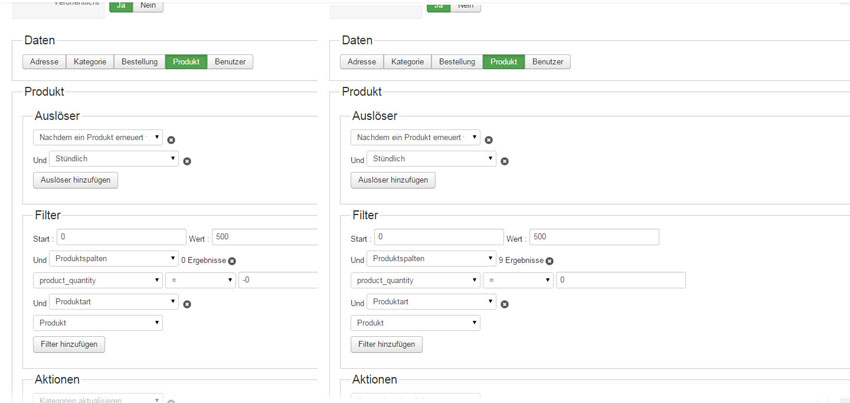
In this example you write: product_quantity = 0, but whatever I do, the 0 does not work. If i set "0" all my products will be changed to out of stock, but if I set "-0" it seems it works. Could that be right??? :blink:
And where can I see/read, what "int, Float, String and operation" means :blush:
Theres another problem with my Mass-Action.
I fount this nice example: change the category of a product .
In this example you write: product_quantity = 0, but whatever I do, the 0 does not work. If i set "0" all my products will be changed to out of stock, but if I set "-0" it seems it works. Could that be right??? :blink:
And where can I see/read, what "int, Float, String and operation" means :blush:
Last edit: 12 years 4 days ago by DIrk.
Please Log in or Create an account to join the conversation.
12 years 4 days ago #176647
by Xavier
Replied by Xavier on topic Sprachdateien
Hi,
If it works with "-0", so use it. With "0" that should be ok, I will do some checks about that.
There is not yet complete documentation for this. It's on my todo list :blush:
"Int", "Float", "String" I think that it's ok, regarding operation, you should find an example in the documentation, you can edit dynamically the values, for example increase the stock by 1 thanks to: "product.product_quantity + 1"
If it works with "-0", so use it. With "0" that should be ok, I will do some checks about that.
There is not yet complete documentation for this. It's on my todo list :blush:
"Int", "Float", "String" I think that it's ok, regarding operation, you should find an example in the documentation, you can edit dynamically the values, for example increase the stock by 1 thanks to: "product.product_quantity + 1"
The following user(s) said Thank You: DIrk
Please Log in or Create an account to join the conversation.
Time to create page: 0.434 seconds