

- Posts: 17
- Thank you received: 0
Move Cart Button and icons etc up
11 years 11 months ago #179204
by at36
Move Cart Button and icons etc up was created by at36
-- HikaShop version -- : up to date
-- Joomla version -- : up to date
-- PHP version -- : up to date
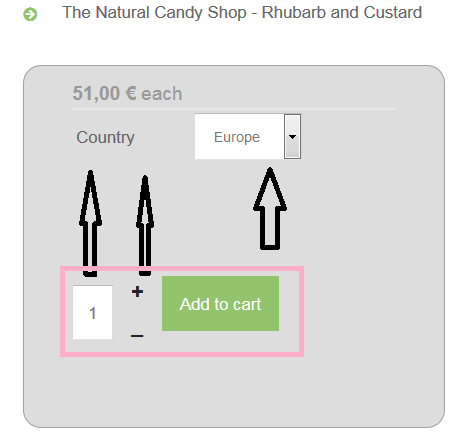
Hi there I want to move the cart button and icons associated up to below the country drop down so everything is a little tidier
How do I do this, i have tried playing with the views but have not been successful
Thanks
A
-- Joomla version -- : up to date
-- PHP version -- : up to date
Hi there I want to move the cart button and icons associated up to below the country drop down so everything is a little tidier
How do I do this, i have tried playing with the views but have not been successful
Thanks
A
Please Log in or Create an account to join the conversation.

11 years 11 months ago #179219
by lousyfool
Need help with customisations of layouts, style or other site development? PM me!
(Don't forget to turn on "E-mail notification of new messages" )
Replied by lousyfool on topic Move Cart Button and icons etc up
Hi,
It's the same as in your previous thread here . You'll need to apply some CSS, and the "how to" is generally described in the link you were given in the other thread.
From user to user: sorry, but it is practically impossible to customize or fine-tune websites without knowledge of at least CSS and HTML. So, if you have trouble achieving what you want despite reading the documentation here, you may want or need to hire a (frontend) developer.
It's the same as in your previous thread here . You'll need to apply some CSS, and the "how to" is generally described in the link you were given in the other thread.
From user to user: sorry, but it is practically impossible to customize or fine-tune websites without knowledge of at least CSS and HTML. So, if you have trouble achieving what you want despite reading the documentation here, you may want or need to hire a (frontend) developer.
Need help with customisations of layouts, style or other site development? PM me!
(Don't forget to turn on "E-mail notification of new messages" )
Please Log in or Create an account to join the conversation.

11 years 11 months ago #179223
by Jerome
Jerome - Obsidev.com
HikaMarket & HikaSerial developer / HikaShop core dev team.
Replied by Jerome on topic Move Cart Button and icons etc up
Hi,
Nothing to add from my previous answer in the other threads.
( www.hikashop.com/forum/product-category-...n-or-not.html#179222 )
Regards,
Nothing to add from my previous answer in the other threads.
( www.hikashop.com/forum/product-category-...n-or-not.html#179222 )
Regards,
Jerome - Obsidev.com
HikaMarket & HikaSerial developer / HikaShop core dev team.
Please Log in or Create an account to join the conversation.
11 years 11 months ago - 11 years 11 months ago #179263
by at36
Replied by at36 on topic Move Cart Button and icons etc up
Thanks guys, 
The reason I ask is because the CSS encapsulates the code, I get a little bit gittery about moving things around.
For example Firebug is useful for finding the relevant CSS, but then relocating something may require moving the code, as I have done in other parts for the product display.
So I guess my questions should be phrased more appropriately e.g. have made these changes to CSS and has not worked etc, and give you more info then you might see the problems I am running into more clearly.
And correct I am not a programmer or front end specialist, but I can normally hack at things and get things done, as long as others are a little patient with the questions that might arise.
Thanks
a
The reason I ask is because the CSS encapsulates the code, I get a little bit gittery about moving things around.
For example Firebug is useful for finding the relevant CSS, but then relocating something may require moving the code, as I have done in other parts for the product display.
So I guess my questions should be phrased more appropriately e.g. have made these changes to CSS and has not worked etc, and give you more info then you might see the problems I am running into more clearly.
And correct I am not a programmer or front end specialist, but I can normally hack at things and get things done, as long as others are a little patient with the questions that might arise.
Thanks
a
Last edit: 11 years 11 months ago by at36.
Please Log in or Create an account to join the conversation.
11 years 11 months ago - 11 years 11 months ago #179290
by at36
Replied by at36 on topic Move Cart Button and icons etc up
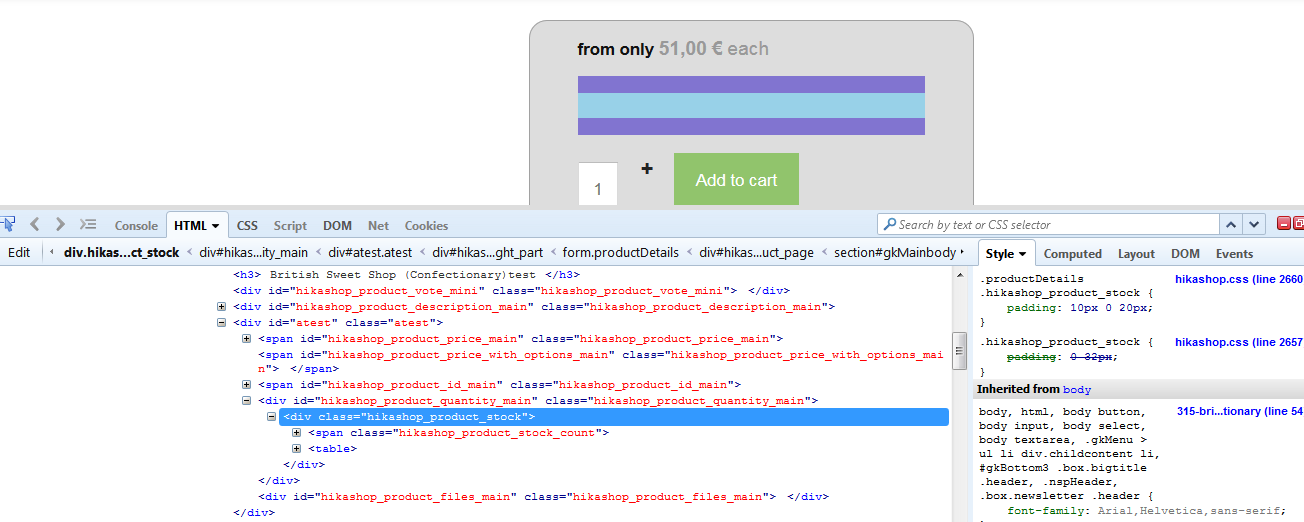
Guys on the basis of the original question re: moving the CART BUTTON.
Unless I am wrong this cannot be done by CSS alone but I either need to move some of the code around so that the cart button move above this line. Please see image below
I have found what I believe to be the correct view that needs editing product / quantity.php, but I am not sure which bit of code to move to move the button above the stock count or just to remove the stock count (comment it out) and get the button to show only.
I believe this will then move the button and quantity + - buttons as well as the box up to the position where I want them.
Is there a way of adding a link that is not displayed to all? so that i can show you the page in more detail?
I hope this is a little more appropriate in terms of the type of questions you can give some guidance on.
Thanks
A
Unless I am wrong this cannot be done by CSS alone but I either need to move some of the code around so that the cart button move above this line. Please see image below
I have found what I believe to be the correct view that needs editing product / quantity.php, but I am not sure which bit of code to move to move the button above the stock count or just to remove the stock count (comment it out) and get the button to show only.
I believe this will then move the button and quantity + - buttons as well as the box up to the position where I want them.
Is there a way of adding a link that is not displayed to all? so that i can show you the page in more detail?
I hope this is a little more appropriate in terms of the type of questions you can give some guidance on.
Thanks
A
Last edit: 11 years 11 months ago by at36.
Please Log in or Create an account to join the conversation.

11 years 11 months ago #179334
by nicolas
Replied by nicolas on topic Move Cart Button and icons etc up
Hi,
I don't believe that it requires any modification to the PHP code, just a simple CSS line of code that you can add anywhere in your template CSS of HikaShop CSS:
.hikashop_product_stock_count{ display:none !important; }
Of course, a link to the page would enable us to use firebug to look at the CSS/HTML of your page and make sure that the code we give will work, so without it, I can't guarantee it but still, a simple CSS solution should be fine.
I don't believe that it requires any modification to the PHP code, just a simple CSS line of code that you can add anywhere in your template CSS of HikaShop CSS:
.hikashop_product_stock_count{ display:none !important; }
Of course, a link to the page would enable us to use firebug to look at the CSS/HTML of your page and make sure that the code we give will work, so without it, I can't guarantee it but still, a simple CSS solution should be fine.
Please Log in or Create an account to join the conversation.
11 years 11 months ago - 11 years 11 months ago #179418
by at36
Replied by at36 on topic Move Cart Button and icons etc up
Nicolas, thank you for the answer spot on, required me to make some other small amendments to some other CSS files to get it right up there, but your answer is exactly what I needed. I am use to hacking away at things to get get them done, but this was a much cleaner solution.
Thanks to all for your help and patience
Rgds
A
Thanks to all for your help and patience
Rgds
A
Last edit: 11 years 11 months ago by at36.
Please Log in or Create an account to join the conversation.
Time to create page: 0.277 seconds