

- Posts: 19
- Thank you received: 0
Sending invoices, confirming orders.
11 years 8 months ago #192069
by LudwigVan
Sending invoices, confirming orders. was created by LudwigVan
-- url of the page with the problem -- :
superiorimportsltd.uk
-- HikaShop version -- : 2.3.5
-- Joomla version -- : 3.4.0
-- Browser(s) name and version -- : Firefox latest
Hello.
Help please. I was reading documentation but there is no chapter what i need.
Is there some tutorial, how to manage orders? How to send invoice to customer, how to confirm order or how to cancel order.
Also, i was testing your demo Hikashop. On demo site, i can easily change order status and let customer know by email.
In my hikashop its different. When i choose change order, pop up will appear and i can see my website in pop up window. Not order status option:
ctrlv.cz/shots/2015/02/25/h313.png
and popup:
ctrlv.cz/shots/2015/02/25/UASv.png
I cant change order status.
Please help me. Thank you very much.
-- HikaShop version -- : 2.3.5
-- Joomla version -- : 3.4.0
-- Browser(s) name and version -- : Firefox latest
Hello.
Help please. I was reading documentation but there is no chapter what i need.
Is there some tutorial, how to manage orders? How to send invoice to customer, how to confirm order or how to cancel order.
Also, i was testing your demo Hikashop. On demo site, i can easily change order status and let customer know by email.
In my hikashop its different. When i choose change order, pop up will appear and i can see my website in pop up window. Not order status option:
ctrlv.cz/shots/2015/02/25/h313.png
and popup:
ctrlv.cz/shots/2015/02/25/UASv.png
I cant change order status.
Please help me. Thank you very much.
Please Log in or Create an account to join the conversation.

11 years 8 months ago - 11 years 8 months ago #192127
by Jabatec
Javier Ballester
Replied by Jabatec on topic Sending invoices, confirming orders.
-- HikaShop version -- : 2.3.5 Business
-- Joomla version -- : 3.4.0
Hi LudwigVan
I have the same problem.
You can change status vía edit order in the back-end, but the process via select "drop down" not work find, When I select drop-down status in the back-end, It open a popup window width the website the front-end and the process send email to customer not work
It occur from last update J! 3.4 today.
Best regards
Javier
-- Joomla version -- : 3.4.0
Hi LudwigVan
I have the same problem.
You can change status vía edit order in the back-end, but the process via select "drop down" not work find, When I select drop-down status in the back-end, It open a popup window width the website the front-end and the process send email to customer not work
It occur from last update J! 3.4 today.
Best regards
Javier
Javier Ballester
Last edit: 11 years 8 months ago by Jabatec.
Please Log in or Create an account to join the conversation.

11 years 8 months ago #192135
by SarahW
Replied by SarahW on topic Sending invoices, confirming orders.
I have exactly the same problem as above, since the Joomla update today. I've tried reinstalling Hikashop, but that makes no difference.
Please Log in or Create an account to join the conversation.

11 years 8 months ago #192148
by Jerome
Jerome - Obsidev.com
HikaMarket & HikaSerial developer / HikaShop core dev team.
Replied by Jerome on topic Sending invoices, confirming orders.
Hi,
For the documentation, once you are in the order listings or order show page, you can click on the "help" button in the toolbar to see the associated documentation.
About the popup issue, it's related to some modification made in Joomla 3.4.0
For the fix, please see the thread:
www.hikashop.com/forum/5-support-en-fran...ristique.html#192105
Where Nicolas is providing the new version of the popup helper.
Regards,
For the documentation, once you are in the order listings or order show page, you can click on the "help" button in the toolbar to see the associated documentation.
About the popup issue, it's related to some modification made in Joomla 3.4.0
For the fix, please see the thread:
www.hikashop.com/forum/5-support-en-fran...ristique.html#192105
Where Nicolas is providing the new version of the popup helper.
Regards,
Jerome - Obsidev.com
HikaMarket & HikaSerial developer / HikaShop core dev team.
The following user(s) said Thank You: LudwigVan
Please Log in or Create an account to join the conversation.
11 years 8 months ago - 11 years 8 months ago #192157
by LudwigVan
Replied by LudwigVan on topic Sending invoices, confirming orders.
thank you for fast reply and for swiftly resolving the problem.
should i replace php file in hikashop with Nicolas's file?
edit: i just replaced file and still not working. I dont understand FR
should i replace php file in hikashop with Nicolas's file?
edit: i just replaced file and still not working. I dont understand FR
Last edit: 11 years 8 months ago by LudwigVan.
Please Log in or Create an account to join the conversation.
Less
More
- Posts: 609
- Thank you received: 13
11 years 8 months ago #192175
by mohairbears
Replied by mohairbears on topic Sending invoices, confirming orders.
Hi, I am also getting problems after upgrading to Joomla 3.4
error in backend in the orders see attached
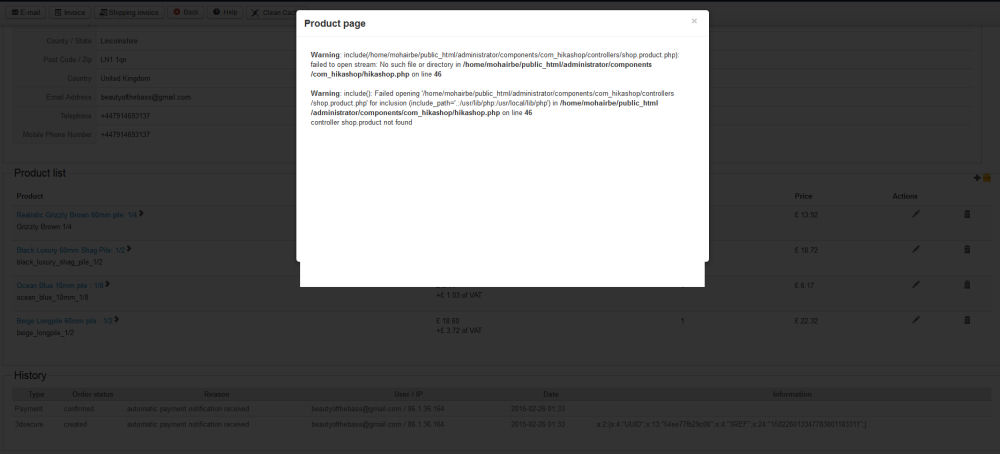
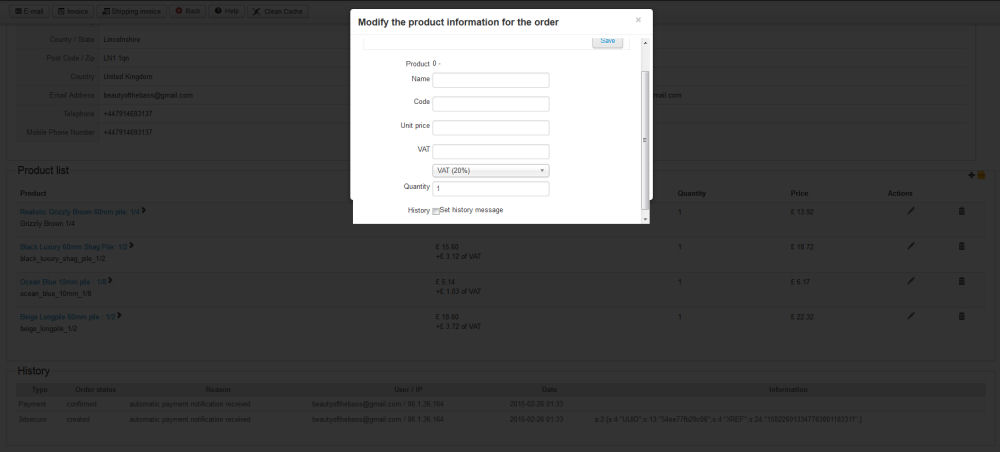
error in backend in the orders see attached
Please Log in or Create an account to join the conversation.
11 years 8 months ago #192196
by allanb
Replied by allanb on topic Sending invoices, confirming orders.
Hi Guys.
I have tried this but I am still getting my site in the pop-up.
I have simply replaced the file
administrator/components/com_hikashop/helpers/popup.php
with the one in the zip file.
Help will be appreciated, it is really urgent.
I have tried this but I am still getting my site in the pop-up.
I have simply replaced the file
administrator/components/com_hikashop/helpers/popup.php
with the one in the zip file.
Help will be appreciated, it is really urgent.
Please Log in or Create an account to join the conversation.
Less
More
- Posts: 609
- Thank you received: 13
11 years 8 months ago #192200
by mohairbears
Replied by mohairbears on topic Sending invoices, confirming orders.
I have gone back to 3.3.6 all now works ok again.
Please Log in or Create an account to join the conversation.
11 years 8 months ago #192211
by allanb
Replied by allanb on topic Sending invoices, confirming orders.
Thanks, I was forced to do the same. Now it's all working again.
Please Log in or Create an account to join the conversation.
Less
More
- Posts: 609
- Thank you received: 13
11 years 8 months ago #192218
by mohairbears
Replied by mohairbears on topic Sending invoices, confirming orders.
It's not the Hikashop boy's fault, I also have a problem with the Joomla 'global configuration' on 3.4.
Please Log in or Create an account to join the conversation.
11 years 8 months ago #192226
by LudwigVan
Replied by LudwigVan on topic Sending invoices, confirming orders.
Guys hope this issue will be solved without downgrading joomla.
Boys from Hikashop are not guilty. We need to wait for some new update.
Replaced file not work, we should wait.
Boys from Hikashop are not guilty. We need to wait for some new update.
Replaced file not work, we should wait.
Please Log in or Create an account to join the conversation.

11 years 8 months ago #192264
by nicolas
Replied by nicolas on topic Sending invoices, confirming orders.
Hi,
That's another bug introduced with the changes on the popup system of Joomla 3.4 yes.
Change the code:
to:
in the file media/com_hikashop/js/hikashop.js and that will fix the problem.
That's another bug introduced with the changes on the popup system of Joomla 3.4 yes.
Change the code:
Code:
jQuery('#modal-' + id + '-container').find('iframe').attr('src', url);
Code:
if(document.getElementById('modal-' + id + '-container'))
jQuery('#modal-' + id + '-container').find('iframe').attr('src', url);
else
jQuery('#modal-' + id).find('iframe').attr('src', url);
Please Log in or Create an account to join the conversation.
11 years 8 months ago #192270
by LudwigVan
Replied by LudwigVan on topic Sending invoices, confirming orders.
Thank you for fast solution Nicolas!
Everythin works.
Everythin works.
Please Log in or Create an account to join the conversation.

11 years 7 months ago #192291
by Aradise
www.aradise.com Joomla Website Designers and Internet Marketing Specialists
Replied by Aradise on topic Sending invoices, confirming orders.
These solutions aren't working for me. What am I missing? The same thing occurs, my website front page pops up the confirm window.
HikaShop Starter 2.3.5
Joomla 3.4
HikaShop Starter 2.3.5
Joomla 3.4
www.aradise.com Joomla Website Designers and Internet Marketing Specialists
Please Log in or Create an account to join the conversation.
11 years 7 months ago #192307
by LudwigVan
Replied by LudwigVan on topic Sending invoices, confirming orders.
did you replaced the php file too?
Please Log in or Create an account to join the conversation.
11 years 7 months ago #192292
by Jerome
Jerome - Obsidev.com
HikaMarket & HikaSerial developer / HikaShop core dev team.
Replied by Jerome on topic Sending invoices, confirming orders.
Hi,
Please be sure that you have right refresh the javascript cache ; removing the cache from your browser.
For what we tested, the fix is solving the issue so it should be your cache.
Regards,
Please be sure that you have right refresh the javascript cache ; removing the cache from your browser.
For what we tested, the fix is solving the issue so it should be your cache.
Regards,
Jerome - Obsidev.com
HikaMarket & HikaSerial developer / HikaShop core dev team.
Please Log in or Create an account to join the conversation.
11 years 7 months ago #192433
by Aradise
www.aradise.com Joomla Website Designers and Internet Marketing Specialists
Replied by Aradise on topic Sending invoices, confirming orders.
I did included both changes.
What do you mean by "remove the cache?" Do you mean clear my standard browser cache or something else?
What do you mean by "remove the cache?" Do you mean clear my standard browser cache or something else?
www.aradise.com Joomla Website Designers and Internet Marketing Specialists
Please Log in or Create an account to join the conversation.
11 years 7 months ago #192437
by LudwigVan
Replied by LudwigVan on topic Sending invoices, confirming orders.
I think try to remove joomla cache also, System>clear cache
Please Log in or Create an account to join the conversation.
11 years 7 months ago #192443
by donpeek
Replied by donpeek on topic Sending invoices, confirming orders.
That needs to be in HS 3.2.6 ... and they need to get it out. ASAP.. . as you know, when a new install fails, out of the box..
My customer reported it to me.. when they got stuck on an order.. They didn't know what they did to break it..
They have the Essential package so I make a new install on a blank site to try to compare the sites and fix it.. I was surprised when a NEW install did not work..
Thanks.. This gets them going.. ..
Don Peek
My customer reported it to me.. when they got stuck on an order.. They didn't know what they did to break it..
They have the Essential package so I make a new install on a blank site to try to compare the sites and fix it.. I was surprised when a NEW install did not work..
Thanks.. This gets them going.. ..
Don Peek
Please Log in or Create an account to join the conversation.
11 years 7 months ago #192472
by nicolas
Replied by nicolas on topic Sending invoices, confirming orders.
@Aradise yes your browser cache.
@donpeek we're working on preparing a new release.
@donpeek we're working on preparing a new release.
Please Log in or Create an account to join the conversation.
Time to create page: 0.679 seconds