
- Posts: 609
- Thank you received: 13
Poor layout in variants
- mohairbears
-
 Topic Author
- Offline
Less
More
11 years 3 months ago - 11 years 3 months ago #207013
by mohairbears
Poor layout in variants was created by mohairbears
-- HikaShop version -- : 2.5
-- Joomla version -- : 3.4.1
-- PHP version -- : 5.4.24
-- Browser(s) name and version -- : Firefox
Gents Having now used Hikashop for a number of years I have updated to the 2.5 version and found huge changes to the back-end products layout, some good some not so good.
The biggest issue I currently have is with the variants layout... there is a rather large white space that pushes the product weight off screen? this left me scratching my head for some time wondering where the product weight had gone can you please fix this as it's looks very unprofessional.
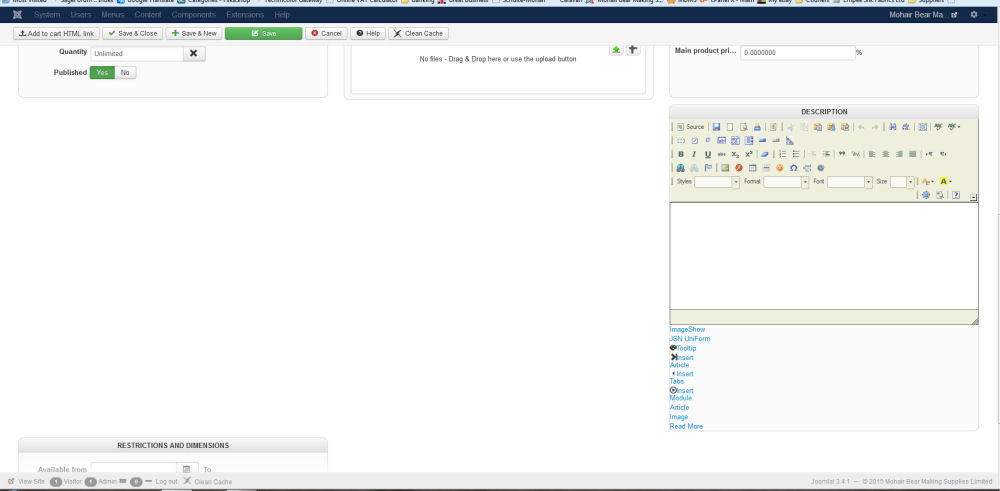
Further more to this I have just found that I can no longer unpublish products in 'variants' by clicking the green tick as previous, I now have to go the longer route and go in to the variant and unpublish from there?
-- Joomla version -- : 3.4.1
-- PHP version -- : 5.4.24
-- Browser(s) name and version -- : Firefox
Gents Having now used Hikashop for a number of years I have updated to the 2.5 version and found huge changes to the back-end products layout, some good some not so good.
The biggest issue I currently have is with the variants layout... there is a rather large white space that pushes the product weight off screen? this left me scratching my head for some time wondering where the product weight had gone can you please fix this as it's looks very unprofessional.
Further more to this I have just found that I can no longer unpublish products in 'variants' by clicking the green tick as previous, I now have to go the longer route and go in to the variant and unpublish from there?
Last edit: 11 years 3 months ago by mohairbears.
Please Log in or Create an account to join the conversation.
11 years 3 months ago #207105
by DB35611
Replied by DB35611 on topic Poor layout in variants
The whole new 2.5 layout for adding new products is awkward and takes twice as long. Has anyone else found this to be true? Wish I could uninstall the update!!!
Please Log in or Create an account to join the conversation.
- mohairbears
-
Topic Author
- Offline
Less
More
- Posts: 609
- Thank you received: 13
11 years 3 months ago #207107
by mohairbears
Replied by mohairbears on topic Poor layout in variants
You can if you want to, just install the previous version and it will go back to previous.
I also find it very cumbersome to use but I suppose I will get used to it, can't wait for the missus to see the changes as she's the one who normally adds products, she will go mental as she is already technologically challenged
I also find it very cumbersome to use but I suppose I will get used to it, can't wait for the missus to see the changes as she's the one who normally adds products, she will go mental as she is already technologically challenged
Please Log in or Create an account to join the conversation.
11 years 3 months ago #207115
by DB35611
Replied by DB35611 on topic Poor layout in variants
Thanks. Its been driving me crazy since yesterday! Would you happen to know where I can find the previous versions?? I click on updates and it says I'm using the latest. btw: A crazy missus is not good for anyone
Please Log in or Create an account to join the conversation.

11 years 3 months ago #207129
by nicolas
Replied by nicolas on topic Poor layout in variants
Hi,
@mohairbears
Thank you for your feedback.
Change the line:
min-height: 255.955px;
to:
min-height: 275px;
in the backend CSS file of HikaShop and that will display as it should for you too. We'll add that change on our end.
Regarding the icons, yes they are not clickable for now. That's something we want to add for next version. Please understand that we spent a lot of lot on that new interface and at some point, you have to go with what you have or you never release.
@DB35611
As @mohairbears said, you can install the previous version. But even simpler, you can add &legacy=1 in the URL of the product edition page and it will display with the old interface.
Most feedbacks we had were, contrary to yours, saying that the new version is much easier and faster to use. What did you find slow to do in the new interface ? Maybe there are things to improve for us, or maybe you missed something in the new interface ?
If you need to get access to a previous version of HikaShop, please use our contact form to request the version number and edition you want along with your order number of HikaShop and we'll provide it, but again, you already have access to the old interface if necessary as I explained above.
@mohairbears
Thank you for your feedback.
Change the line:
min-height: 255.955px;
to:
min-height: 275px;
in the backend CSS file of HikaShop and that will display as it should for you too. We'll add that change on our end.
Regarding the icons, yes they are not clickable for now. That's something we want to add for next version. Please understand that we spent a lot of lot on that new interface and at some point, you have to go with what you have or you never release.
@DB35611
As @mohairbears said, you can install the previous version. But even simpler, you can add &legacy=1 in the URL of the product edition page and it will display with the old interface.
Most feedbacks we had were, contrary to yours, saying that the new version is much easier and faster to use. What did you find slow to do in the new interface ? Maybe there are things to improve for us, or maybe you missed something in the new interface ?
If you need to get access to a previous version of HikaShop, please use our contact form to request the version number and edition you want along with your order number of HikaShop and we'll provide it, but again, you already have access to the old interface if necessary as I explained above.
Please Log in or Create an account to join the conversation.
11 years 3 months ago #207141
by DB35611
Replied by DB35611 on topic Poor layout in variants
@Nicolas Thanks for the response. Question? Could you explain the "add &legacy=1 in the URL of the product edition page" a little more? I'm more of a newbie with a lot of this.
I guess what I find awkward is the vast layout of the addition page. Say I have a jacket in 10 different colors (I know I could use variants for this-But in retail I feel it just doesn't sell as well) and the description is the same...before, I could pretty much build the entire page (name, item description, seo description, keywords) in the description box. Then copy and paste in the next item, drag to the correct spot, pop in a picture and be done. (if any of that makes sense?) Now it seems that Im having to scroll down, and back up then back down and the whole picture thing will take some getting use to.
Sorry, creature of habit I guess
I guess what I find awkward is the vast layout of the addition page. Say I have a jacket in 10 different colors (I know I could use variants for this-But in retail I feel it just doesn't sell as well) and the description is the same...before, I could pretty much build the entire page (name, item description, seo description, keywords) in the description box. Then copy and paste in the next item, drag to the correct spot, pop in a picture and be done. (if any of that makes sense?) Now it seems that Im having to scroll down, and back up then back down and the whole picture thing will take some getting use to.
Sorry, creature of habit I guess
Please Log in or Create an account to join the conversation.
- mohairbears
-
Topic Author
- Offline
Less
More
- Posts: 609
- Thank you received: 13
11 years 3 months ago #207143
by mohairbears
Replied by mohairbears on topic Poor layout in variants
Hi Nicolas, That has fixed it ok.
First day's use of new version 2.5 and with the complete change to the backend it has taken some getting used to after using the previous backend for the last 4 years or so.
thanks
First day's use of new version 2.5 and with the complete change to the backend it has taken some getting used to after using the previous backend for the last 4 years or so.
thanks
Please Log in or Create an account to join the conversation.
11 years 3 months ago #207145
by nicolas
Replied by nicolas on topic Poor layout in variants
Hi,
@DB35611
For example, I'm editing this product:
take.ms/RiJ0k
I add the &legacy=1 parameter in the URL of the page, and then I see that page:
take.ms/ucfLl
So now I see the old interface edition.
I think that your problem is more about the way you use the interface than the interface itself though.
If you need to create ten times the same product out of one product, there is no need to keep copy/pasting data from the first product to the others. Just create one product like you want and on the listing of products, select it and click on the "copy" button at the top. That will duplicate it with all of its data. Then, you just have to change the image if necessary (as you were saying) and you're done. No more copy/pasting. It goes for the old interface but also for the new one.
@DB35611
For example, I'm editing this product:
take.ms/RiJ0k
I add the &legacy=1 parameter in the URL of the page, and then I see that page:
take.ms/ucfLl
So now I see the old interface edition.
I think that your problem is more about the way you use the interface than the interface itself though.
If you need to create ten times the same product out of one product, there is no need to keep copy/pasting data from the first product to the others. Just create one product like you want and on the listing of products, select it and click on the "copy" button at the top. That will duplicate it with all of its data. Then, you just have to change the image if necessary (as you were saying) and you're done. No more copy/pasting. It goes for the old interface but also for the new one.
Please Log in or Create an account to join the conversation.
11 years 3 months ago #207254
by DB35611
Replied by DB35611 on topic Poor layout in variants
Thanks Nicolas!! Duh, that would be a lot easier to build!! And after seeing your screenshot of the new layout, I like it. Mine looks nothing like that! It may because I'm using IE? But as you can see from the pic, the layout is spread all over the place. Is there some setting I'm missing?
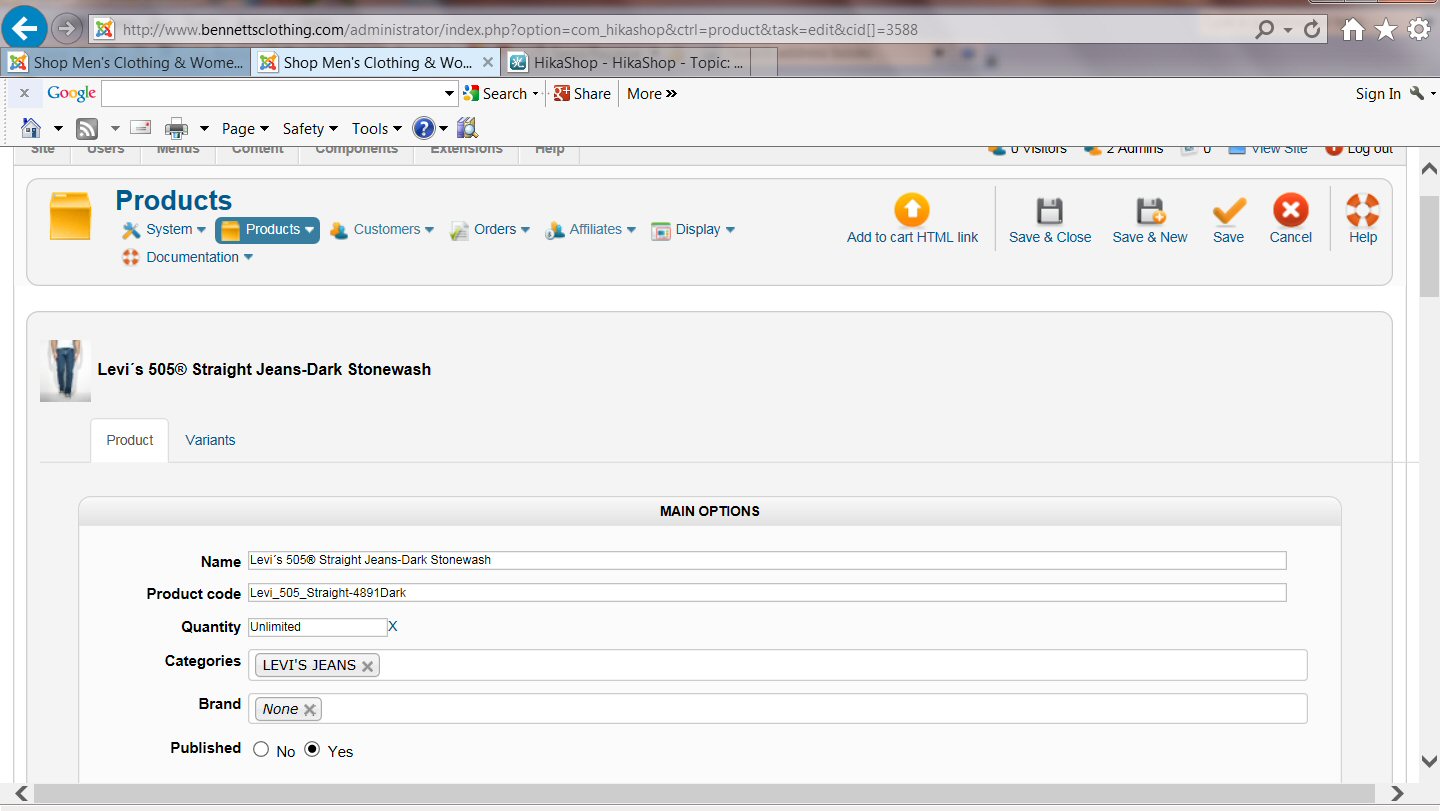
Please Log in or Create an account to join the conversation.
11 years 3 months ago #207266
by DB35611
Replied by DB35611 on topic Poor layout in variants
Never mind!! Just saw where screen size was 125%. Placed back to 100 and can navigate lots better. Now, whats the trick to adding photos from computer??? Before I could simply click + and it would go to my photo files. Very easy. Now seems I have to drag?
Please Log in or Create an account to join the conversation.
11 years 3 months ago #207271
by nicolas
Replied by nicolas on topic Poor layout in variants
Hi,
You can still click on the up arrow icon on the top right corner of the images area in order to select a file on your computer. The drag & drop is something on top of that as many people find it easier to drag & drop images (you can do several at the same time).
You can still click on the up arrow icon on the top right corner of the images area in order to select a file on your computer. The drag & drop is something on top of that as many people find it easier to drag & drop images (you can do several at the same time).
Please Log in or Create an account to join the conversation.
11 years 3 months ago #207551
by DB35611
Replied by DB35611 on topic Poor layout in variants
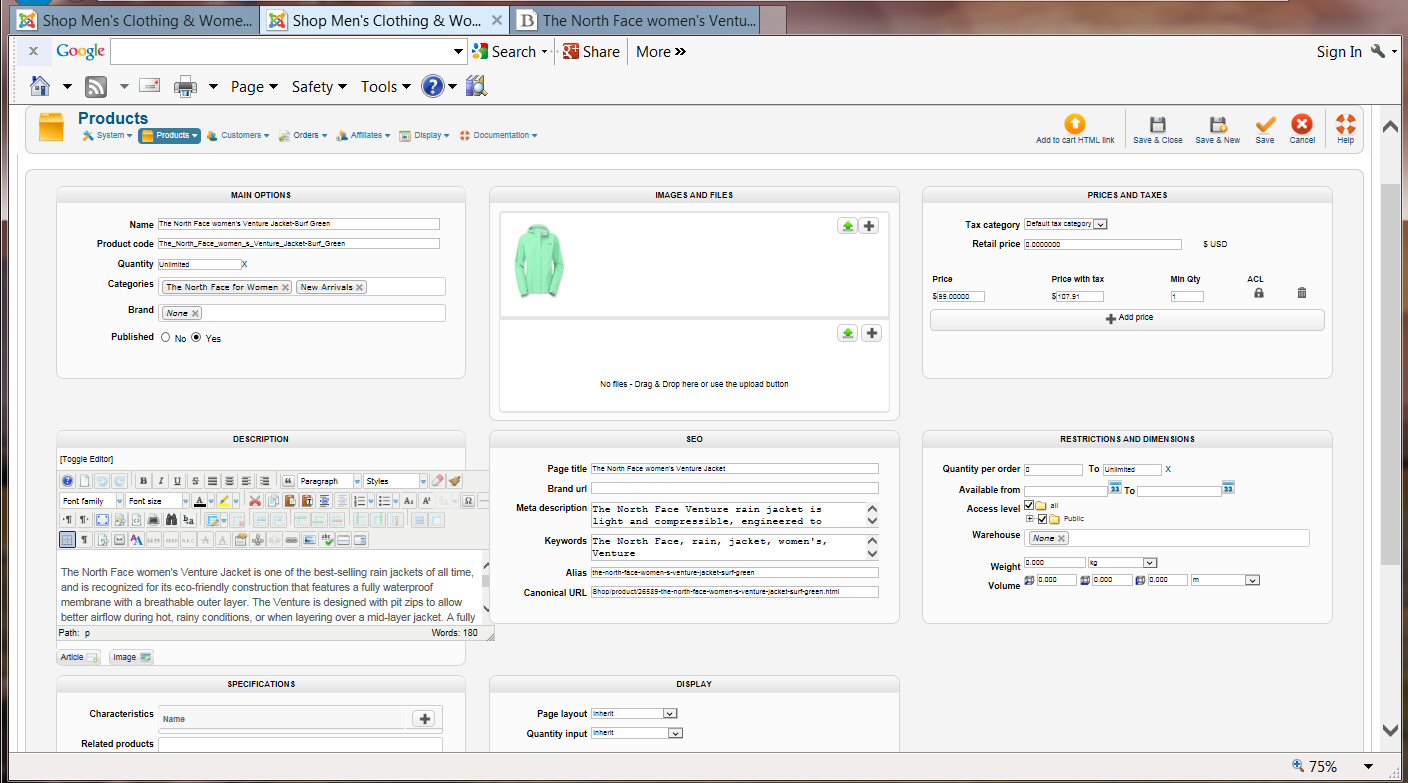
Awesome Nicolas. I've worked with it today and starting to enjoy the layout except for the Variants which is how this whole feed got started. Very cumbersome to add/remove sizes. On that note, I added this new color of jacket today. I used the copy feature like I did for lots of items today with no problems but the size variant on this item will not work. I've tried deleting the variant/re-add and now it wont let me add anything back. Suggestions? Just trying to understand the new format. Thanks
Please Log in or Create an account to join the conversation.
11 years 3 months ago #207552
by DB35611
Replied by DB35611 on topic Poor layout in variants
BTW @Nicolas, here is a link to the front end if that would help more.
www.bennettsclothing.com/Shop/product/26...cket-surf-green.html
www.bennettsclothing.com/Shop/product/26...cket-surf-green.html
Please Log in or Create an account to join the conversation.
11 years 3 months ago #207554
by nicolas
Replied by nicolas on topic Poor layout in variants
Hi,
Hard to say. We would have to look directly in the backend in order to start to understand the problem as we can't reproduce it on our end.
Hard to say. We would have to look directly in the backend in order to start to understand the problem as we can't reproduce it on our end.
Please Log in or Create an account to join the conversation.
11 years 3 months ago #207654
by DB35611
Replied by DB35611 on topic Poor layout in variants
I just figured out that you cannot make a copy OF a copy. The variants will not work. The copy feature works great with items that were built in past versions of Hikashop.
Please Log in or Create an account to join the conversation.
11 years 3 months ago #207665
by nicolas
Replied by nicolas on topic Poor layout in variants
I've done a test on my end and had no problem to first make a backup of a product with variants, and then a copy of that copy.
It might however not work properly if you change the product code of the main copied product without changing accordingly the product code of each of its variants.
It might however not work properly if you change the product code of the main copied product without changing accordingly the product code of each of its variants.
Please Log in or Create an account to join the conversation.
11 years 3 months ago #208646
by DB35611
Replied by DB35611 on topic Poor layout in variants
It loses the variants and that being clothing sizes in my case. And if I try rebuilding the item it wont let me add the variant either. Am I missing something? The sizes would be added through "characteristics" correct?
Please Log in or Create an account to join the conversation.
11 years 3 months ago #208653
by nicolas
Replied by nicolas on topic Poor layout in variants
Hi,
As I said, if you loose the variants during the copy, it means that the variants product code is not synchronized with the main product code.
Try with a new product, without changing the product code of the main product after adding the variants. If you copy it, it should work just fine.
As I said, if you loose the variants during the copy, it means that the variants product code is not synchronized with the main product code.
Try with a new product, without changing the product code of the main product after adding the variants. If you copy it, it should work just fine.
Please Log in or Create an account to join the conversation.
11 years 3 months ago #208936
by DB35611
Replied by DB35611 on topic Poor layout in variants
Thanks Nicolas for all of your help of trying to get the sizing working on a copied product. Ive tried copying the item and not changing the product code (although this seems confusing having products with the same codes) and it still will not work. Here is the item
www.bennettsclothing.com/Shop/product/26...ullover-crimson.html
And its a copy of this item
www.bennettsclothing.com/Shop/product/26...pullover-orange.html
The only thing I changed was the color description, picture and college name.
Please Log in or Create an account to join the conversation.
11 years 3 months ago #208942
by nicolas
Replied by nicolas on topic Poor layout in variants
Hi,
The issue not about not changing the product code of the copied product. You can do that.
The problem is that the original product already didn't had product codes that there not in synched.
As I said, configure a new product that you create from 0 and once done try to copy that product. You'll see that it will work.
The issue not about not changing the product code of the copied product. You can do that.
The problem is that the original product already didn't had product codes that there not in synched.
As I said, configure a new product that you create from 0 and once done try to copy that product. You'll see that it will work.
Please Log in or Create an account to join the conversation.
Time to create page: 0.512 seconds