

- Posts: 6
- Thank you received: 0
Advanced datepicker button only with bootstrap
10 years 5 months ago #239442
by petertak
Advanced datepicker button only with bootstrap was created by petertak
-- url of the page with the problem -- :
www.vloedgravenwijhe.nl/index.php/e-shop
-- HikaShop version -- : 2.6.3
-- Joomla version -- : 3.4.3
-- PHP version -- : 5.6
Hi,
When making a custom field (advanced datepicker) it shows correct in the backend, with an icon next to it for displaying the calendar
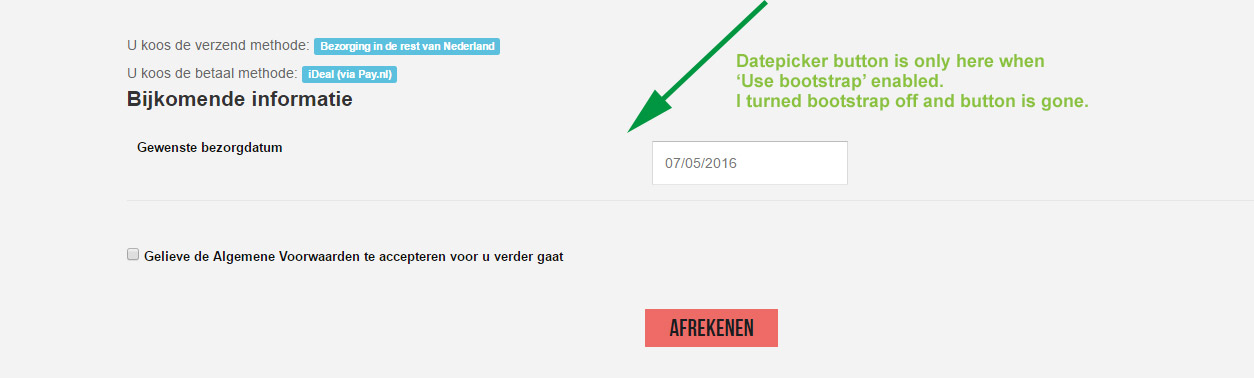
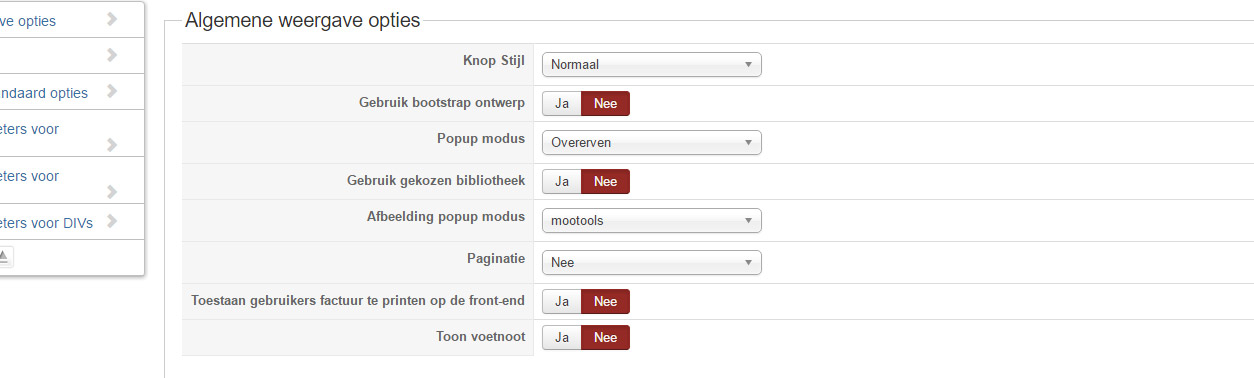
In frontend however it only shows when bootstrap enabled in the default display options. Is it possible to get the icon (and functionality with it) without bootstrap enabled?
Turning on bootstrap will mess up my design (product display) big time.
Thanx a lot for your suggestions.
Peter
p.s. screenshots are in Dutch but present the idea...
-- HikaShop version -- : 2.6.3
-- Joomla version -- : 3.4.3
-- PHP version -- : 5.6
Hi,
When making a custom field (advanced datepicker) it shows correct in the backend, with an icon next to it for displaying the calendar
In frontend however it only shows when bootstrap enabled in the default display options. Is it possible to get the icon (and functionality with it) without bootstrap enabled?
Turning on bootstrap will mess up my design (product display) big time.
Thanx a lot for your suggestions.
Peter
p.s. screenshots are in Dutch but present the idea...
Please Log in or Create an account to join the conversation.
10 years 5 months ago #239443
by petertak
Replied by petertak on topic Advanced datepicker button only with bootstrap
screenshots...
Please Log in or Create an account to join the conversation.
10 years 5 months ago #239449
by petertak
Replied by petertak on topic Advanced datepicker button only with bootstrap
Ok, in the plugin i copied the responsive part in the non-responsive part.
Is working now!
Is working now!
Please Log in or Create an account to join the conversation.

10 years 5 months ago #239460
by nicolas
Replied by nicolas on topic Advanced datepicker button only with bootstrap
Hi,
I suppose that the problem is a jQuery conflict on your website.
Yu can also try installing and configuring the extension jQuery Easy which can often fix these:
extensions.joomla.org/extension/jquery-easy
I suppose that the problem is a jQuery conflict on your website.
Yu can also try installing and configuring the extension jQuery Easy which can often fix these:
extensions.joomla.org/extension/jquery-easy
Please Log in or Create an account to join the conversation.
10 years 5 months ago #239477
by petertak
Replied by petertak on topic Advanced datepicker button only with bootstrap
Thank you for your respons and suggestion.
This might well be the case! I will probably encounter this with the next Hikashop website i have to make and will try your idea.
Thanx again!
This might well be the case! I will probably encounter this with the next Hikashop website i have to make and will try your idea.
Thanx again!
Please Log in or Create an account to join the conversation.
Less
More
- Posts: 424
- Thank you received: 11
10 years 5 months ago #240425
by BluepointWebdesign
Replied by BluepointWebdesign on topic Advanced datepicker button only with bootstrap
We are working on hikashop 2.6.3 and joomla 3.5.1 and i can not figure it out how to let the datepicker work without bootstrap, also i can not figure out how the jquery easy plugin works.
We have the same problem.
Please help. thanks.
We have the same problem.
Please help. thanks.
Please Log in or Create an account to join the conversation.
10 years 5 months ago #240428
by nicolas
Replied by nicolas on topic Advanced datepicker button only with bootstrap
Hi,
Could you provide a link to the shop so that we can see the issue ? The cause might be different on your website.
Could you provide a link to the shop so that we can see the issue ? The cause might be different on your website.
Please Log in or Create an account to join the conversation.
Less
More
- Posts: 424
- Thank you received: 11
10 years 5 months ago #240839
by BluepointWebdesign
Replied by BluepointWebdesign on topic Advanced datepicker button only with bootstrap
Hello,
We are trying to get the jQuery easy plugin working in order to let the advanced date picker working. But i really don't know how to.. can you explain it to me?
Thanks.
We are trying to get the jQuery easy plugin working in order to let the advanced date picker working. But i really don't know how to.. can you explain it to me?
Thanks.
Please Log in or Create an account to join the conversation.
10 years 5 months ago #240851
by nicolas
Replied by nicolas on topic Advanced datepicker button only with bootstrap
Hi,
Well, I4ve never used it much myself. Normally, you just install, activate it, and configure it to handle jQuery and jQuery UI and that's it.
Does that help ?
Well, I4ve never used it much myself. Normally, you just install, activate it, and configure it to handle jQuery and jQuery UI and that's it.
Does that help ?
Please Log in or Create an account to join the conversation.
Less
More
- Posts: 424
- Thank you received: 11
10 years 4 months ago #241485
by BluepointWebdesign
Replied by BluepointWebdesign on topic Advanced datepicker button only with bootstrap
i am sorry but that doesn't help, but after updating to the newest version of hikashop the 2.6.3 we get to see something not right in the backend of the custom fields. see picture. please help.
Please Log in or Create an account to join the conversation.
10 years 4 months ago #241506
by nicolas
Replied by nicolas on topic Advanced datepicker button only with bootstrap
Hi,
That's normal actually. We've added new display options for some types of custom fields. And thus the options of the listing are not adapted anymore. Edit these custom fields and look at the display options and you'll understand.
Then, can you provide a link to the page with the datepicker on your website so that we can have a look ?
That's normal actually. We've added new display options for some types of custom fields. And thus the options of the listing are not adapted anymore. Edit these custom fields and look at the display options and you'll understand.
Then, can you provide a link to the page with the datepicker on your website so that we can have a look ?
Please Log in or Create an account to join the conversation.
Less
More
- Posts: 424
- Thank you received: 11
10 years 4 months ago #241539
by BluepointWebdesign
Replied by BluepointWebdesign on topic Advanced datepicker button only with bootstrap
Hello,
04.uw-hiow-concept.nl/opslag-huren/unit-...-5/product/2-unit-51 on this product page you will see the date picker. look at the field with the date
At this moment the custom text field: "Opslag nodig vanaf:" can not be moved to its right place at the moment. another custom field always folows. The one direct below it. Hope you understand. And can help us with the datepicker.
Thanks
04.uw-hiow-concept.nl/opslag-huren/unit-...-5/product/2-unit-51 on this product page you will see the date picker. look at the field with the date
At this moment the custom text field: "Opslag nodig vanaf:" can not be moved to its right place at the moment. another custom field always folows. The one direct below it. Hope you understand. And can help us with the datepicker.
Thanks
Please Log in or Create an account to join the conversation.
10 years 4 months ago #241576
by nicolas
Replied by nicolas on topic Advanced datepicker button only with bootstrap
Hi,
Please download again the install package on our end and install it on your website. We've added a patch and that should help.
Please download again the install package on our end and install it on your website. We've added a patch and that should help.
Please Log in or Create an account to join the conversation.

10 years 4 months ago #241629
by eurospar
Replied by eurospar on topic Advanced datepicker button only with bootstrap
Hi
I still have the same problem for the advanced date picker.
The simple date picker is no problem.
please can somebody give a good solution?
thanks
I still have the same problem for the advanced date picker.
The simple date picker is no problem.
please can somebody give a good solution?
thanks
Please Log in or Create an account to join the conversation.
Less
More
- Posts: 424
- Thank you received: 11
10 years 4 months ago #241638
by BluepointWebdesign
Replied by BluepointWebdesign on topic Advanced datepicker button only with bootstrap
Hello Nicolas,
I downloaded the business package again, installed it but still the advanced date picker is not working. Or did i just need the patch? if then so where can i find it?
Thanks.
I downloaded the business package again, installed it but still the advanced date picker is not working. Or did i just need the patch? if then so where can i find it?
Thanks.
Please Log in or Create an account to join the conversation.
10 years 4 months ago #241642
by nicolas
Replied by nicolas on topic Advanced datepicker button only with bootstrap
The patch is included. If you still have the problem after that, edit your custom field settings and save them. It should help.
Please Log in or Create an account to join the conversation.
10 years 4 months ago #241708
by eurospar
Replied by eurospar on topic Advanced datepicker button only with bootstrap
can we download a new version in 'our subscription'?
thanks for your reply
thanks for your reply
Please Log in or Create an account to join the conversation.
10 years 4 months ago #241718
by nicolas
Replied by nicolas on topic Advanced datepicker button only with bootstrap
Yes. Go there and you'll find a download link for the zip install package. click on it and it will send you the zip.
Please Log in or Create an account to join the conversation.
Less
More
- Posts: 424
- Thank you received: 11
10 years 4 months ago #241850
by BluepointWebdesign
Replied by BluepointWebdesign on topic Advanced datepicker button only with bootstrap
on the page we have now the simple date picker, that one is working fine but we are stil unable to get the advanced date picker working on the frontend on the backend it is working in the preview?
edited the custom field unfortunatly it still didn't work.
edited the custom field unfortunatly it still didn't work.
Please Log in or Create an account to join the conversation.
10 years 4 months ago #241853
by eurospar
Replied by eurospar on topic Advanced datepicker button only with bootstrap
Same problem as HIOW_HIKA ...simple date picker works fine but not the advanced (i need the advanced)
preview in backend is correct
preview in backend is correct
Please Log in or Create an account to join the conversation.
Time to create page: 0.521 seconds