

- Posts: 31
- Thank you received: 0
CSS issue on update to 3
9 years 7 months ago #262810
by Jim
CSS issue on update to 3 was created by Jim
Hello,
I'm currently looking into updating to hikashop 3 for a customer.
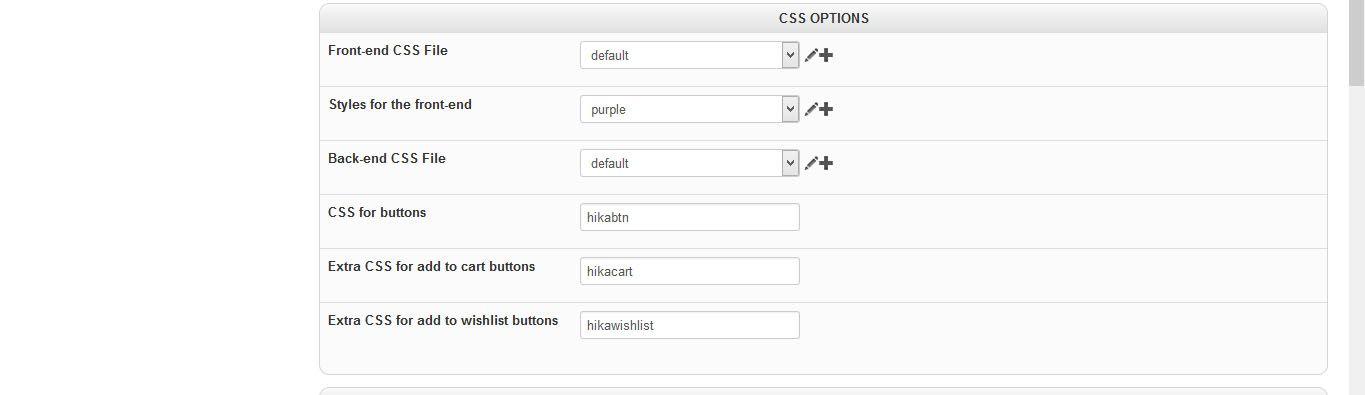
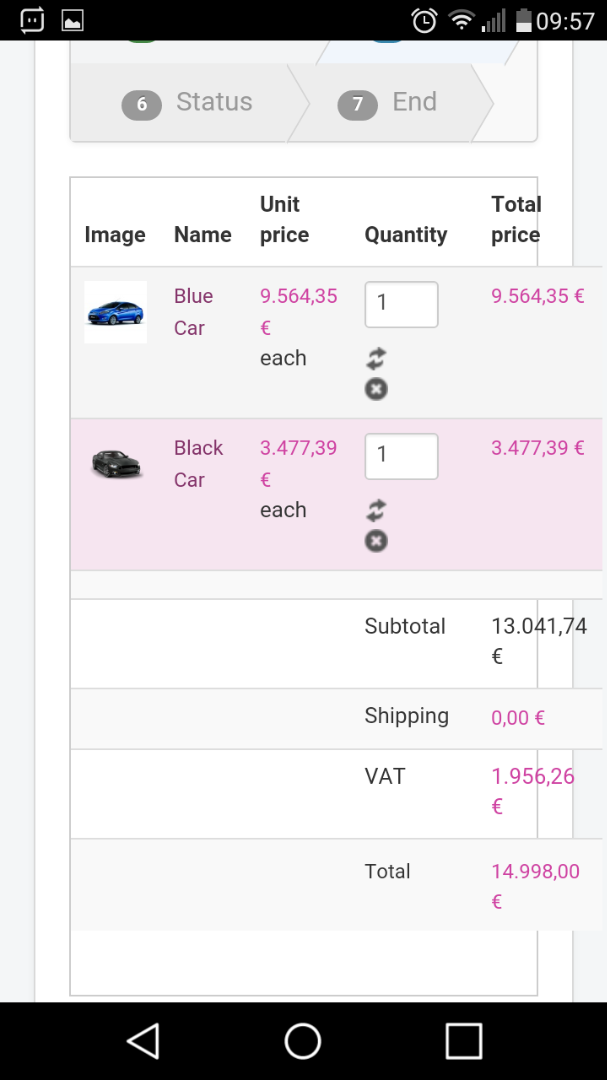
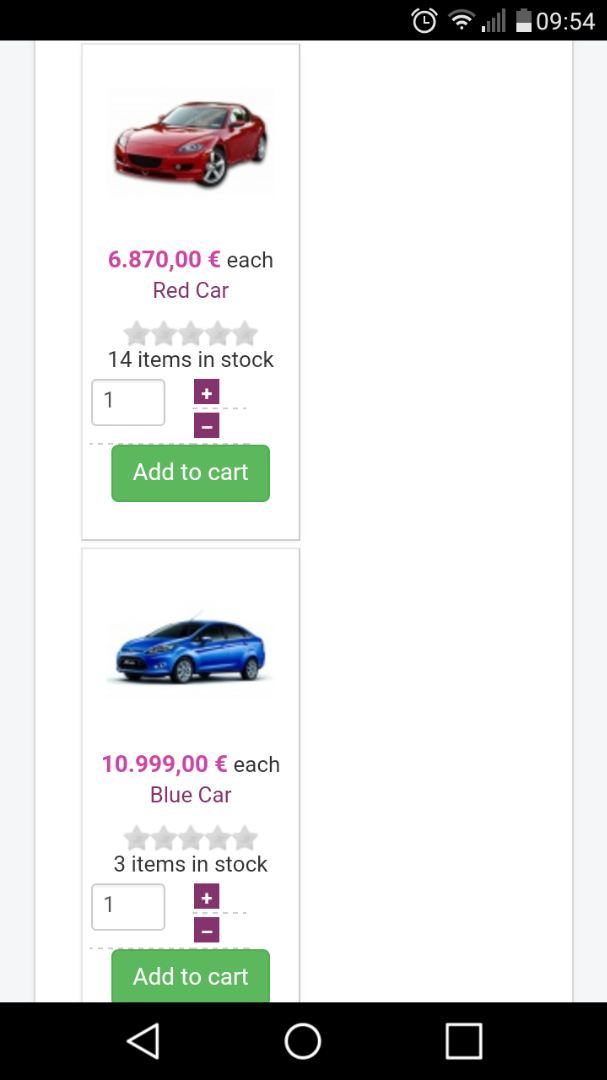
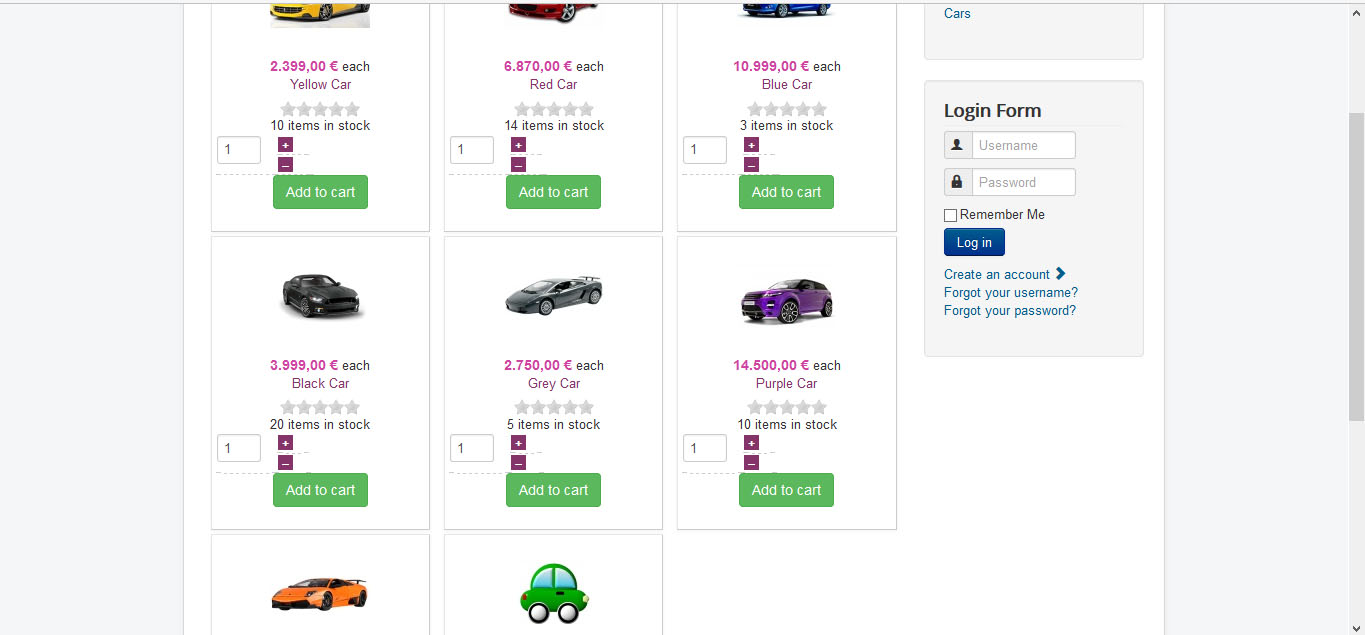
Therefore I did a clean install of joomla 3.6.5 and hikashop 3. First things look pretty. When I installed one of your styles the css styling goes odd.
I included some screenshots.
Pls, advice what to do.
I'm currently looking into updating to hikashop 3 for a customer.
Therefore I did a clean install of joomla 3.6.5 and hikashop 3. First things look pretty. When I installed one of your styles the css styling goes odd.
I included some screenshots.
Pls, advice what to do.
Please Log in or Create an account to join the conversation.

9 years 7 months ago #262820
by nicolas
Replied by nicolas on topic CSS issue on update to 3
Hi,
The style packs were made for HikaShop 1.x and 2.x. With HikaShop 3.x, the add to cart/cart/checkout/responsive systems have been rewritten from 0 and thus that means that the style packs are not totally compatible with these new systems.
If you turn on the legacy settings of the add to cart and checkout in the Advanced tab of the HikaShop configuration, it will use the old viewsand it should display better, however you'll loose the improvments that were added in the new systems.
The style packs were made for HikaShop 1.x and 2.x. With HikaShop 3.x, the add to cart/cart/checkout/responsive systems have been rewritten from 0 and thus that means that the style packs are not totally compatible with these new systems.
If you turn on the legacy settings of the add to cart and checkout in the Advanced tab of the HikaShop configuration, it will use the old viewsand it should display better, however you'll loose the improvments that were added in the new systems.
The following user(s) said Thank You: Jim
Please Log in or Create an account to join the conversation.
9 years 7 months ago #263110
by Jim
Replied by Jim on topic CSS issue on update to 3
HI,
thanks for the answer. Looks like a lot of handiwork.
Is there a documentation on the css files, what class is in what file?
thanks for the answer. Looks like a lot of handiwork.
Is there a documentation on the css files, what class is in what file?
Please Log in or Create an account to join the conversation.

9 years 7 months ago #263116
by Jerome
Jerome - Obsidev.com
HikaMarket & HikaSerial developer / HikaShop core dev team.
Replied by Jerome on topic CSS issue on update to 3
Hi,
We have that documentation page :
www.hikashop.com/support/documentation/1...the-display.html#css
Regards,
We have that documentation page :
www.hikashop.com/support/documentation/1...the-display.html#css
Regards,
Jerome - Obsidev.com
HikaMarket & HikaSerial developer / HikaShop core dev team.
Please Log in or Create an account to join the conversation.
9 years 7 months ago - 9 years 7 months ago #263977
by Jim
Replied by Jim on topic CSS issue on update to 3
Hi again,
did some testing and modifying. But I still can't solve some issues.
Pls, advice where to look.
In pic1 I can't get the quantity field and the order button in the middle and centered. I went the style_default and frontend_default up and down. Tried different things, without luck.
In pic2 there is a hell of space under the product pic, then @ the end of the page the title and description
are placed, the price as seen in pic3, is on top of the next column on the right.
In pic4 I don't get the bottom buttons on checkout, so I am stuck in the cart
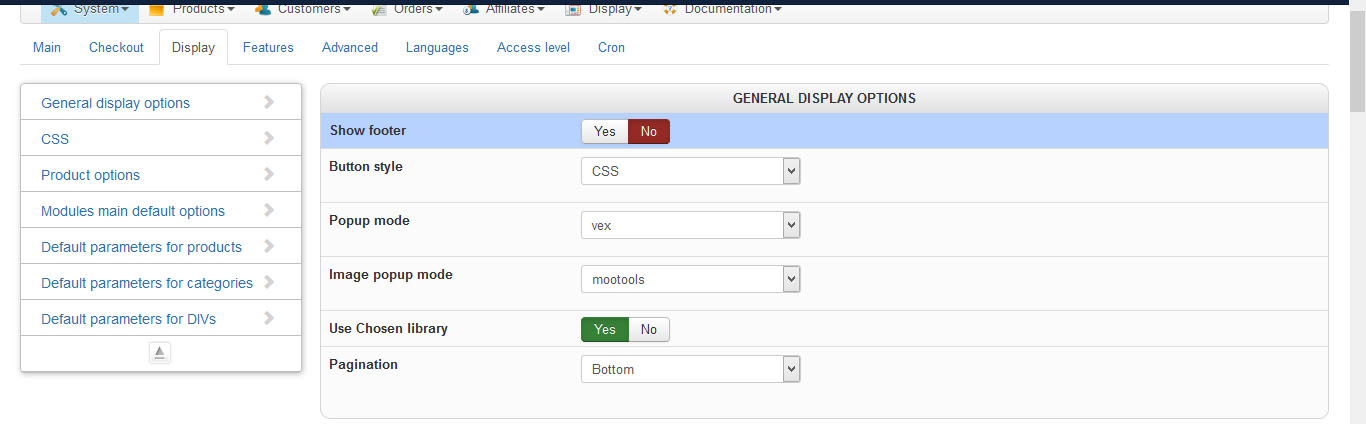
In pic5 I attached to display config of hikashop
One last thing. I can't get the prices be shown with vat. Hikashop is ignoring my configuration. When I configure with tax or without tax its always the price without tax. Even when I configure price both. I get shown both prices with out tax. And yes, tax class is configured and used in product. As well is there a price with and without tax.
Pls help. I spend long hours in reading, searching, trying an becoming more and more frustrated
PS: one other thing. Is it possible to change the initial position where the add to cart pop up appears be changed. My customers is using a fixed header so the first pop up appears always behind the header.
did some testing and modifying. But I still can't solve some issues.
Pls, advice where to look.
In pic1 I can't get the quantity field and the order button in the middle and centered. I went the style_default and frontend_default up and down. Tried different things, without luck.
In pic2 there is a hell of space under the product pic, then @ the end of the page the title and description
are placed, the price as seen in pic3, is on top of the next column on the right.
In pic4 I don't get the bottom buttons on checkout, so I am stuck in the cart
In pic5 I attached to display config of hikashop
One last thing. I can't get the prices be shown with vat. Hikashop is ignoring my configuration. When I configure with tax or without tax its always the price without tax. Even when I configure price both. I get shown both prices with out tax. And yes, tax class is configured and used in product. As well is there a price with and without tax.
Pls help. I spend long hours in reading, searching, trying an becoming more and more frustrated
PS: one other thing. Is it possible to change the initial position where the add to cart pop up appears be changed. My customers is using a fixed header so the first pop up appears always behind the header.
Last edit: 9 years 7 months ago by Jim.
Please Log in or Create an account to join the conversation.
9 years 7 months ago #263986
by nicolas
Replied by nicolas on topic CSS issue on update to 3
Hi,
1. to 4. and 6. We can't say. Please provide a link to the page so that we can look at the situation and analyze the CSS on the page.
5. The taxes issue is something we've fixed since then.
Download again the install package on our website and install it on yours and that will fix the problem.
1. to 4. and 6. We can't say. Please provide a link to the page so that we can look at the situation and analyze the CSS on the page.
5. The taxes issue is something we've fixed since then.
Download again the install package on our website and install it on yours and that will fix the problem.
Please Log in or Create an account to join the conversation.
9 years 6 months ago #264593
by Jim
Replied by Jim on topic CSS issue on update to 3
Hi Nicolas,
thanks for the answer. Regarding tax issue, I will do. For the rest. site is currently in offline devel environment. Will move it online and give you a notice as soon as possible.
thanks for the answer. Regarding tax issue, I will do. For the rest. site is currently in offline devel environment. Will move it online and give you a notice as soon as possible.
Please Log in or Create an account to join the conversation.
9 years 6 months ago #265904
by nicolas
Replied by nicolas on topic CSS issue on update to 3
Hi,
I saw your PM today. Please use our contact form with a link to the thread you're talking about and not PMs so that we directly see your messages rapidely.
1. You can do that by adding such CSS:
.hikashop_listing_img_title form{
display: inline-block !important;
width: 50% !important;
}
.hikashop_listing_img_title form table, .hikashop_listing_img_title form .hikabtn{
float:left;
}
2. and 3. The page is separated in 4 areas:
- top at the top iwith the name
- left with the image
- right with the price, options, add to cart
- bottom with the description
If you want to change the order of the elements or change them from one area to another, you can edit the file "show_default" via the menu Display>Views. More information is available here:
www.hikashop.com/support/documentation/1...ize-the-display.html
4. I suppose that you're talking about that page:
monosnap.com/file/hJG8r0hogyx12H2hwMHOW0Z12T78Fg
that you can reach by clicking on the small cart icon at the top.
But that's not the checkout so it's normal that there are no buttons at the bottom. That's the cart display page.
That's the checkout on your website: monosnap.com/file/aYws5KUE3nXUuAmsg5ZDKXp5OJUGiZ
And you can see that the Next button displays properly. So your problem is that the cart icon that you placed at the top doesn't go to the page you want it to go to.
6. Normally, even if you turn off the display of all the taxes, you should still see the total tax amount after the shipping and before the final total on the checkout cart.
Since you don't get it, it means that no tax is applied because HikaShop couldn't find any tax rule matching with the product tax category and the main tax zone you configured in your HikaShop configuration.
So the problem is with the way you configured your tax rules I suppose. I would recommend to check this FAQ in order to see what is the cause of the situation:
www.hikashop.com/support/documentation/3...ion-listing.html#faq
I saw your PM today. Please use our contact form with a link to the thread you're talking about and not PMs so that we directly see your messages rapidely.
1. You can do that by adding such CSS:
.hikashop_listing_img_title form{
display: inline-block !important;
width: 50% !important;
}
.hikashop_listing_img_title form table, .hikashop_listing_img_title form .hikabtn{
float:left;
}
2. and 3. The page is separated in 4 areas:
- top at the top iwith the name
- left with the image
- right with the price, options, add to cart
- bottom with the description
If you want to change the order of the elements or change them from one area to another, you can edit the file "show_default" via the menu Display>Views. More information is available here:
www.hikashop.com/support/documentation/1...ize-the-display.html
4. I suppose that you're talking about that page:
monosnap.com/file/hJG8r0hogyx12H2hwMHOW0Z12T78Fg
that you can reach by clicking on the small cart icon at the top.
But that's not the checkout so it's normal that there are no buttons at the bottom. That's the cart display page.
That's the checkout on your website: monosnap.com/file/aYws5KUE3nXUuAmsg5ZDKXp5OJUGiZ
And you can see that the Next button displays properly. So your problem is that the cart icon that you placed at the top doesn't go to the page you want it to go to.
6. Normally, even if you turn off the display of all the taxes, you should still see the total tax amount after the shipping and before the final total on the checkout cart.
Since you don't get it, it means that no tax is applied because HikaShop couldn't find any tax rule matching with the product tax category and the main tax zone you configured in your HikaShop configuration.
So the problem is with the way you configured your tax rules I suppose. I would recommend to check this FAQ in order to see what is the cause of the situation:
www.hikashop.com/support/documentation/3...ion-listing.html#faq
Please Log in or Create an account to join the conversation.
9 years 6 months ago #266028
by Jim
Replied by Jim on topic CSS issue on update to 3
@nicolas:
@2+3: will try shortly
@4: sorry clicked the wrong item in menu config (selected cart display instead of checkout)
have 2 further problems:
the add to cart pop up is behind sticky header of helix 3 template, can this be fixed
I get an error in the dasboard, pls see attached pics
@2+3: will try shortly
@4: sorry clicked the wrong item in menu config (selected cart display instead of checkout)
have 2 further problems:
the add to cart pop up is behind sticky header of helix 3 template, can this be fixed
I get an error in the dasboard, pls see attached pics
Please Log in or Create an account to join the conversation.
9 years 6 months ago #266055
by nicolas
Replied by nicolas on topic CSS issue on update to 3
Hi,
1. I tried on my end but I do see it on top:
monosnap.com/file/Hph8nyFLzDh48Z0NUIfqytUVWBfVqC
2. That's normal. As the message says there is not enough data to display anything.
And if you look at the orders listing below you can see that there are no orders in your shop.
And it's impossible to display a chart of the orders over time without any orders placed.
1. I tried on my end but I do see it on top:
monosnap.com/file/Hph8nyFLzDh48Z0NUIfqytUVWBfVqC
2. That's normal. As the message says there is not enough data to display anything.
And if you look at the orders listing below you can see that there are no orders in your shop.
And it's impossible to display a chart of the orders over time without any orders placed.
Please Log in or Create an account to join the conversation.
9 years 6 months ago #266084
by Jim
Replied by Jim on topic CSS issue on update to 3
Hi Nicolas,
@1: For me it's only working on Chrome 57 and IE 11 aswell as on Android 6 with their Internet Browser 5.70 and chrome 52
Won't work for me with Vivaldi 1.7, Firefox 52 and SlimJet 13
With this browsers it's only working as long as you don't scroll down. The moment you scroll down and the header with the nav bar get's to fixed, the pop up will only show up behind the header
@2: thx for the explanation. I was irritated of the error message due "Not enough columns given ....". I was thinking of there is not enough space.
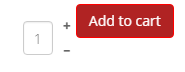
regarding your post of yesteday, 1) the code is working, but I still have an formating issue as shown in the attached pic. I was playing with the % but that's my best result
@1: For me it's only working on Chrome 57 and IE 11 aswell as on Android 6 with their Internet Browser 5.70 and chrome 52
Won't work for me with Vivaldi 1.7, Firefox 52 and SlimJet 13
With this browsers it's only working as long as you don't scroll down. The moment you scroll down and the header with the nav bar get's to fixed, the pop up will only show up behind the header
@2: thx for the explanation. I was irritated of the error message due "Not enough columns given ....". I was thinking of there is not enough space.
regarding your post of yesteday, 1) the code is working, but I still have an formating issue as shown in the attached pic. I was playing with the % but that's my best result
Please Log in or Create an account to join the conversation.
9 years 6 months ago #266087
by Jim
Replied by Jim on topic CSS issue on update to 3
Hi again,
I became aware of 2 further issues.
See attached pics.
Where to fix?
I became aware of 2 further issues.
See attached pics.
Where to fix?
Please Log in or Create an account to join the conversation.
9 years 6 months ago #266089
by nicolas
Replied by nicolas on topic CSS issue on update to 3
Hi,
1. Thanks for the additional information. This comes from your template though. I was able to reproduce the problem and added a patch in order to fix the problem so that the problem shouldn't happen anymore. Download the install package and on our website and install it again and you'll get the patch.
2. You could add such CSS:
a.hikacart {
margin-top: 3px;
}
On my end it then displays properly: monosnap.com/file/lou4NoCzpUGDnMb7rHPidIE2Jnu9vq
3. For the input fields that's also linked to your template CSS.
Add such CSS to prevent that:
.hkform-control {
width: auto !important;
}
4. That comes from the code:
#hikashop_checkout_cart_final_total_title {display:none;}
of the file /media/com_hikashop/css/style_les.css
Remove it and it will display properly.
1. Thanks for the additional information. This comes from your template though. I was able to reproduce the problem and added a patch in order to fix the problem so that the problem shouldn't happen anymore. Download the install package and on our website and install it again and you'll get the patch.
2. You could add such CSS:
a.hikacart {
margin-top: 3px;
}
On my end it then displays properly: monosnap.com/file/lou4NoCzpUGDnMb7rHPidIE2Jnu9vq
3. For the input fields that's also linked to your template CSS.
Add such CSS to prevent that:
.hkform-control {
width: auto !important;
}
4. That comes from the code:
#hikashop_checkout_cart_final_total_title {display:none;}
of the file /media/com_hikashop/css/style_les.css
Remove it and it will display properly.
Please Log in or Create an account to join the conversation.
9 years 6 months ago #266167
by Jim
Replied by Jim on topic CSS issue on update to 3
Hi Nicolas,
thanks for the answers. Will check it out shortly.
In the meantime another question. Does Hikashop use the PHP Mail or the System Settings of Joomla?
thanks for the answers. Will check it out shortly.
In the meantime another question. Does Hikashop use the PHP Mail or the System Settings of Joomla?
Please Log in or Create an account to join the conversation.
9 years 6 months ago #266215
by Jim
Replied by Jim on topic CSS issue on update to 3
Is this new? That there is a next button on register and login?
Where can I center the whole add to cart and quantity field al marked?
Where can I center the whole add to cart and quantity field al marked?
Please Log in or Create an account to join the conversation.

Less
More
- Posts: 12953
- Thank you received: 1778
9 years 6 months ago - 9 years 6 months ago #266173
by Mohamed Thelji
Replied by Mohamed Thelji on topic CSS issue on update to 3
Hello,
1. Hikashop actually use the Joomla Email system.
2. In checkout legacy, the "next" button could be hidden.
3. www.hikashop.com/support/documentation/1...the-display.html#css
1. Hikashop actually use the Joomla Email system.
2. In checkout legacy, the "next" button could be hidden.
3. www.hikashop.com/support/documentation/1...the-display.html#css
Last edit: 9 years 6 months ago by Jerome.
Please Log in or Create an account to join the conversation.
9 years 6 months ago #266272
by Jim
Replied by Jim on topic CSS issue on update to 3
Hi,
2. have disabled "Checkout"," Add to cart", "Backend dashboard" legacy at setup. So therefore legacy shouldn't be a concern.
When enabling legacy mode I can't find an option to hide "next" button
2. have disabled "Checkout"," Add to cart", "Backend dashboard" legacy at setup. So therefore legacy shouldn't be a concern.
When enabling legacy mode I can't find an option to hide "next" button
Please Log in or Create an account to join the conversation.
Less
More
- Posts: 12953
- Thank you received: 1778
9 years 6 months ago #266277
by Mohamed Thelji
Replied by Mohamed Thelji on topic CSS issue on update to 3
Hello,
It will actually depends on how you configured your checkout workflow via "Hikashop->System->Configuration->Checkout". So to be sure that you won't have any "next" button, you should make sure that your checkout workflow will have only one step.
It will actually depends on how you configured your checkout workflow via "Hikashop->System->Configuration->Checkout". So to be sure that you won't have any "next" button, you should make sure that your checkout workflow will have only one step.
Please Log in or Create an account to join the conversation.
9 years 6 months ago - 9 years 6 months ago #266373
by Jim
Replied by Jim on topic CSS issue on update to 3
Hi,
I found another issue.
When you go to a product page.
1) The hikashop_product_options and hikashop_product_characteristics in the product > show_default view will always exceed the screen of my phone.
Even with " with: auto !important" they won't stay on the screen
2) the "add to cart" button will always go to the next line, see attached pic
Advice pls.
I found another issue.
When you go to a product page.
1) The hikashop_product_options and hikashop_product_characteristics in the product > show_default view will always exceed the screen of my phone.
Even with " with: auto !important" they won't stay on the screen
2) the "add to cart" button will always go to the next line, see attached pic
Advice pls.
Last edit: 9 years 6 months ago by Jim. Reason: forgott to attach file
Please Log in or Create an account to join the conversation.

9 years 6 months ago - 9 years 6 months ago #266424
by Philip
Replied by Philip on topic CSS issue on update to 3
Hello,
For your display issue, I think you can use Css order, @media, like this :
Here, that means that your element will be 600px for all screen except when screen size will be under 480px, that will switch to 200px.
Note : Learn here how to custom your frontend css , here and see this Css reference, here .
Regards
For your display issue, I think you can use Css order, @media, like this :
Code:
.your_element_to_modify {
width : 600 px;
}
@media screen and (min-width: 480px) {
.your_element_to_modify {
width : 200 px;
}
}
Note : Learn here how to custom your frontend css , here and see this Css reference, here .
Regards
Last edit: 9 years 6 months ago by Philip.
Please Log in or Create an account to join the conversation.
Time to create page: 0.355 seconds