

- Posts: 65
- Thank you received: 3
User Control panel displays oddly
9 years 3 weeks ago #278168
by notnilla
User Control panel displays oddly was created by notnilla
-- HikaShop version -- : 3.1.1
-- Joomla version -- : 3.7.5
-- PHP version -- : 5.5
-- Browser(s) name and version -- : safari
-- Error-message(debug-mod must be tuned on) -- : none, please see attached photo
When I click on My Account (menu item via Hikashop user control panel type), the page renders but the four items seem to display on top of one another. The items that should be displaying are Customer account, manage address, orders, and carts. If I click on them, they all go to the pages they should but it needs to display wider so customers can read the options.
How I do I control the width or edit this so it displays correct?
Thank you!
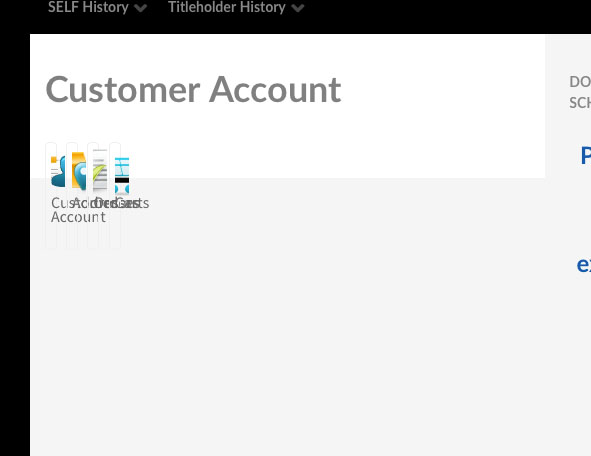
-- Joomla version -- : 3.7.5
-- PHP version -- : 5.5
-- Browser(s) name and version -- : safari
-- Error-message(debug-mod must be tuned on) -- : none, please see attached photo
When I click on My Account (menu item via Hikashop user control panel type), the page renders but the four items seem to display on top of one another. The items that should be displaying are Customer account, manage address, orders, and carts. If I click on them, they all go to the pages they should but it needs to display wider so customers can read the options.
How I do I control the width or edit this so it displays correct?
Thank you!
Please Log in or Create an account to join the conversation.

9 years 3 weeks ago #278171
by Jerome
Jerome - Obsidev.com
HikaMarket & HikaSerial developer / HikaShop core dev team.
Replied by Jerome on topic User Control panel displays oddly
Hello,
You're using a "frontend_custom" CSS file for the front-end.
If you take a look at the content of the "frontend_default.css" file, you will see some rules made to display the icons in the user cpanel
You have to look for :
And you'll see the different rules required to display that user control panel.
Regards,
You're using a "frontend_custom" CSS file for the front-end.
If you take a look at the content of the "frontend_default.css" file, you will see some rules made to display the icons in the user cpanel
You have to look for :
Code:
div.icon-wrapper {
Regards,
Jerome - Obsidev.com
HikaMarket & HikaSerial developer / HikaShop core dev team.
Please Log in or Create an account to join the conversation.
9 years 3 weeks ago #278254
by notnilla
Replied by notnilla on topic User Control panel displays oddly
Thank you. I found the file without issue.
I believe the lines you're referring to are from 507 to 570.
I looked through them and below is all I have that refers to the user control panel. Am I missing a line of code somewhere? And yes, I don't know code but I know enough to change numbers. Thank you in advance.
/* customer control panel */
#hikashopcpanel div.icon a {
border:1px solid #F0F0F0;
color:#666666;
display:block;
float:left;
text-decoration:none;
vertical-align:middle;
width:100%;
}
#hikashopcpanel div.icon:hover a {
-moz-background-clip:border;
-moz-background-inline-policy:continuous;
-moz-background-origin:padding;
background:#F9F9F9 none repeat scroll 0 0;
border-color:#EEEEEE #CCCCCC #CCCCCC #EEEEEE;
border-style:solid;
border-width:1px;
color:#0B55C4;
}
#hikashopcpanel div.icon {
float:left;
margin-bottom:5px;
margin-right:5px;
text-align:center;
width: 100%;
}
#hikashopcpanel span {
display:block;
text-align:center;
background-repeat: no-repeat;
background-position: center;
height: 48px;
}
.hikashop_cpanel_icon_image_span{
background-repeat: no-repeat;
background-position: center;
height: 48px;
}
#hikashopcpanel td{
text-align: center;
}
.hikashop_cpanel_icon_image{
width: 80px;
}
.hikashop_cpanel_icon_table{
width: 100%;
}
#hikashopcpanel img {
margin:0 auto;
padding:10px 0;
}
.hikashopcpanel{
width:500px;
margin:auto;
margin-top:20px;
}
.hikashop_header_title{ float: left; }
.hikashop_header_buttons{ float: right; }
I believe the lines you're referring to are from 507 to 570.
I looked through them and below is all I have that refers to the user control panel. Am I missing a line of code somewhere? And yes, I don't know code but I know enough to change numbers. Thank you in advance.
/* customer control panel */
#hikashopcpanel div.icon a {
border:1px solid #F0F0F0;
color:#666666;
display:block;
float:left;
text-decoration:none;
vertical-align:middle;
width:100%;
}
#hikashopcpanel div.icon:hover a {
-moz-background-clip:border;
-moz-background-inline-policy:continuous;
-moz-background-origin:padding;
background:#F9F9F9 none repeat scroll 0 0;
border-color:#EEEEEE #CCCCCC #CCCCCC #EEEEEE;
border-style:solid;
border-width:1px;
color:#0B55C4;
}
#hikashopcpanel div.icon {
float:left;
margin-bottom:5px;
margin-right:5px;
text-align:center;
width: 100%;
}
#hikashopcpanel span {
display:block;
text-align:center;
background-repeat: no-repeat;
background-position: center;
height: 48px;
}
.hikashop_cpanel_icon_image_span{
background-repeat: no-repeat;
background-position: center;
height: 48px;
}
#hikashopcpanel td{
text-align: center;
}
.hikashop_cpanel_icon_image{
width: 80px;
}
.hikashop_cpanel_icon_table{
width: 100%;
}
#hikashopcpanel img {
margin:0 auto;
padding:10px 0;
}
.hikashopcpanel{
width:500px;
margin:auto;
margin-top:20px;
}
.hikashop_header_title{ float: left; }
.hikashop_header_buttons{ float: right; }
Please Log in or Create an account to join the conversation.
9 years 3 weeks ago #278256
by Jerome
Jerome - Obsidev.com
HikaMarket & HikaSerial developer / HikaShop core dev team.
Replied by Jerome on topic User Control panel displays oddly
Hello,
No, I'm talking about the line in the file frontend_default.css which starts with:
And that line is around the line 100 in the file that I'm talking about.
Regards,
No, I'm talking about the line in the file frontend_default.css which starts with:
Code:
div.icon-wrapper {
Regards,
Jerome - Obsidev.com
HikaMarket & HikaSerial developer / HikaShop core dev team.
The following user(s) said Thank You: notnilla
Please Log in or Create an account to join the conversation.
Time to create page: 0.184 seconds