

- Posts: 4
- Thank you received: 0
Title duplicity
8 years 11 months ago #282997
by altonaga
Title duplicity was created by altonaga
-- HikaShop version -- : 3.2.1
-- Joomla version -- : 3.7.5
-- PHP version -- : 7.1.11
-- Browser(s) name and version -- : firefox 52.5.0
Hi,
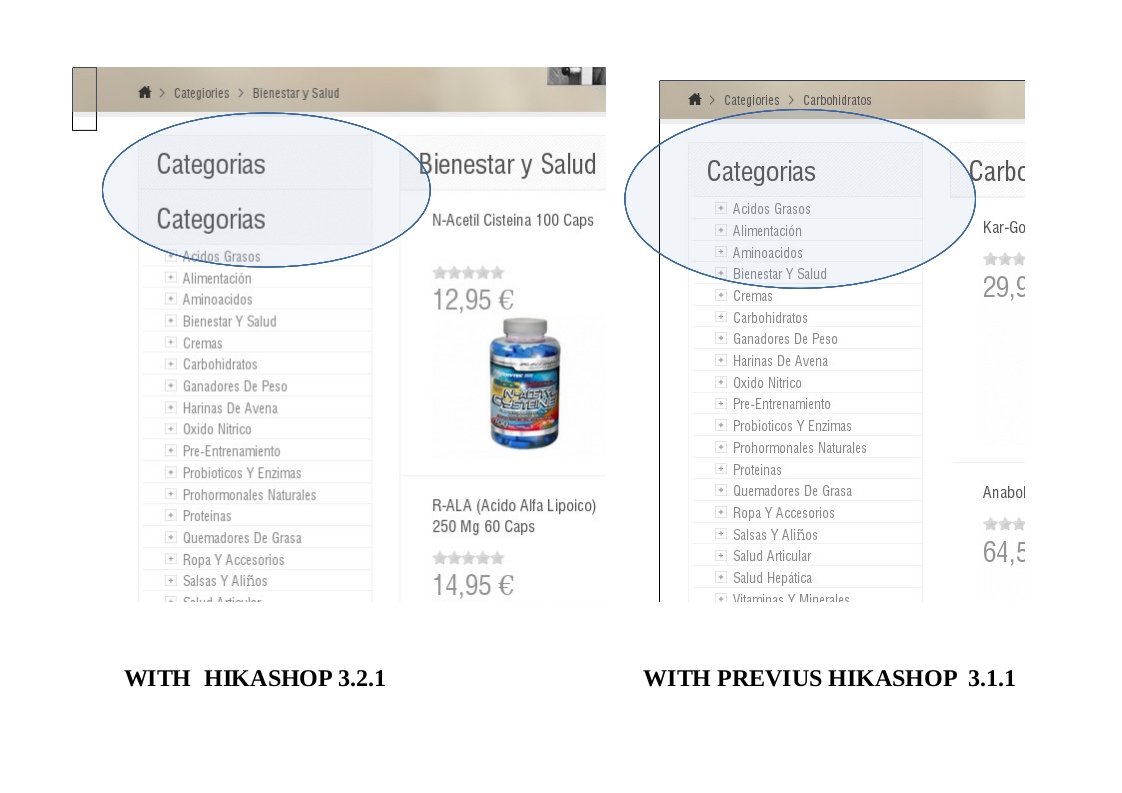
I have updated to the new version 3.2.1 since the previous 3.1.1 and there is a duplication effect in the title of the list of categories, as can be seen in the capture.
-- Joomla version -- : 3.7.5
-- PHP version -- : 7.1.11
-- Browser(s) name and version -- : firefox 52.5.0
Hi,
I have updated to the new version 3.2.1 since the previous 3.1.1 and there is a duplication effect in the title of the list of categories, as can be seen in the capture.
Please Log in or Create an account to join the conversation.

8 years 11 months ago #282998
by nicolas
Replied by nicolas on topic Title duplicity
Hi,
Can you provide a link to the page where you have that issue ?
Can you provide a link to the page where you have that issue ?
Please Log in or Create an account to join the conversation.
8 years 11 months ago #283061
by altonaga
Replied by altonaga on topic Title duplicity
Please Log in or Create an account to join the conversation.

8 years 11 months ago - 8 years 11 months ago #283077
by Philip
Replied by Philip on topic Title duplicity
Hello,
By looking on your Url link, I see this :
[img][/img]
The Green bordered show your first title html, with unknown class (from a display plugin ?), so 3 solutions :
- Switch off the plugin
- Unable the title to be display from your plugin configuration
OR
- Use a css command to hide this unwanted title, like the on red bordered in your frontend.css file.
=> See this tutorial to see how to proceed.
Hope this will help you.
Regards
By looking on your Url link, I see this :
[img][/img]
The Green bordered show your first title html, with unknown class (from a display plugin ?), so 3 solutions :
- Switch off the plugin
- Unable the title to be display from your plugin configuration
OR
- Use a css command to hide this unwanted title, like the on red bordered in your frontend.css file.
=> See this tutorial to see how to proceed.
Hope this will help you.
Regards
Last edit: 8 years 11 months ago by Philip.
Please Log in or Create an account to join the conversation.
8 years 11 months ago #283132
by altonaga
Replied by altonaga on topic Title duplicity
Hello,
I can not find the plugin you reference or the references to Green bordered or Red bordered in my CSS style files.
Could you tell me more in detail the procedure.?
Thank you
I can not find the plugin you reference or the references to Green bordered or Red bordered in my CSS style files.
Could you tell me more in detail the procedure.?
Thank you
Please Log in or Create an account to join the conversation.
8 years 11 months ago #283133
by nicolas
Replied by nicolas on topic Title duplicity
Hi,
I'm not sure what Philip was talking about.
However, here is what I can say:
The first title of the module comes from the template displaying the module, and it's normal that you have it.
The second title comes directly from the HTML of the module in HikaShop. However, that's not like that by default. What I think is that the "listing" file of the view "category" has been customized in a wrong way which lead to that second title being displayed on modules even though it shouldn't.
If you rename the file templates/YOUR_TEMPLATE/html/com_hikashop/category/listing.php to something else, that will deactivate the override for that view file and it should display properly indicating that the issue comes from some changes done in that view file override.
I'm not sure what Philip was talking about.
However, here is what I can say:
The first title of the module comes from the template displaying the module, and it's normal that you have it.
The second title comes directly from the HTML of the module in HikaShop. However, that's not like that by default. What I think is that the "listing" file of the view "category" has been customized in a wrong way which lead to that second title being displayed on modules even though it shouldn't.
If you rename the file templates/YOUR_TEMPLATE/html/com_hikashop/category/listing.php to something else, that will deactivate the override for that view file and it should display properly indicating that the issue comes from some changes done in that view file override.
The following user(s) said Thank You: altonaga
Please Log in or Create an account to join the conversation.
8 years 11 months ago #283220
by altonaga
Replied by altonaga on topic Title duplicity
Hi,
Solved.
Thanks
Solved.
Thanks
Please Log in or Create an account to join the conversation.
Time to create page: 0.299 seconds