

- Posts: 104
- Thank you received: 5
jQuery not working on shipping.php
8 years 6 months ago #292114
by p3.chuck
jQuery not working on shipping.php was created by p3.chuck
-- HikaShop version -- : 3.4.0 [1804201434]
-- Joomla version -- : 3.8.7
-- PHP version -- : 5.6.38
-- Browser(s) name and version -- : Chrome
I've created an override page for shipping.php in templates/gantry/html/com_hikashop/checkout. Within it, I created a section that shows some custom messages.
Now I'm trying to add the Terms and Conditions to our checkout page, but I want it to show up in the 'Terms_Conditions div in the code above. I've enabled the Terms and Conditions and it current appears directly above that code. I've written the following at the bottom of the page, but it does not seem to work (as the console.log is not displaying):
The function($) already existing, I imply added the jQuery(document).ready stuff.
Any suggestions on fixing this so the Terms & Conditions ends up in that div would be greatly appreciated.
Thanks,
Chuck W.
-- Joomla version -- : 3.8.7
-- PHP version -- : 5.6.38
-- Browser(s) name and version -- : Chrome
I've created an override page for shipping.php in templates/gantry/html/com_hikashop/checkout. Within it, I created a section that shows some custom messages.
Code:
div class="hikashop_shipping_methods" id="hikashop_shipping_methods">
<hr width="100%" style="border: 1px solid #000" />
<h2><font color="#FF0000">Important Shipping and Return Notes</font></h2>
<p>Please review our <a href="https://www.p3proswing.com/site3/ups-shipping" target="new">Ground Shipping Time in Transit details</a>. This should help you select the appropriate shipping service.</p>
<p>For Return & Guarantee Information, please visit our <a href="https://p3proswing.freshdesk.com/solution/articles/230565-guarantee-return-policy" target="new"> Guarantee & Return Policy</a> page.</p>
<div id="Terms_Conditions">
</div>
<hr width="100%" style="border: 1px solid #000" />
<fieldset>
<legend><?php echo JText::_('HIKASHOP_SHIPPING_METHOD');?></legend>
Now I'm trying to add the Terms and Conditions to our checkout page, but I want it to show up in the 'Terms_Conditions div in the code above. I've enabled the Terms and Conditions and it current appears directly above that code. I've written the following at the bottom of the page, but it does not seem to work (as the console.log is not displaying):
Code:
<script type="text/javascript">
jQuery(document).ready(function() {
console.log("Document Ready.\r\n");
$("#hikashop_checkout_terms").appendTo("#Terms_Conditions");
});
(function($){
$("#hikashop_shipping_methods .hika-radio input:checked").each(function() {
$("label[for=" + jQuery(this).attr('id') + "]").addClass('active btn-primary');
});
$("#hikashop_shipping_methods .hika-radio input").change(function() {
$(this).parents('div.hika-radio').find('label.active').removeClass('active btn-primary');
$("label[for=" + jQuery(this).attr('id') + "]").addClass('active btn-primary');
});
})(jQuery);
</script>
The function($) already existing, I imply added the jQuery(document).ready stuff.
Any suggestions on fixing this so the Terms & Conditions ends up in that div would be greatly appreciated.
Thanks,
Chuck W.
Please Log in or Create an account to join the conversation.
8 years 6 months ago #292115
by p3.chuck
Replied by p3.chuck on topic jQuery not working on shipping.php
I also get a javascript error when clicking on the Terms & Conditions Link (although it displays fine):
browser-engines.js:54 Uncaught TypeError: Function.attempt is not a function
at browser-engines.js:54
at browser-engines.js:65
at browser-engines.js:163
browser-engines.js:54 Uncaught TypeError: Function.attempt is not a function
at browser-engines.js:54
at browser-engines.js:65
at browser-engines.js:163
Please Log in or Create an account to join the conversation.
8 years 6 months ago #292116
by p3.chuck
Replied by p3.chuck on topic jQuery not working on shipping.php
And I just noticed that all the shipping options are showing up twice. This was not happening previously, so I'm not sure if this was due to a recent update or what is going on with that, but I'd love to resolve it.
Please Log in or Create an account to join the conversation.

8 years 6 months ago #292135
by nicolas
Replied by nicolas on topic jQuery not working on shipping.php
Hi,
First, please note that you're using the old checkout of HikaShop 2.x.
I would recommend to switch to the new checkout of Hikashop 3.x by turning off the "checkout legacy" setting of the HikaShop configuration.
Note however, that the views used then will be different and your custom work will have to be redone.
Regarding jQuery, if you can't use it, it's likely a conflict with two jquery libs loaded on the page. To prevent that, the best is to install and setup the plugin jQuery Easy which is made to solve such issues.
Regarding the Terms and conditions popup. If it doesn't work, switch to "vex" in the "popup mode" setting of the Hikashop configuration. It will then use our own popup system instead of Joomla/Mootools popup system and it will avoid any kind of javascript conflict.
If you have the shipping selection showing twice, I can only think that you have the "shipping" view twice in your checkout workflow. So check on that in the HikaShop configuration.
First, please note that you're using the old checkout of HikaShop 2.x.
I would recommend to switch to the new checkout of Hikashop 3.x by turning off the "checkout legacy" setting of the HikaShop configuration.
Note however, that the views used then will be different and your custom work will have to be redone.
Regarding jQuery, if you can't use it, it's likely a conflict with two jquery libs loaded on the page. To prevent that, the best is to install and setup the plugin jQuery Easy which is made to solve such issues.
Regarding the Terms and conditions popup. If it doesn't work, switch to "vex" in the "popup mode" setting of the Hikashop configuration. It will then use our own popup system instead of Joomla/Mootools popup system and it will avoid any kind of javascript conflict.
If you have the shipping selection showing twice, I can only think that you have the "shipping" view twice in your checkout workflow. So check on that in the HikaShop configuration.
Please Log in or Create an account to join the conversation.
8 years 6 months ago #292173
by p3.chuck
Replied by p3.chuck on topic jQuery not working on shipping.php
If I change to Hikashop 3.x, where will I find the files that I need to create template overrides to so I can install my custom section? It obviously must be in a different section as it appears that I can change back & forth without issue.
I have installed the jQuery Easy plugin and that did not resolve the issue. It appears the "<script></script>" portion is being stripped from the code as it does not appear if I View Source.
The Terms and Conditions work, I simply want to move them into my custom text div.
As for shipping showing up twice, I don't think I was clear. Each shipping option is appearing twice (UPS Ground twice, then UPS 3 Day Select twice, etc.)
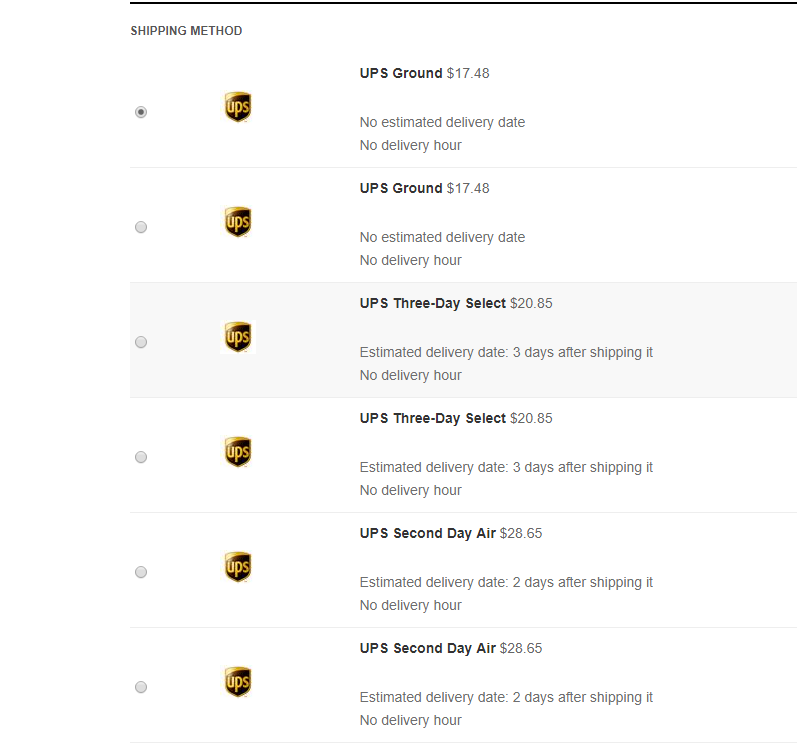
I have installed the jQuery Easy plugin and that did not resolve the issue. It appears the "<script></script>" portion is being stripped from the code as it does not appear if I View Source.
The Terms and Conditions work, I simply want to move them into my custom text div.
As for shipping showing up twice, I don't think I was clear. Each shipping option is appearing twice (UPS Ground twice, then UPS 3 Day Select twice, etc.)
Please Log in or Create an account to join the conversation.
8 years 6 months ago #292177
by p3.chuck
Replied by p3.chuck on topic jQuery not working on shipping.php
Ok... I resolved the jQuery issue. I just wasn't paying close enough attention and I put my code inside an existing if statement.
I still have 2 issues:
#1 - I get the Function.attempt errors when I click on the Terms and Conditions article. Everything seems to work ok, but I hate seeing errors in Google Developer Tools because they can lead to other unknown problems.
#2 - The duplicate shipping issue.
I'd love to move to HikaShop checkout 3 as well, but need to know where the shipping.php file is for that so I can edit it.
I still have 2 issues:
#1 - I get the Function.attempt errors when I click on the Terms and Conditions article. Everything seems to work ok, but I hate seeing errors in Google Developer Tools because they can lead to other unknown problems.
#2 - The duplicate shipping issue.
I'd love to move to HikaShop checkout 3 as well, but need to know where the shipping.php file is for that so I can edit it.
Please Log in or Create an account to join the conversation.
8 years 6 months ago #292175
by nicolas
Replied by nicolas on topic jQuery not working on shipping.php
Hi,
1. I would recommend to use the "Display view files" setting of the HikaShop configuration. That will allow you to easily see which view file is used where on your frontend.
2. With the new checkout system, you can add custom HTML around the views so you could easily wrap the terms and condition view around a specific DIV with that:
www.hikashop.com/support/documentation/409#text
3. So it's not the shipping view being twice in the checkout. The problem comes from the shipping methods. You must have configured two shipping methods for UPS instead of one. Please check on that in the System>Shipping methods menu.
1. I would recommend to use the "Display view files" setting of the HikaShop configuration. That will allow you to easily see which view file is used where on your frontend.
2. With the new checkout system, you can add custom HTML around the views so you could easily wrap the terms and condition view around a specific DIV with that:
www.hikashop.com/support/documentation/409#text
3. So it's not the shipping view being twice in the checkout. The problem comes from the shipping methods. You must have configured two shipping methods for UPS instead of one. Please check on that in the System>Shipping methods menu.
Please Log in or Create an account to join the conversation.
8 years 6 months ago #292256
by p3.chuck
Replied by p3.chuck on topic jQuery not working on shipping.php
That's correct. I needed to setup 2 shipping methods (per Hikashop instructions) in order to have our packages. We have 1 Shipping Method 'UPS' and one for not grouping packages called 'UPS - No Grouping'.
Please Log in or Create an account to join the conversation.
8 years 6 months ago #292286
by nicolas
Replied by nicolas on topic jQuery not working on shipping.php
Hi,
Then I don't see the problem ?
It's then normal that you have the shipping methods doubled. Once for the products grouped and once for the products not grouped.
You get the same prices because I suppose you only have one product in your cart and thus one package.
Then I don't see the problem ?
It's then normal that you have the shipping methods doubled. Once for the products grouped and once for the products not grouped.
You get the same prices because I suppose you only have one product in your cart and thus one package.
Please Log in or Create an account to join the conversation.
8 years 6 months ago #292299
by p3.chuck
Replied by p3.chuck on topic jQuery not working on shipping.php
There isn't a functionality problem, but from the customer side of things it looks confusing and looks like we don't know what we're doing.
Please Log in or Create an account to join the conversation.

Less
More
- Posts: 12953
- Thank you received: 1778
8 years 6 months ago #292302
by Mohamed Thelji
Replied by Mohamed Thelji on topic jQuery not working on shipping.php
Hello,
Thank you for your feedback, we'll add on our TODO list the creation of a solution to properly prevent that kind of situation to happen again with the "Group packages" option.
Best regards,
Mohamed Thelji.
Thank you for your feedback, we'll add on our TODO list the creation of a solution to properly prevent that kind of situation to happen again with the "Group packages" option.
Best regards,
Mohamed Thelji.
Please Log in or Create an account to join the conversation.
Time to create page: 0.088 seconds