
- Posts: 121
- Thank you received: 2
Shopping cart icon module
- andrewwinkler
-
 Topic Author
- Offline
Less
More
5 years 7 months ago - 5 years 7 months ago #329858
by andrewwinkler
Shopping cart icon module was created by andrewwinkler
-- HikaShop version -- : 4.4.0
-- Joomla version -- : 3.9.23
-- PHP version -- : 7.3.25
-- Browser(s) name and version -- : Firefox
On some online stores there is a module that provides an icon linking to the shopping cart and showing the total amount of the items already on the cart. They look like this:

Is there such a feature available for Hikashop?
-- Joomla version -- : 3.9.23
-- PHP version -- : 7.3.25
-- Browser(s) name and version -- : Firefox
On some online stores there is a module that provides an icon linking to the shopping cart and showing the total amount of the items already on the cart. They look like this:
Is there such a feature available for Hikashop?
Last edit: 5 years 7 months ago by andrewwinkler.
Please Log in or Create an account to join the conversation.

5 years 7 months ago #329878
by nicolas
Replied by nicolas on topic Shopping cart icon module
Hi,
Yes. You can do that with the HikaShop cart module.
Configure it to display in "mini cart" mode with only the price displayed and you'll have something similar to your screenshot, minus the cart icon. And the cart icon can be added to that HikaShop cart module with a bit of CSS or translation overrides:
www.hikashop.com/forum/4-how-to/878588-a...ini-cart.html#210741
www.hikashop.com/forum/4-how-to/21694-di...ge-in-mini-cart.html
Yes. You can do that with the HikaShop cart module.
Configure it to display in "mini cart" mode with only the price displayed and you'll have something similar to your screenshot, minus the cart icon. And the cart icon can be added to that HikaShop cart module with a bit of CSS or translation overrides:
www.hikashop.com/forum/4-how-to/878588-a...ini-cart.html#210741
www.hikashop.com/forum/4-how-to/21694-di...ge-in-mini-cart.html
The following user(s) said Thank You: andrewwinkler
Please Log in or Create an account to join the conversation.
- andrewwinkler
-
Topic Author
- Offline
Less
More
- Posts: 121
- Thank you received: 2
5 years 7 months ago #329887
by andrewwinkler
Replied by andrewwinkler on topic Shopping cart icon module
On my site, the HikaShop Cart module goes to the checkout, not the cart.
Please Log in or Create an account to join the conversation.
5 years 7 months ago #329891
by nicolas
Replied by nicolas on topic Shopping cart icon module
Hi,
That's correct, the cart module's link will go to the checkout not the cart details page.
You have two solutions to change that:
- You can modify your checkout workflow to have only the cart view on the first step of your checkout in the HikaShop configuration. In that case, the first page of the checkout will only have the cart, and will be similar to the cart details page.
- You can edit the file product / cart.php via the menu Display>Views and change the URL of that link to your cart details page. You can just add such line at the beginning:
That's correct, the cart module's link will go to the checkout not the cart details page.
You have two solutions to change that:
- You can modify your checkout workflow to have only the cart view on the first step of your checkout in the HikaShop configuration. In that case, the first page of the checkout will only have the cart, and will be similar to the cart details page.
- You can edit the file product / cart.php via the menu Display>Views and change the URL of that link to your cart details page. You can just add such line at the beginning:
Code:
<?php $this->url_checkout = hikashop_completeLink('cart&task=showcart&cart_id='.$this->element->cart_id.'&cart_type='.$this->element->cart_type . $this->cart_itemid); ?>
Please Log in or Create an account to join the conversation.
- andrewwinkler
-
Topic Author
- Offline
Less
More
- Posts: 121
- Thank you received: 2
5 years 7 months ago #329977
by andrewwinkler
Replied by andrewwinkler on topic Shopping cart icon module
How can I modify your checkout workflow to have only the cart view on the first step of your checkout in the HikaShop configuration?
Please Log in or Create an account to join the conversation.

Less
More
- Posts: 12953
- Thank you received: 1778
5 years 7 months ago #330005
by Mohamed Thelji
Replied by Mohamed Thelji on topic Shopping cart icon module
Hello,
To do that, you'll have to edit your checkout workflow via "Hikashop->System->Configuration->Checkout" and make sure you only have the "Cart" through your checkout workflow's first step.
Kind regards,
Mohamed.
To do that, you'll have to edit your checkout workflow via "Hikashop->System->Configuration->Checkout" and make sure you only have the "Cart" through your checkout workflow's first step.
Kind regards,
Mohamed.
The following user(s) said Thank You: andrewwinkler
Please Log in or Create an account to join the conversation.
- andrewwinkler
-
Topic Author
- Offline
Less
More
- Posts: 121
- Thank you received: 2
5 years 6 months ago - 5 years 6 months ago #330423
by andrewwinkler
Replied by andrewwinkler on topic Shopping cart icon module
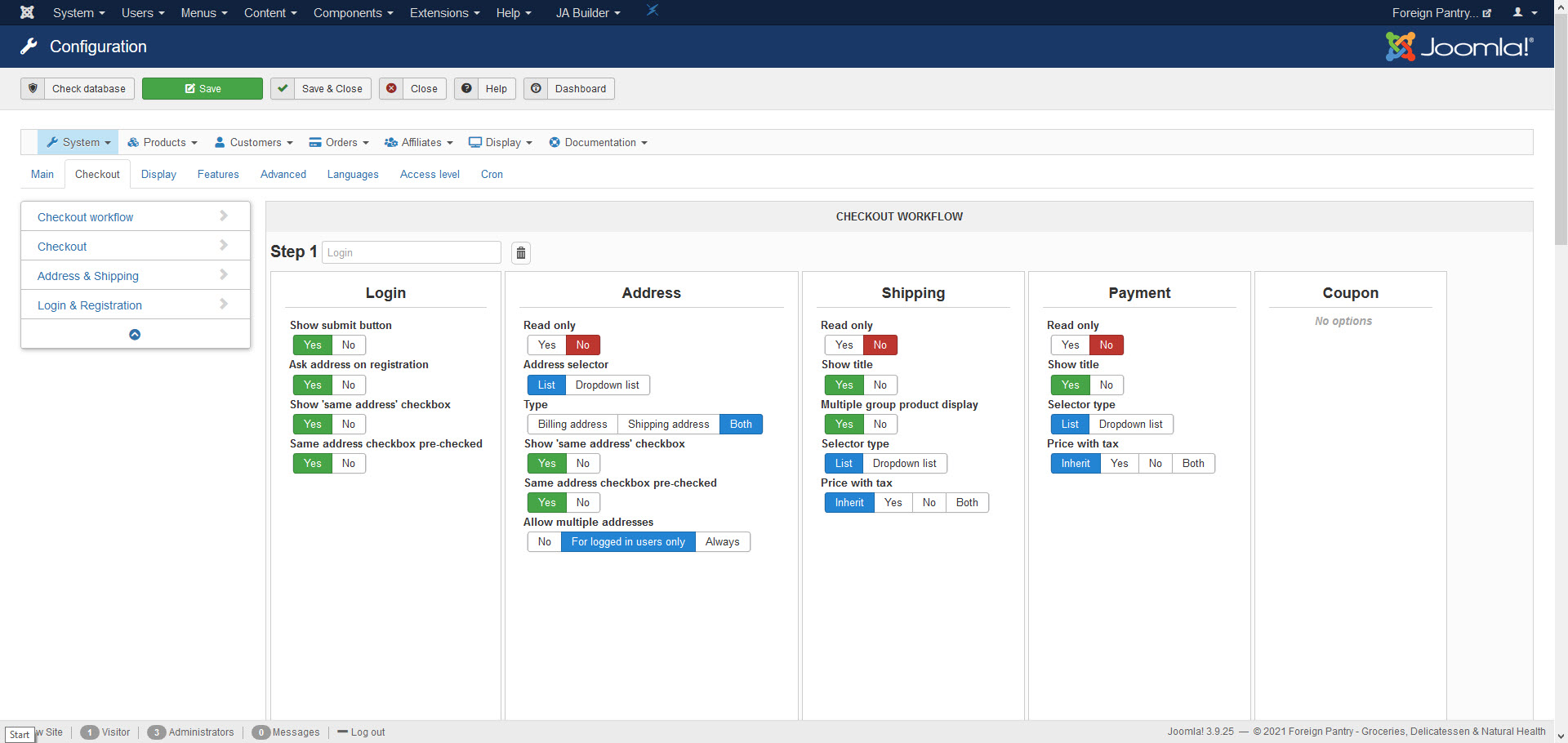
I couldn't work out what to do following your previous instructions. Here's the relevant screen. What do I need to change?
Last edit: 5 years 6 months ago by andrewwinkler.
Please Log in or Create an account to join the conversation.
5 years 6 months ago #330438
by nicolas
Replied by nicolas on topic Shopping cart icon module
Hi,
I would recommend you to first read this tutorial which explains how to modify your checkout workflow:
www.hikashop.com/support/documentation/4...eckout-workflow.html
Once you read it and understand how this all works, our messages here should be easier to understand.
I would recommend you to first read this tutorial which explains how to modify your checkout workflow:
www.hikashop.com/support/documentation/4...eckout-workflow.html
Once you read it and understand how this all works, our messages here should be easier to understand.
Please Log in or Create an account to join the conversation.
Time to create page: 0.292 seconds