
- Posts: 121
- Thank you received: 2
Too many choices using list of characteristics
- andrewwinkler
-
 Topic Author
- Offline
Less
More
5 years 8 months ago #330422
by andrewwinkler
Too many choices using list of characteristics was created by andrewwinkler
-- url of the page with the problem -- :
foreignpantry.com/shop/product/12-iget-shion-vape-pen
-- HikaShop version -- : 4.4.1
-- Joomla version -- : 3.9.25
-- PHP version -- : 7.4
-- Browser(s) name and version -- : Firefox
I need customers to choose between 20 different flavor of the same item. At the moment, I'm using characteristics, but that makes the page too long. It would be far better, if users could select between flavors using a scrollbar.
-- HikaShop version -- : 4.4.1
-- Joomla version -- : 3.9.25
-- PHP version -- : 7.4
-- Browser(s) name and version -- : Firefox
I need customers to choose between 20 different flavor of the same item. At the moment, I'm using characteristics, but that makes the page too long. It would be far better, if users could select between flavors using a scrollbar.
Please Log in or Create an account to join the conversation.

5 years 8 months ago #330436
by nicolas
Replied by nicolas on topic Too many choices using list of characteristics
Hi,
I suppose that you're talking about doing something like that:
www.cssplay.co.uk/menu/tablescroll.html
You should be able to do it with custom CSS:
stackoverflow.com/questions/8232713/how-...ar-onto-a-html-table
I suppose that you're talking about doing something like that:
www.cssplay.co.uk/menu/tablescroll.html
You should be able to do it with custom CSS:
stackoverflow.com/questions/8232713/how-...ar-onto-a-html-table
Please Log in or Create an account to join the conversation.
- andrewwinkler
-
Topic Author
- Offline
Less
More
- Posts: 121
- Thank you received: 2
5 years 7 months ago #330719
by andrewwinkler
Replied by andrewwinkler on topic Too many choices using list of characteristics
I was more thinking of a scrollbar where I can select the variant/flavour, change the quantity if needed, and click the add to cart button.
Please Log in or Create an account to join the conversation.

5 years 7 months ago - 5 years 7 months ago #330722
by Philip
Replied by Philip on topic Too many choices using list of characteristics
hello,
If you mean something like shown in my screenshot :
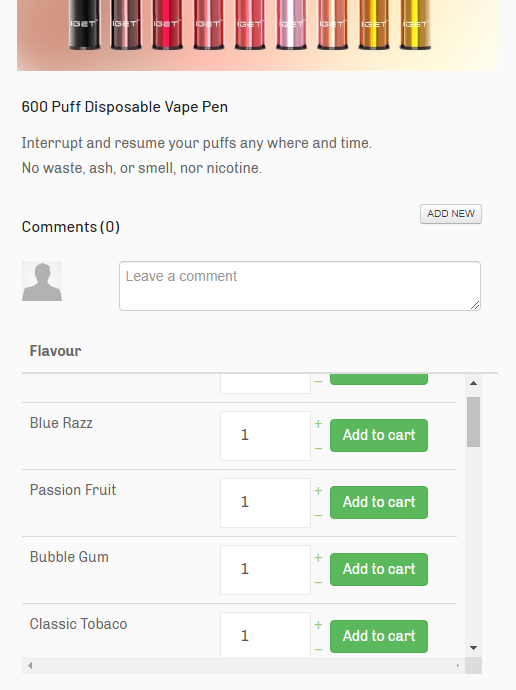
Then this can of display is possible with kind of css command explained here .
Some adjustements have to be done as a table have sometime strange behavior with somme Css command.
Note : With this documentation discover how to add css command to your frontend file.
Hope this help you to achieved what you need.
Regards
If you mean something like shown in my screenshot :
Then this can of display is possible with kind of css command explained here .
Some adjustements have to be done as a table have sometime strange behavior with somme Css command.
Code:
table.table_html_class {
overflow: scroll;
}
Note : With this documentation discover how to add css command to your frontend file.
Hope this help you to achieved what you need.
Regards
Last edit: 5 years 7 months ago by Philip.
Please Log in or Create an account to join the conversation.
- andrewwinkler
-
Topic Author
- Offline
Less
More
- Posts: 121
- Thank you received: 2
5 years 7 months ago #330781
by andrewwinkler
Replied by andrewwinkler on topic Too many choices using list of characteristics
Sorry, no, that's not what I meant. I actually meant a variant dropdown list where they can pick the variant they want, next to it is the field for choosing the quantity of items plus an "add to cart" button.
Please Log in or Create an account to join the conversation.
5 years 7 months ago #330798
by nicolas
Replied by nicolas on topic Too many choices using list of characteristics
Hi,
So you're talking about the default look of the characteristic selection system no ?
If you set the option "Characteristics selection method" to "dropdown" (which is the default), and not "list" as you have it now, you'll get a dropdown of selectio for your variants and a quantity field and an add to cart button.
Something like this:
demo.hikashop.com/index.php/en/hikashop/...with-characteristics
So you're talking about the default look of the characteristic selection system no ?
If you set the option "Characteristics selection method" to "dropdown" (which is the default), and not "list" as you have it now, you'll get a dropdown of selectio for your variants and a quantity field and an add to cart button.
Something like this:
demo.hikashop.com/index.php/en/hikashop/...with-characteristics
The following user(s) said Thank You: andrewwinkler
Please Log in or Create an account to join the conversation.
- andrewwinkler
-
Topic Author
- Offline
Less
More
- Posts: 121
- Thank you received: 2
5 years 7 months ago - 5 years 7 months ago #330872
by andrewwinkler
Replied by andrewwinkler on topic Too many choices using list of characteristics
Indeed, that's exactly what I am looking for. So where do I make that selection? After selecting "droplist" as characteristic selection method, the list of 20 variants/characteristics has disappeared, as intended, but no droplist where to choose the variant/characteristic/flavour is being displayed.
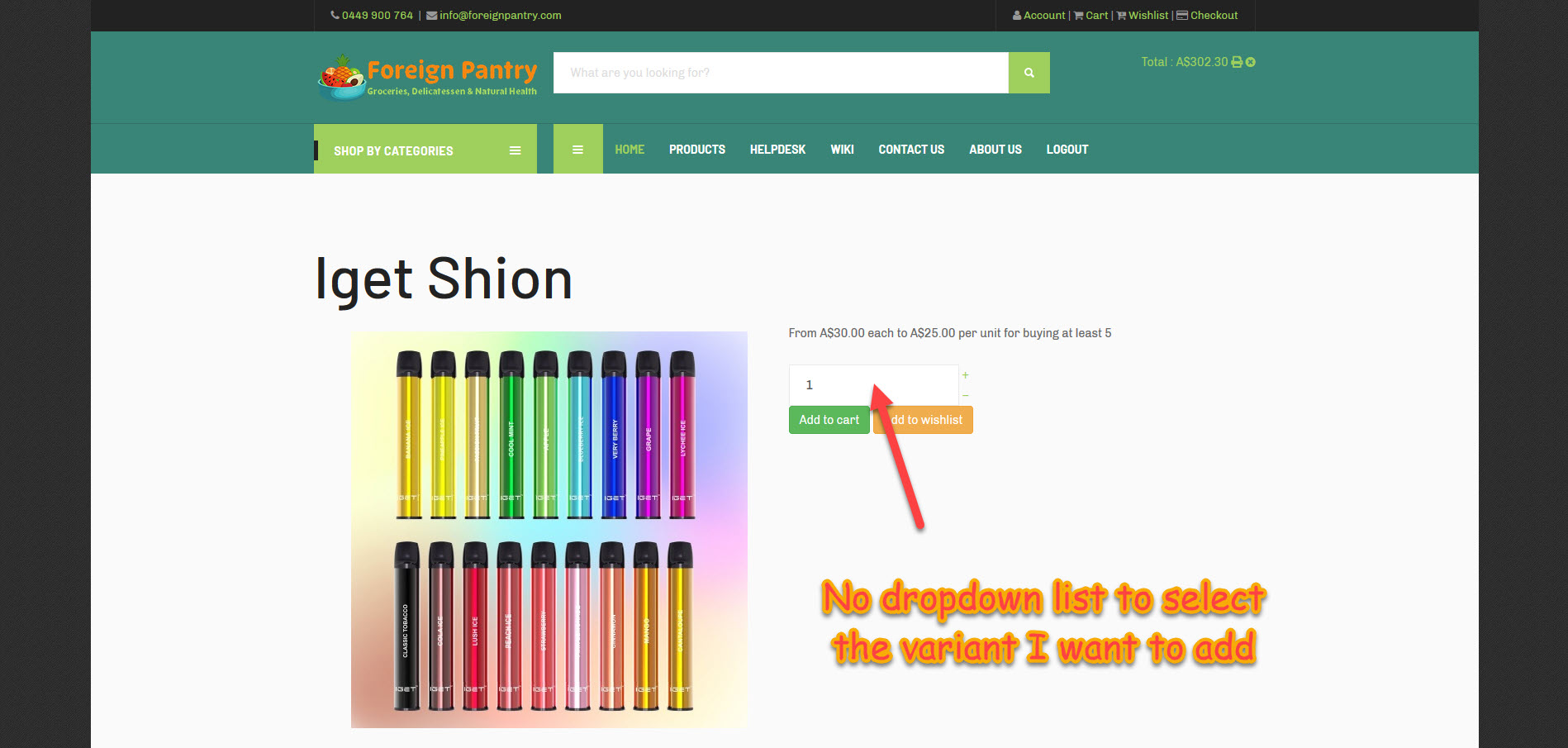
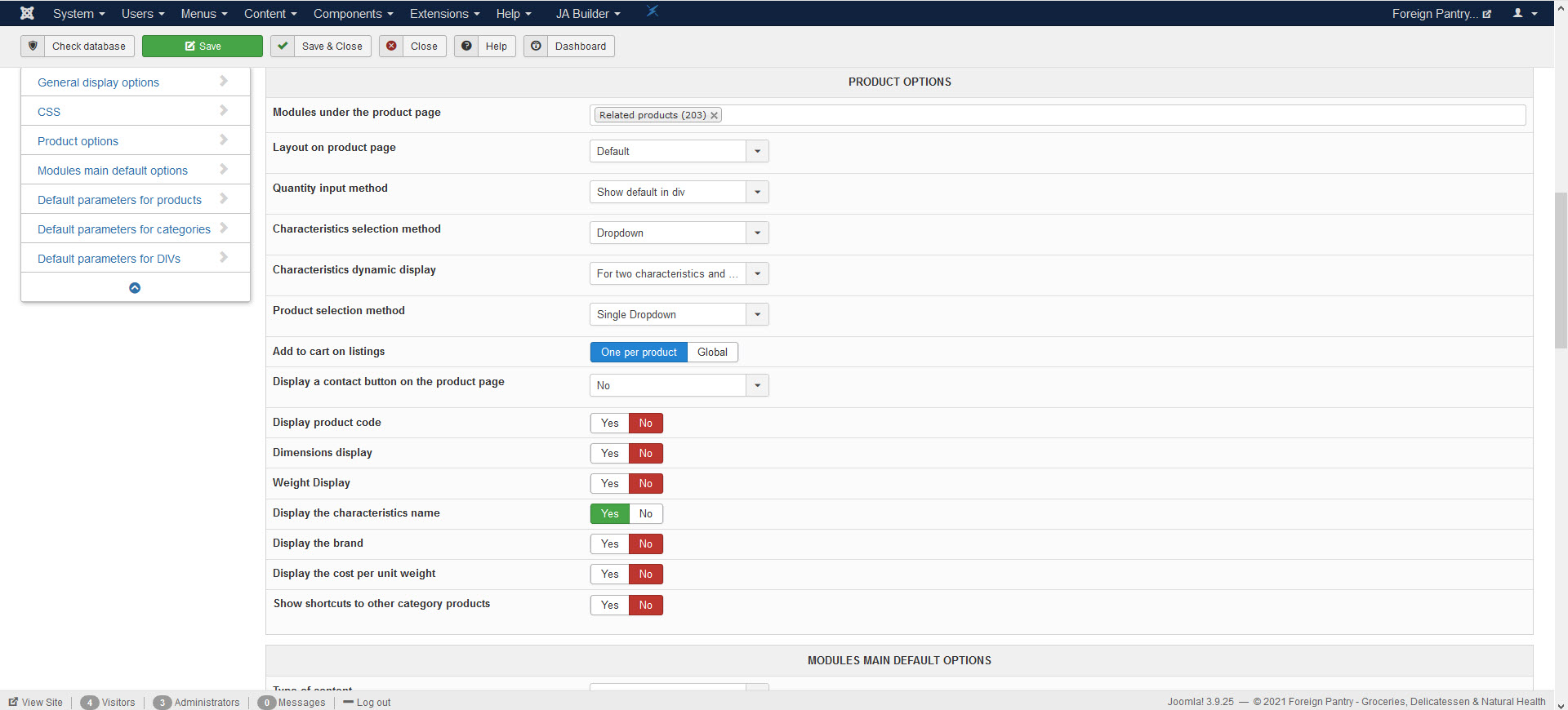
Last edit: 5 years 7 months ago by andrewwinkler.
Please Log in or Create an account to join the conversation.
5 years 7 months ago - 5 years 7 months ago #330875
by nicolas
Replied by nicolas on topic Too many choices using list of characteristics
Hi,
The setting "Characteristics selection method" is in the HikaShop configuration.
If you don't see the dropdown there, then either your product doesn't have any variants / characteristics or there is a view override or a CSS custom code which hides that area.
Check with the default template of Joomla and you should see the dropdown there if your product has variants / characteristics, and it will confirm that it comes from a view override or CSS in your template.
The setting "Characteristics selection method" is in the HikaShop configuration.
If you don't see the dropdown there, then either your product doesn't have any variants / characteristics or there is a view override or a CSS custom code which hides that area.
Check with the default template of Joomla and you should see the dropdown there if your product has variants / characteristics, and it will confirm that it comes from a view override or CSS in your template.
Last edit: 5 years 7 months ago by nicolas.
Please Log in or Create an account to join the conversation.
- andrewwinkler
-
Topic Author
- Offline
Less
More
- Posts: 121
- Thank you received: 2
5 years 7 months ago #331014
by andrewwinkler
Replied by andrewwinkler on topic Too many choices using list of characteristics
I found the selection and changed the variant selection method to dropdown list with the result shown in the screenshot on my previous post on this ticket. No dropdown list is being displayed on the frontend. Only the list of variant options has disappeared.
Please Log in or Create an account to join the conversation.
5 years 7 months ago - 5 years 7 months ago #331040
by Philip
Replied by Philip on topic Too many choices using list of characteristics
Hello,
Please provide provide an backend access (backend url link & super admin reference) thanks to our Contact us form, in order to allow us to check ourselves the situation.
Don't forget to add an Url link to this topic in order to keep the link.
Awaiting your element to be able to progress on your issue.
Regards
Please provide provide an backend access (backend url link & super admin reference) thanks to our Contact us form, in order to allow us to check ourselves the situation.
Don't forget to add an Url link to this topic in order to keep the link.
Awaiting your element to be able to progress on your issue.
Regards
Last edit: 5 years 7 months ago by Philip.
Please Log in or Create an account to join the conversation.
- andrewwinkler
-
Topic Author
- Offline
Less
More
- Posts: 121
- Thank you received: 2
5 years 7 months ago #331102
by andrewwinkler
Replied by andrewwinkler on topic Too many choices using list of characteristics
Done
Please Log in or Create an account to join the conversation.
5 years 7 months ago #331153
by nicolas
Replied by nicolas on topic Too many choices using list of characteristics
Hi,
The characteristics area is hidden there because of this custom CSS :
that was added on your end to the file templates/ja_autoshop/css/custom.css
The characteristics area is hidden there because of this custom CSS :
Code:
@media (min-width: 992px) {
#hikashop_product_characteristics {
width: 50%;
position: relative;
top: -800px;
float: right;
}
}
The following user(s) said Thank You: andrewwinkler
Please Log in or Create an account to join the conversation.
- andrewwinkler
-
Topic Author
- Offline
Less
More
- Posts: 121
- Thank you received: 2
5 years 7 months ago #331166
by andrewwinkler
Replied by andrewwinkler on topic Too many choices using list of characteristics
It's perfect now.
Please Log in or Create an account to join the conversation.
Time to create page: 0.368 seconds