

- Posts: 2
- Thank you received: 1
layout of the product page
4 years 4 months ago #342328
by mjanisch
layout of the product page was created by mjanisch
-- HikaShop version -- : 4.6.0
-- Joomla version -- : 4.2.1
-- PHP version -- : 7.4.9
-- Browser(s) name and version -- : edge
where can I change these settings in "quantity layout of the product page" the display is cut off - see picture
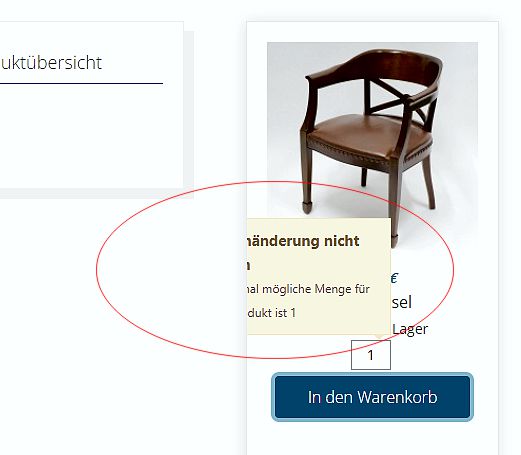
thx
-- Joomla version -- : 4.2.1
-- PHP version -- : 7.4.9
-- Browser(s) name and version -- : edge
where can I change these settings in "quantity layout of the product page" the display is cut off - see picture
thx
Please Log in or Create an account to join the conversation.

4 years 4 months ago #342331
by nicolas
Replied by nicolas on topic layout of the product page
Hi,
That sounds like a z-index issue linked to your template's CSS.
Could you provide a link to that page so that we can look at the situation and analyze the CSS code involved ?
That sounds like a z-index issue linked to your template's CSS.
Could you provide a link to that page so that we can look at the situation and analyze the CSS code involved ?
Please Log in or Create an account to join the conversation.
4 years 4 months ago #342366
by mjanisch
Replied by mjanisch on topic layout of the product page
this website "janisch.wien" is in draft and only for testing
you can see if you order more than one - see picture
many thanks
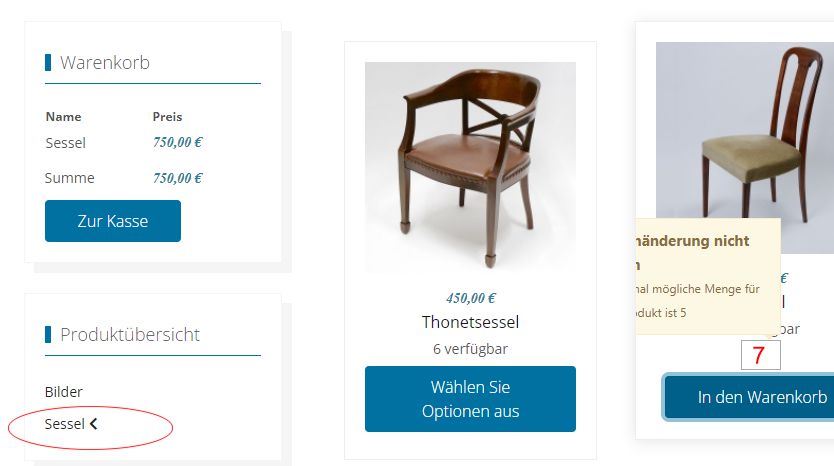
you can see if you order more than one - see picture
many thanks
Please Log in or Create an account to join the conversation.

4 years 4 months ago - 4 years 4 months ago #342376
by Philip
Replied by Philip on topic layout of the product page
Hello,
It seems that your issue can be solve with few css command, follow me step by step to see how to proceed :
1. Learn here how to add custom command
2. Use this css command, in order to adjust popup position :
=> Of course, you can adjust your command top/left but note you are forced to remain within the framework of your product container (in your product list).
Hope this will fit your needs.
Regards
It seems that your issue can be solve with few css command, follow me step by step to see how to proceed :
1. Learn here how to add custom command
2. Use this css command, in order to adjust popup position :
Code:
.notifyjs-container {
left: -124px !important;
top: -117px !important;
}
=> Of course, you can adjust your command top/left but note you are forced to remain within the framework of your product container (in your product list).
Hope this will fit your needs.
Regards
Last edit: 4 years 4 months ago by Philip.
Please Log in or Create an account to join the conversation.
4 years 4 months ago #342414
by mjanisch
Replied by mjanisch on topic layout of the product page
Works perfectly - thanks
The following user(s) said Thank You: Philip
Please Log in or Create an account to join the conversation.
Time to create page: 0.070 seconds