

- Posts: 240
- Thank you received: 13
error in joomla 5
3 years 1 week ago #356144
by khashiz
error in joomla 5 was created by khashiz
-- HikaShop version -- : 5.0.0
-- Joomla version -- : 5.0.0
-- PHP version -- : 8.1
Hi
i have recently updated the hukashop and joomla to version 5.0.0
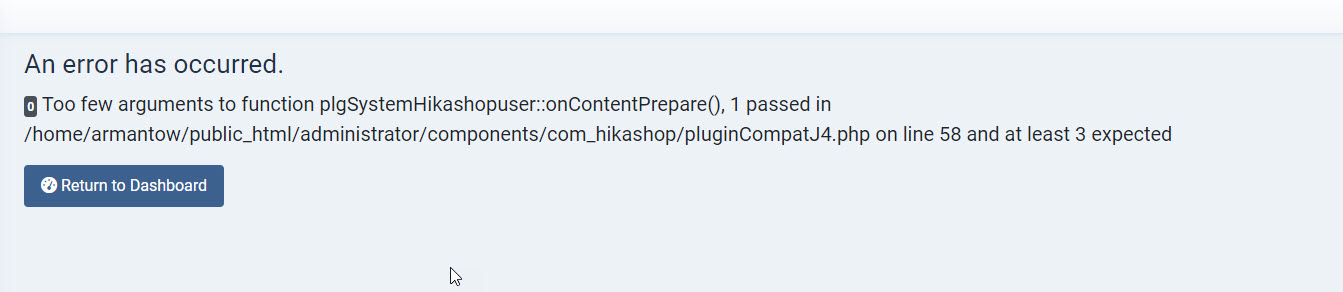
i'm getting the error i attached in my site in both frontend and backend
-- Joomla version -- : 5.0.0
-- PHP version -- : 8.1
Hi
i have recently updated the hukashop and joomla to version 5.0.0
i'm getting the error i attached in my site in both frontend and backend
Please Log in or Create an account to join the conversation.

3 years 1 week ago #356147
by nicolas
Replied by nicolas on topic error in joomla 5
Hi,
Could you provide a backend and a FTP access in order to check the situation as we're not able to reproduce the problem on our end ?
Could you provide a backend and a FTP access in order to check the situation as we're not able to reproduce the problem on our end ?
Please Log in or Create an account to join the conversation.
3 years 1 week ago #356160
by khashiz
Replied by khashiz on topic error in joomla 5
sure ... would you please make this post private ?
Please Log in or Create an account to join the conversation.
3 years 1 week ago #356161
by khashiz
Replied by khashiz on topic error in joomla 5
i cant even create a new user !!
i get the same error when i click the save button
i get the same error when i click the save button
Please Log in or Create an account to join the conversation.
3 years 1 week ago #356162
by nicolas
Replied by nicolas on topic error in joomla 5
Hi,
I can't make this post private. There is no such feature on our forum. You can provide your credentials via our contact form:
www.hikashop.com/support/contact-us.html
Regarding the saving of the user, rename the file pointed by the error to something else via FTP.
You won't get this error anymore. You should normally get another message pointing at the file of a plugin. Rename that file too and you won't get the error anymore. You should then be able to do what you want.
I can't make this post private. There is no such feature on our forum. You can provide your credentials via our contact form:
www.hikashop.com/support/contact-us.html
Regarding the saving of the user, rename the file pointed by the error to something else via FTP.
You won't get this error anymore. You should normally get another message pointing at the file of a plugin. Rename that file too and you won't get the error anymore. You should then be able to do what you want.
Please Log in or Create an account to join the conversation.
3 years 1 week ago #356174
by khashiz
Replied by khashiz on topic error in joomla 5
when i rename the file "pluginCompatJ4.php"
i get this error :
Class "hikashopJoomlaPlugin" not found
i get this error :
Class "hikashopJoomlaPlugin" not found
Please Log in or Create an account to join the conversation.
3 years 1 week ago #356177
by nicolas
Replied by nicolas on topic error in joomla 5
Hi,
Yes, that's normal. Activate the debug of Joomla and you'll get a full error message with the file where that class is not found, and you'll be able to rename that file via FTP too, as I was saying.
Yes, that's normal. Activate the debug of Joomla and you'll get a full error message with the file where that class is not found, and you'll be able to rename that file via FTP too, as I was saying.
Please Log in or Create an account to join the conversation.
3 years 1 week ago #356205
by khashiz
Replied by khashiz on topic error in joomla 5
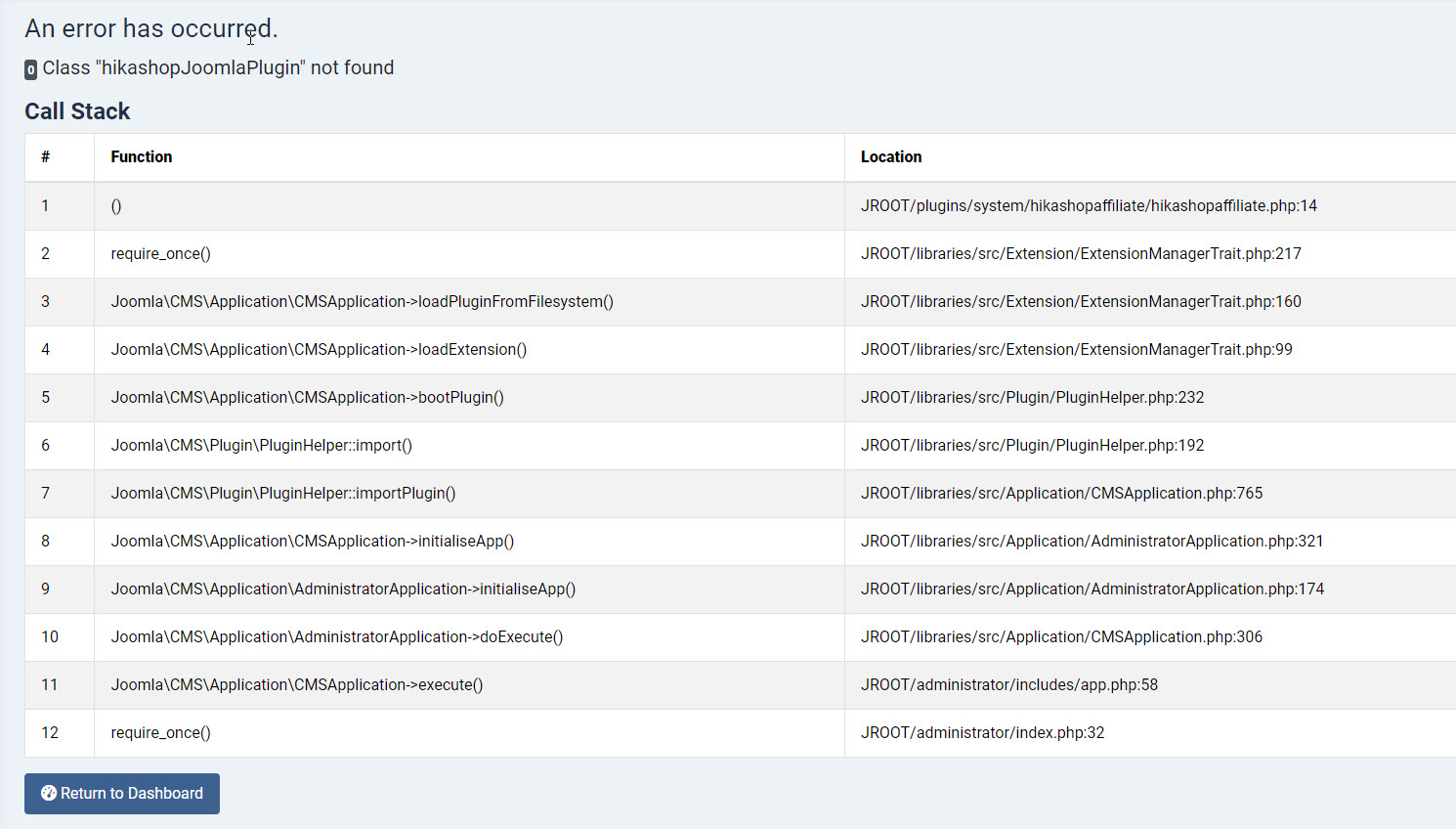
I attached the screen shot of the error when the debug mode is on
would you please tell me which file should I rename ?
would you please tell me which file should I rename ?
Please Log in or Create an account to join the conversation.
3 years 1 week ago #356207
by khashiz
Replied by khashiz on topic error in joomla 5
look i renamed a bunch of files and every time system gives error pointing another file !!
i will send you ftp access and my own super user admin username/password via contact form
please help me solve this problem, i have fall in a big problem
thank you
i will send you ftp access and my own super user admin username/password via contact form
please help me solve this problem, i have fall in a big problem
thank you
Please Log in or Create an account to join the conversation.
3 years 1 week ago #356208
by khashiz
Replied by khashiz on topic error in joomla 5
I just sent the aceess info
Please Log in or Create an account to join the conversation.
3 years 1 week ago #356211
by nicolas
Replied by nicolas on topic error in joomla 5
Hi,
When you said that you had updated HikaShop recently, I thought you meant like 2 days ago.
Checking your backend I saw you actually updated HikaShop 3 weeks ago.
So you didn't get the patchs we made during the month of October.
So I've installed the latest build of the 5.0.0 to make sure you have all the patchs and I think it fixed the problem as I'm not able to reproduce the issue anymore. Please check.
When you said that you had updated HikaShop recently, I thought you meant like 2 days ago.
Checking your backend I saw you actually updated HikaShop 3 weeks ago.
So you didn't get the patchs we made during the month of October.
So I've installed the latest build of the 5.0.0 to make sure you have all the patchs and I think it fixed the problem as I'm not able to reproduce the issue anymore. Please check.
Please Log in or Create an account to join the conversation.
3 years 1 week ago #356212
by khashiz
Replied by khashiz on topic error in joomla 5
thank you
i think its because my subscription has expired
i need to renew it
i will check and let you know
i think its because my subscription has expired
i need to renew it
i will check and let you know
Please Log in or Create an account to join the conversation.
3 years 6 days ago - 3 years 6 days ago #356305
by tadosborn
Replied by tadosborn on topic error in joomla 5
Same issue. I was able to resolve the issue by installing the latest UPDATED 5 version HikaShop Business 5.0.0 [2310301745]
Last edit: 3 years 6 days ago by tadosborn.
The following user(s) said Thank You: Philip
Please Log in or Create an account to join the conversation.

3 years 6 days ago - 3 years 6 days ago #356308
by Philip
Replied by Philip on topic error in joomla 5
Hello,
If your are an HikaShop Customer with a valid license (last renewal less than a year) you download the latest version of HikaShop in your Subscription , My Account dropdown => My Subscription.
Regards
If your are an HikaShop Customer with a valid license (last renewal less than a year) you download the latest version of HikaShop in your Subscription , My Account dropdown => My Subscription.
Regards
Last edit: 3 years 6 days ago by Philip.
Please Log in or Create an account to join the conversation.
Time to create page: 0.240 seconds