
- Posts: 132
- Thank you received: 3
How to change or add new customer menu item
- alexmartin
-
 Topic Author
- Offline
Less
More
2 years 2 months ago #362873
by alexmartin
How to change or add new customer menu item was created by alexmartin
Please see attachment - I cant find instructions on how to add / delete / change customer account left side meu - attached image profited
Please provide instructions
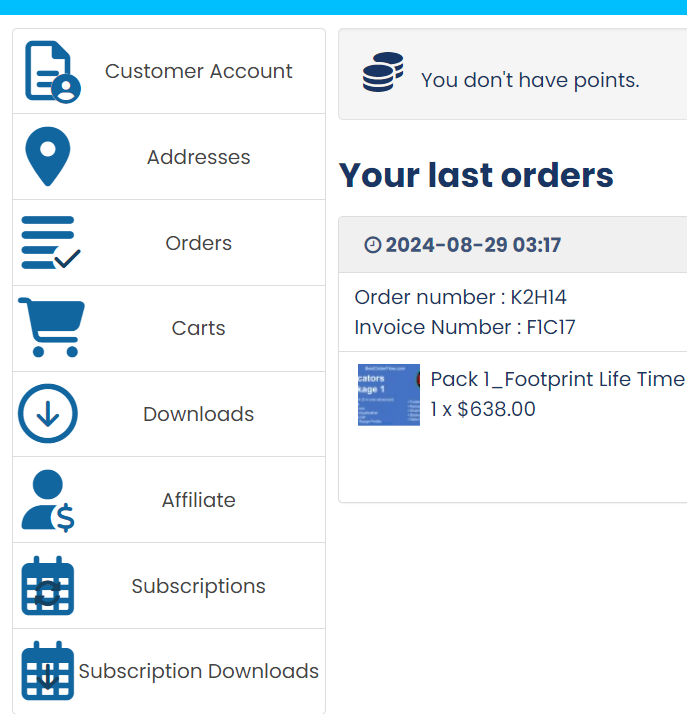
Please provide instructions
Please Log in or Create an account to join the conversation.

2 years 2 months ago #362879
by nicolas
Replied by nicolas on topic How to change or add new customer menu item
Hi,
How best to remove or change these sidebar items depends on what you want to do exactly.
For example, if you want to change the text, you should be able to use a translation override:
www.hikashop.com/download/languages.html#modify
If you want to change the icon, you could do it with CSS.
Similarly, if you want to hide them, you should be able to do it with CSS:
www.hikashop.com/support/documentation/1...ize-the-display.html
However, it's also possible to remove many of them by turning off the appropriate option, or disabling the appropriate plugin.
For example, if you want to remove the "customer account" item, you can turn off the "HikaShop joomla user account link plugin" via the Joomla plugins manager. Or if you want to disable the affiliate item, because you're not using the affiliate system built in HikaShop, you can disable the HikaShop Affiliate plugin.
Finally, you can edit the file user / cpanel via the menu Display>Views, and add some custom coding to do all of the changes you want with the most flexibility:
www.hikashop.com/forum/customers/907963-...l-sidebar-icons.html
www.hikashop.com/forum/customers/901103-...ton-from-cpanel.html
www.hikashop.com/forum/customers/890077-...r-control-panel.html
How best to remove or change these sidebar items depends on what you want to do exactly.
For example, if you want to change the text, you should be able to use a translation override:
www.hikashop.com/download/languages.html#modify
If you want to change the icon, you could do it with CSS.
Similarly, if you want to hide them, you should be able to do it with CSS:
www.hikashop.com/support/documentation/1...ize-the-display.html
However, it's also possible to remove many of them by turning off the appropriate option, or disabling the appropriate plugin.
For example, if you want to remove the "customer account" item, you can turn off the "HikaShop joomla user account link plugin" via the Joomla plugins manager. Or if you want to disable the affiliate item, because you're not using the affiliate system built in HikaShop, you can disable the HikaShop Affiliate plugin.
Finally, you can edit the file user / cpanel via the menu Display>Views, and add some custom coding to do all of the changes you want with the most flexibility:
www.hikashop.com/forum/customers/907963-...l-sidebar-icons.html
www.hikashop.com/forum/customers/901103-...ton-from-cpanel.html
www.hikashop.com/forum/customers/890077-...r-control-panel.html
Please Log in or Create an account to join the conversation.
Time to create page: 0.122 seconds