
- Posts: 608
- Thank you received: 13
No admission to Documentation
- mohairbears
-
 Topic Author
- Offline
Less
More
1 month 1 week ago - 1 month 1 week ago #373220
by mohairbears
No admission to Documentation was created by mohairbears
-- HikaShop version -- : 6.6
-- Joomla version -- : 5.4.8
-- PHP version -- : 8.3
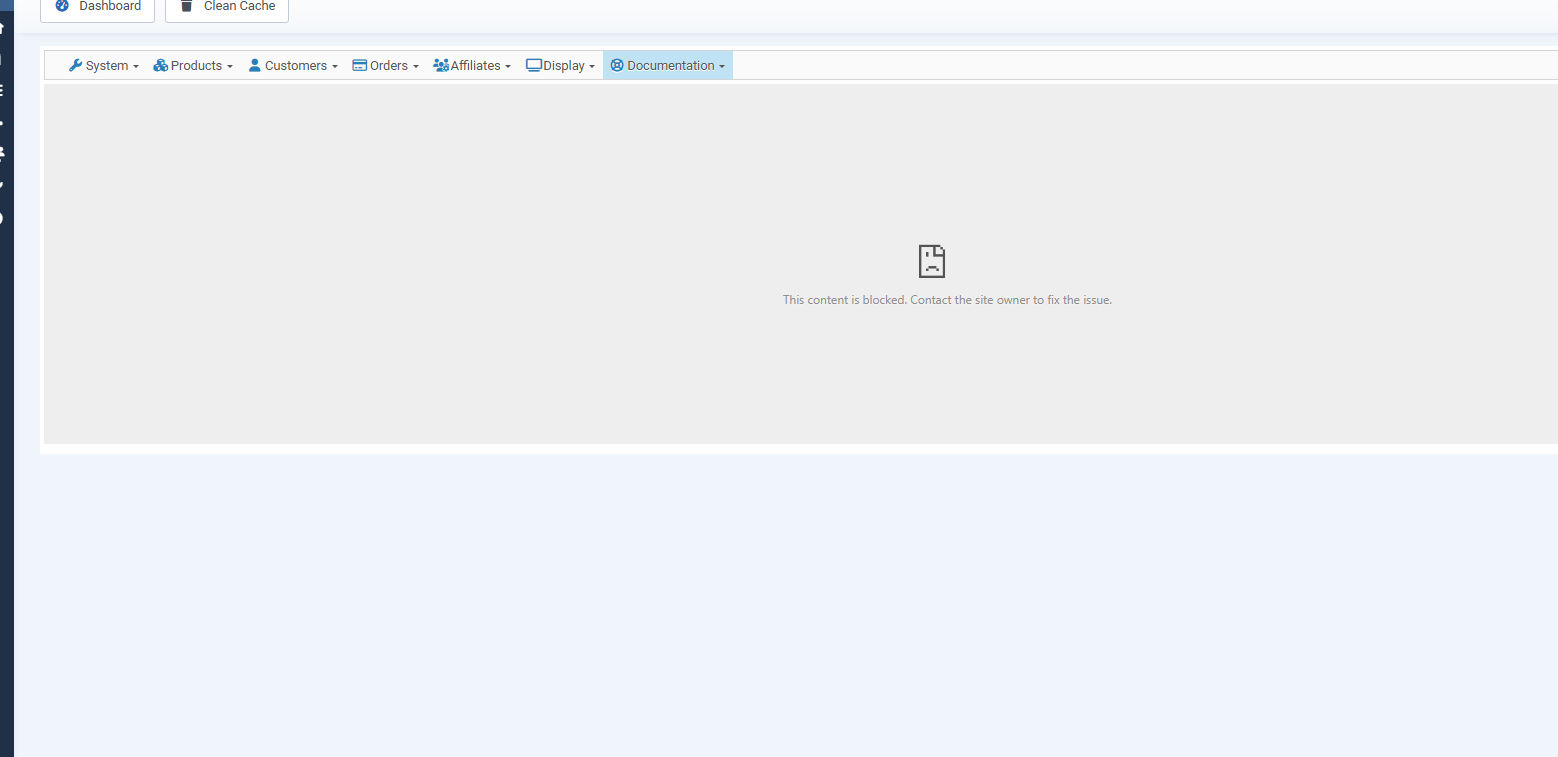
-- Error-message(debug-mod must be tuned on) -- : This content is blocked. Contact the site owner to fix the issue.
Hi, I have developed an issue with Actions - change status, sending emails to customers when the 'send a notification email' box is NOT ticked??
EDIT: it has also stretched the Explorer Menu?
I also found another issue when getting info for this issue, I seem to be blocked from viewing, Documentation and update/about I use Chrome and have also tried Firefox with the same result? see attached
 ?
?
-- Joomla version -- : 5.4.8
-- PHP version -- : 8.3
-- Error-message(debug-mod must be tuned on) -- : This content is blocked. Contact the site owner to fix the issue.
Hi, I have developed an issue with Actions - change status, sending emails to customers when the 'send a notification email' box is NOT ticked??
EDIT: it has also stretched the Explorer Menu?
I also found another issue when getting info for this issue, I seem to be blocked from viewing, Documentation and update/about I use Chrome and have also tried Firefox with the same result? see attached
Last edit: 1 month 1 week ago by mohairbears. Reason: new error
Please Log in or Create an account to join the conversation.

1 month 1 week ago #373222
by nicolas
Replied by nicolas on topic No admission to Documentation
Hi,
We looked at your website and found what blocks the Documentation page. Your site sends this header, on the frontend and on /administrator/ alike:
The Documentation page, and the update/about page, display a page of www.hikashop.com in an iframe. Your frame-src only allows your own website and PayPal, so the browser refuses to load that iframe and displays "This content is blocked. Contact the site owner to fix the issue.". That is also why it happens in every browser and in a private window: it comes from your own website, not from an extension and not from us. We checked our side too: our server sets no restriction on being framed, and that page loads normally in an iframe hosted on another domain.
So the fix is to add www.hikashop.com to the frame-src of that header:
Neither HikaShop nor Joomla itself sends that header, so it comes from Joomla's "System - HTTP Headers" plugin, from a security extension like Admin Tools, or from an .htaccess file or the configuration of your server. Whichever of those it is, that is where the line has to be changed. In the meantime, the same documentation is available directly on www.hikashop.com/support/documentation.html
Another point, which may or may not be related to your emails: the pages of your shop announce HikaShop Business 6.5.2, built on July 30, and not 6.6.0. So either the update did not go through, or the site you updated is another one. Could you check what the Joomla extensions manager says?
About the notification emails, the "Change status" action was indeed sending the email whether the "Send notification email" checkbox was ticked or not, but we corrected that in HikaShop 6.5.1, so both 6.5.2 and 6.6.0 should already have the correction. Could you check in the "Mass actions" menu whether you have another mass action set on the "After an order is updated" or "After an order is confirmed" trigger with a "Send email" action in it? Such an action sends its emails on its own, regardless of that checkbox. A screenshot of the action you are running would help us too, along with whether the email your customers receive is the order status notification email or a different one.
We looked at your website and found what blocks the Documentation page. Your site sends this header, on the frontend and on /administrator/ alike:
Code:
content-security-policy: default-src 'self' 'unsafe-inline'; script-src 'self' 'unsafe-inline' https://*.paypal.com https://*.paypalobjects.com; frame-src 'self' https://*.paypal.com; connect-src 'self' https://*.paypal.com; img-src 'self' data: https://*.paypal.com https://*.paypalobjects.com
The Documentation page, and the update/about page, display a page of www.hikashop.com in an iframe. Your frame-src only allows your own website and PayPal, so the browser refuses to load that iframe and displays "This content is blocked. Contact the site owner to fix the issue.". That is also why it happens in every browser and in a private window: it comes from your own website, not from an extension and not from us. We checked our side too: our server sets no restriction on being framed, and that page loads normally in an iframe hosted on another domain.
So the fix is to add www.hikashop.com to the frame-src of that header:
Code:
frame-src 'self' https://*.paypal.com https://www.hikashop.com;
Neither HikaShop nor Joomla itself sends that header, so it comes from Joomla's "System - HTTP Headers" plugin, from a security extension like Admin Tools, or from an .htaccess file or the configuration of your server. Whichever of those it is, that is where the line has to be changed. In the meantime, the same documentation is available directly on www.hikashop.com/support/documentation.html
Another point, which may or may not be related to your emails: the pages of your shop announce HikaShop Business 6.5.2, built on July 30, and not 6.6.0. So either the update did not go through, or the site you updated is another one. Could you check what the Joomla extensions manager says?
About the notification emails, the "Change status" action was indeed sending the email whether the "Send notification email" checkbox was ticked or not, but we corrected that in HikaShop 6.5.1, so both 6.5.2 and 6.6.0 should already have the correction. Could you check in the "Mass actions" menu whether you have another mass action set on the "After an order is updated" or "After an order is confirmed" trigger with a "Send email" action in it? Such an action sends its emails on its own, regardless of that checkbox. A screenshot of the action you are running would help us too, along with whether the email your customers receive is the order status notification email or a different one.
Please Log in or Create an account to join the conversation.
- mohairbears
-
Topic Author
- Offline
Less
More
- Posts: 608
- Thank you received: 13
1 month 1 week ago #373235
by mohairbears
Replied by mohairbears on topic No admission to Documentation
Hi, Yes the header is what you provided me to fix the PayPal issue, which it has done  the block is now fixed thank you.
I have updated to 6.6 and it's still sending emails when we do not want it to. If it's done 1 at a time in orders, then it does not send one unless the box is ticked, it is only happening when I use 'actions' for multiple orders (or in this testing case a single order) There is nothing in mass action to set this off as far as I can see, there are 2 we use at the end of the day to change orders to shipped and shipped with tracking, these are run manually. I have unticked to 'send email' tabs in both these and tried again, it is still sending out and email when changing from created to cancelled etc.?
Rgds
the block is now fixed thank you.I have updated to 6.6 and it's still sending emails when we do not want it to. If it's done 1 at a time in orders, then it does not send one unless the box is ticked, it is only happening when I use 'actions' for multiple orders (or in this testing case a single order) There is nothing in mass action to set this off as far as I can see, there are 2 we use at the end of the day to change orders to shipped and shipped with tracking, these are run manually. I have unticked to 'send email' tabs in both these and tried again, it is still sending out and email when changing from created to cancelled etc.?
Rgds
Please Log in or Create an account to join the conversation.
1 month 1 week ago #373241
by nicolas
Replied by nicolas on topic No admission to Documentation
If you don't want a mass action to run when you change the status of an order, you should either unpublish it, or make sure it doesn't have a "trigger" configured.
Please Log in or Create an account to join the conversation.
- mohairbears
-
Topic Author
- Offline
Less
More
- Posts: 608
- Thank you received: 13
1 month 1 week ago #373247
by mohairbears
Replied by mohairbears on topic No admission to Documentation
Hi, No mass action is running? I just unpublished the only 2 that change statuses (these rum manually) and it's still sending an email when using 'actions' from the order page? surely it should not do this without the 'send email' box being ticked??
I have also done a test using the Mass Action we use to inform customers and unticking the 'send an email' box and yes, it still sends an email when we said no??
I have also done a test using the Mass Action we use to inform customers and unticking the 'send an email' box and yes, it still sends an email when we said no??
Please Log in or Create an account to join the conversation.
1 month 1 week ago #373256
by nicolas
Replied by nicolas on topic No admission to Documentation
Hi,
I looked deeper on my end and I reproduced your problem on a test shop and found a real bug in HikaShop, which we have now corrected.
The fix is in the 6.6.0 installation package on our website. Download it again and reinstall it, and the change of status will stay silent unless you tick the box. We checked both ways on our side after the correction: unticked, the status changes and no email leaves the shop; ticked, the customer receives the notification as before.
I looked deeper on my end and I reproduced your problem on a test shop and found a real bug in HikaShop, which we have now corrected.
The fix is in the 6.6.0 installation package on our website. Download it again and reinstall it, and the change of status will stay silent unless you tick the box. We checked both ways on our side after the correction: unticked, the status changes and no email leaves the shop; ticked, the customer receives the notification as before.
The following user(s) said Thank You: mohairbears
Please Log in or Create an account to join the conversation.
- mohairbears
-
Topic Author
- Offline
Less
More
- Posts: 608
- Thank you received: 13
1 month 1 week ago - 1 month 1 week ago #373275
by mohairbears
Replied by mohairbears on topic No admission to Documentation
Hi, Since I updated to the new version (fixed the above issue) I now have at least 2 issues in the backend (vessel template)
First one it white numbers (can barely see them)
Second is huge tick's??
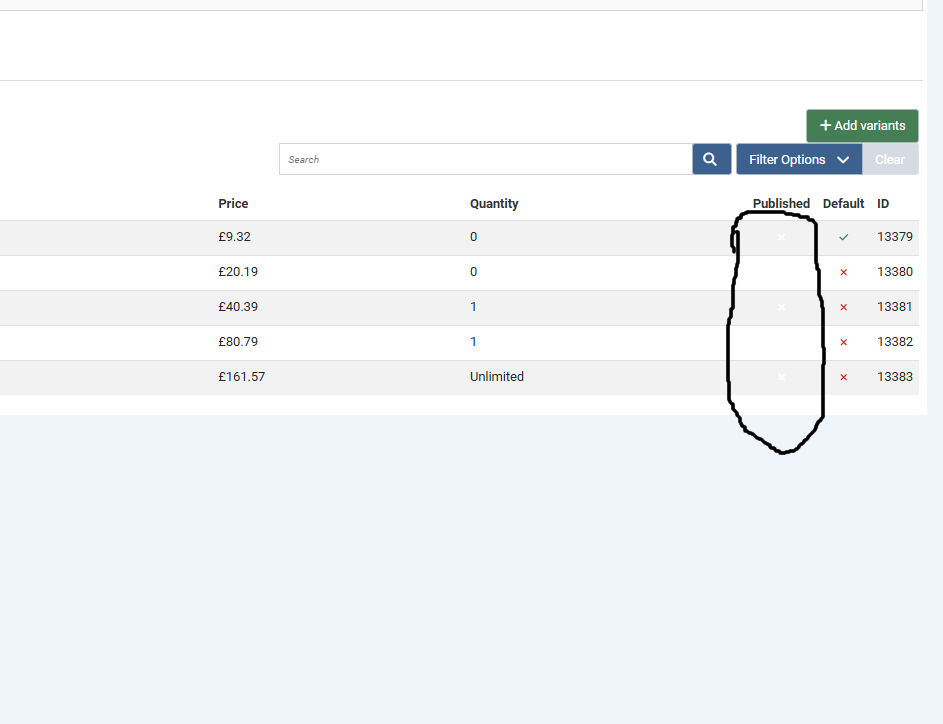
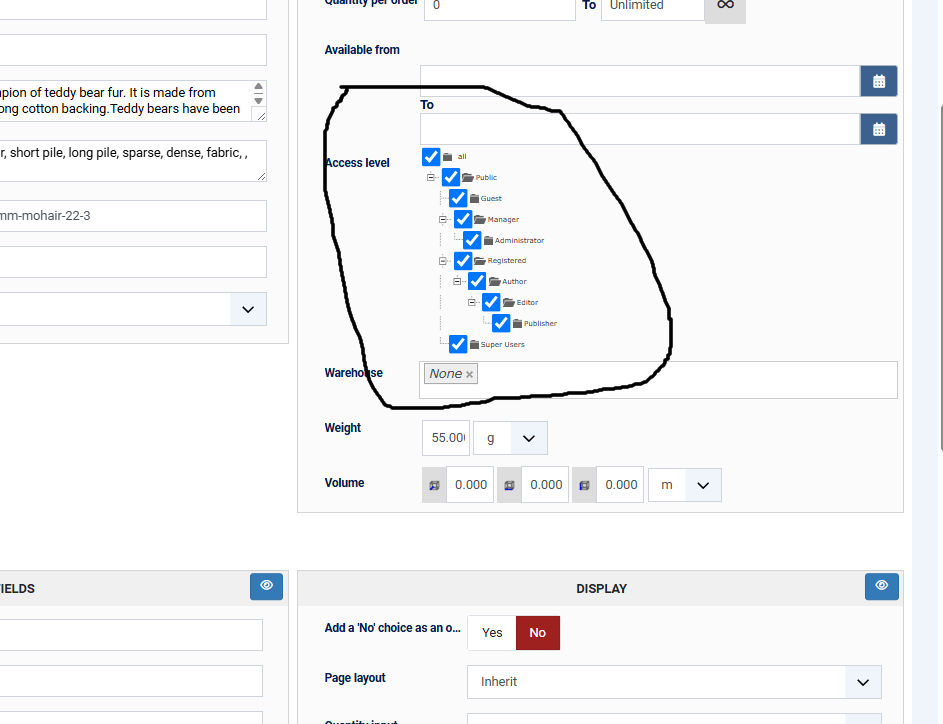
First one it white numbers (can barely see them)
Second is huge tick's??
Last edit: 1 month 1 week ago by mohairbears.
Please Log in or Create an account to join the conversation.
1 month 1 week ago #373276
by nicolas
Replied by nicolas on topic No admission to Documentation
Hi,
The white icons are a bug on our side, and it comes from the 6.6.0 update indeed. In 6.6.0 the published / unpublished icon of the listings, which never did anything when clicked, was turned into a plain marker so that screen readers stop announcing a link that does nothing. The stylesheet which colours those icons in red and green was still written for the link, so on Joomla 5 and 6 the marker took the white text of Joomla's own style, and that is what you see in the Published column of the variants, and in fact in every listing of HikaShop. It is corrected: download the 6.6.0 package again from your account and reinstall it, and the icons come back in red and green.
The big ticks come from the same update: to make the small controls of the trees easier to hit, 6.6.0 spaced the rows out and also forced the checkboxes to 24 pixels, which is bigger than the browser draws them everywhere else in the backend. The rows keep their spacing, the checkboxes are back to their normal size, and the tree itself is now drawn with vector graphics instead of the small images, so its lines follow the rows whatever the spacing and stay sharp on any screen. All of that is in the same package, so the one download covers everything.
The white icons are a bug on our side, and it comes from the 6.6.0 update indeed. In 6.6.0 the published / unpublished icon of the listings, which never did anything when clicked, was turned into a plain marker so that screen readers stop announcing a link that does nothing. The stylesheet which colours those icons in red and green was still written for the link, so on Joomla 5 and 6 the marker took the white text of Joomla's own style, and that is what you see in the Published column of the variants, and in fact in every listing of HikaShop. It is corrected: download the 6.6.0 package again from your account and reinstall it, and the icons come back in red and green.
The big ticks come from the same update: to make the small controls of the trees easier to hit, 6.6.0 spaced the rows out and also forced the checkboxes to 24 pixels, which is bigger than the browser draws them everywhere else in the backend. The rows keep their spacing, the checkboxes are back to their normal size, and the tree itself is now drawn with vector graphics instead of the small images, so its lines follow the rows whatever the spacing and stay sharp on any screen. All of that is in the same package, so the one download covers everything.
Please Log in or Create an account to join the conversation.
- mohairbears
-
Topic Author
- Offline
Less
More
- Posts: 608
- Thank you received: 13
1 month 1 week ago #373279
by mohairbears
Replied by mohairbears on topic No admission to Documentation
fixed thank you
Please Log in or Create an account to join the conversation.
Time to create page: 0.220 seconds