

- Posts: 10
- Thank you received: 0
Enable discounts, show discounted price crossed
12 years 9 months ago #140485
by santhis
Enable discounts, show discounted price crossed was created by santhis
Hi all,
fistly, thank you for the great product and support. We have actually bought the business edition.
My two questions, "naive" as they may be:
1) where and how do I enable discounts? I for the love of God cannot find that!!!
2) In one particular hikashop display module, we need to show the initial price "crossed", i.e. with a strikethough. The discounted price should show, too, of course.
Can you please direct us in the two above issues? I promise I have done all the search in the world!
best regards,
Spiros
-- url of the page with the problem -- : cyba-jewellery.co.uk
-- HikaShop version -- : 2.2.2
fistly, thank you for the great product and support. We have actually bought the business edition.
My two questions, "naive" as they may be:
1) where and how do I enable discounts? I for the love of God cannot find that!!!
2) In one particular hikashop display module, we need to show the initial price "crossed", i.e. with a strikethough. The discounted price should show, too, of course.
Can you please direct us in the two above issues? I promise I have done all the search in the world!
best regards,
Spiros
-- url of the page with the problem -- : cyba-jewellery.co.uk
-- HikaShop version -- : 2.2.2
Please Log in or Create an account to join the conversation.

Less
More
- Posts: 12953
- Thank you received: 1778
12 years 9 months ago #140572
by Mohamed Thelji
Replied by Mohamed Thelji on topic Enable discounts, show discounted price crossed
Hi Spiros,
1. You'll be able to do it through the page "Hikashop->Orders->Discount", you'll also find more information through the documentation .
2. You'll just have to :
- Go to "Hikashop->Display->Content menus/modules"
- Edit your product listing content menu/module configuration page
- Set the "Show discounted price" option to Display the price before the discount is applied.
1. You'll be able to do it through the page "Hikashop->Orders->Discount", you'll also find more information through the documentation .
2. You'll just have to :
- Go to "Hikashop->Display->Content menus/modules"
- Edit your product listing content menu/module configuration page
- Set the "Show discounted price" option to Display the price before the discount is applied.
The following user(s) said Thank You: santhis
Please Log in or Create an account to join the conversation.
12 years 9 months ago #140580
by santhis
Replied by santhis on topic Enable discounts, show discounted price crossed
Dear Mohamed,
THANK YOU for your help. If only everything was that quick and perfect in life!
Spiros Anthis
THANK YOU for your help. If only everything was that quick and perfect in life!
Spiros Anthis
Please Log in or Create an account to join the conversation.
12 years 9 months ago #141875
by jtjohnson
Replied by jtjohnson on topic Enable discounts, show discounted price crossed
This was just what I was looking for, however, when I click on the "More Details" link to view the product page, it shows the discount and then the discounted price right next to it, unlike the other views where it shows the original price with a strike through and then the discounted price. How would I go about getting the product page to show like[strike] $19.95[/strike] $9.95 instead of -$10.00 $9.95 in the product page?
Please Log in or Create an account to join the conversation.

12 years 9 months ago #141984
by nicolas
Replied by nicolas on topic Enable discounts, show discounted price crossed
You need to configure the "show discounted price" option of the configuration to "Display the price before the discount is applied"
Please Log in or Create an account to join the conversation.
Less
More
- Posts: 100
- Thank you received: 1
12 years 5 months ago #156214
by paddyrolls
Replied by paddyrolls on topic Enable discounts, show discounted price crossed
HI
In the latest version I have enabled Show discounted price - Display the price before the discount is applied.
It shows the original price with strikethrough and then the discounted price next to it.
I would like to show: [strike]AUD $180[/strike] Early Bird $100
However when I do a language override PRICE_DISCOUNT_START="Early Bird" it puts this in the beginning
[strike]Early Bird AUD $180[/strike] Early Bird $100
Am I using the right language variable.
Thanks
In the latest version I have enabled Show discounted price - Display the price before the discount is applied.
It shows the original price with strikethrough and then the discounted price next to it.
I would like to show: [strike]AUD $180[/strike] Early Bird $100
However when I do a language override PRICE_DISCOUNT_START="Early Bird" it puts this in the beginning
[strike]Early Bird AUD $180[/strike] Early Bird $100
Am I using the right language variable.
Thanks
Please Log in or Create an account to join the conversation.

12 years 5 months ago #156327
by Xavier
Replied by Xavier on topic Enable discounts, show discounted price crossed
Hi,
I think that the more adapted part to add a language override is "PRICE_BEFORE_ORIG" instead of "PRICE_DISCOUNT_START".
I think that the more adapted part to add a language override is "PRICE_BEFORE_ORIG" instead of "PRICE_DISCOUNT_START".
Please Log in or Create an account to join the conversation.
Less
More
- Posts: 100
- Thank you received: 1
12 years 5 months ago - 12 years 5 months ago #156352
by paddyrolls
Replied by paddyrolls on topic Enable discounts, show discounted price crossed
HI Xavier
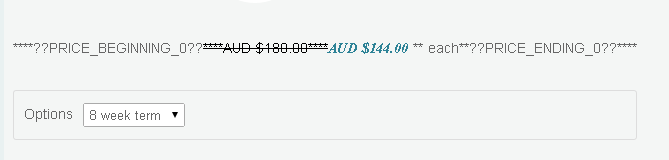
I tried using PRICE_BEFORE_ORIG and PRICE_AFTER_ORIG but changes are not appearing.
I tried changing the other ones listed in the language but it either puts it at the beginning or at the end. It does not put in between striked out and discounted price.
I have uploaded a screenshot with language debug on but can't see the discounted price being translatable.
Thanks
Patrick
I tried using PRICE_BEFORE_ORIG and PRICE_AFTER_ORIG but changes are not appearing.
I tried changing the other ones listed in the language but it either puts it at the beginning or at the end. It does not put in between striked out and discounted price.
I have uploaded a screenshot with language debug on but can't see the discounted price being translatable.
Thanks
Patrick
Last edit: 12 years 5 months ago by paddyrolls.
Please Log in or Create an account to join the conversation.
12 years 5 months ago #156354
by Xavier
Replied by Xavier on topic Enable discounts, show discounted price crossed
Hi,
Thanks to edit the view "product / listing_price" via the menu Display > Views and after the line:
Add:
Then add a translation override like:
Thanks to edit the view "product / listing_price" via the menu Display > Views and after the line:
Code:
echo '<span class="'.implode(' ',$classes).'">';
Code:
echo JText::_('PRICE_BEFORE_DISCOUNTED');
Then add a translation override like:
PRICE_BEFORE_DISCOUNTED="Early bird"
Please Log in or Create an account to join the conversation.
Time to create page: 0.086 seconds