

- Posts: 22
- Thank you received: 0
Change font size for listing_table
10 years 5 months ago #241628
by johnelny
Change font size for listing_table was created by johnelny
-- HikaShop version -- : 2.6.3
-- Joomla version -- : 3.5.1
Hello -- I can't figure out where/what to edit to change the font size for the product info in the product listing table.
-- Joomla version -- : 3.5.1
Hello -- I can't figure out where/what to edit to change the font size for the product info in the product listing table.
Please Log in or Create an account to join the conversation.
10 years 5 months ago - 10 years 5 months ago #241661
by Philip
Replied by Philip on topic Change font size for listing_table
Hello,
You can edit your Css file in order to change the font size, for this follow this different steps descibe here to create a custom Css file.
Note : I advice you to edit your Css file at the end, later that will be easier to find and correct it.
To learn more about Css code and their properties, I invite you to read this source, here
and maybe more especially this one for text and color, and this one for font size, here .
Hope that will help you.
Regards,
You can edit your Css file in order to change the font size, for this follow this different steps descibe here to create a custom Css file.
Note : I advice you to edit your Css file at the end, later that will be easier to find and correct it.
To learn more about Css code and their properties, I invite you to read this source, here
and maybe more especially this one for text and color, and this one for font size, here .
Hope that will help you.
Regards,
Last edit: 10 years 5 months ago by Philip.
Please Log in or Create an account to join the conversation.
10 years 5 months ago #241720
by johnelny
Replied by johnelny on topic Change font size for listing_table
ok -- i reviewed. this is what i can find in the css related to the products listing table. But I don't seem to see anything to modify the font in the body of the table for the product listings. I tried tbody, and that didn't work.
.hikashop_products_table{border-collapse: collapse; margin:20px 0px}
.hikashop_products_table thead th{border-bottom: 1px solid #DDDDDD; padding: 5px 10px; color:#333; font-weight:bold; font-size: 12px; text-align: left;}
.hikashop_products_table td {padding:10px}
.hikashop_products_table tr {border-bottom:1px solid #eee}
.hikashop_products_table{border-collapse: collapse; margin:20px 0px}
.hikashop_products_table thead th{border-bottom: 1px solid #DDDDDD; padding: 5px 10px; color:#333; font-weight:bold; font-size: 12px; text-align: left;}
.hikashop_products_table td {padding:10px}
.hikashop_products_table tr {border-bottom:1px solid #eee}
Please Log in or Create an account to join the conversation.
10 years 5 months ago - 10 years 5 months ago #241782
by Philip
Replied by Philip on topic Change font size for listing_table
Hello,
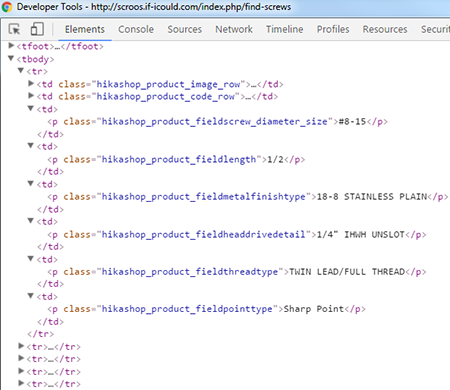
You have to write (and add at hte end of your Css file) a more precise selector to only apply your Css order, view this example :
tbody td p.hikashop_product_fieldscrew_diameter_size,
tbody td p.hikashop_product_fieldlength {
font-size: 16px;
}
with a comma (",") you can add several html selector, and so view all different class that you can use to select on which text your font-size order will be applied.
Simply keep : "tbody td p." + add your P class="X"
Hope that will help you.
Regards
You have to write (and add at hte end of your Css file) a more precise selector to only apply your Css order, view this example :
tbody td p.hikashop_product_fieldscrew_diameter_size,
tbody td p.hikashop_product_fieldlength {
font-size: 16px;
}
with a comma (",") you can add several html selector, and so view all different class that you can use to select on which text your font-size order will be applied.
Simply keep : "tbody td p." + add your P class="X"
Hope that will help you.
Regards
Last edit: 10 years 5 months ago by Philip.
Please Log in or Create an account to join the conversation.
Time to create page: 0.060 seconds