

- Posts: 5
- Thank you received: 0
need characteristics in both dropdown and list
10 years 3 months ago #247003
by koda279
need characteristics in both dropdown and list was created by koda279
I need to be able to have my characteristics display in both dropdown and list how can i do this?
Here is what im trying to achieve
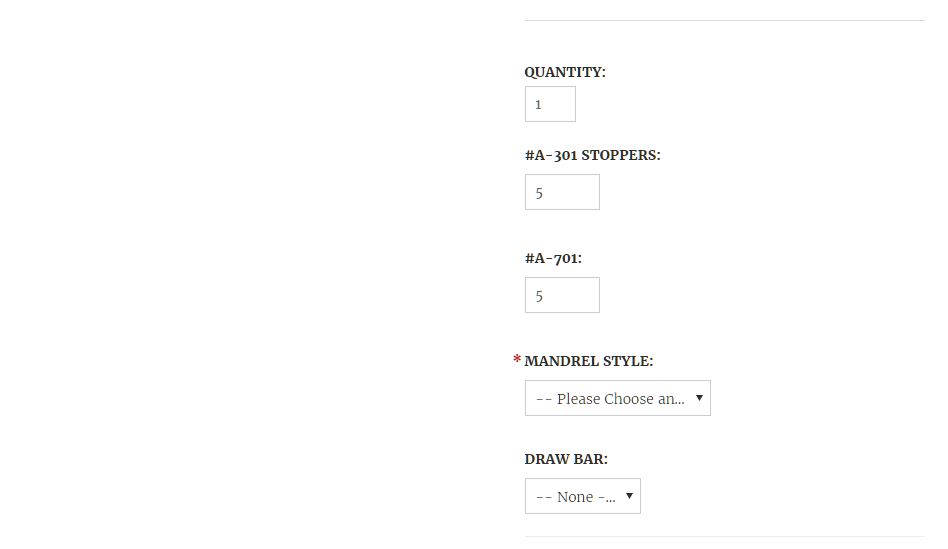
Here is what im trying to achieve
Please Log in or Create an account to join the conversation.
10 years 3 months ago - 10 years 3 months ago #247018
by Philip
Replied by Philip on topic need characteristics in both dropdown and list
Hello,
There are two way to define characteristic selection method, in the general option.
Here in Components => HikaShop => Configuration, and on Main tab and Product part :
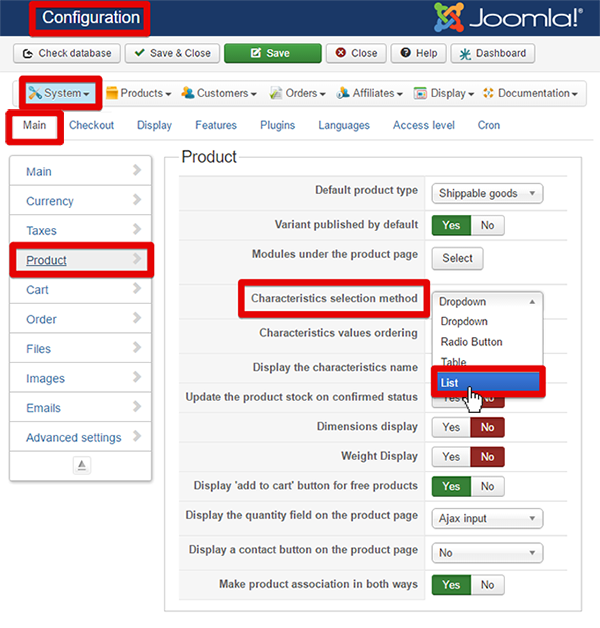
And, in Characteristic options, when you create or edit it :
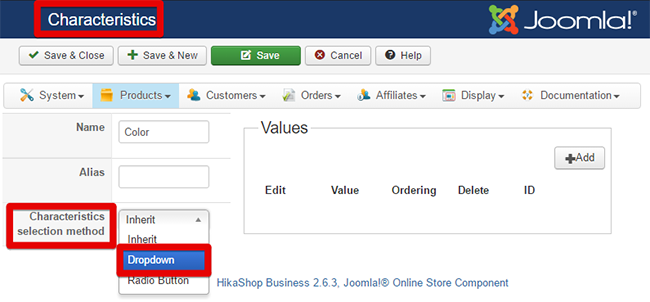
Hope this will help you !
Regards
There are two way to define characteristic selection method, in the general option.
Here in Components => HikaShop => Configuration, and on Main tab and Product part :
And, in Characteristic options, when you create or edit it :
Hope this will help you !
Regards
Last edit: 10 years 3 months ago by Philip.
Please Log in or Create an account to join the conversation.
10 years 3 months ago #247069
by koda279
Replied by koda279 on topic need characteristics in both dropdown and list
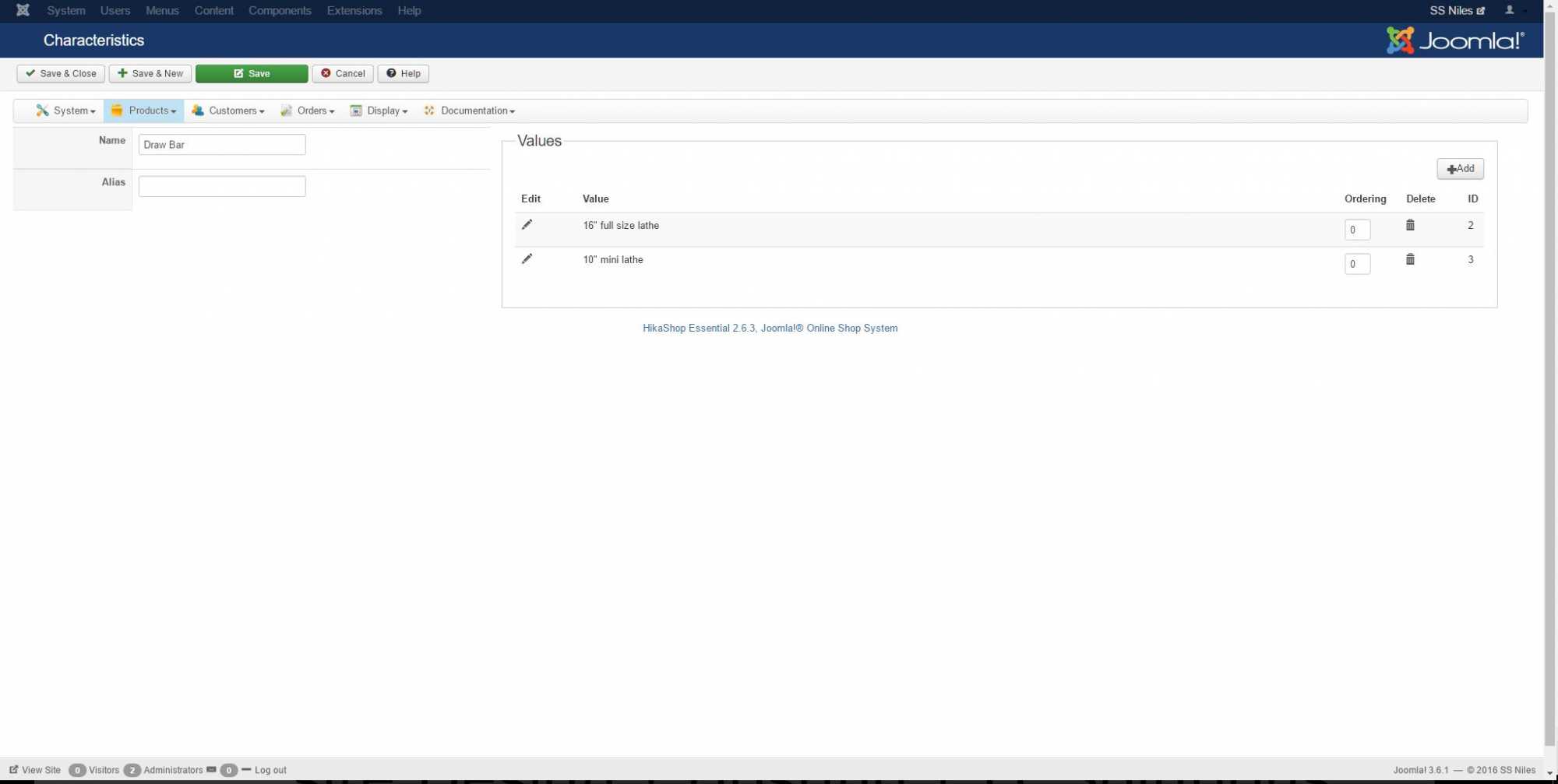
this is all i see under characteristics what am i missing
Please Log in or Create an account to join the conversation.
10 years 3 months ago #247070
by koda279
Replied by koda279 on topic need characteristics in both dropdown and list
if i have dropdown selected in the configurations i can get characteristics selection to show but not if i select list under configuration menu. also with dropdown selected under configuration i can not select list under the characteristics... is there a workaround for this?
Please Log in or Create an account to join the conversation.

10 years 3 months ago #247081
by nicolas
Replied by nicolas on topic need characteristics in both dropdown and list
Hi,
I'm note following you.
In your first message, you've provided a screenshot of :
- a quantity input field
- two input fields
- two dropdowns
There is no "list" display there.
The "list" display of characteristics will remove the characteristics selection area and display instead a listing of the variants on the product page. You can't have the variants listed and at the same time dropdowns to select the variant you want to use, they are contradictory.
Which is why the characteristic display method setting of the characteristics will be removed if you select a "list" display on the HikaShop configuration.
But based on your screenshot, it doesn't look that you want to use the "list" display, but instead that you want to have characteristics displayed as dropdowns and then custom fields of the table "item" and of the type "text" so that you get your input fields. Note that custom item fields are only available with the Business edition.
www.hikashop.com/support/documentation/4...shop-field-form.html
Please Log in or Create an account to join the conversation.

8 years 10 months ago - 8 years 10 months ago #285088
by Jabatec
Javier Ballester
Replied by Jabatec on topic need characteristics in both dropdown and list
Hi
I think what you were looking for was this.
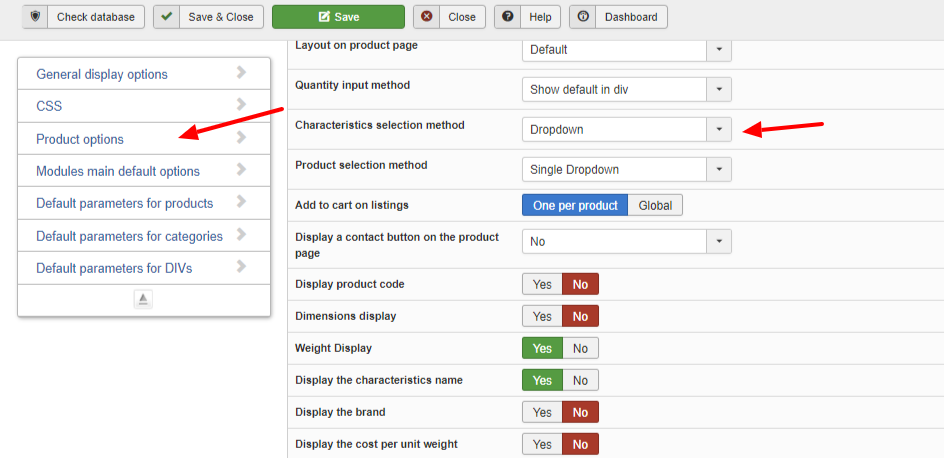
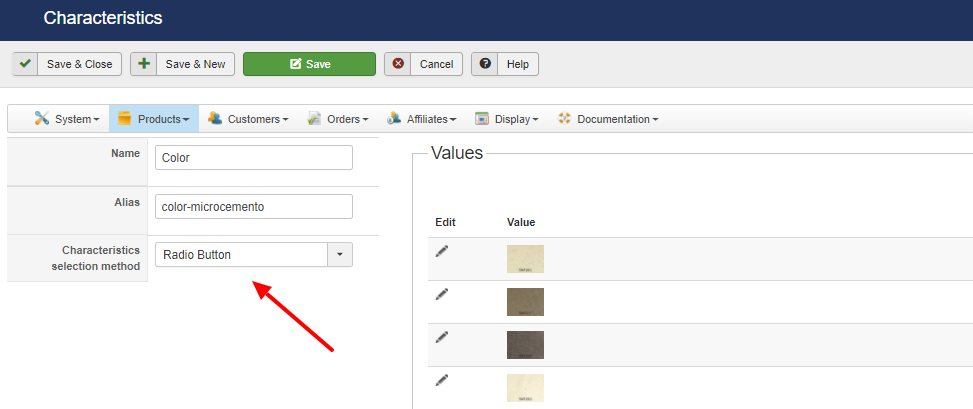
Hikashop allows you to indicate a selection method for all the characteristics. But for a particular characteristic, it will show you the option dropdown or radio button when you have selected the option "Dropdown" or "radio" in "Product Option / Characteristics selection method".
If you select "table" or "list" for all the products in "Product Options / Characteristics selection method", it will not show you the selector for a particular characteristic. (it is not necessary)
For it, the steps that I followed
1) select a method for all products, "dropdown" or "radio"
2) in Characteristics, the "dropdown" or "radio button" drop-down will appear for a particular characteristic.
Best regards
Javier
# SYSTEM / CONFIGURATION / DISPLAY / PRODUCT OPTIONS
# PRODUCTS / CHARACTERISTICS
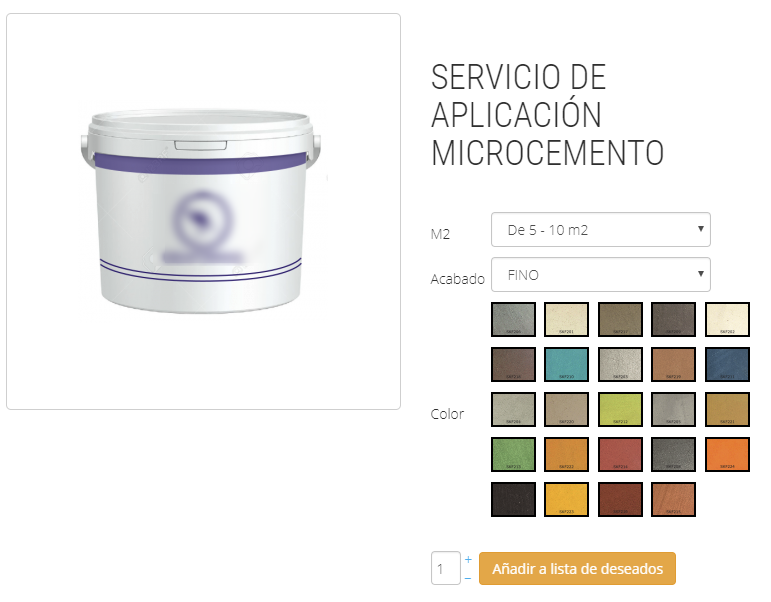
# DEMO
I think what you were looking for was this.
Hikashop allows you to indicate a selection method for all the characteristics. But for a particular characteristic, it will show you the option dropdown or radio button when you have selected the option "Dropdown" or "radio" in "Product Option / Characteristics selection method".
If you select "table" or "list" for all the products in "Product Options / Characteristics selection method", it will not show you the selector for a particular characteristic. (it is not necessary)
For it, the steps that I followed
1) select a method for all products, "dropdown" or "radio"
2) in Characteristics, the "dropdown" or "radio button" drop-down will appear for a particular characteristic.
Best regards
Javier
# SYSTEM / CONFIGURATION / DISPLAY / PRODUCT OPTIONS
# PRODUCTS / CHARACTERISTICS
# DEMO
Javier Ballester
Last edit: 8 years 10 months ago by Jabatec.
The following user(s) said Thank You: Mohamed Thelji, p30yaran
Please Log in or Create an account to join the conversation.
Time to create page: 0.077 seconds