
Hide products on category page

9 years 9 months ago #261963
by Aradise
www.aradise.com Joomla Website Designers and Internet Marketing Specialists
Hide products on category page was created by Aradise
-- HikaShop version -- : 2.6.3
-- Joomla version -- : 3.6.5
I have the menu item "Categories listing" selected but can't figure out how to only show the categories. At this point, below the list of categories are products. I would like to hide the products on the categories listing page.
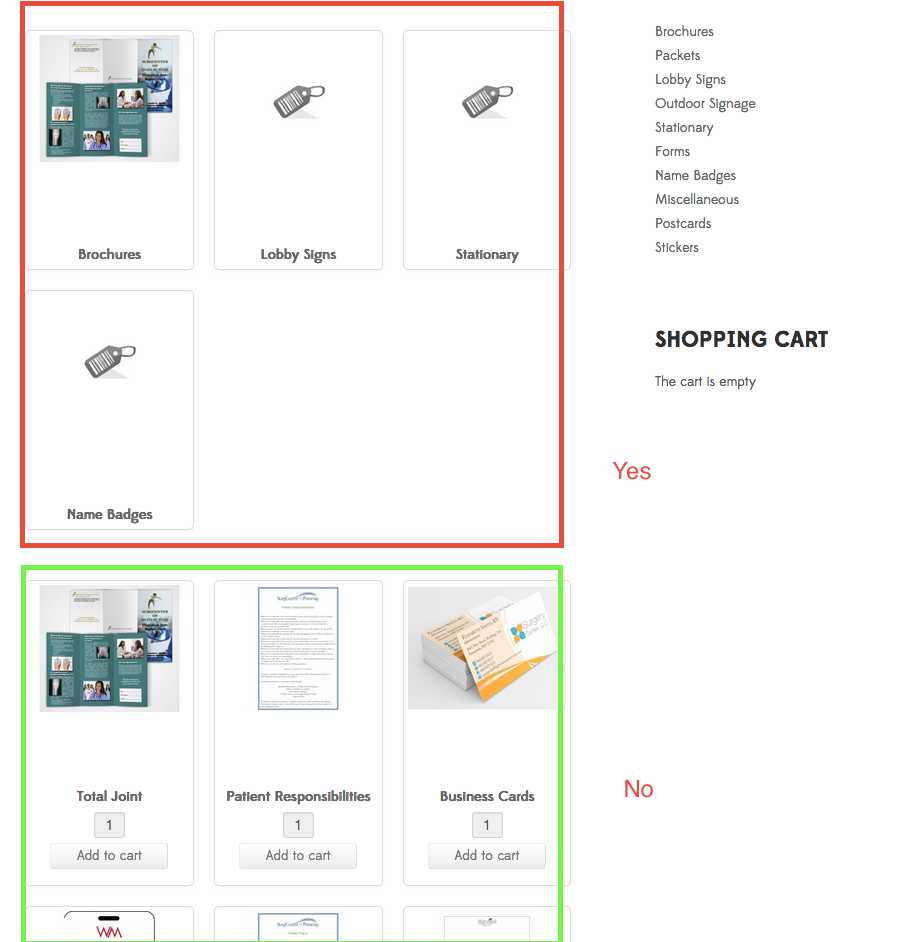
-- Joomla version -- : 3.6.5
I have the menu item "Categories listing" selected but can't figure out how to only show the categories. At this point, below the list of categories are products. I would like to hide the products on the categories listing page.
www.aradise.com Joomla Website Designers and Internet Marketing Specialists
Please Log in or Create an account to join the conversation.

9 years 9 months ago #261974
by Jerome
Jerome - Obsidev.com
HikaMarket & HikaSerial developer / HikaShop core dev team.
Replied by Jerome on topic Hide products on category page
Hi,
If was possible before to have a category listing without product listing below but that specific case did not have real usages.
Because, when you have a category listing, if you can't have a product listing below, you won't be able to see any other information that the categories and if you enter into a category without sub categories, you will just have a "blank" page.
Afterwards, the best is to configure the "product options" section of your Joomla menu to just display the "direct sub elements".
www.hikashop.com/support/documentation/3...splay-front-end.html
Regards,
If was possible before to have a category listing without product listing below but that specific case did not have real usages.
Because, when you have a category listing, if you can't have a product listing below, you won't be able to see any other information that the categories and if you enter into a category without sub categories, you will just have a "blank" page.
Afterwards, the best is to configure the "product options" section of your Joomla menu to just display the "direct sub elements".
www.hikashop.com/support/documentation/3...splay-front-end.html
Regards,
Jerome - Obsidev.com
HikaMarket & HikaSerial developer / HikaShop core dev team.
Please Log in or Create an account to join the conversation.
Less
More
- Posts: 109
- Thank you received: 1
7 years 9 months ago #302900
by dagroupinc
Replied by dagroupinc on topic Hide products on category page
When I do this, it displays all the products by category—Under the categories. How do I get it to display only the categories?
Jackets
Jackets
Please Log in or Create an account to join the conversation.
Less
More
- Posts: 109
- Thank you received: 1
7 years 9 months ago - 7 years 9 months ago #302901
by dagroupinc
Replied by dagroupinc on topic Hide products on category page
When I do this, it displays all the products by category—Under the categories. How do I get it to display only the categories?
Jackets
– Rain Jackets
– Lined Jackets
– Unlined Jackets
Jackets
– Rain Jackets
– Lined Jackets
– Unlined Jackets
Last edit: 7 years 9 months ago by dagroupinc.
Please Log in or Create an account to join the conversation.

7 years 9 months ago #302913
by nicolas
Replied by nicolas on topic Hide products on category page
Hi,
As Jerome said, you want to select the option "direct sub elements" and not "grouped by category".
As Jerome said, you want to select the option "direct sub elements" and not "grouped by category".
Please Log in or Create an account to join the conversation.
Less
More
- Posts: 109
- Thank you received: 1
7 years 9 months ago #302937
by dagroupinc
Replied by dagroupinc on topic Hide products on category page
Nicolas/Jerome,
The default install setting is "direct sub-elements" and on our site displays products below the Categories. If we switch it to "grouped by category" it then shows ALL the products, for ALL the Categories, organized by Category—below the Category groups (see attached screenshot). We cannot find a setting to turn off the display of products below the Category groups.
In the attached screenshot you can see our three Categories at the top:
Rain jackets
Lined Jackets
Unlined Jackets
Everything shown below those three Categories are the products we'd like to turn off. This occurs on all our Category pages.
Paul
The default install setting is "direct sub-elements" and on our site displays products below the Categories. If we switch it to "grouped by category" it then shows ALL the products, for ALL the Categories, organized by Category—below the Category groups (see attached screenshot). We cannot find a setting to turn off the display of products below the Category groups.
In the attached screenshot you can see our three Categories at the top:
Rain jackets
Lined Jackets
Unlined Jackets
Everything shown below those three Categories are the products we'd like to turn off. This occurs on all our Category pages.
Paul
Please Log in or Create an account to join the conversation.
7 years 9 months ago #302939
by nicolas
Replied by nicolas on topic Hide products on category page
Hi,
Then the issue is not with the settings of the menu item but with the categories of your products. You should only add the leaf categories to the products.
So if you have a product in the Rain jackets category which is in the Jackets category, you should only have the Rain jackets category selected in the product, not the Jackets category.
Then the issue is not with the settings of the menu item but with the categories of your products. You should only add the leaf categories to the products.
So if you have a product in the Rain jackets category which is in the Jackets category, you should only have the Rain jackets category selected in the product, not the Jackets category.
Please Log in or Create an account to join the conversation.
Less
More
- Posts: 109
- Thank you received: 1
7 years 9 months ago #302979
by dagroupinc
Replied by dagroupinc on topic Hide products on category page
I'm not sure I understand.
If I have a category called 'Jackets' with 3 types (rain, lined, unlined), that also come in 3 additional types (mens, womens, youth) are you saying I would only assign—for instance— a 'rain' jacket to the 'Jacket' category? If so then how does the menu structure work?
See attached.
Paul
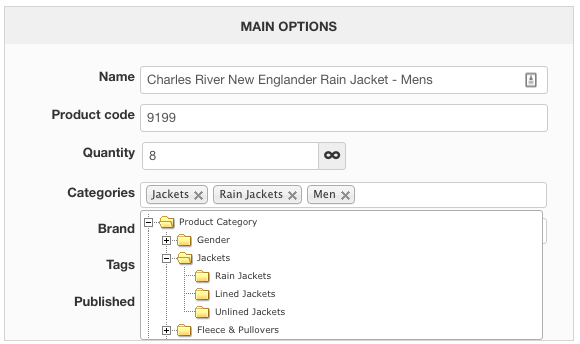
If I have a category called 'Jackets' with 3 types (rain, lined, unlined), that also come in 3 additional types (mens, womens, youth) are you saying I would only assign—for instance— a 'rain' jacket to the 'Jacket' category? If so then how does the menu structure work?
See attached.
Paul
Please Log in or Create an account to join the conversation.
7 years 9 months ago #303009
by nicolas
Replied by nicolas on topic Hide products on category page
Hi,
No, I'm saying that you want to remove in that "categories" setting the "jackets" you selected because you already selected the "rain jackets" category.
No, I'm saying that you want to remove in that "categories" setting the "jackets" you selected because you already selected the "rain jackets" category.
Please Log in or Create an account to join the conversation.
Time to create page: 0.068 seconds