
- Posts: 23
- Thank you received: 0
Colums not working following upgrade to 3.01 from 2.64
- aran.gibbs
-
 Topic Author
- Offline
Less
More
9 years 6 months ago #267743
by aran.gibbs
Colums not working following upgrade to 3.01 from 2.64 was created by aran.gibbs
-- HikaShop version -- : 3.01
-- Joomla version -- : 3.6.5
Hi Guys,
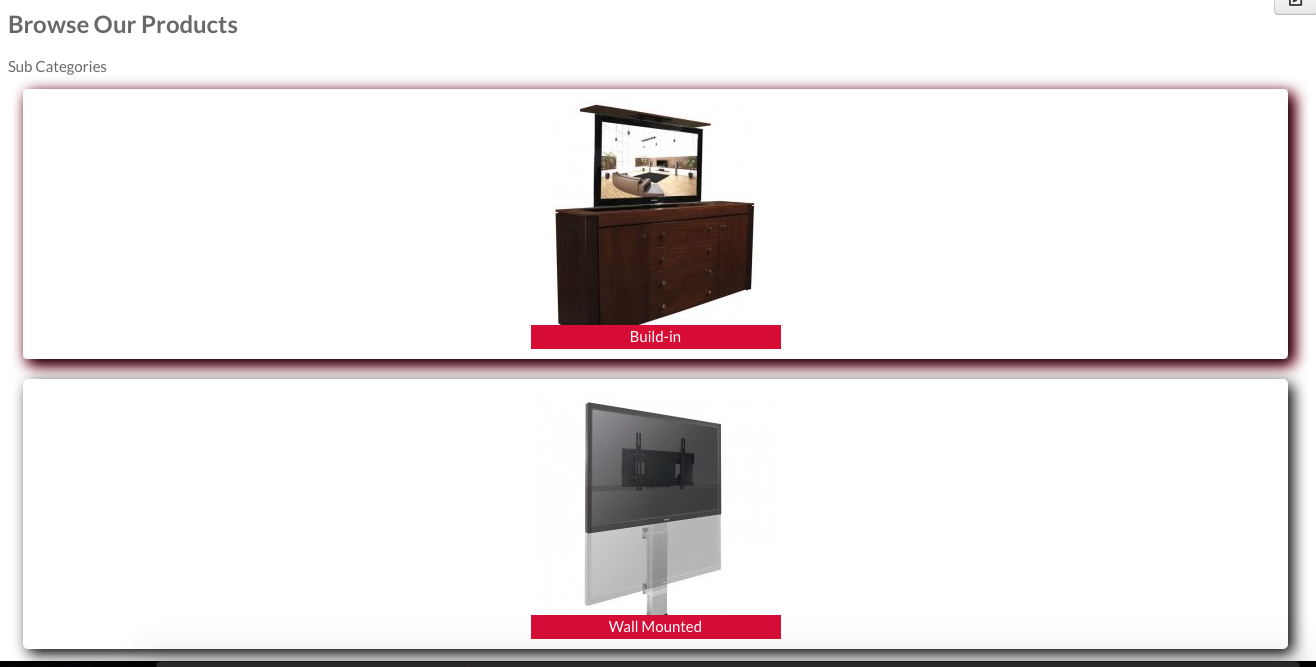
I upgraded to 3.01 this morning on our site and I have noticed it's now ignoring the column setting in modules or menus and just displaying 1 column.
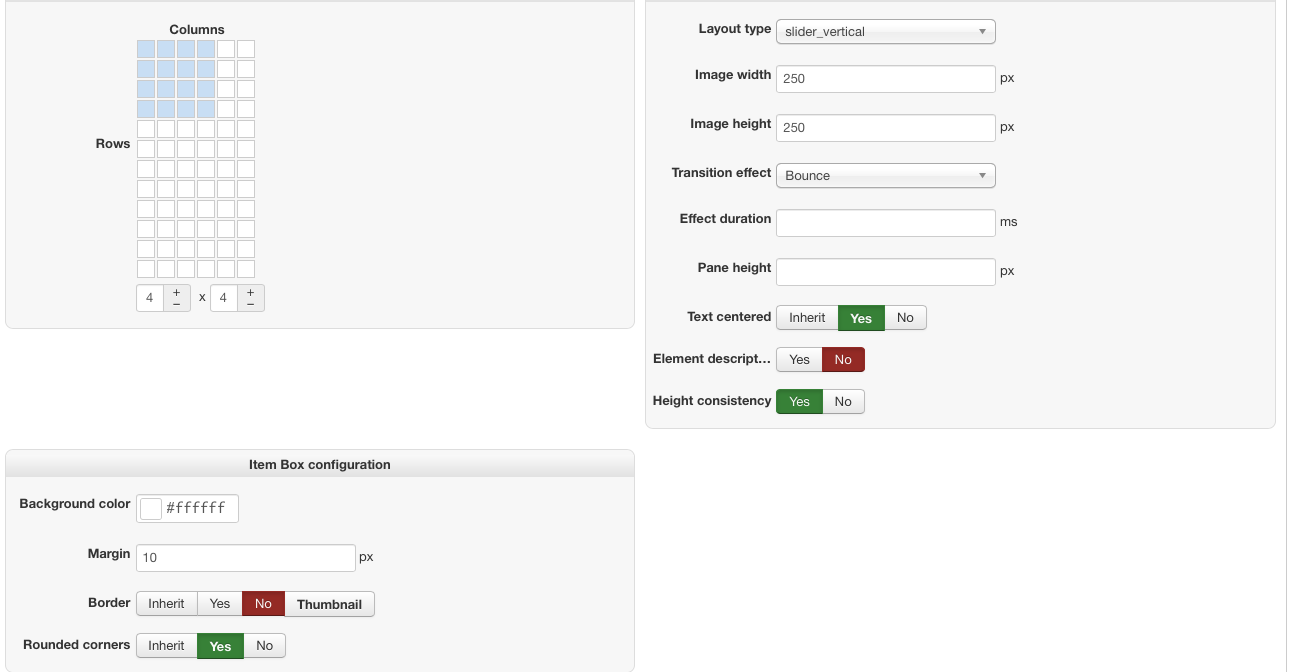
I have the module shown in the screenshot set to 4 columns wide and its works fine for over a year but once i upgraded this morning to 3.01 its now just showing all in one column. I have the same issue on menu where it was set to 2 columns but its now just showing in one. I have checked the settings and they are still set correctly and I tried changing them to a different config but it makes no difference.
Please help as it ruining the look of the site and will prevent me upgrading other sites for the client.
Aran
-- Joomla version -- : 3.6.5
Hi Guys,
I upgraded to 3.01 this morning on our site and I have noticed it's now ignoring the column setting in modules or menus and just displaying 1 column.
I have the module shown in the screenshot set to 4 columns wide and its works fine for over a year but once i upgraded this morning to 3.01 its now just showing all in one column. I have the same issue on menu where it was set to 2 columns but its now just showing in one. I have checked the settings and they are still set correctly and I tried changing them to a different config but it makes no difference.
Please help as it ruining the look of the site and will prevent me upgrading other sites for the client.
Aran
Please Log in or Create an account to join the conversation.

9 years 6 months ago #267744
by Jerome
Jerome - Obsidev.com
HikaMarket & HikaSerial developer / HikaShop core dev team.
Replied by Jerome on topic Colums not working following upgrade to 3.01 from 2.64
Jerome - Obsidev.com
HikaMarket & HikaSerial developer / HikaShop core dev team.
Please Log in or Create an account to join the conversation.
- aran.gibbs
-
Topic Author
- Offline
Less
More
- Posts: 23
- Thank you received: 0
9 years 6 months ago - 9 years 6 months ago #267938
by aran.gibbs
Replied by aran.gibbs on topic Colums not working following upgrade to 3.01 from 2.64
HI,
Thanks. I looked at the css file in config as per that link and in the section suggested I removed the width parameter and that worked so it now looks like this:
.hikashop_subcategories div.hikashop_category, .hikashop_products_listing div.hikashop_product {
float: left;
}
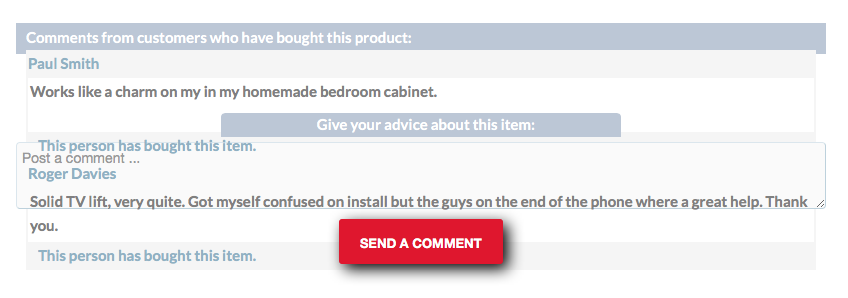
We have also noticed an issue with the comments display. Comments and the comment form are siting on top of each other (see image). I've gotten around this temporarily by restoring View Vote - Listing from version 2.6.2 of hikashop but would like to see it fixed properly.
Thanks. I looked at the css file in config as per that link and in the section suggested I removed the width parameter and that worked so it now looks like this:
.hikashop_subcategories div.hikashop_category, .hikashop_products_listing div.hikashop_product {
float: left;
}
We have also noticed an issue with the comments display. Comments and the comment form are siting on top of each other (see image). I've gotten around this temporarily by restoring View Vote - Listing from version 2.6.2 of hikashop but would like to see it fixed properly.
Last edit: 9 years 6 months ago by aran.gibbs.
Please Log in or Create an account to join the conversation.
9 years 6 months ago #267955
by Jerome
Jerome - Obsidev.com
HikaMarket & HikaSerial developer / HikaShop core dev team.
Replied by Jerome on topic Colums not working following upgrade to 3.01 from 2.64
Hello,
It is possible that there are some missing CSS for the vote and comments.
You can activate temporally the style "default" in HikaShop in order to get the HikaShop 2.6.4 CSS file (and all his rules).
That file is there to provide a retro-compatibility.
Afterwards, if you think there are some errors in the HTML view ; we would need to have an access to a page with the problem in order to see it directly.
Regards,
It is possible that there are some missing CSS for the vote and comments.
You can activate temporally the style "default" in HikaShop in order to get the HikaShop 2.6.4 CSS file (and all his rules).
That file is there to provide a retro-compatibility.
Afterwards, if you think there are some errors in the HTML view ; we would need to have an access to a page with the problem in order to see it directly.
Regards,
Jerome - Obsidev.com
HikaMarket & HikaSerial developer / HikaShop core dev team.
Please Log in or Create an account to join the conversation.

9 years 6 months ago #268268
by swbouton
Replied by swbouton on topic Colums not working following upgrade to 3.01 from 2.64
Hello. I am having the same problem since the 3.0` upgrade. At this point, my site is very simple and I've changed none of the CSS. My product list was displaying 3 column and 20 rows, but now it is all one column no matter what I do.
URL to Product Pagehttp://aquatech-marine.com/newsite/index.php
I use Gantry 5, Joomla 3.7.0, PHP 7.0.18.
URL to Product Pagehttp://aquatech-marine.com/newsite/index.php
I use Gantry 5, Joomla 3.7.0, PHP 7.0.18.
Please Log in or Create an account to join the conversation.
9 years 6 months ago #268269
by Jerome
Jerome - Obsidev.com
HikaMarket & HikaSerial developer / HikaShop core dev team.
Replied by Jerome on topic Colums not working following upgrade to 3.01 from 2.64
Hello,
If you take a look at your configuration, you will see that your frontend CSS file is : frontend_custom.
So you did change your CSS because you do have an override (and customized) file.
Regards,
If you take a look at your configuration, you will see that your frontend CSS file is : frontend_custom.
So you did change your CSS because you do have an override (and customized) file.
Regards,
Jerome - Obsidev.com
HikaMarket & HikaSerial developer / HikaShop core dev team.
Please Log in or Create an account to join the conversation.
9 years 6 months ago #268331
by swbouton
Replied by swbouton on topic Colums not working following upgrade to 3.01 from 2.64
My error. Sorry. Thank you for your help.
Please Log in or Create an account to join the conversation.
Time to create page: 0.061 seconds