

- Posts: 17
- Thank you received: 0
Add to cart and wishlist buttons styling
8 years 4 months ago - 8 years 4 months ago #294159
by jess116
Add to cart and wishlist buttons styling was created by jess116
-- HikaShop version -- : 3.4.0
-- Joomla version -- : 3.8.2
-- PHP version -- : 7.1
-- Browser(s) name and version -- : Firefox & chrome
Hi there!
I am trying to get my product description page "add to cart" button and "add to wishlist" buttons one above the other, and also the "stock count" and Quantity selector also in separate lines.. basically i want them all in a straight vertical line, one beneath the other, but they are all grouped together and I am not really sure how to separate them.
I also have an issue with the quantity input field on the mobile version of the product description page, the input field is really long the plus and minus don't have the nice background/formatting of the desktop version.
If anyone could help that would be amazing, thank you!
Jess
-- Joomla version -- : 3.8.2
-- PHP version -- : 7.1
-- Browser(s) name and version -- : Firefox & chrome
Hi there!
I am trying to get my product description page "add to cart" button and "add to wishlist" buttons one above the other, and also the "stock count" and Quantity selector also in separate lines.. basically i want them all in a straight vertical line, one beneath the other, but they are all grouped together and I am not really sure how to separate them.
I also have an issue with the quantity input field on the mobile version of the product description page, the input field is really long the plus and minus don't have the nice background/formatting of the desktop version.
If anyone could help that would be amazing, thank you!
Jess
Last edit: 8 years 4 months ago by jess116.
Please Log in or Create an account to join the conversation.
8 years 4 months ago - 8 years 4 months ago #294180
by jess116
Replied by jess116 on topic Add to cart and wishlist buttons styling
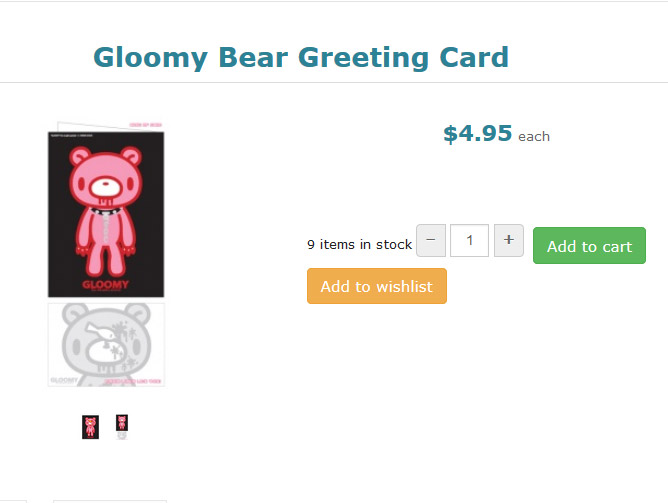
This is how it currently looks
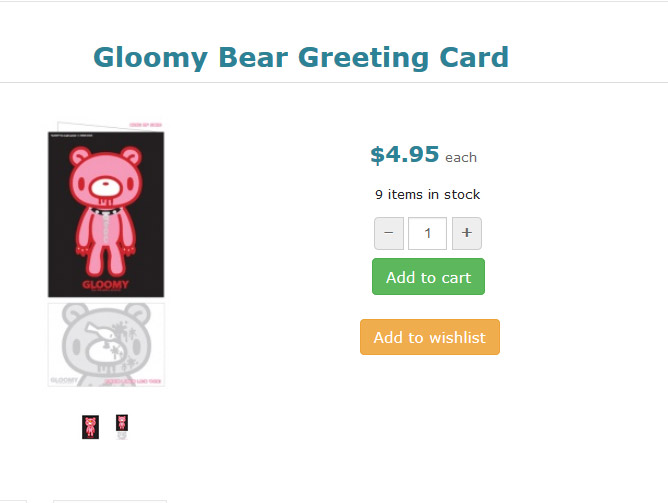
This is how I would like it to look
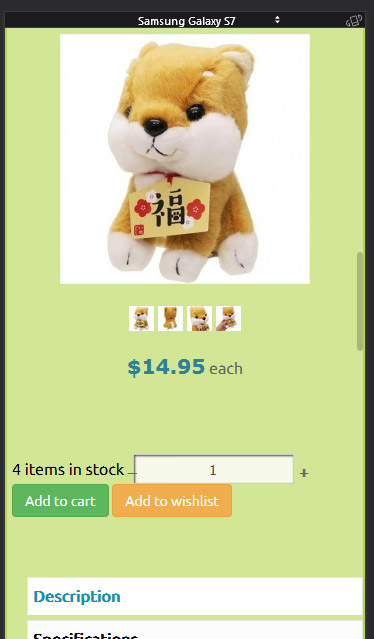
And this is the mobile version, the add to cart section is just kinda messed up
This is how I would like it to look
And this is the mobile version, the add to cart section is just kinda messed up
Last edit: 8 years 4 months ago by jess116.
Please Log in or Create an account to join the conversation.

8 years 4 months ago - 8 years 4 months ago #294189
by Philip
Replied by Philip on topic Add to cart and wishlist buttons styling
Hello,
You can use some custom Css to add like show on this tutorial .
I think that you can add this kind of Css command :
Hope this will help you to get what you want.
Regards
You can use some custom Css to add like show on this tutorial .
I think that you can add this kind of Css command :
Code:
add_to_cart_class,
add_to_whishlist_class,
quantity_block_class {
display:block;
}
Hope this will help you to get what you want.
Regards
Last edit: 8 years 4 months ago by Philip.
Please Log in or Create an account to join the conversation.
8 years 4 months ago #294201
by jess116
Replied by jess116 on topic Add to cart and wishlist buttons styling
Hi Philip, thank you very much for your reply.
I tried adding that code to my frontend custom css file, but it doesnt seem to have made any difference unfortunately
Are there any other possibilites you know of that might help?
Thank you kindly,
Jess
I tried adding that code to my frontend custom css file, but it doesnt seem to have made any difference unfortunately
Are there any other possibilites you know of that might help?
Thank you kindly,
Jess
Please Log in or Create an account to join the conversation.
8 years 4 months ago - 8 years 4 months ago #294219
by Philip
Replied by Philip on topic Add to cart and wishlist buttons styling
Hello,
Can you provide an Url link with your custom Css ? In order to better see the context ?
Note : If needed, you can use our Contact us form to provide your Url or references, don't forget to add to your message an Url link to this topic.
Awaiting news from you.
Regards
Can you provide an Url link with your custom Css ? In order to better see the context ?
Note : If needed, you can use our Contact us form to provide your Url or references, don't forget to add to your message an Url link to this topic.
Awaiting news from you.
Regards
Last edit: 8 years 4 months ago by Philip.
Please Log in or Create an account to join the conversation.
Time to create page: 0.079 seconds