

- Posts: 35
- Thank you received: 0
New line in product name
6 years 6 months ago - 6 years 6 months ago #316904
by Gerner
New line in product name was created by Gerner
-- url of the page with the problem -- :
www.dykkerhulen.dk/webshop/produkt/1949-...category_pathway-139
-- HikaShop version -- : 4.2.3
-- Joomla version -- : 3.9.15
-- PHP version -- : 5.6.40
-- Browser(s) name and version -- : Google Chrome
Hi,
On my product page I have the product name and if there is any characteristics to the product its showed right after then mave like:
Mask: Blue
But I need it to be showed like this:
Mask
Blue
I cant figure out how to get a "<br>" in the code to move the characteristics down to next line.
I have tried to fix it on the code here (product / show_default.php):
As you can see on the attached photo its showed like:
Look: Klar silikone / blå ramme
But I need it as:
Look
Klar silikone / blå ramme
But was not able to manage it, can some one please advice?
-- HikaShop version -- : 4.2.3
-- Joomla version -- : 3.9.15
-- PHP version -- : 5.6.40
-- Browser(s) name and version -- : Google Chrome
Hi,
On my product page I have the product name and if there is any characteristics to the product its showed right after then mave like:
Mask: Blue
But I need it to be showed like this:
Mask
Blue
I cant figure out how to get a "<br>" in the code to move the characteristics down to next line.
I have tried to fix it on the code here (product / show_default.php):
Code:
<h4 class="hhead-line-bottom">
<span id="hikashop_product_name_main" class="hikashop_product_name_main" itemprop="name">
<?php if(hikashop_getCID('product_id') != $this->element->product_id && isset($this->element->main->product_name))
echo $this->element->main->product_name;
else
echo $this->element->product_name;
?>
</span>
</h4>
As you can see on the attached photo its showed like:
Look: Klar silikone / blå ramme
But I need it as:
Look
Klar silikone / blå ramme
But was not able to manage it, can some one please advice?
Last edit: 6 years 6 months ago by Gerner.
Please Log in or Create an account to join the conversation.

6 years 6 months ago - 6 years 6 months ago #316908
by Philip
Replied by Philip on topic New line in product name
Hello,
I have I think a better solution for you, via css custom code follow me step by step :
1. First have a look on this tutorial to see how to add your css code.
2. Point your product title then, right-click => Inspect (or inspector tool)
3. Note your product name html class and create some custom css code, like this pseudo code :
Ex : .product_page_html_class span.title_html_class span {
display: block;
}
Details :
.product_page_html_class : is the product page class (in order that your custom css only works in your product page)
span.title_html_class : title container html class
span : Your variant name is always display in a "<span>...</span>"

Hope this will help you
Regards
I have I think a better solution for you, via css custom code follow me step by step :
1. First have a look on this tutorial to see how to add your css code.
2. Point your product title then, right-click => Inspect (or inspector tool)
3. Note your product name html class and create some custom css code, like this pseudo code :
Ex : .product_page_html_class span.title_html_class span {
display: block;
}
Details :
.product_page_html_class : is the product page class (in order that your custom css only works in your product page)
span.title_html_class : title container html class
span : Your variant name is always display in a "<span>...</span>"
Hope this will help you
Regards
Last edit: 6 years 6 months ago by Philip.
Please Log in or Create an account to join the conversation.
6 years 6 months ago #316963
by Gerner
Replied by Gerner on topic New line in product name
Hi,
Thanks for your reply. The CSS is all new to me and a difficult
When I follow your suggest and try to add my own codes i looks like:
But ti does not help. Maybe you can help me a little more. Maybe you can show how it should be so I can learn what CSS codes to use for next time?
Hope you can advise again and THANKS.
Thanks for your reply. The CSS is all new to me and a difficult
When I follow your suggest and try to add my own codes i looks like:
Code:
.hhead-line-bottom hikashop_product_variant_subname span {
display: block;
}
But ti does not help. Maybe you can help me a little more. Maybe you can show how it should be so I can learn what CSS codes to use for next time?
Hope you can advise again and THANKS.
Please Log in or Create an account to join the conversation.
6 years 6 months ago #316976
by Gerner
Replied by Gerner on topic New line in product name
Move subname / characteristics to new line.
When you go to the website and to a product the page look like this:
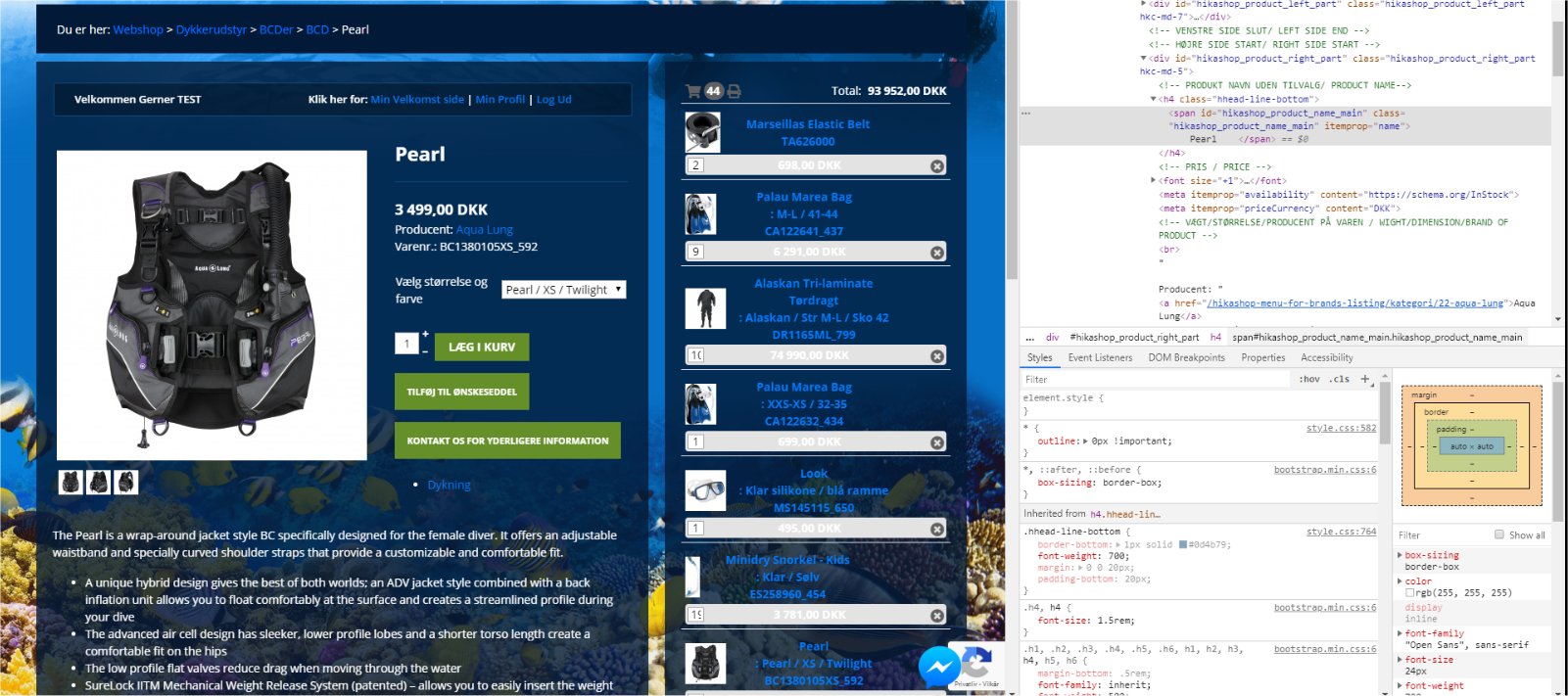
Its where the product name is: Pearl I face the issue. The above photo is correct, but when you choose a size (characteristics) the page change to this:
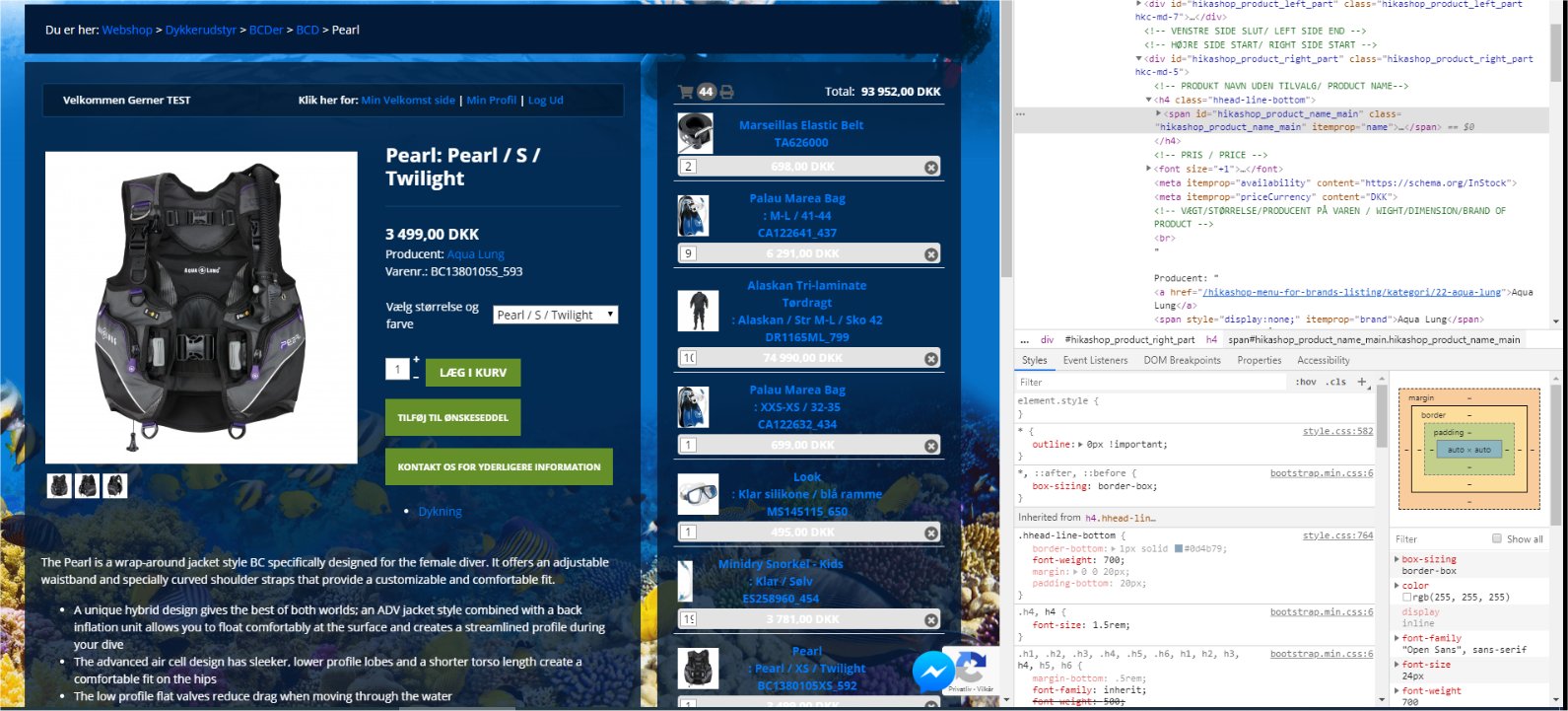
Now the product name says: Pearl: Pearl /S / Twilight
What I want is that the text look like this:
Pearl
Pearl /S / Twilight
when you choose a size (characteristics).
The blow code is from Google Chrome
But when I search for hikashop_product_variant_subname in all CSS files nothing show up! I was hoping that I could change something in there.
When I check the php file I can find the code:
And that show the product name (Pearl), so if I remove that code the product name on the website disappeared and the same for the characteristics when that is chosen, but the above code don’t refer to the characteristics codes so I’m not able to add a <br> anywhere. Can some one tell me where the code are located for characteristics displayed on the product page?
When you go to the website and to a product the page look like this:
Its where the product name is: Pearl I face the issue. The above photo is correct, but when you choose a size (characteristics) the page change to this:
Now the product name says: Pearl: Pearl /S / Twilight
What I want is that the text look like this:
Pearl
Pearl /S / Twilight
when you choose a size (characteristics).
The blow code is from Google Chrome
Code:
<span id="hikashop_product_name_main" class="hikashop_product_name_main" itemprop="name">
Pearl
<span class="hikashop_product_variant_subname">
Pearl / S / Twilight
</span></span>
But when I search for hikashop_product_variant_subname in all CSS files nothing show up! I was hoping that I could change something in there.
When I check the php file I can find the code:
Code:
<h4 class="hhead-line-bottom">
<span id="hikashop_product_name_main" class="hikashop_product_name_main" itemprop="name">
<?php if(hikashop_getCID('product_id') != $this->element->product_id && isset($this->element->main->product_name))
echo $this->element->main->product_name;
echo $this->element->product_name;
?>
</span>
</h4>
And that show the product name (Pearl), so if I remove that code the product name on the website disappeared and the same for the characteristics when that is chosen, but the above code don’t refer to the characteristics codes so I’m not able to add a <br> anywhere. Can some one tell me where the code are located for characteristics displayed on the product page?
Please Log in or Create an account to join the conversation.
6 years 6 months ago - 6 years 6 months ago #316981
by Philip
Replied by Philip on topic New line in product name
Hello,
First point, note that you have to let your variant name empty, like on my screenshot :

If you follow this, and unfortunately if that didn't fit your needs nevertheless, maybe I need to see your context, in this idea can you provide a product page url.
Note : You can use our Contact us form to provide this url (and if required frontend access), don't forget to add to your message an url link to this topic.
Awaiting elements to progress on your subject.
Regards
First point, note that you have to let your variant name empty, like on my screenshot :
If you follow this, and unfortunately if that didn't fit your needs nevertheless, maybe I need to see your context, in this idea can you provide a product page url.
Note : You can use our Contact us form to provide this url (and if required frontend access), don't forget to add to your message an url link to this topic.
Awaiting elements to progress on your subject.
Regards
Last edit: 6 years 6 months ago by Philip.
Please Log in or Create an account to join the conversation.
6 years 6 months ago #317016
by Gerner
Replied by Gerner on topic New line in product name
THANKS 
Email sendt with info.
Email sendt with info.
Please Log in or Create an account to join the conversation.

6 years 6 months ago #317028
by nicolas
Replied by nicolas on topic New line in product name
Hi,
You don't need any CSS to do that.
You can just add a translation override like this:
HIKA_VARIANT_SEPARATOR="<br/>"
and it will do what you want.
www.hikashop.com/download/languages.html#modify
You don't need any CSS to do that.
You can just add a translation override like this:
HIKA_VARIANT_SEPARATOR="<br/>"
and it will do what you want.
www.hikashop.com/download/languages.html#modify
Please Log in or Create an account to join the conversation.
6 years 6 months ago #317072
by Gerner
Replied by Gerner on topic New line in product name
Thanks, I add the <br> and that works fine
I now try to do some small changes to the CSS and need an advice. In the shopping cart on the product page the text is placed in left side of the box and in the middle, but I would like to move it to the top, but I cant finde the right comando to do it. What I got is:
As you can see I tryed to add: vertical-align: top; and: vertical-align: text-top; but non of them move the text to the top. Please see attached photo.
Can anyone advice?
I now try to do some small changes to the CSS and need an advice. In the shopping cart on the product page the text is placed in left side of the box and in the middle, but I would like to move it to the top, but I cant finde the right comando to do it. What I got is:
Code:
.hikashop_cart_module_enhanced .hikashop_cart_module_product_name_value.hikashop_cart_value a {
display: block;
text-align: left;
margin-left: 3px;
font-weight: bold;
vertical-align: top;
width: 280px;
}
As you can see I tryed to add: vertical-align: top; and: vertical-align: text-top; but non of them move the text to the top. Please see attached photo.
Can anyone advice?
Please Log in or Create an account to join the conversation.
6 years 6 months ago #317076
by nicolas
Replied by nicolas on topic New line in product name
Hi,
I'm not sure what you mean ?
You want to move the price up without moving the rest ?
You can use such CSS then:
monosnap.com/file/2KDE4yK8niqSEjXuGUNJ8pcLprrBvf
I'm not sure what you mean ?
You want to move the price up without moving the rest ?
You can use such CSS then:
monosnap.com/file/2KDE4yK8niqSEjXuGUNJ8pcLprrBvf
Please Log in or Create an account to join the conversation.
6 years 6 months ago - 6 years 6 months ago #317116
by Gerner
Replied by Gerner on topic New line in product name
Thanks for your reply. Sorry for not being clear in my question. It’s the text like:
Pearl
Pearl / M / Twilight
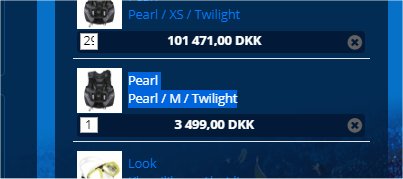
I would like it to be moved up to the same height as the top of the photo, so the text is on the top of the box and not centered vertical
Hope that make sense
Pearl
Pearl / M / Twilight
I would like it to be moved up to the same height as the top of the photo, so the text is on the top of the box and not centered vertical
Hope that make sense
Last edit: 6 years 6 months ago by Gerner.
Please Log in or Create an account to join the conversation.
6 years 6 months ago #317131
by nicolas
Replied by nicolas on topic New line in product name
Hi,
Then, you can add such CSS:
Then, you can add such CSS:
Code:
.hikashop_cart_module_enhanced .hikashop_cart_module_product_data { vertical-align: sub !important; }
Please Log in or Create an account to join the conversation.
6 years 6 months ago #317148
by Gerner
Replied by Gerner on topic New line in product name
Hi - THANKS, it worked. I add this code:
So now everything is as it should be
Code:
.hikashop_cart_module_enhanced .hikashop_cart_module_product_data {
display: inline-block;
vertical-align: sub !important;
width: 65%;
}
So now everything is as it should be
Please Log in or Create an account to join the conversation.
Time to create page: 0.229 seconds