

- Posts: 73
- Thank you received: 1
Product Display
6 years 7 months ago #316923
by masweb
Product Display was created by masweb
-- url of the page with the problem -- :
www.customqualitypetfurniture.com/
-- HikaShop version -- : 4.2.3
-- Joomla version -- : 3.9.16
-- PHP version -- : 7.3.6
When you select the characteristic everything drops under the picture. Where or how do I edit to keep everything to the right?
-- HikaShop version -- : 4.2.3
-- Joomla version -- : 3.9.16
-- PHP version -- : 7.3.6
When you select the characteristic everything drops under the picture. Where or how do I edit to keep everything to the right?
Please Log in or Create an account to join the conversation.

6 years 7 months ago #316924
by nicolas
Replied by nicolas on topic Product Display
Hi,
In the file www.customqualitypetfurniture.com/templa...e/css/thirdparty.css of your template you have that CSS :
This is what is creating the problem. Without that CSS it would work fine.
Now I don't know why your template provider is adding that CSS since I don't see it solving any problem the default CSS of HikaShop already solves.
So I would recommend to check with your template provider as they will be able to provide the best solution, knowing why that CSS code is there.
In the file www.customqualitypetfurniture.com/templa...e/css/thirdparty.css of your template you have that CSS :
Code:
.hikashop_product_left_part {
width: 55% !important;
}
.hikashop_product_right_part {
width: auto !important;
}
Now I don't know why your template provider is adding that CSS since I don't see it solving any problem the default CSS of HikaShop already solves.
So I would recommend to check with your template provider as they will be able to provide the best solution, knowing why that CSS code is there.
Please Log in or Create an account to join the conversation.
6 years 7 months ago #316944
by masweb
Replied by masweb on topic Product Display
Ok thank you,
Please Log in or Create an account to join the conversation.
6 years 7 months ago #316946
by masweb
Replied by masweb on topic Product Display
I just removed it, works great now. 
Please Log in or Create an account to join the conversation.
6 years 7 months ago #316947
by masweb
Replied by masweb on topic Product Display
Last question...I hope! When a product is added to the cart the popup is not working to go to checkout. Right now you would have to go the top shopping cart to proceed to checkout. Any idea why the pop up isn't working?
Please Log in or Create an account to join the conversation.
6 years 7 months ago #316948
by masweb
Replied by masweb on topic Product Display
Actually it is there just way down below description. Is there a way for me to move it up?
Please Log in or Create an account to join the conversation.
6 years 7 months ago #316953
by nicolas
Replied by nicolas on topic Product Display
Hi,
What you can do is to change the settings of the HikaShop cart notify plugin via the Joomla plugins manager. There, you'll find settings to display a popup with two buttons in the middle of the screen after the cart so the customer can easily go to the checkout.
What you can do is to change the settings of the HikaShop cart notify plugin via the Joomla plugins manager. There, you'll find settings to display a popup with two buttons in the middle of the screen after the cart so the customer can easily go to the checkout.
Please Log in or Create an account to join the conversation.
6 years 7 months ago #316961
by masweb
Replied by masweb on topic Product Display
Perfect, thank you
Please Log in or Create an account to join the conversation.
6 years 7 months ago #316965
by masweb
Replied by masweb on topic Product Display
Sorry, one more question.
Can I move the Description up under Characteristics?
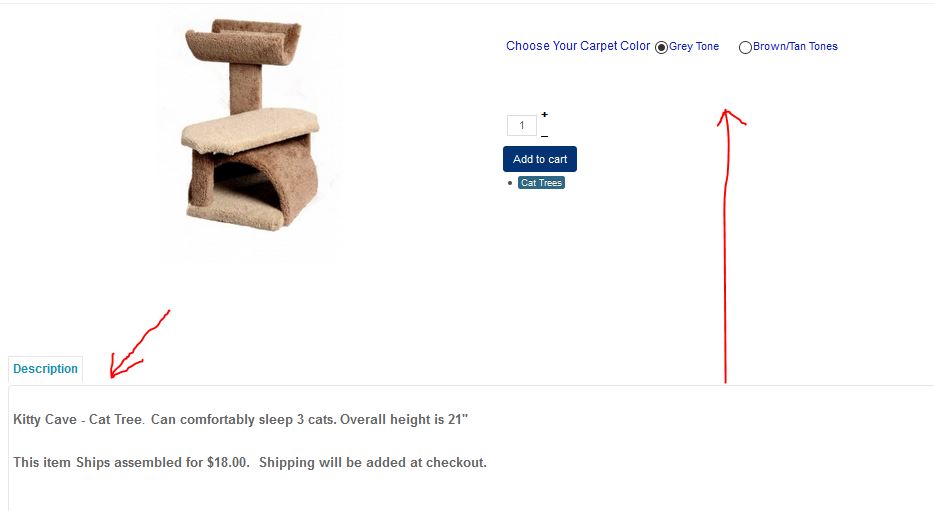
Can I move the Description up under Characteristics?
Please Log in or Create an account to join the conversation.
6 years 7 months ago #316972
by nicolas
Replied by nicolas on topic Product Display
Hi,
It's possible but a bit more complex as it requires to edit the view file displaying the product page:
www.hikashop.com/forum/product-category-...on-to-the-right.html
It's possible but a bit more complex as it requires to edit the view file displaying the product page:
www.hikashop.com/forum/product-category-...on-to-the-right.html
Please Log in or Create an account to join the conversation.
6 years 7 months ago #316991
by masweb
Replied by masweb on topic Product Display
Ok, Can you tell me what needs to be edited or added to the code? I would prefer not to go off of someone else's. Thank you
Please Log in or Create an account to join the conversation.
6 years 7 months ago #317010
by nicolas
Replied by nicolas on topic Product Display
Hi,
Well, you need to edit the view file used there via the Display>Views menu (I suppose it must be product / show_tabular.php but you should confirm thanks to the "Display view files" setting of the HikaShop configuration).
There, you need to change the code:
to:
in order to remove the description at the bottom.
And then, you can add the code:
after the line:
and that will add the description just before the add to cart button area.
Well, you need to edit the view file used there via the Display>Views menu (I suppose it must be product / show_tabular.php but you should confirm thanks to the "Display view files" setting of the HikaShop configuration).
There, you need to change the code:
Code:
$description = trim(JHTML::_('content.prepare',preg_replace('#<hr *id="system-readmore" */>#i','',$this->element->product_description)));
Code:
$description = '';
And then, you can add the code:
Code:
echo trim(JHTML::_('content.prepare',preg_replace('#<hr *id="system-readmore" */>#i','',$this->element->product_description)));
Code:
if($this->params->get('show_price')) {
?>
<span id="hikashop_product_price_with_options_main" class="hikashop_product_price_with_options_main"></span>
<?php
}
Please Log in or Create an account to join the conversation.
6 years 7 months ago #317015
by masweb
Replied by masweb on topic Product Display
Perfect Instructions. Thank you
Please Log in or Create an account to join the conversation.
6 years 7 months ago #317093
by masweb
Replied by masweb on topic Product Display
Everything is working correctly now HOWEVER. My description is not showing the FULL description and it has to. At one point it was something about clearing the cart but there are 114 products in there, is there a way to do this so it clears them all or am I missing something to make the full description show?
EXAMPLE: www.customqualitypetfurniture.com/cat-tr...roduct/591-cat-trees
Full description in backend is:
The base is a full 2' x 4' and overall height is 57". Top is 16" x 4' with 2 - 24" angled shelves and a 2' x 3' middle section.
This item Ships assembled for $99.00. Shipping will be added at checkout.
April Sale 20% off, enter code Whiskers at final checkout
Front end is only showing what I originally had in there:
The base is a full 2' x 4' and overall height is 57". Top is 16" x 4' with 2 - 24" angled shelves and a 2' x 3' middle section.
EXAMPLE: www.customqualitypetfurniture.com/cat-tr...roduct/591-cat-trees
Full description in backend is:
The base is a full 2' x 4' and overall height is 57". Top is 16" x 4' with 2 - 24" angled shelves and a 2' x 3' middle section.
This item Ships assembled for $99.00. Shipping will be added at checkout.
April Sale 20% off, enter code Whiskers at final checkout
Front end is only showing what I originally had in there:
The base is a full 2' x 4' and overall height is 57". Top is 16" x 4' with 2 - 24" angled shelves and a 2' x 3' middle section.
Please Log in or Create an account to join the conversation.
6 years 7 months ago #317096
by nicolas
Replied by nicolas on topic Product Display
Hi,
I suppose that it's because you have the small version of the description in your variants. Please clear the description from the variants under the variants tab of the product edition page.
I suppose that it's because you have the small version of the description in your variants. Please clear the description from the variants under the variants tab of the product edition page.
Please Log in or Create an account to join the conversation.
6 years 7 months ago #317103
by masweb
Replied by masweb on topic Product Display
That did it, I looked in there 10 times, but did not pull it by code so nothing was showing there. Thank you!
Please Log in or Create an account to join the conversation.
Time to create page: 0.077 seconds