

- Posts: 18
- Thank you received: 1
Change public rights in batch
6 years 3 months ago #323145
by ebordes
Change public rights in batch was created by ebordes
-- HikaShop version -- : 4.3.0
-- Joomla version -- : 3.9.20
-- PHP version -- : 7.3.21
I've got a shop running with over 1400 product running and this is working fine! However I need to change the rights for thsi products to make the pricing also public and also for guests.
i know this can be done in batch but can someone lead me to the proper instructions?
Thanks!
-- Joomla version -- : 3.9.20
-- PHP version -- : 7.3.21
I've got a shop running with over 1400 product running and this is working fine! However I need to change the rights for thsi products to make the pricing also public and also for guests.
i know this can be done in batch but can someone lead me to the proper instructions?
Thanks!
Please Log in or Create an account to join the conversation.

Less
More
- Posts: 12953
- Thank you received: 1778
6 years 3 months ago #323158
by Mohamed Thelji
Replied by Mohamed Thelji on topic Change public rights in batch
Hello,
To do that using mass actions via "Hikashop->System->Mass actions" will do the job. For more information about how to set them :
www.hikashop.com/support/documentation/167-massaction-form.html
Kind regards,
Mohamed.
To do that using mass actions via "Hikashop->System->Mass actions" will do the job. For more information about how to set them :
www.hikashop.com/support/documentation/167-massaction-form.html
Kind regards,
Mohamed.
Please Log in or Create an account to join the conversation.
6 years 1 month ago - 6 years 1 month ago #324862
by ebordes
Replied by ebordes on topic Change public rights in batch
Dear Mohamed,
Thanks for your reply. I've tried different settings and variables on this mass action but I can't get it right...I would like to set the pricing access to "all", see screendump. Any suggestions?
Thanks!
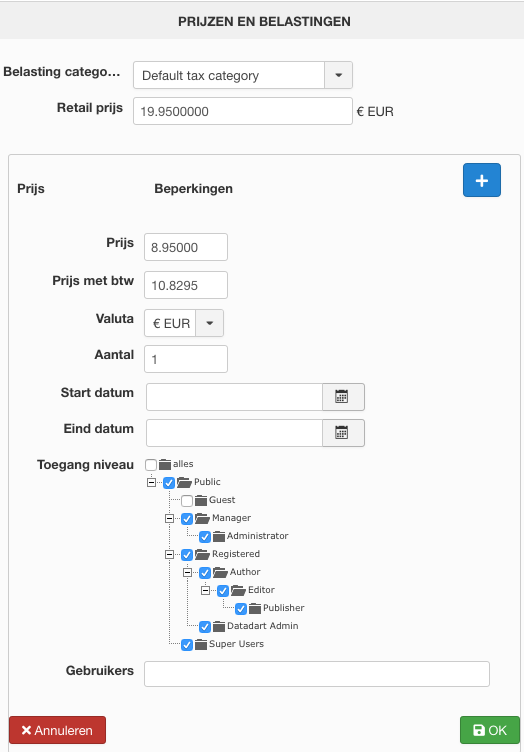
Thanks for your reply. I've tried different settings and variables on this mass action but I can't get it right...I would like to set the pricing access to "all", see screendump. Any suggestions?
Thanks!
Last edit: 6 years 1 month ago by ebordes.
Please Log in or Create an account to join the conversation.

6 years 1 month ago #324873
by nicolas
Replied by nicolas on topic Change public rights in batch
Hi,
Setting the price access level to all with a mass action is quite easy actually.
You just need an action "update the values" in the column "price_access" with the "string" mode and the value "all" (without the double quotes). When you process the mass action, it will run the action on all the products unless you add some filters to your mass action to only do it for some products.
Setting the price access level to all with a mass action is quite easy actually.
You just need an action "update the values" in the column "price_access" with the "string" mode and the value "all" (without the double quotes). When you process the mass action, it will run the action on all the products unless you add some filters to your mass action to only do it for some products.
Please Log in or Create an account to join the conversation.
Time to create page: 0.050 seconds